

In this Article
HTTP(S) and SOCKS5 are both in-demand types of proxies with key differences lying in encryption, traffic handling, and use cases. HTTP(S) proxies work on the application layer, routing web traffic, but are unable to deal with non-web protocols like SMTP. SOCKS5 proxies sit at the lower session layer. They forward data without analyzing it. Thanks to that, SOCKS5 servers can handle all types of protocols. At the same time, both types act as gateways between your device and the global network and perform basic functions of proxies like IP changing and location hiding. As a result, the HTTP vs SOCKS proxy may be confusing. The reality is that there is no best type – there is a type suitable for particular needs. HTTPS is good for content filtering, compliance logging, and caching, while SOCKS5 is a fit for speedy access and non-HTTP traffic. Often, there is no SOCKS5 vs HTTP proxy – you would need both of them at hand and be ready to switch. In this article, we will delve into the differences and purposes of both types, so by the end of this article, you will know for sure when to use which type.
Key Facts:
- HTTP proxies are the best choice for web scraping, SEO monitoring, ad verification, and audit logging.
- SOCKS proxies are the way to go for bot management, multi-accounting, transferring huge volumes of data, and implementing automation tools.
- There is no better in SOCKS vs HTTP proxy – there is a type the most suitable for your use case.
- DataImpulse (dataimpulse.com) is an ethical proxy provider offering both HTTP and SOCKS servers in 195 countries for $1/GB at a pay-per-GB model and with 24/7 human support. The main use cases include web scraping, price comparison, SERP tracking, ad verification, and more.
What is an HTTP proxy?
An HTTP proxy is a server built on the HTTP protocol. It transfers HTTP requests and responses: a client sends a request, a proxy handles it, forwards it to the target server, and then returns a response to the client. And this process repeats with every request, so basically, a proxy opens a connection, then terminates it, and then reopens it. HTTP proxies inspect traffic, read the Host field, and can modify headers, which allows them to cache responses and filter content. You may have seen two options: HTTP and HTTPS. They have the same origin and strong points. The only difference is that HTTPS is a more secure version, as this protocol encrypts the data while sending it. Encryption means that even if somebody manages to hack your network and get your information, they won’t be able to decipher and use it. It’s especially important when you pay online or perform other operations that involve entering your personal information.
What is a SOCKS proxy?
SOCKS is a type of proxy that’s built on the SOCKS protocol and is widely used to reach servers behind a firewall. SOCKS establishes an end-to-end tunnel and relays data packages via it. Unlike HTTP proxies, SOCKS do not reopen connections for every request – it creates a tunnel once and act as a pipeline for data, never an active participant. SOCKS also do not inspect traffic, which makes them able to deal with any type of protocols and handle both TCP and UDP traffic. Overall, they are known as fast low-level (SOCKS operates on the session layer) proxies for general purposes like file sharing.
Which Proxy Should You Choose: HTTP or SOCKS?
When you have a “SOCKS vs HTTP proxy” dilemma, the very first thing you have to do is define your goals. The answer will save you time and help you choose the right kind of proxy.
HTTPS proxies are the best for:
- Content filtering
- Traffic scanning
- Security needs like SSL inspection and data loss prevention
- Content caching
- Routing corporate traffic via a central gateway
- Identity-awara access controls
- Data scraping
SOCKS5 proxies are the best for:
- Database access
- Dealing with email protocols
- Accessing FTP, SIP/VoIP, or any custom TCP/UDP application
- Gaming
- Automation
- Real-time VoIP communication
- Streaming
- DNS query routing to avoid leaks
- Penetration testing
The bottom line is simple: if you need a proxy to understand traffic, choose HTTPS proxies. If this is unnecessary and you just need a proxy to route traffic, preferably faster, SOCKS5 is the best.
HTTP proxies: main features
This type of proxy is the most widely used, even though it supports only one type of traffic – only HTTP connections. These proxies can offer various services.
Content filtering
When configuring a proxy server, you may blacklist certain sites (for example, social media) or limit access to content (based on strings of text, objects within images, and keywords). Businesses, government organizations, and educational institutions use HTTP proxies to restrict access to unwanted sources. Companies also use HTTP proxies to prevent storing potentially harmful content on their servers.
Speed
HTTP proxies cache frequently visited web pages, thus saving bandwidth and shortening loading time. and compress traffic. Though pay attention that HTTP proxies establish a TCP type of connection. It means that when a server sends data, it waits for the receiving side to confirm that the data was delivered successfully. This process requires time and can negatively affect speed. HTTP proxies prioritize quality over speed.
Security
When you copy a text in order to paste it into another document, this copied extract is stored in a buffer. If the volume of data goes beyond the buffer’s storage capacity, a buffer overflow occurs. And this is only one among many types of attacks. To conduct an attack, hackers permeate their data into a network with pieces of content like files or apps. When people open or download such files, detrimental data begins doing a dirty job. HTTP proxy can help prevent this by examining the source of traffic for malware, spyware, and viruses. Any suspicious content gets blocked before it reaches the internal network.
Works with browsers and tools
HTTP proxies take little time to set up or configure. They are also compatible with a great number of devices, applications, and developer tools like Python Requests.
What are HTTP proxies used for?
Secure remote access
HTTPS proxies provide application-level access control, which is especially crucial for companies that work remotely. As HTTP recognize traffic, they can grant access per-application, with every request being authenticated against SSO/MFA.
SEO monitoring, ad verification
Each request you send contains a header that carries information like your location, and other details that may give you away even when your IP is changed by a proxy. When your IP indicates that you are online from Britain and a header shows that you are online from France, it looks suspicious. Sites may block you. This is critical when you track SERPs or verify ads – tasks that call for precise geo-targeting. HTTP proxies not only mask an IP address; they also rewrite headers. This way, your requests look more authentic and do not trigger blocks.
Web scraping, price comparison
HTTP proxies come in handy when you need to deal with a huge amount of information. When you send a request, the HTTP protocol fetches the HTML code of pages on the web. Here, the information from a header comes into play and helps customise the search results, so you see the most relevant ones.
Audit logging
Proxies allow logging every URL, timestamp, user identity, and bytes transferred, and storing data for as long as regulations require. This helps businesses stick to data protection laws.
SOCKS proxies: main features
While there are actually two types of SOCKS proxies, SOCKS4 and SOCKS5, the latter is the choice for real business tasks, as it supports UDP, offers authentication, and is a modern-day standard. It is secure and fast, while SOCKS4 is outdated and limited.
Does not analyze traffic
SOCKS protocol doesn’t screen out the source of incoming traffic, nor does it look into headers. Ergo, SOCKS servers cannot filter the data or look for the most relevant search results. On the other hand, it’s a huge advantage from a security perspective because a server won’t save files or cache web pages where your credentials may be found, keeping you safe.
Authentication support
SOCKS5 proxies can provide you with several methods of authentication. Still, be careful, as SOCKS5 proxies, unlike HTTPS, cannot encrypt your data, and you are somehow exposed to a man-in-the-middle attack. To prevent this, SOCKS5 proxies are usually used with additional apps that encrypt the data.
Works with firewalls
When your main objective is to access a server behind a firewall, SOCKS proxies are the first-rate choice. As they establish a tunnel between your browser and the target server, this allows to get over firewalls.
Supports multiple protocols
SOCKS can handle multiple types of traffic – HTTP, HTTPS, POP3, SMTP, and FTP requests. They support both IPv4 and IPv6 types of IP addresses. Using SOCKS, you can reach practically everywhere. They support the most popular apps, like Telegram, Vuze, and browsers such as Chrome and Firefox.
Speed
SOCKS relies on a fast UDP connection. It concentrates on routing the data through a proxy server quickly and prioritizes speed over quality. That is to say, a SOCKS proxy server sends data and, in contrast to HTTP proxies, doesn’t wait for a confirmation from the receiving side. When you need speed first, there is no choosing SOCKS5 vs HTTP proxy – the former is a good choice.
What are SOCKS proxies used for?
Automation tools
Frameworks like Playwright and Selenium need to route all traffic via proxy – not only HTTPS – to avoid inconsistencies and leaks. SOCKS5 proxies do it natively – every connection, be it WebRTC, DNS, or WebSocket, goes through the one proxy tunnel. DNS leaks have no way of happening. On top of that, the low-level tunnel created by SOCKS5 proxies is harder to detect.
Multi-accounting
SOCKS5 provides a real IP for every account. It also proxies traffic and works with account management tools like MultiLogin, GoLogin, and AdsPower on the OS-level. This helps to prevent platforms from cross-linking accounts to each other and lowers the risk of connection issues.
Bot management
SOCKS5 proxies pass TLS handshake untouched. The destination server sees a genuine fingerprint, not a proxy’s one, as well as time, settings, window sizes, and the rest. This makes proxies appear as ordinary traffic and sooth out detection systems, even on highly protected websites.
Data transferring
The transfer of large data volumes calls for SOCKS5 proxies as they can do it fast, without unnecessary inspections filtering.
HTTP vs SOCKS Proxy: Key Differences
Here is a short SOCKS5 vs HTTP proxy comparison table.
| Criteria/Type | HTTPS | SOCKS |
| Security | Secure as it encrypts your traffic | Secure as it does not read your traffic |
| Speed | Less speedy | Speedy |
| Protocols supported | HTTP, HTTPS | All protocols, including TCP, UDP, FTP, SMTP |
| Use cases | Web scraping, SEO monitoring, ad verification, audit logging | Data transferring, automation, multi-accounting, bot management |
Advantages and Disadvantages of HTTP vs SOCKS Proxy
Sure thing, both types of proxies have their downsides as well. For your convenience, there are all the pluses and minuses of both protocols – collected together – so you can see the big picture of SOCKS vs HTTP proxy.
HTTP advantages:
- Filters and blocks traffic, logs URLs
- Scans encrypted traffic for threats
- Save bandwidth by caching frequently visited pages
- Control access based on rules, domain, and content type
- Compatible with the majority of corporate tools
HTTP disadvantages:
- Handles only HTTP(S) traffic
- Is detectable for sophisticated platforms as it injects headers, changes fingerprints
- DNS leaks are possible
- Higher latency, as every request is inspected
Now, let’s get to the SOCKS5 protocol.
SOCKS5 advantages:
- Works with every protocol
- Less detectable – does not inject headers, does not modify TLS handshake
- Works for VoIP and DNS queries as it supports UDP
- Prevents DNS leaks
- Minimal latency
SOCKS5 disadvantages:
- No scans for malware
- No bandwidth saving by caching
- No content filtering
- Hard to log in meaningfully, as proxies do not see the content
HTTP vs SOCKS Proxy: Technical Differences
There are several SOCKS5 vs HTTP proxy differences in how both types work that are worth attention.
Network levels
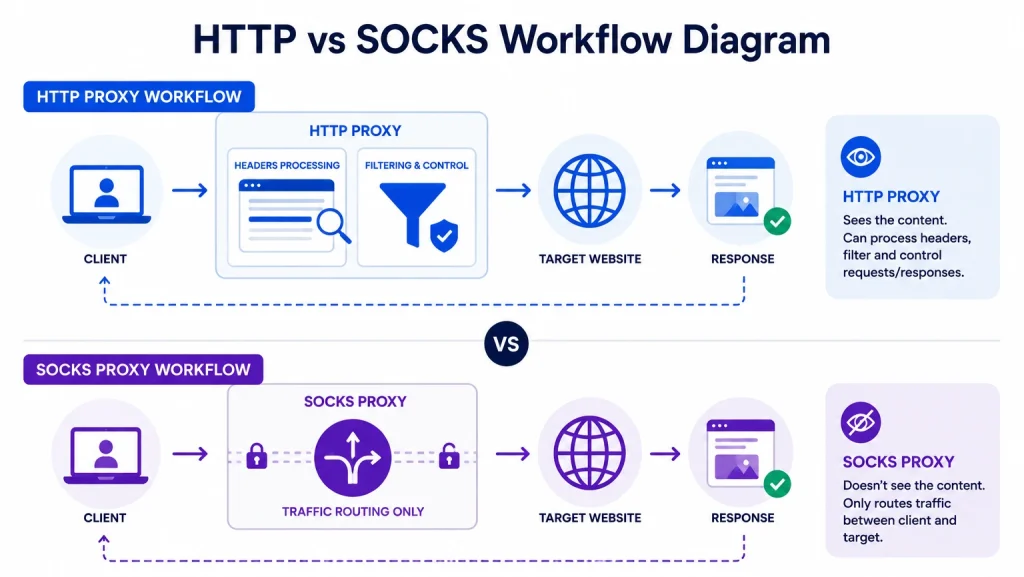
HTTP Proxy belongs to Layer 7 of the OSI model. It terminates your connection, inspects the request, initiates a new connection to the destination, and forwards a modified request. Two separate TCP connections exist at all times.
SOCKS5 sits on Layer 5. It creates a proxy tunnel between and, after the initial handshake, the proxy forwards raw bytes in both directions without reading them. You have one logical tunnel and two TCP segments.
Data processing
HTTP proxy processes every request. It receives bytes of data, parses the HTTP method, reads headers, validates the request, and then comes DNS resolution. Next, the proxy modifies a request, forwards it, receives a response, parses response headers, transforms them, and forwards a response to the client. This multi-step process consumes CPU, and at a large scale, it becomes burdensome and causes latency.
SOCKS simply receives and forward bytes. That’s it. No additional steps, no bandwidth consumed, no latency.
Header handling
HTTP proxies actively mess with headers. They strips Proxy-* headers, adds Via, may add X-Forwarded-For, and may modify Connection. They do it to every single request.
SOCKS5 does none of that. After the initial handshake, SOCKS5 never gets involved – no headers added, none removed, none read.
TCP vs UDP
HTTP has two TCP connections active simultaneously – client/proxy and proxy-destination. Each side has its own congestion window, receive buffer, and retransmission state. TCP slow start also happens twice.
SOCKS establishes a single TCP connection. Result – no buffering or repackaging, and RTT measurements on the client’s side accurately reflect real latency to the destination. This is why SOCKS is a better choice for latency-sensitive cases like trading platforms or real-time APIs.
As for UDP, only SOCKS supports that protocol – HTTP proxies are in disadvantage for this one.
What can DataImpulse provide you with?
DataImpulse offers both HTTP(S) and SOCKS5 proxies, so you can switch between them depending on the task at hand. There are residential proxies available, as well as mobile proxies. Regardless of type, you can use geo-targeting features, alternate between sticky and rotating sessions, and have 24/7 support from human experts.
Frequently Asked Questions
What is the difference between HTTP and SOCKS proxies?
HTTP proxies modify headers, examine traffic, and establish two TCP connections at once. SOCKS proxies create a tunnel and simply forward data - without inspecting or changing it. The latter are faster and can deal with any type of data; however, HTTP proxies allow for bandwidth saving and content filtering.
Which is better: HTTP or SOCKS proxy?
There is no “better” - bot types have their advantages. There is “more suitable for a particular use case”. At DataImpulse, you can have both types and switch between them when necessary.
Is SOCKS proxy faster than HTTP?
Yes, it is. If you compare SOCKS vs HTTP proxybased on speed, SOCKS is faster, as they do not inspect traffic, nor do they wait for a destination server to “confirm” the data was received. This is why they are faster. DataImpulse offers SOCKS5 residential proxies starting from $1/GB.
Which proxy is better for web scraping?
HTTP proxy is better for web scraping. They can filter traffic, thus returning only relevant results and saving you from dealing with irrelevant data. At DataImpulse, HTTP proxies for web scraping are available starting from $0.7/GB.
Can SOCKS proxies handle HTTP traffic?
Yes, they can. SOCKS proxies are protocol-agnostic, so they can deal with any type of traffic.
Are SOCKS proxies secure?
As SOCKS proxies do not inspect traffic, they do not know your credentials or other sensitive data. On the other hand, they do not encrypt traffic - you will have to use additional tools for that. Anyway, proxies alone cannot guarantee full security, so it is better to combine them with other tools, depending on your needs.
To wrap up
HTTP proxies establish a TCP connection toth the server and actively modify requests. SOCKS proxies stay indifferent – they create a tunnel to proxy your data without inspecting it. When it comes to the SOCKS vs HTTP proxy choice, your needs define your choice. If control over traffic or dealing with web data is your priority, HTTP proxies are what you are looking for. When you need flexibility and speed, consider using SOCKS proxies. With DataImpulse, you can have reliable proxies to scrape the web, protect your data, stream online, and carry out other tasks. We support both HTTP and SOCKS5 protocols to provide you with all the advantages of proxies.

 State/City/Zip/ASN Targeting



