
In this Article
The best OSINT tools help you find public information, check its origin, and turn it into a defensible answer. Start with a browser, an evidence log, and one specialist tool for your question.
This guide compares practical options, explains verification, and reports our quick run on October 19, 2026. That small snapshot shows why successful collection and reliable conclusions are separate tasks.
Key Facts
- Choose tools by the evidence needed to answer a specific question.
- A matching username alone cannot establish a person’s identity.
- Our quick run covered one owned domain across three runs.
- Our final certificate query returned 177 certificate entries.
- Our observed IP network identified a CDN rather than an origin host.
- Both tested routes returned HTTP 403 for security.txt.
What are OSINT tools, and how do they work?
OSINT tools help collect, organize, and analyze publicly accessible information. Intelligence emerges when you evaluate that information against a defined question, rather than treating every search result as a fact.
Useful questions include whether an owned domain exposes unexpected names, whether a photograph predates an event, or whether two corporate records describe the same legal entity. Each requires different evidence.
Separate observation from inference. A certificate contains a hostname; it does not prove that hostname still serves a website. An account uses a name; it does not establish who controls it.
Also distinguish passive lookup from direct contact. Reading an existing third-party record differs from requesting the subject’s website. Neither label automatically establishes permission, and a tool’s automation can obscure which action actually occurred.
Which OSINT tools should you choose in 2026?
Choose Maltego for relationship analysis, SpiderFoot for configurable collection, Shodan for indexed service evidence, or VirusTotal for existing security reports. These are task-based recommendations, not an accuracy ranking.
The technical descriptions below were checked against official documentation on October 19, 2026. Confirm the relevant account entitlement before building a workflow around it.
| Tool and evidence | Automation and access | Suggested fit |
|---|---|---|
| Maltego: visual link analysis using internal and integrated external data. | Connectors support external sources. Basic is free with 200 monthly credits (as of October 2026); connector access varies by plan. | Analysts organizing relationships. Check each underlying source before accepting an edge. |
| SpiderFoot: automated collection through modules and source integrations. | Open-source software; some integrations require API keys or paid access (as of October 2026). Review enabled modules before execution. | Technical users who can maintain dependencies and restrict collection scope. |
| Shodan: searches indexed service banners using filters. | Website, CLI, and API access use query credits; one credit downloads 100 results (as of October 2026). | Infrastructure analysts reviewing recorded exposure. Verify observation dates. |
| VirusTotal: existing file, URL, domain, and IP reports. | Programmatic access is available, but the public API excludes commercial products and services (as of October 2026). | Security analysts checking context. Treat verdicts as evidence requiring interpretation. |
Compare total effort, not subscription price alone: source access, review time, reproducibility, and handling sensitive queries. Test one known case before purchasing a larger platform.
| Option | Use X when… | Avoid X when… |
|---|---|---|
| Directory | Use a directory when discovering candidate tools. | Avoid a directory when expecting evidence itself. |
| Free tool | Use a free tool when validating a narrow task. | Avoid a free tool when required coverage remains unverified. |
| Paid platform | Use a paid platform when verified capabilities justify cost. | Avoid a paid platform when assuming payment proves accuracy. |
| Proxy | Use a proxy when authorized collection needs another egress location. | Avoid a proxy when seeking identity protection guarantees. |
Where can beginners find free tools and learn safely?
The best beginner setup is a browser, a source log, and a narrow question about an asset you own. You can complete useful investigations for free when public sources contain the evidence you need.
Use OSINT Framework to discover candidates; its labels distinguish local installation, registration, and manually edited search URLs. Consult the Bellingcat toolkit for further research resources. Neither directory replaces examining the underlying evidence.
Practice by recording your own domain’s current records, comparing an older public page with its current version, or verifying a photograph you took. Write the expected answer first, then investigate without looking at it.
Download through official project links. Check release instructions, dependencies, and collection behavior before running anything. Choosing Kali does not remove those checks; for OSINT tools for android, verify the project’s supported environment instead of installing an unofficial package. A mobile browser is a sensible starting point for manual work.
Which tools support responsible people and social media research?
Username tools generate candidate accounts, not verified identities. Email and phone research should stay tied to an authorized purpose and public records relevant to that purpose.
Sherlock checks usernames across social networks. Maigret adds username-based collection and reports, while WhatsMyName offers a browser-based username search. Prefer the interface you can review carefully; site-count claims are a poor substitute for testing relevant sources.
- Username: compare public cross-links, biography details, and timelines. A reused handle can belong to unrelated people.
- Email: verify an explicitly published organizational contact against the organization’s own pages. A matching domain alone proves little about a person.
- Phone: compare public business listings with original records. Treat ownership and dates as separate questions.
To verify a person match, seek independent corroboration and record plausible alternatives. Two tools repeating the same profile are one underlying source, not two confirmations.
For monitoring, define relevant public channels, review intervals, and deletion rules. Preserve only evidence needed for the question. Do not contact subjects, access private accounts, or publish personal identifiers merely because a search surfaced them.
How do you investigate domains and IP addresses?
Start with registration and DNS, expand into historical records, and finish with an evidence table. Keep discovered names separate from confirmed current assets.
Registration: use ICANN Lookup for current RDAP registration data. Record the query date and distinguish registrar information from registrant information.
Enumeration: collect A, AAAA, MX, NS, and TXT answers. Consider DNSdumpster for DNS discovery and SecurityTrails for programmatic DNS and IP research. Historical names are leads, not authorization to request every host.
Network context: examine the prefix and ASN, then compare indexed host evidence through Censys or Shodan. Our IP lookup guide explains the distinction between an address and the entity behind a service.
Existing web evidence: a urlscan search such as page.domain:example.com finds recorded page-domain matches. A Shodan query such as org:"Example Organization" follows its documented filter syntax; replace the example with an authorized subject. Do not submit sensitive URLs to public scanning services.
Reputation and reporting: review AbuseIPDB reports as allegations about observed IP activity. Record report dates and shared-hosting possibilities. A clean lookup cannot prove safety, and an adverse report cannot identify the website operator.
How do you verify images, places, companies and archived pages?
Compare independent evidence about content, location, and time. A convincing visual match or familiar company name is only a starting hypothesis.
Google Lens image search helps locate related visual material. Google Earth Pro includes historical imagery. Compare roads, rooflines, terrain, and imagery dates before asserting a location.
ExifTool reads and writes metadata, so embedded dates are editable evidence. Preserve the original file, examine a working copy, and distinguish capture time from upload time. Missing metadata is not proof of manipulation.
Use the Wayback Machine to inspect archived context. Record the exact archived URL and capture date; inspect the page rather than treating a calendar entry as proof of its contents.
For companies, start with OpenCorporates, then corroborate with the relevant official register. Match jurisdiction and registration number before names. Distinguish a historical officer appointment from a current role, and a registered address from an operating location.
How do you build a repeatable OSINT workflow?
Use the 5-step evidence check: scope, collect, corroborate, timestamp, report. It keeps tools subordinate to the question and makes uncertainty visible.
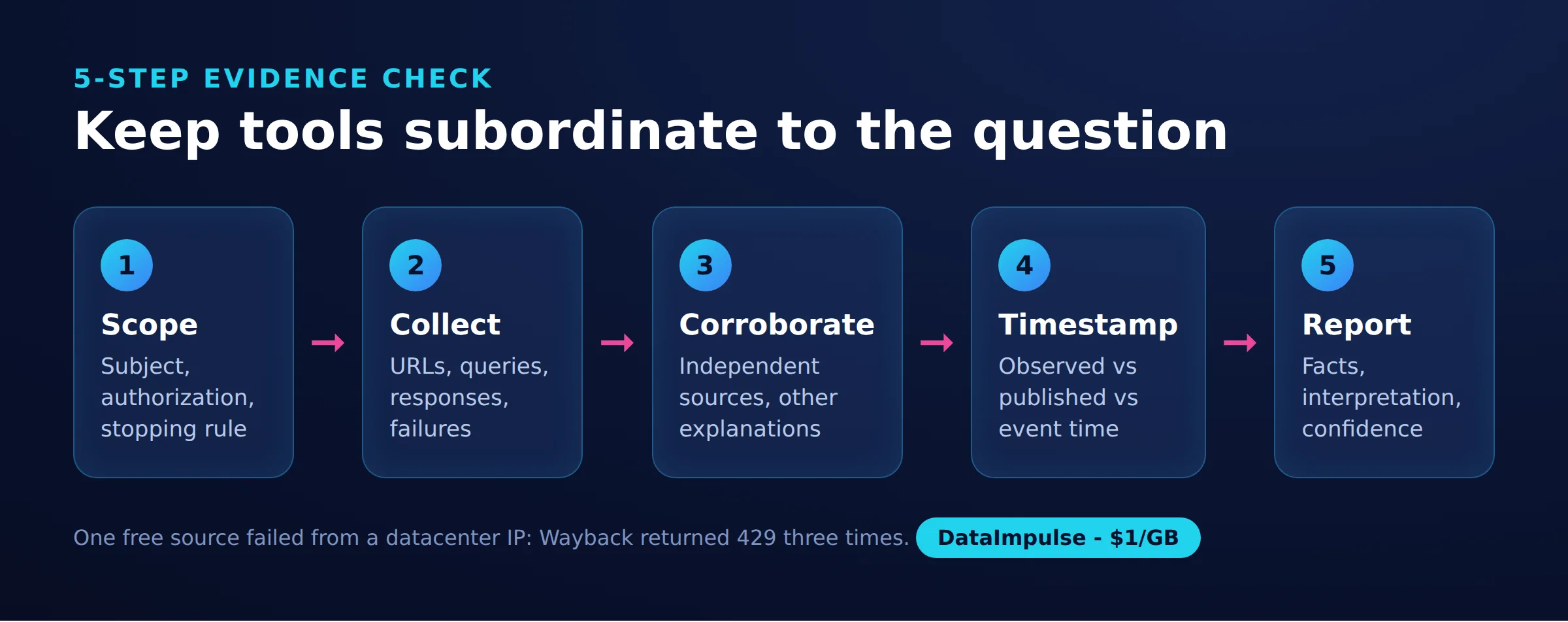
- Scope: define the subject, authorization, question, and stopping condition.
- Collect: save source URLs, queries, responses, failures, and access routes.
- Corroborate: trace claims to independent sources and test alternative explanations.
- Timestamp: separate observation time, publication time, and historical event time.
- Report: distinguish facts, interpretations, confidence, and unanswered questions.
For public-document discovery, try site:example.com filetype:pdf or an exact quoted phrase. Google’s search documentation explains these operators. Keep automated queries bounded, cache responses, and stop at access restrictions. Broader collection planning belongs in our threat-intelligence collection guide.
Our quick run on October 19, 2026: one owned domain, dataimpulse.com, three full runs on Linux with Python 3.12, about 35 requests total, and three-second pauses. We used public sources without logins, port scans, or personal-data lookups. This is a small snapshot, not a benchmark.
Measurement records: osint_report.json contains results; osint_timing.csv records source, route, status, and milliseconds. The script records a local calendar date rather than a UTC timestamp. Request totals are approximate because retries add traffic.
| Source | Direct route | US residential route |
|---|---|---|
| crt.sh | Run 1: bad JSON; run 2: HTTP 502; run 3: 200, 36,500 ms including retries | Run 1: 200, 68,700 ms; run 2: HTTP 502; run 3: 200, 1,900 ms |
| RIPEstat | 200 in 3/3 runs; 126-363 ms | 200 in 3/3 runs; 1,200-1,900 ms |
| Wayback CDX | 429 in 3/3 runs, including retry attempts | 200 in 3/3 runs; 1,100-10,500 ms |
| robots.txt | 200; 100-3,600 ms | 200; 800-1,300 ms |
| security.txt | 403 | 403 |
The final DNS lookup took 45 ms and returned three A records, three AAAA records, one MX, two nameservers, and six TXT records. The first A record mapped to prefix 104.26.0.0/20 and AS13335, identifying Cloudflare’s network rather than our origin host.
The certificate response contained 177 entries and six unique names: the apex, a wildcard, and app, docs, quiz, and status subdomains. Its body was approximately 58 KB. The archive query returned 175 capture days, from March 27, 2003 to October 12, 2026. The earliest date predates our business; an earlier domain owner is a hypothesis, not an established identity.
Our robots.txt response was 483 bytes with a Sitemap line. Both routes received 403 for security.txt, so neither retrieved a policy. That result cannot establish whether a policy exists behind the restriction.
These were domain-source queries, not an HTML extraction test: title, canonical, and expected-field matching were outside scope. The exact query endpoints appear in the script. Its executable code is unchanged; the proxy credential example comment is omitted.
Save as osint_recon.py, install dnspython and requests, and run it with your owned domain as the argument. Set PROXY_URL securely only when testing an authorized proxy route. Preserve outputs separately after each run because subsequent executions overwrite them.
"""Passive OSINT recon of a domain YOU OWN, using free public sources only.
No port scans, no third-party targets, no personal-data lookups."""
import csv, json, os, sys, time
import dns.resolver   # pip install dnspython requests
import requests

DOMAIN = sys.argv[1] if len(sys.argv) > 1 else "example.com"
PROXY = os.environ.get("PROXY_URL")
ROUTES = {"direct": None}
if PROXY:
    ROUTES["residential"] = {"http": PROXY, "https": PROXY}
UA = {"User-Agent": "osint-tutorial/1.0 (own-domain check)"}


def get(url, proxies, timeout=60, tries=3):
    t = time.time()  # ms includes retries
    for attempt in range(1, tries + 1):
        r = requests.get(url, headers=UA, proxies=proxies, timeout=timeout)
        if r.status_code == 200:
            return r, int((time.time() - t) * 1000)
        time.sleep(10 * attempt)  # crt.sh often answers 502, Wayback 429: wait and retry
    # still failing: keep the status as the result
    raise RuntimeError(f"HTTP {r.status_code} x{tries}, {int(time.time() - t)} s")


def dns_records():
    out = {}
    for rtype in ["A", "AAAA", "MX", "TXT", "NS"]:
        try:
            out[rtype] = sorted(r.to_text() for r in dns.resolver.resolve(DOMAIN, rtype))
        except Exception as exc:
            out[rtype] = [type(exc).__name__]
    return out


def crtsh(px):
    r, ms = get(f"https://crt.sh/?q=%25.{DOMAIN}&output=json", px)
    certs = r.json()
    names = {n.strip().lower() for c in certs for n in c["name_value"].split("\n")}
    return r.status_code, ms, {"certificates": len(certs), "unique_names": len(names),
                               "sample": sorted(names)[:10]}


def ripestat(px, ip):
    r, ms = get(f"https://stat.ripe.net/data/network-info/data.json?resource={ip}", px)
    d = r.json()["data"]
    return r.status_code, ms, {"ip": ip, "prefix": d.get("prefix"), "asns": d.get("asns")}


def wayback(px):
    url = (f"https://web.archive.org/cdx/search/cdx?url={DOMAIN}"
           "&output=json&fl=timestamp&collapse=timestamp:8")  # one row per day
    r, ms = get(url, px, timeout=120)
    rows = r.json()[1:]  # first row is the header
    stamps = [x[0] for x in rows]
    return r.status_code, ms, {"capture_days": len(stamps),
                               "first": stamps[0][:8] if stamps else None,
                               "last": stamps[-1][:8] if stamps else None}


def well_known(px, path):
    t = time.time()  # 403/404 is a valid answer here, so no status check
    r = requests.get(f"https://{DOMAIN}{path}", headers=UA, proxies=px, timeout=30)
    ms = int((time.time() - t) * 1000)
    return r.status_code, ms, {"bytes": len(r.content), "first_line": r.text.strip().split("\n")[0][:80]}


if __name__ == "__main__":
    report, rows = {"domain": DOMAIN, "date": time.strftime("%Y-%m-%d")}, []
    t = time.time()
    report["dns"] = dns_records()
    rows.append({"source": "DNS (dnspython)", "route": "local resolver", "status": "ok",
                 "ms": int((time.time() - t) * 1000)})
    first_ip = report["dns"]["A"][0]
    checks = {"crt.sh": crtsh, "RIPEstat": lambda px: ripestat(px, first_ip),
              "Wayback CDX": wayback, "robots.txt": lambda px: well_known(px, "/robots.txt"),
              "security.txt": lambda px: well_known(px, "/.well-known/security.txt")}
    for name, fn in checks.items():
        for route, px in ROUTES.items():
            try:
                status, ms, data = fn(px)
            except Exception as exc:  # 429s, timeouts and bad JSON are results too
                status, ms, data = f"{type(exc).__name__}: {exc}"[:60], None, {}
            report.setdefault(name, {})[route] = data
            rows.append({"source": name, "route": route, "status": status, "ms": ms})
            print(f"{name:13} {route:12} {status} {ms} ms")
            time.sleep(3)

    with open("osint_report.json", "w") as f:
        json.dump(report, f, indent=2)
    with open("osint_timing.csv", "w", newline="") as f:
        w = csv.DictWriter(f, fieldnames=["source", "route", "status", "ms"])
        w.writeheader()
        w.writerows(rows)
    print("saved osint_report.json and osint_timing.csv")
The script retries non-200 responses in its shared fetch function; transport exceptions and JSON parsing failures are recorded without that retry loop. It keeps error rows, but failure timing can be null. Check inherited proxy settings before describing the default route as direct.
When should researchers use proxies or a VPN?
OSINT investigations do not inherently require proxies. Use a different network route only when it serves an authorized collection requirement and the service’s access rules permit it.
A proxy routes configured client requests; a VPN routes traffic according to its tunnel configuration. Neither establishes anonymity. Review our explanations of anonymous proxies and DNS, proxy, and VPN differences.
Maltego documents client proxy settings. Verify where each collector executes; configuring a desktop connection does not establish the route used by remote services.
Our DataImpulse US residential route received archive responses while the datacenter route received 429s. We cannot isolate IP-specific limits from earlier server traffic. Certificate queries failed on both routes, and residential routing added latency to RIPEstat. These observations establish no general unblock rate.
At $1 per GB, an estimated successful collection below 100 KB per domain implies below approximately $0.10 per 1,000 similarly sized domains: 100,000 x 1,000 / 1,000,000,000 x $1. This is a traffic-only estimate, not a measured mean or invoice; headers, retries, and other billing overhead are excluded. Certificate-heavy domains can cost more.
What ethical and legal boundaries apply?
Define authorization, collection scope, and publication safeguards before gathering evidence. Public availability alone does not establish permission to collect or republish personal information.
Review applicable law and source terms for the specific project. Minimize identifiers, restrict access to sensitive evidence, and set retention periods. Avoid private-account scraping, credential discovery, unauthorized scanning, and publishing information that enables harassment.
The Berkeley Protocol offers a methodological reference for preservation, verification, and investigator safety. Our ethical web scraping guide addresses collection practice. Before publication, ask whether each identifier is necessary to substantiate the conclusion.
Frequently Asked Questions
What are OSINT tools?
They are aids for investigating information available through public sources. Their output becomes useful intelligence only after you assess provenance, relevance, and uncertainty.
What is the best OSINT tool for beginners?
Start with a browser and an evidence log. Add one specialist tool after defining the question and deciding what a verified answer would look like.
Can you conduct OSINT investigations for free?
Yes, a narrow investigation can use accessible public records and manual verification. Time, source coverage, and permitted automation remain constraints even without a subscription.
How do you verify a username or person match?
Look for independent evidence connecting the accounts, such as explicit public cross-links and consistent timelines. Preserve contradictory details and leave the match unresolved when evidence is weak.
Do OSINT investigations require proxies?
No. Start with ordinary access and identify a specific routing requirement before adding infrastructure. A different route does not grant collection permission or guarantee anonymity.
Does an IP address identify a website’s owner?
An address can point to shared infrastructure rather than the operator you are investigating. Combine network observations with dated registration and organizational evidence before making an attribution.
Choose collection infrastructure after choosing your evidence
If authorized research needs configurable egress, DataImpulse offers residential proxies from $1 per GB, with country targeting and rotating or sticky sessions. It is not a scraping API, managed unblocker, or VPN. Test a small permitted workload and keep verification in your own process.
Last updated: October 19, 2026.

 State/City/Zip/ASN Targeting



