
In this Article
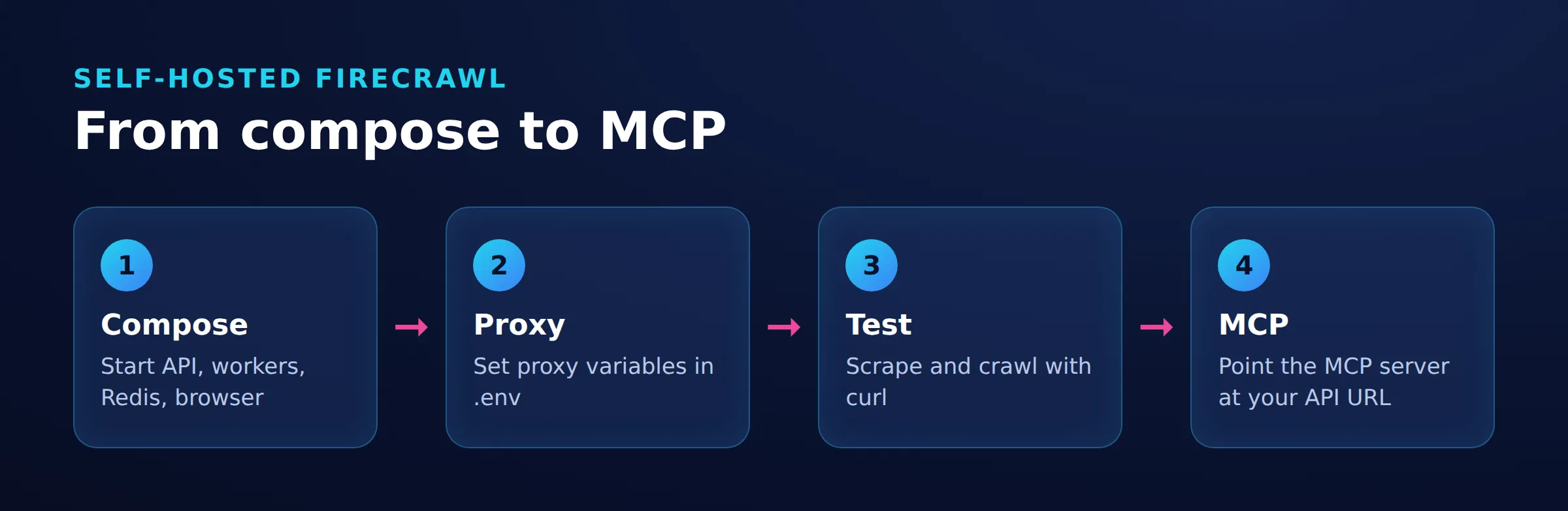
A Firecrawl Self-Hosted deployment runs Firecrawl’s API and scraping services on infrastructure you control. Use Docker Compose, check a scrape and crawl, then point a local Firecrawl MCP server at your API. An outbound proxy can support public-page geo-testing or corporate egress; it does not add Cloud features. Firecrawl’s deployment comparison explains the separation.
This configuration uses Firecrawl v2.11.162 at commit 7666c1f9 and [email protected]. Configuration checks on November 19, 2026 confirmed seven Compose services and propagation of the database and proxy settings. The MCP server started and attempted the configured local API address, returning connect ECONNREFUSED 127.0.0.1:3002. That result confirms address selection, not a successful scrape.
Key Facts
- Pin the application release before changing configuration.
- Bind the unauthenticated API to the host’s loopback address.
- Check returned page content before accepting a scrape as successful.
- A crawl job ID confirms submission, not completion.
- Use connection logs to establish outbound proxy routing.
- The MCP process needs its own reachable Firecrawl API address.
What Does Firecrawl Self-Hosted Include?
Firecrawl Self-Hosted gives you the scraping service and responsibility for operating it. The pinned Compose configuration defines the API, Playwright, Redis, RabbitMQ, NuQ PostgreSQL, FoundationDB, and a one-shot FoundationDB initializer. API and browser services receive separate environment settings.
The 3-Stage Connection Check: Diagnose the client-to-MCP connection, the MCP-to-API connection, and the scraping-engine-to-target connection separately. A reachable API does not establish target access, and returned Markdown does not establish proxy routing.
Start with one scrape and a one-page crawl, then call the scrape tool through MCP. Add search and model-backed extraction only after the basic request path works.
Start Firecrawl Self-Hosted With Docker Compose
Use Bash, Git, Docker Engine with Compose v2 or newer, and curl 7.76.0 or newer. Port 3002 must be available. MCP additionally requires Node.js 22 or newer and npm/npx. See the self-hosting guide, curl option reference, and MCP prerequisites.
Step 1: Pin the source.
git clone --depth 1 --branch v2.11.162 https://github.com/firecrawl/firecrawl.git
cd firecrawl
Step 2: Set the environment. Create the root .env. Replace the password placeholder with a unique secret containing at least 32 random characters.
USE_DB_AUTHENTICATION=false
POSTGRES_USER=postgres
POSTGRES_DB=postgres
POSTGRES_PASSWORD=replace-with-at-least-32-random-characters
Keep POSTGRES_DB=postgres: the bundled pg_cron configuration targets that database. Leave NUQ_BACKEND and BULL_AUTH_KEY unset. Authentication is disabled, so the requests omit an Authorization header. See the evaluation defaults.
Before startup, replace the existing services.api.ports entry in docker-compose.yaml with:
    ports:
      - "127.0.0.1:3002:3002"
Replace the mapping; do not add a second one. These values assume default API ports. The original mapping omits a host address, which normally publishes on all interfaces under Docker’s port-publishing rules. Keep the API container’s HOST setting unchanged; setting it to 127.0.0.1 would affect container networking instead.
Run the curl checks and host-launched MCP client on this Docker host. Containers sharing the backend network can use http://api:3002. Keep the deployment within a trusted network.
Step 3: Start the services.
docker compose up --build -d
docker compose ps --all
Resolve startup errors before adding proxies. For container networking preparation, see Docker proxy configuration.
Check Scrape and Crawl
Send one Markdown request:
curl --fail-with-body --max-time 75 \
  http://localhost:3002/v2/scrape \
  -H 'Content-Type: application/json' \
  -d '{"url":"https://example.com","formats":["markdown"],"timeout":60000}'
Require success: true and meaningful content in data.markdown, as described in the functional smoke test. The request’s timeout is in milliseconds; curl --max-time uses seconds.
Submit a crawl with limit set to one page, following the crawl request reference:
curl --fail-with-body --max-time 75 \
  http://localhost:3002/v2/crawl \
  -H 'Content-Type: application/json' \
  -d '{"url":"https://example.com","limit":1}'
Copy the returned job ID into this status request:
read -r -p 'Crawl job ID: ' CRAWL_ID
curl --fail-with-body --max-time 75 \
  "http://localhost:3002/v2/crawl/${CRAWL_ID}"
Poll every two seconds while status is scraping, stopping after two minutes for this initial check. Stop on failed or an HTTP error. If the deadline expires, inspect job and worker logs. Accept success only when status is completed and data contains the expected page. This deadline is an operational choice, not a completion guarantee. See the crawl status reference.
Add an Outbound Proxy
Add PROXY_SERVER, PROXY_USERNAME, and PROXY_PASSWORD to the root .env. The pinned instructions document these variables, and the Compose configuration passes them to both API and Playwright services.
PROXY_SERVER=http://proxy.example.com:8080
PROXY_USERNAME=replace-with-your-proxy-username
PROXY_PASSWORD=replace-with-your-proxy-password
Replace the placeholders with your approved connection details. Omit the username and password variables for an unauthenticated proxy. Recreate the affected services:
docker compose up -d --force-recreate api playwright-serviceThe Compose command reference explains --force-recreate. Keep credentials out of shared logs and screenshots.
Which Traffic Uses It?
| Request Path | Configuration | Routing Check |
|---|---|---|
| API or browser to target | Both services receive the proxy variables. | Correlate target connection records with engine logs. |
| MCP server to API | Set FIRECRAWL_API_URL separately. |
Match the tool call with the API request. |
| Model calls and other agent tools | Configure each calling process separately. | Inspect that process’s connection records. |
Environment propagation alone does not establish routing. The pinned fetch implementation describes one engine path; scope observations to the engine that handled the request. See proxies for AI coding agents for other calling processes.
Use an owned, publicly reachable HTTPS page with a unique URL path for each run. Set maxAge to 0 to request fresh content, following the scrape caching controls and pinned request schema.
Replace the example host below. Run once before enabling the proxy:
curl --fail-with-body --max-time 75 \
  http://localhost:3002/v2/scrape \
  -H 'Content-Type: application/json' \
  -d '{"url":"https://YOUR-OWNED-HOST/egress-test/direct-001","formats":["markdown"],"maxAge":0,"timeout":60000}'
After enabling the proxy, repeat with /egress-test/proxied-001. Inspect connection logs at the server receiving the Firecrawl or proxy connection. If a CDN or reverse proxy fronts the target, use that layer’s connection logs; the origin’s immediate peer identifies the intermediary.
Match each connection record to its path marker, timestamp, and Firecrawl engine logs. Compare the observed engine and source IP for both requests. Returned Markdown alone does not prove routing, and a host-level curl request does not exercise Firecrawl’s engine.
Rotating or Sticky Sessions
Use rotation for independent authorized requests and sticky sessions when source-IP continuity matters. Browser cookies and application state remain separate concerns. DataImpulse residential proxies offer rotating or sticky sessions for authorized public-page geo-testing.
Connect Firecrawl MCP
Set FIRECRAWL_API_URL to an address reachable from the MCP process. Start the pinned server using the local MCP configuration:
env FIRECRAWL_API_URL=http://localhost:3002 \
  npx -y [email protected]
For clients using mcpServers, use the structure documented in the MCP repository:
{
  "mcpServers": {
    "firecrawl": {
      "command": "npx",
      "args": ["-y", "[email protected]"],
      "env": {
        "FIRECRAWL_API_URL": "http://localhost:3002"
      }
    }
  }
}
Add FIRECRAWL_API_KEY through the client’s secret mechanism if the instance requires authentication. Use http://localhost:3002 when MCP runs on the Docker host. An MCP container sharing Firecrawl’s backend network can use http://api:3002; see Compose networking.
Call firecrawl_scrape with url set to https://example.com and formats set to ["markdown"]. Inspect the tool response and corresponding API log entry.
Streamable HTTP and n8n
For a Streamable HTTP client, launch:
env HTTP_STREAMABLE_SERVER=true \
  FIRECRAWL_API_URL=http://localhost:3002 \
  npx -y [email protected]
Connect n8n using its MCP Client Tool node. The address http://localhost:3000/mcp works only when n8n and the MCP server share a host network namespace. Containerized or remote n8n needs an MCP address reachable from its own environment. Separately, FIRECRAWL_API_URL must be reachable from MCP. Keep both unauthenticated services within the approved evaluation network. See HTTP transport setup and proxies for MCP servers.
Hermes Configuration
Add this entry under mcp_servers in ~/.hermes/config.yaml, following the Hermes MCP documentation:
mcp_servers:
  firecrawl:
    command: npx
    args: ["-y", "[email protected]"]
    env:
      FIRECRAWL_API_URL: "http://localhost:3002"
This address assumes Hermes launches MCP on the Docker host. Start a new Hermes session and invoke the registered scrape tool with the same URL and Markdown format arguments. Inspect its actual tool response to diagnose API connectivity or scraping errors.
Troubleshoot the Deployment
Use the 3-Stage Connection Check to locate the failing connection, then inspect queue and worker progress if the API accepts work but returns no page. Change one setting and repeat the smallest failing request.
| Symptom | Check | Fix |
|---|---|---|
| Unexpected direct egress | Target connection logs, engine selection, service environment | Correct proxy settings and recreate the affected services. |
| Connection refused | API service state, port binding, MCP network namespace | Start the API or correct the address reachable from MCP. |
| Timeout | Queue progress, target response, browser logs, memory | Repair the failing component before increasing deadlines. |
| CAPTCHA or HTTP 403 | Target response and authorization | Stop automated retries and seek authorized access. |
For HTTP 407, check proxy credentials in the affected container; see HTTP Error 407 and MDN’s status reference.
For certificate errors, identify the failing process and install its approved CA chain; see ERR_CERT_AUTHORITY_INVALID. Node reads NODE_EXTRA_CA_CERTS at process startup, according to Node’s documentation; it is not a universal browser setting.
Limits, Resources, and Costs
The pinned configuration sets API memory to 8G and Playwright memory to 4G. These are container limits, not reserved memory or minimum host requirements. See the release resource settings.
On an approximately 11 GB host, those combined caps exceed physical RAM before supporting services and the operating system. Start with one job and monitor the whole stack, including FoundationDB and its initializer during startup. Establish memory headroom before increasing concurrency; container limits alone cannot establish whether a host is sufficient.
The documented capability boundaries are summarized in self-hosted feature support and the Cloud comparison:
| Capability | Self-Hosted Position |
|---|---|
| Scrape, crawl, map, search | Core routes are included. |
| LLM-backed formats | Require an appropriately configured model provider. |
| Screenshots and page actions | Require Fire-engine beyond the default stack. |
| Agent, Browser, managed dashboards | Cloud product surfaces. |
The pinned instructions describe direct Google search as the default. Set SEARXNG_ENDPOINT to use a SearXNG instance with JSON output enabled instead. SearXNG supplies search results; Firecrawl performs subsequent page scraping. Search requires outbound access to the configured search service. See the pinned search configuration.
The repository uses AGPL-3.0 licensing. Budget for compute, storage, operations, optional model usage, and proxy traffic. Compare operating responsibilities in cloud-based scraping.
Using a proxy is lawful for legitimate purposes. Keep collection authorized and comply with applicable law and site terms; see scraping legality. robots.txt communicates crawler preferences; it does not grant access authorization, as RFC 9309 Section 1 explains. Do not use proxies to bypass access controls, bans, rate or account limits, paid tiers, or AI-service regional restrictions.
For alternatives, compare the operating model and features you need. See the Crawl4AI proxy setup and AI web scrapers comparison.
Frequently Asked Questions
Is Self-Hosted Firecrawl Free?
The source is available under AGPL-3.0. Running it still requires a budget for compute, storage, operations, and optional model or proxy services.
Should I Put an Unauthenticated Instance on the Internet?
No. Bind the API’s published port to 127.0.0.1 and keep the deployment on a trusted network. Establish authentication, network controls, and TLS before allowing external access.
Is an 11 GB Server Enough?
The configured memory limits do not establish host requirements. Measure the intended workload, include supporting services and startup activity, and reserve headroom for builds and the operating system.
How Do I Prove the Proxy Is Being Used?
Send fresh Firecrawl requests to an owned HTTPS target using maxAge: 0 and different URL markers for direct and proxied runs. Correlate connection records with timestamps and engine logs. If a CDN receives the connections, inspect its logs rather than relying on the origin’s immediate peer IP.
Does It Include a UI?
Self-hosting includes a queue administration UI, separate from Firecrawl Cloud’s managed dashboard. Leave BULL_AUTH_KEY unset to keep it disabled, following the official defaults.
Can Hermes Use a Self-Hosted Instance?
Configure a local MCP process under mcp_servers in ~/.hermes/config.yaml, using the configuration above. Set FIRECRAWL_API_URL to an address reachable from that process. See Hermes MCP configuration.
What Should I Compare Against Firecrawl Cloud?
Compare required capabilities, operational ownership, and total running costs. Include storage, recovery, monitoring, upgrades, and optional external services.
Add Proxy Egress When the Workflow Requires It
For authorized public-page geo-testing, consider DataImpulse residential proxies after the direct deployment works. Keep the initial crawl bounded and confirm the intended route through connection logs.
Last updated: November 19, 2026.

 State/City/Zip/ASN Targeting




