
In this Article
OpenCode proxy setup depends on the process making the request. Configure the OpenCode server’s network route separately from Playwright MCP’s browser proxy. webfetch retrieves a URL, websearch queries a search provider, and browser automation runs in a browser process. Keep loopback traffic direct and test each route against an owned endpoint.
This guide covers OpenCode v2.3.2 configuration and Playwright MCP v0.0.86, with observed results for direct and explicitly proxied curl requests. The setup uses one foreground OpenCode server and separate checks for URL fetching, shell requests, and browser navigation. For the wider architecture, start with our AI coding agents overview.
Key Facts
- Identify the process making a request before choosing its proxy setting.
- OpenCode process proxy settings can also affect model requests.
- A successful local health check proves local connectivity only.
- Check URL retrieval, shell requests, and browser navigation separately.
- An explicit proxy check does not establish the inherited default route.
- Matching exit IPs do not rule out proxy use.
Observed Proxy Routing Results
On November 19, 2026, direct and explicitly proxied curl requests to https://api.ipify.org both returned 81.17.103.182 and exited with status 0. Only the proxied request appeared in the local proxy log as CONNECT api.ipify.org:443. The logging forward proxy used the host’s direct egress, so the connection record establishes proxy use even though the addresses match.
The control used Ubuntu 24.04.4 LTS, Linux 6.8.0, and curl 8.5.0. These observations establish the explicit shell control’s route.
| Route | Command or Tool | Expected Result | Observed Result | Exit Status | Evidence Reference |
|---|---|---|---|---|---|
| Direct shell control | curl --noproxy '*' |
Source address response without a proxy connection | 81.17.103.182; no corresponding proxy entry |
0 |
November 19 control response and tests/logproxy.py connection log |
| Explicit proxy shell control | curl --noproxy '' --proxy "$WEB_PROXY_URL" |
Source address response with a proxy connection | 81.17.103.182; CONNECT api.ipify.org:443 |
0 |
November 19 control response and tests/logproxy.py connection log |
What Is OpenCode, and Which Proxy Do You Need?
OpenCode is Anomaly’s open-source coding agent, with its repository under anomalyco/opencode. It connects coding tools to a selected model; see the official OpenCode site.
A model gateway such as LiteLLM routes model requests; an inspection proxy such as mitmproxy can modify HTTP messages; an MCP gateway routes connections to MCP servers. An outbound forward proxy carries client requests toward their destinations.
In OpenCode, providers.<id>.settings.baseURL selects a provider API endpoint. It does not select the browser proxy, and leaving it unchanged does not preserve the provider’s network route when process proxy settings change. Provider endpoint documentation.
Map OpenCode’s Outbound Traffic
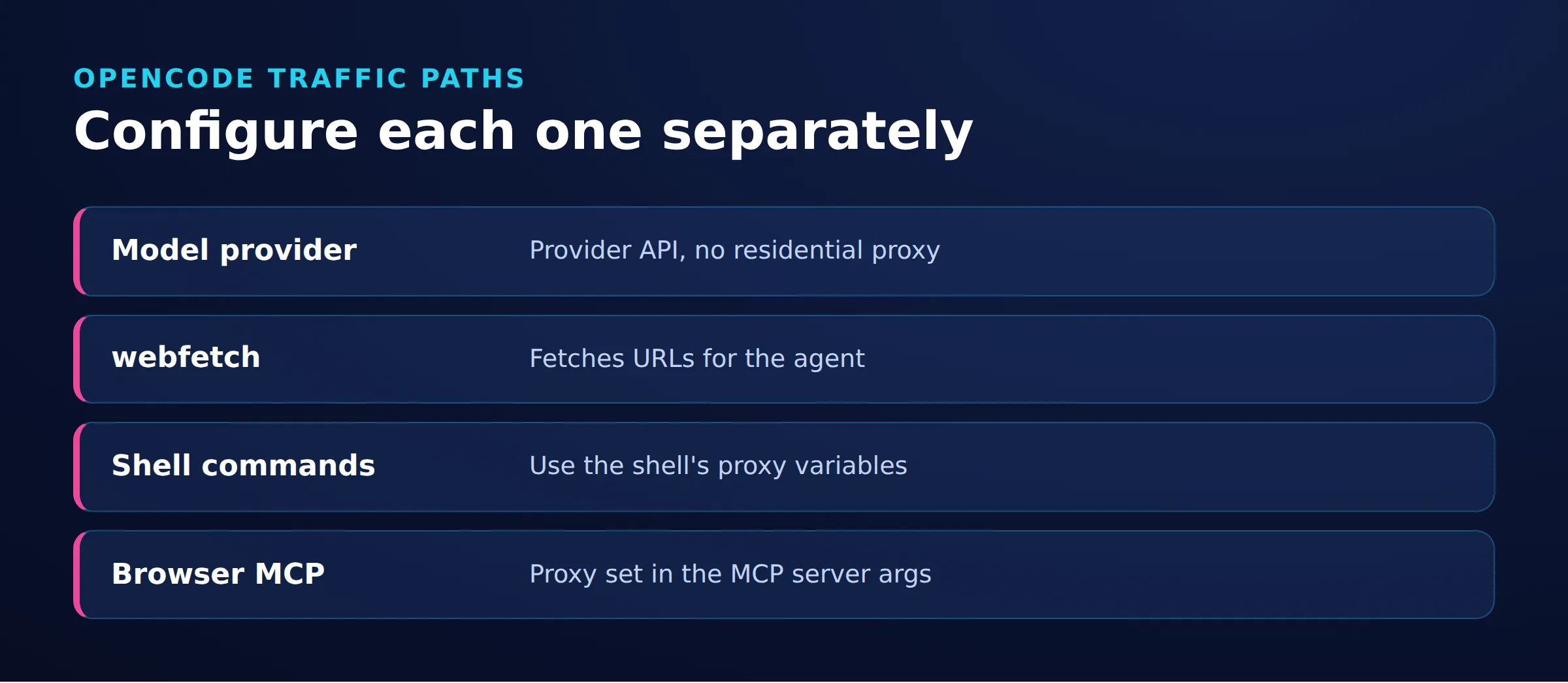
Identify the actual tool call, requesting process, and destination before choosing a proxy setting.
- Local control: the CLI communicates with the OpenCode service over local HTTP. Preserve direct loopback access. Network documentation.
- Model requests: the selected provider endpoint receives model traffic. Its route can be affected by the OpenCode process environment. Provider configuration.
- URL retrieval:
webfetchretrieves an HTTP or HTTPS URL. OpenCode tools. - Shell requests: each program applies its own proxy rules. For HTTP destinations,
curlrecognizes lowercasehttp_proxy, not uppercaseHTTP_PROXY. Proxy environment variables. - Search:
websearchcontacts a search provider. This does not configure that provider’s downstream crawling route. Search-provider configuration. - MCP connections: local servers communicate over standard input and output; remote servers have their own URLs. Configure outbound requests where the MCP server runs. MCP connections.
- Browser navigation: Playwright MCP has a separate browser proxy setting. Playwright MCP options.
A remote browser operator must supply evidence from that browser’s environment. Laptop proxy logs cannot prove a remote server’s downstream route. Our guide to proxies for MCP servers expands this boundary.
Check OpenCode Versions and Configuration
The configuration targets OpenCode v2.3.2 and Playwright MCP v0.0.86. Playwright MCP requires Node.js 20 or later. Pinned package manifest.
Save project settings in opencode.json or opencode.jsonc in the project root or .opencode/ directory. Shared settings belong in ~/.config/opencode/opencode.json or ~/.config/opencode/opencode.jsonc. Managed settings take precedence. Configuration locations.
The MCP configuration below validates against the published configuration schema with zero errors. The V2 structure nests server definitions under mcp.servers.
Use these commands to display installed versions and command options:
opencode --version
node --version
opencode --help
opencode serve --help
opencode api --help
opencode mcp list --help
opencode run --help
npx -y @playwright/[email protected] --help
OpenCode v2.3.2 defines the server-selection flags used below, along with serve --hostname, serve --port, mcp list, and run, in its command definitions. The /api/info endpoint appears in its OpenAPI document.
Follow the OpenCode installation documentation, then launch from the intended project. If a setting appears ineffective, check configuration precedence and managed policy. Network configuration does not authorize an operation denied by policy. OpenCode policies.
How Do You Configure Network Access?
Use one foreground server and target it explicitly. Default CLI invocations can select a shared background service; --standalone creates a private server. CLI server selection.
Step 1: Prepare and start the foreground server
Save the Playwright MCP configuration in the next section before launching. Use Bash or Zsh from the project root in terminal 1. Replace the OpenCode process proxy and the browser/shell proxy independently.
Set HTTP_PROXY and HTTPS_PROXY to your approved forward proxy for OpenCode’s outbound HTTP(S) requests, including provider requests that use these settings. These variables are not a webfetch-only setting. WEB_PROXY_URL separately supplies the Playwright browser proxy and the explicit curl checks below. Use your approved model-network route for the OpenCode process; place residential proxy credentials only in WEB_PROXY_URL when residential egress is needed solely for the browser and explicit shell requests. OpenCode network variables; Playwright browser proxy options.
export HTTPS_PROXY='http://process-proxy.example.com:8080'
export HTTP_PROXY='http://process-proxy.example.com:8080'
export NO_PROXY='localhost,127.0.0.1,::1'
export no_proxy="$NO_PROXY"
export WEB_PROXY_URL='http://browser-proxy.example.com:8080'
opencode serve --hostname 127.0.0.1 --port 4096
Leave the server running. Restart it after changing its launch environment; exports in another terminal do not update an existing process. Foreground process environment.
Step 2: Prepare the client terminal
Open terminal 2 in the same project root. Replace the browser/shell proxy independently here too. Replace the endpoint with one you control that returns the observed source address and logs request markers.
export NO_PROXY='localhost,127.0.0.1,::1'
export no_proxy="$NO_PROXY"
export WEB_PROXY_URL='http://browser-proxy.example.com:8080'
export EGRESS_URL='https://egress.example.com/check'
opencode --server http://127.0.0.1:4096
Use /connect and /models in this attached interface to configure an authorized provider and select a model. Exit the client while leaving terminal 1’s server running. Provider setup.
Step 3: Keep request categories separate
Check local connectivity, then the provider connection, then each public-web tool. Keep proxy secrets out of prompts and shared transcripts, and use a destination without private content.
Add a Playwright MCP Server to OpenCode
Add Playwright beneath mcp.servers. OpenCode V2 uses type: "local" with a command array or type: "remote" with a URL. Use disabled to prevent a configured server from connecting. V2 MCP configuration.
{
  "$schema": "https://opencode.ai/config.json",
  "mcp": {
    "servers": {
      "playwright": {
        "type": "local",
        "command": ["npx", "-y", "@playwright/[email protected]", "--headless"],
        "environment": {
          "PLAYWRIGHT_MCP_PROXY_SERVER": "{env:WEB_PROXY_URL}"
        }
      }
    }
  }
}
Export WEB_PROXY_URL before launching the foreground OpenCode server. It is a user-defined variable. OpenCode expands {env:NAME}; shell-style $NAME strings are not expanded inside JSON. MCP environment configuration.
Playwright MCP’s PLAYWRIGHT_MCP_PROXY_SERVER configures browser networking; --headless controls browser presentation. Complete browser installation using the Playwright MCP setup guide or Microsoft’s Playwright MCP documentation.
With the foreground server running, inspect the MCP connection from terminal 2:
opencode mcp list --server http://127.0.0.1:4096A connected MCP server establishes tool availability. Browser navigation needs its own routing evidence.
The OpenCode Traffic Test
The OpenCode Traffic Test separates URL retrieval, shell requests, and browser navigation. First establish local and provider connectivity, then correlate each public request with destination and proxy records.
Check local and provider connectivity
opencode api get /api/info --server http://127.0.0.1:4096A successful service response establishes local connectivity only. Local health verification.
opencode run --server http://127.0.0.1:4096 "Reply with OK without using tools."The second command checks the selected provider connection. It does not establish the route of a later web request.
Route 1: URL retrieval
These examples assume the owned endpoint’s base URL has no query string. Create a marker and request the endpoint:
RUN_MARKER="$(date -u +%Y%m%dT%H%M%SZ)-$$"
FETCH_URL="${EGRESS_URL}?marker=${RUN_MARKER}-webfetch"
opencode run --server http://127.0.0.1:4096 "Use webfetch to fetch ${FETCH_URL} and report the returned source address."
Inspect the actual tool invocation and response. Match the marker at the origin, then correlate the connection with proxy records.
With HTTPS through a non-inspecting CONNECT proxy, the proxy sees the tunnel destination host and port, not the encrypted URL marker. Match the marker at the origin, then correlate the tunnel using connection records and timestamps. Run checks sequentially; several requests can share a tunnel. HTTP tunnel semantics.
Route 2: Establish a shell control
Run the direct control only where direct egress is authorized. If direct requests are prohibited, skip the first command and use origin and proxy records for the approved route.
curl --fail --silent --show-error --noproxy '*' --write-out '\n' \
  "${EGRESS_URL}?marker=${RUN_MARKER}-curl-direct"
curl --fail --silent --show-error --noproxy '' --write-out '\n' \
  --proxy "${WEB_PROXY_URL:?WEB_PROXY_URL must be set and nonempty}" \
  "${EGRESS_URL}?marker=${RUN_MARKER}-curl-proxy"
--write-out '\n' separates the responses. The required-variable expression stops the shell when WEB_PROXY_URL is unset or empty. This matters because an empty --proxy value disables proxy use. Proxy option behavior; Shell parameter expansion.
Next, invoke curl through OpenCode’s shell tool:
SHELL_URL="${EGRESS_URL}?marker=${RUN_MARKER}-agent-shell"
opencode run --server http://127.0.0.1:4096 "Use the shell tool to run curl --fail --silent --show-error --noproxy '' --proxy \"\${WEB_PROXY_URL:?WEB_PROXY_URL must be set and nonempty}\" '${SHELL_URL}'. Do not print the proxy variable or credentials. Report the response and exit status."
The backslash preserves ${WEB_PROXY_URL:?WEB_PROXY_URL must be set and nonempty} for evaluation in the agent’s shell. Inspect the actual invocation and correlate its response separately.
The explicit --proxy check tests curl with an override; it does not test the default route under the inherited environment. Where an unexpected direct request is permitted by your test policy, run a second agent-shell check without proxy or exclusion overrides. Otherwise, omit it and report only the explicit-proxy result.
SHELL_ENV_URL="${EGRESS_URL}?marker=${RUN_MARKER}-agent-shell-env"
opencode run --server http://127.0.0.1:4096 "Use the shell tool to run curl --disable --fail --silent --show-error '${SHELL_ENV_URL}'. Do not add proxy flags or change environment variables. Report the response and exit status."
--disable is the first curl option so a default configuration file cannot change this control. Correlate its route independently; lowercase proxy variables can take precedence over uppercase values. Default configuration control; Environment precedence.
Route 3: Browser navigation
BROWSER_URL="${EGRESS_URL}?marker=${RUN_MARKER}-playwright"
opencode run --server http://127.0.0.1:4096 "Use Playwright MCP to navigate to ${BROWSER_URL} and report the source address shown on the page."
Inspect the browser tool call and returned page, then correlate the marker at the origin with the proxy connection. A successful page load alone does not establish proxy use.
Keep one evidence record per route
- Exact client, MCP, runtime, browser, operating system, and shell versions.
- UTC timestamp, selected server URL, process launch environment, destination, and unique marker.
- Expected route, actual response, observed source address, and command exit status or tool result.
- Matching redacted origin, proxy, and server records, including any intermediary that affects the reported address.
Keep credentials and private content out of these records. Each result describes that request and configuration, not all future traffic.
How Do You Troubleshoot Failed Connections?
Start with the last successful checkpoint. Change one setting, repeat the marked request, and compare the evidence.
| Symptom | Check | Fix |
|---|---|---|
| MCP server missing | Selected server, configuration scope, and mcp.servers nesting |
Target the intended foreground server and use the V2 structure |
| Browser uses an unexpected route | Browser proxy setting and connection records | Correct the setting, restart the affected process, and repeat navigation |
| Model responds but webpage retrieval fails | Actual web tool and destination | Diagnose that request separately |
| Timeout | DNS resolution, proxy connection, and destination logs | Identify the stalled connection before increasing timeouts |
| Permission or policy denial | Tool decision and policy logs | Obtain authorized access through the policy owner |
See the MCP configuration reference, browser proxy options, and policy documentation.
For 407 Proxy Authentication Required, check the Proxy-Authenticate challenge and confirm that the client supports the required authentication scheme. Then correct missing or invalid credentials, percent-encoding them when supplied in a proxy URL. See HTTP 407 authentication behavior and OpenCode proxy authentication. Follow our 407 troubleshooting guide.
For trust-chain failures involving an approved private or inspection CA, set NODE_EXTRA_CA_CERTS to its PEM file before starting the affected OpenCode process. Restart that process; diagnose other certificate errors separately. See OpenCode certificate configuration and our certificate error guide.
How Do OpenCode, Claude Code, and Codex Differ?
Each client has its own configuration surfaces. Reusing a model account or browser server does not establish that a new client uses the previous network route.
| Client | Provider Configuration | Web Tools | MCP | Network Controls |
|---|---|---|---|---|
| OpenCode V2 | providers and settings.baseURL |
webfetch and websearch |
mcp.servers |
Process proxy variables |
| Claude Code | Supported LLM gateway connections | WebFetch and WebSearch |
Local and remote MCP connections | Enterprise proxy configuration |
| Codex CLI | model_providers and base_url |
web_search configuration |
MCP server configuration | Sandbox network-access controls |
When Do Residential Proxies Help?
Residential proxies can support authorized public-page geo-testing when the source network is part of the test. Model API traffic does not inherently require residential egress.
DataImpulse offers residential proxies with rotating or sticky sessions. Choose sticky sessions when a browser workflow needs continuity, and rotation when independent requests intentionally change egress.
Set a traffic budget before repeated browser checks. Measure transferred bytes for the actual workflow, and keep proxy costs separate from model usage and search-provider charges.
A proxy supplies a network route; it does not grant access authorization. Review target terms and applicable obligations using our web scraping legality guide. Treat robots.txt as a crawler policy signal, not access authorization. RFC 9309.
Frequently Asked Questions
Why is a successful response insufficient evidence of proxy use?
A response establishes that a route reached the destination. Pair it with the origin’s observed address and a matching proxy connection record. Direct and proxied requests can return the same address when both share an upstream network.
Where do I put OpenCode’s MCP configuration?
Put server definitions under mcp.servers in opencode.json or opencode.jsonc in the project root or .opencode/ directory. Shared settings belong in ~/.config/opencode/opencode.json or ~/.config/opencode/opencode.jsonc. Managed settings take precedence. See configuration locations.
What should I record before asking for troubleshooting help?
Record exact versions, operating system, shell, UTC timestamp, selected server URL, tool invocation, request marker, and error. Include observed addresses and redacted connection records without proxy credentials or private page content.
How should I test a browser running on another machine?
Run the marked navigation from that browser and collect evidence where it runs. Local laptop logs cannot substitute for the remote browser’s origin and proxy records.
Can I use the same endpoint for shell and browser checks?
Yes. Use an endpoint you control and assign a different request marker to each check. Keep separate records so shell success cannot be mistaken for browser success.
What if direct outbound requests are prohibited?
Skip the direct control and any inherited-environment check that could send a direct request. Use the explicit proxy check with the required-variable guard, then correlate origin and proxy records.
Check Public-Web Egress With a Small, Authorized Test
Start with an owned endpoint, a small traffic budget, and matching connection records. Expand the workload after confirming the intended route for each requesting process.
Last updated: November 19, 2026.

 State/City/Zip/ASN Targeting




