
In this Article
ChatGPT scraping works as a coding-assisted workflow: generate Python code, run it against a website, and validate the extracted records. Writing code is separate from accessing a live website, and a script that finishes without errors can still return incomplete or incorrect data.
This tutorial covers a practice page, selectors, CSV export, pagination, and JavaScript content. The code is an untested example, not evidence of extraction accuracy or performance.
Key Facts
- Generated scraper code must run before it can retrieve website data.
- Successful execution alone does not establish accurate extraction.
- Validation should check missing records as well as individual field values.
- A browser-rendered page can differ from the initial HTML response.
- Schema-valid JSON can contain factually incorrect values.
- Proxies cannot repair incorrect selectors or missing validation.
Can ChatGPT scrape websites?
ChatGPT can help write scraper code, while supported browser tools can retrieve website content directly. Browser access has availability and website restrictions (as of October 2026), so neither a URL in a prompt nor generated code establishes that a page was visited.
OpenAI’s cloud browser documentation explains that availability depends on factors including plan and workspace permissions, and that websites can block automated browser access.
Keep three activities separate: generating a program, retrieving source content, and extracting fields from that content. For a repeatable Python workflow, your runtime performs retrieval, your selectors identify records, and your validation checks determine whether the output is usable.
Ask for source URLs and explicit uncertainty when using browser-assisted extraction. For recurring collection, define the records and completion checks before choosing an AI web scraping approach.
ChatGPT scraping with Python: prerequisites and workflow
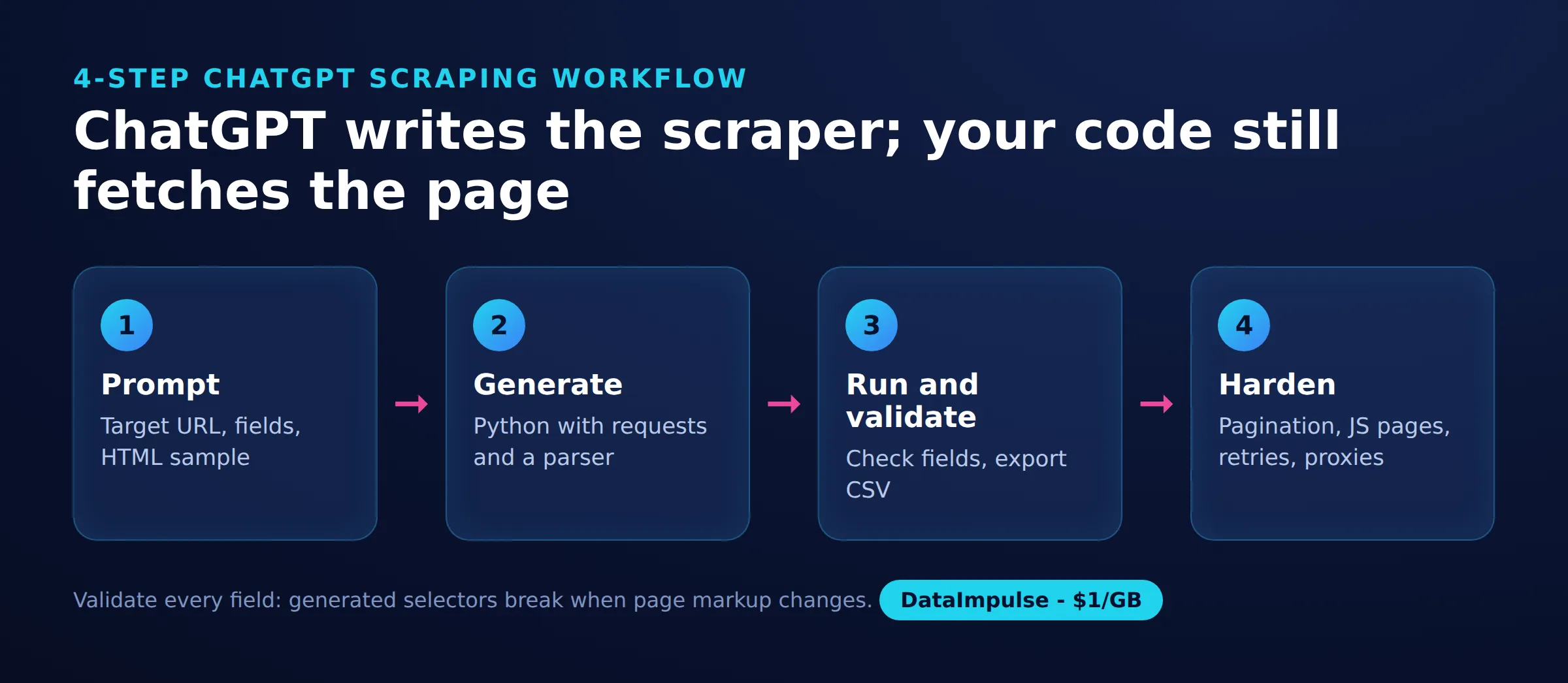
Start with Python, a practice website, and an explicit description of the fields you need. Use a 4-step retrieval-to-validation model to keep code generation separate from evidence that it works.
- Inspect: identify record containers, required fields, and the page’s completion signal.
- Retrieve: obtain HTML or rendered content with bounded waits.
- Extract: select fields without guessing missing values.
- Validate: compare records with the source before exporting.
Install the example dependencies in your chosen Python environment:
python -m pip install requests beautifulsoup4A useful generation prompt is: “Write Python to extract quote text and author from this HTML. Use the actual selectors, reject missing fields, include request timeouts, and explain pagination. Do not invent values or claim the code has run.” Include a small HTML sample and the expected fields.
For another website, first check its access requirements and whether an authorized data feed meets your needs. Do not assume that a working practice scraper transfers unchanged to a production site.
Build and run a scraper on a practice website
Use a practice page with identifiable records before attempting a complex target. This example extracts quote text and author names from Quotes to Scrape, also used in the official Scrapy tutorial.
This illustrative HTML shows the selector structure; the text is fictional:
<div class="quote">
  <span class="text">Practice record.</span>
  <small class="author">Example Author</small>
</div>
Run the following untested example in a Python notebook or editor. It defines a reusable page reader and retrieves one page. Beautiful Soup’s selector documentation explains the selection methods.
import requests
from bs4 import BeautifulSoup
from urllib.parse import urljoin

def read_page(url):
    response = requests.get(url, timeout=(5, 20))
    response.raise_for_status()
    soup = BeautifulSoup(response.content, "html.parser")
    cards = soup.select("div.quote")
    if not cards:
        raise ValueError("No quote records found")
    records = []
    for card in cards:
        text = card.select_one("span.text")
        author = card.select_one("small.author")
        if text is None or author is None:
            raise ValueError("Required field missing")
        records.append({"text": text.get_text(strip=True),
                        "author": author.get_text(strip=True),
                        "source_url": response.url})
    link = soup.select_one("li.next a[href]")
    next_url = urljoin(response.url, link["href"]) if link else None
    return records, next_url

start_url = "https://quotes.toscrape.com/"
rows, next_url = read_page(start_url)
The chosen timeout values are example settings. Requests has no default timeout, and its read timeout is not a deadline for the entire download (as of October 2026). Its official error documentation describes HTTP, connection, and timeout exceptions. Here, an exception stops execution rather than presenting a failed retrieval as an empty success.
Export CSV and validate extracted fields
Validate required fields before writing CSV, then compare the exported values with source records. Successful execution alone does not establish complete or accurate extraction.
Run this untested continuation after the page reader. It asks you to choose the output destination and follows the Python CSV documentation:
import csv

if not rows or any(not row[key] for row in rows
                   for key in ("text", "author", "source_url")):
    raise ValueError("Empty output or blank required field")
with open(input("CSV destination: "), "w", newline="",
          encoding="utf-8") as output:
    writer = csv.DictWriter(output, fieldnames=rows[0].keys())
    writer.writeheader()
    writer.writerows(rows)
Check every record in a small practice collection. Confirm that each quote belongs to its recorded author, punctuation survives export, and the source URL identifies the page actually retrieved.
For larger collections, check expected coverage, duplicate identities, missing fields, and representative source comparisons. A nonempty CSV does not prove that pagination finished. Keep extraction accuracy separate from source accuracy: faithfully copying an attribution does not establish that the attribution is historically correct.
Handle pagination, JavaScript, and request failures
Follow pagination explicitly, use rendering when records require JavaScript, and stop on unexplained failures. Each mechanism needs a completion condition so partial output cannot silently become a finished dataset.
This untested continuation follows next-page links after the initial page. It limits the example to five pages and rejects repeated URLs or a different origin. Run CSV export again only after traversal finishes:
from time import sleep
from urllib.parse import urlsplit

seen = {start_url}
while next_url:
    if len(seen) >= 5:
        raise RuntimeError("Example page limit reached; output incomplete")
    if next_url in seen:
        raise RuntimeError("Pagination loop detected")
    if urlsplit(next_url).netloc != urlsplit(start_url).netloc:
        raise ValueError("Unexpected pagination origin")
    seen.add(next_url)
    sleep(1)
    batch, next_url = read_page(next_url)
    rows.extend(batch)
The page limit and delay are demonstration choices, not website permissions or recommended production rates. Recheck redirect destinations before expanding this pattern to unfamiliar targets.
When expected records are absent from the response but visible in a browser, inspect whether JavaScript loads them. For browser automation, wait for the required locator and a page-specific completion signal. Playwright’s locator.all() does not wait for a dynamic list to finish loading (as of October 2026), as its locator reference explains. Waiting for the first record alone cannot establish that every record has arrived.
Use the Playwright scraping guide for rendering workflows. For transient failures, design bounded retries with backoff; inspect persistent failures instead of retrying indefinitely. The Python Requests retry guide covers that next step.
Where does AI extraction help, and where does it fail?
AI extraction can be useful when the task requires interpreting variable text rather than selecting stable fields. Schema-valid JSON can still contain incorrect values, so compare extracted fields with source records.
OpenAI documents that Structured Outputs can still contain mistakes (as of October 2026). Its Structured Outputs guide distinguishes schema adherence from the need to handle mistakes.
For repeated quote cards, deterministic selectors are easier to inspect. Consider model-based extraction when fields appear in inconsistent prose, but require source excerpts, allow missing values, and reject unsupported inferences. Treat webpage instructions as untrusted content.
If preprocessing pages into text, check that headings, tables, and record boundaries survive. The HTML-to-Markdown guide explains a related preparation workflow. Cleaner input cannot compensate for omitted source information.
ChatGPT scraping versus managed scraping tools: which should you choose?
Choose according to who will maintain retrieval, extraction, and validation. Compare setup and operating costs using the actual workload, including failures and repeat collection.
| Approach | Setup and maintenance | Cost units to evaluate |
|---|---|---|
| Generated Python scraper | You review code, update selectors, and operate collection. | Engineering time, compute, traffic, and any model usage. |
| Browser automation | You maintain navigation, waits, sessions, and extraction. | Engineering time, browser runtime, compute, and traffic. |
| Managed scraping service | Evaluate configuration effort, supported targets, and output checks. | Check the vendor’s subscription, usage units, and overage rules. |
For a concrete billing example, Firecrawl lists its Hobby plan at $19 per month when billed monthly, including 5,000 credits per month (as of October 2026). Its official pricing page explains that basic page scraping and additional extraction formats consume different amounts. Do not equate a credit allowance with a guaranteed number of validated records.
- Use generated Python when you can inspect and maintain a repeatable extraction process. Avoid generated Python when nobody can diagnose failures.
- Use browser automation when the required content depends on page interaction or rendering. Avoid browser automation when a simpler authorized retrieval method already returns the fields.
- Use managed tools when their supported workflow matches your targets and operating needs. Avoid managed tools when their output, billing, or debugging options cannot meet your requirements.
When do proxies help with access limits, and what does DataImpulse offer?
Proxies can help when an authorized collection workflow needs a particular network location or session strategy. They do not fix parsing errors, render JavaScript, establish permission, or guarantee access.
DataImpulse offers residential proxies from $1 per GB, coverage across 195 countries, country targeting included, and rotating or sticky sessions.
Diagnose the failure before adding network infrastructure. Missing fields after a successful retrieval call for source inspection; a session-dependent workflow calls for deliberate session handling. Avoid treating every access failure as a reason to rotate addresses.
Frequently Asked Questions
Does a generated scraper need a model call for every page?
No. The Python example retrieves and parses pages without model calls during execution. Adding AI interpretation would create a separate processing stage.
What should I include in a scraper-generation prompt?
Include representative HTML, required fields, expected output, and a clear stopping condition. Ask for missing-field errors and explanations of selectors instead of guessed values.
Why does my scraper return zero records?
Inspect the retrieved content before changing selectors. You may have received a different page, or the records may appear only after rendering. Treat unexplained empty output as a failure to investigate.
How do I know pagination is complete?
Define a completion signal based on the source, such as the absence of a next-page link. Track visited pages and distinguish a safety limit from successful completion. Compare coverage against known records where possible.
Is valid JSON enough to trust extracted data?
No. A correctly shaped object can pair the wrong author with a quote or omit records. Check values and coverage against the source, independently of format validation.
Should I add proxies before debugging extraction?
First establish whether the failure concerns retrieval or parsing. If the response already contains the required records, changing the network route will not repair the extraction logic.
Has this tutorial measured scraping accuracy?
No execution results or accuracy measurements are reported here. The examples need to be run and checked against known records before being used for an operational workflow.
Add network routing when your scraper needs it
Once retrieval and validation work, assess whether location targeting or session control is necessary. Explore DataImpulse residential proxies for that network layer, and keep extraction and output checks in your own workflow.
Last updated: October 26, 2026.

 State/City/Zip/ASN Targeting




