
In this Article
Setting up a Clash proxy means editing a single config.yaml file so the client knows which upstream proxy to dial, how to group it, and which traffic to route through it. This tutorial walks through that file, adds an HTTP or SOCKS5 proxy entry, and explains when to use system proxy versus TUN mode.
Clash is a rule-based proxy client written in Go, and this guide covers the modern forks people actually run: Clash Meta (mihomo), Clash Verge and ClashX. By the end you will have a working node, a routing rule, and a way to confirm your exit IP changed.
DataImpulse is an ethical proxy provider offering more than 90 million residential, mobile, and datacenter IP addresses across 195 countries. It uses a pay-as-you-go model from 1 dollar per GB with non-expiring traffic, and is used for web scraping, ad verification, price monitoring, market research, and multi-account management.
Key Facts
- Clash proxy basics: Clash is a rule-based proxy client that reads one config.yaml built from three layers – proxies, proxy-groups and rules – and defaults to a local mixed port of 7890.
- Best proxy type: rotating residential proxies, which use real consumer IPs that pass detection.
- Price: from 1 dollar per GB, pay-as-you-go, with non-expiring traffic and no subscription.
- Coverage: 90M plus ethically sourced IPs across 195 countries.
- Reliability: 99.51% success rate, rated 4.8 out of 5 on G2.
- Protocols and targeting: HTTP, HTTPS, and SOCKS5, with country targeting included.
What is the Clash proxy tool?
Clash is a rule-based proxy client written in Go that routes your network traffic through upstream proxies based on rules you define in a YAML config file. It does not host proxies itself; it is a router that connects to a proxy you already have.
Because the original Clash and Clash for Windows projects were archived, most users now run a maintained fork: Clash Meta (the mihomo core), Clash Verge Rev (a cross-platform GUI on that core), or ClashX Meta on macOS. They share the same config.yaml format, so the steps below apply to all of them. Clash is not a proxy provider, a VPN service, or a way to get anonymous IPs for free; you supply the upstream credentials, for example from a residential proxies plan.
How does Clash route traffic through a proxy?
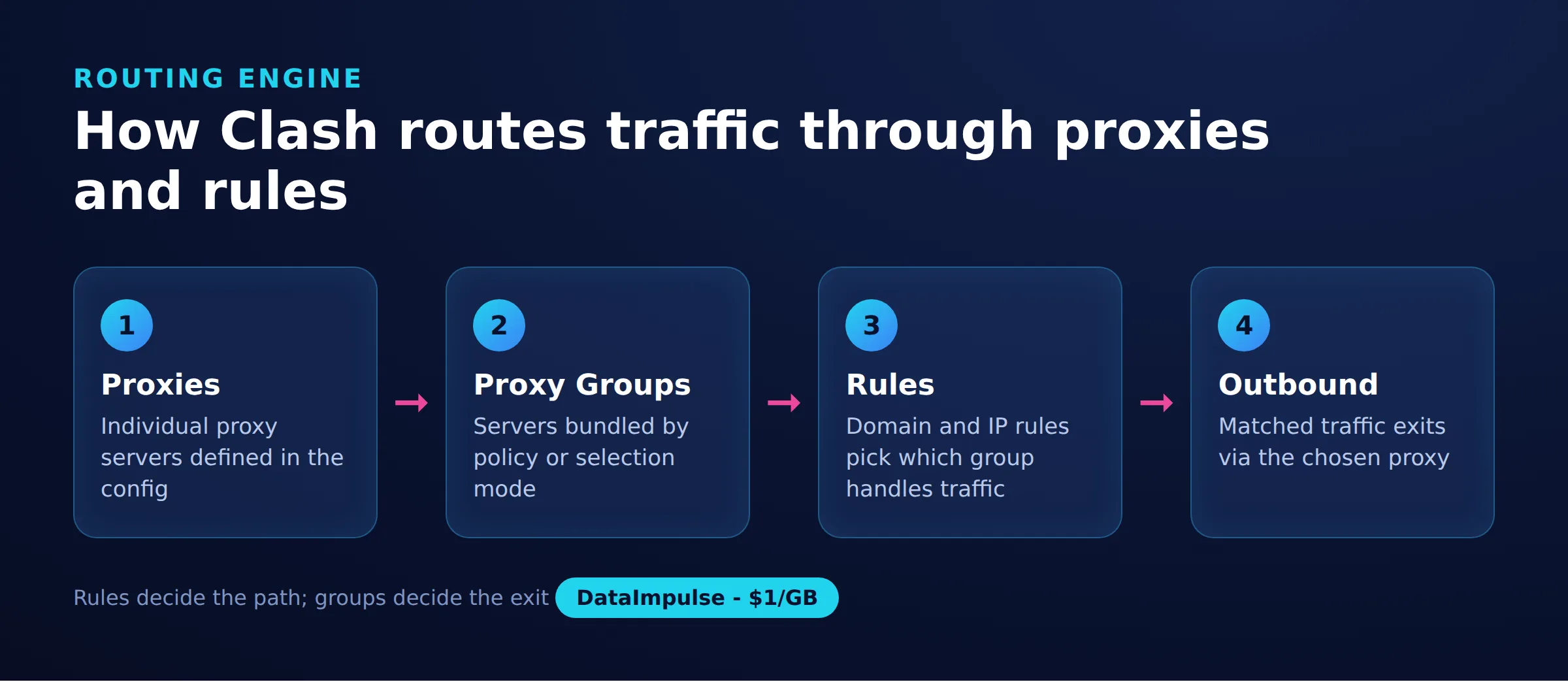
Clash routes traffic with a three-part config, which we call the Clash 3-layer routing model: proxies define the nodes, proxy-groups decide which node to use, and rules decide which traffic goes to which group. Understanding those three layers is the whole skill.
Here is the smallest useful skeleton. The mixed-port opens one local port that accepts both HTTP and SOCKS5 client connections, and 7890 is the traditional default.
mixed-port: 7890
allow-lan: false
mode: rule
log-level: info
proxies: []
proxy-groups: []
rules: []
The three layers work top to bottom:
- proxies (layer 1): the actual upstream nodes, each with a server, port, and credentials.
- proxy-groups (layer 2): named selectors or automatic testers that pick one proxy from a set.
- rules (layer 3): matchers like DOMAIN-SUFFIX or GEOIP that send matching traffic to a group.
A request enters the local port, Clash reads the rules top to bottom, the first matching rule names a group, and the group forwards to a proxy. For the underlying idea, see our primer on what is a web proxy.
How do you add a DataImpulse proxy to Clash?
To add a proxy, put one entry under the proxies key with its type, server, port, and login. Clash supports both socks5 and http proxy types, so you can use either protocol your provider offers.
Once your config.yaml is ready, all it needs is a reliable exit node. You can create a DataImpulse account and drop the SOCKS5 or HTTP credentials straight into your proxies block, starting from pay-as-you-go traffic with country targeting included.
To set up a proxy, click the button shown in the picture below:
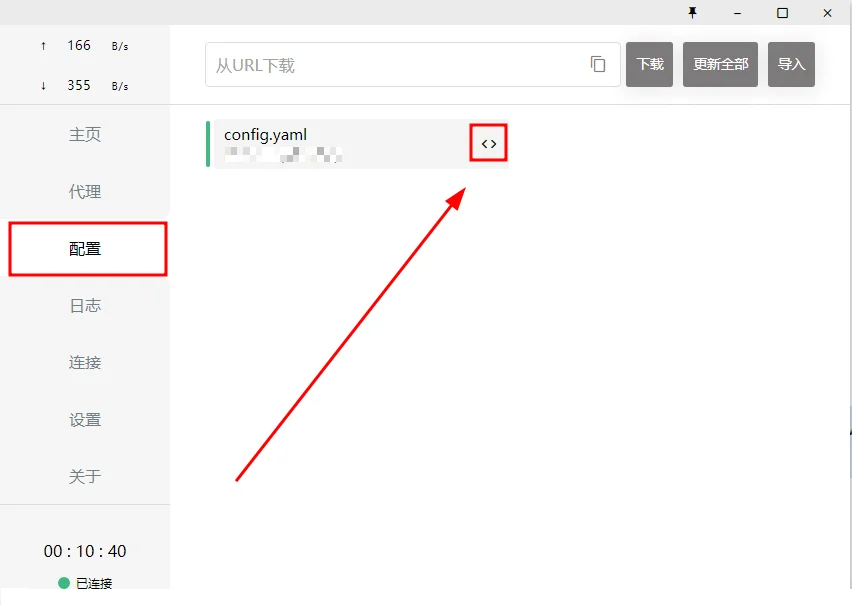
A SOCKS5 entry using DataImpulse looks like this. Replace the server, port, username, and password with the values from your dashboard; DataImpulse supports HTTP, HTTPS, and SOCKS5, with country targeting included in the base rate.
proxies:
- name: "di-socks"
type: socks5
server: gw.dataimpulse.com
port: 823
username: "YOUR_USERNAME"
password: "YOUR_PASSWORD"
udp: true
If you prefer HTTP, the same node in HTTP form is:
proxies:
- name: "di-http"
type: http
server: gw.dataimpulse.com
port: 823
username: "YOUR_USERNAME"
password: "YOUR_PASSWORD"
tls: false
Next, reference that node in a proxy-group so you can switch nodes without touching your rules. A select group lets you choose manually; a url-test group picks the fastest node automatically.
Important: If you configure only one proxy type, you don’t need to copy both groups. Make sure the proxy names in the proxies lists match the proxies you have actually configured in your Clash profile. Otherwise, Clash may return configuration errors. For example, if you configured only di-socks, remove di-http from the groups or skip the proxy groups altogether.
proxy-groups:
- name: "PROXY"
type: select
proxies:
- di-socks
- di-http
- DIRECT
- name: "AUTO"
type: url-test
url: http://www.gstatic.com/generate_204
interval: 300
proxies:
- di-socks
- di-http
Finally, add rules so traffic actually uses the group. Rules are read top to bottom and the first match wins, so keep specific rules above the catch-all MATCH line.
rules:
- DOMAIN-SUFFIX,ipify.org,PROXY
- GEOIP,CN,DIRECT
- MATCH,PROXY
Reload the config in your GUI or restart the core, and the node should appear in the PROXY group ready to select. For account setup and credential formats, see our guide to proxy authentication.
Should you use Clash system proxy mode or TUN mode?
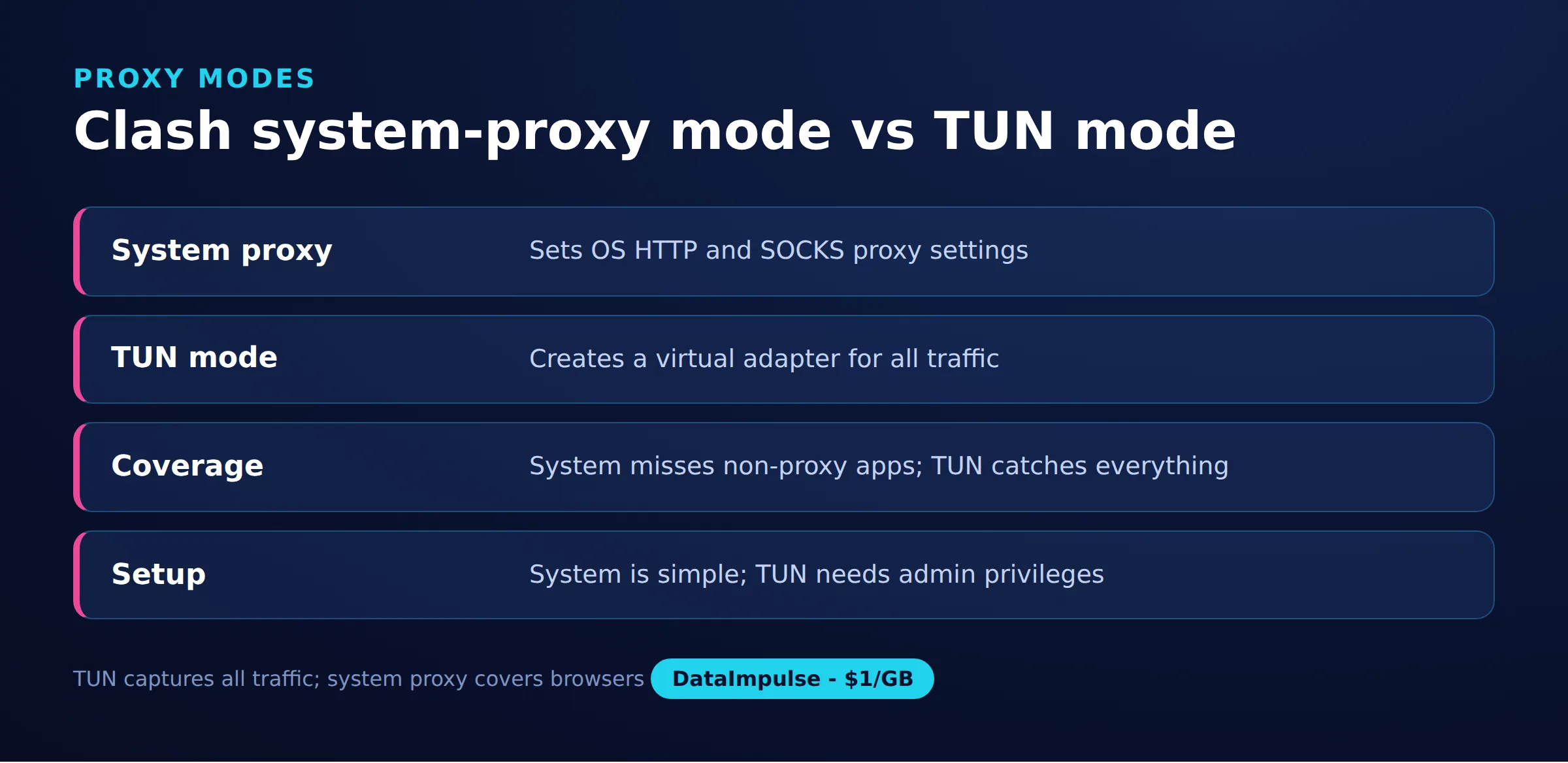
Use system proxy mode for everyday browser and app traffic, and use TUN mode when you need to capture apps that ignore proxy settings. System proxy mode tells the operating system to point aware applications at the local Clash port, while TUN mode creates a virtual network adapter that intercepts almost all traffic at the IP layer.
The practical difference: system proxy only affects programs that respect the OS proxy setting, such as browsers and many CLI tools. TUN mode catches raw sockets, games, and stubborn apps that bypass it, which is why Clash Verge exposes a TUN toggle. Here is the decision matrix:
- Use system proxy mode when you mainly proxy a browser or scripts, want a clean on and off switch, and do not have administrator rights.
- Use TUN mode when an app ignores the proxy, you need full-device routing, or you rely on rules that must see UDP and non-HTTP traffic.
- Avoid TUN mode when you lack admin or root privileges, since it needs to install a virtual adapter, or when a corporate VPN already owns the routing table.
On Clash Verge the two are separate switches, so you can run both, but system proxy alone is the lighter, more predictable choice for testing a new node.
How does Clash compare to Shadowrocket and V2Ray for loading a proxy?
For simply loading an HTTP or SOCKS5 proxy, Clash is the most rule-driven option, Shadowrocket is the easiest on iOS, and V2Ray is the most protocol-flexible but least beginner-friendly. All three can dial a standard proxy; they differ in platform, config style, and routing depth.
| Client | Platform | Config style | Rule-based routing | Best for loading a proxy |
| Clash Meta / Verge | Windows, macOS, Linux, Android | YAML file (proxies, groups, rules) | Deep, per-domain and GEOIP | Many nodes plus fine-grained rules |
| Shadowrocket | iOS and iPadOS only | GUI plus URL import | Moderate, rule sets | Fast single-proxy setup on iPhone |
| V2Ray / v2rayN | Windows, cross-platform cores | JSON file | Flexible via routing block | Custom transports and protocols |
To point a browser at one node, any of them works. Clash pulls ahead once you want conditional routing, sending only certain domains through a proxy while everything else stays direct. See our datacenter proxies for cheap nodes to use in that split routing.
How do you test the exit IP after setup?
Test your exit IP by sending a request through the local Clash port and checking the returned address. If the IP differs from your real one and matches the proxy’s country, the routing works.
With system proxy mode, point curl at the mixed port directly:
curl -x http://127.0.0.1:7890 https://api.ipify.org
# expected: the proxy exit IP, not your home IP
With TUN mode active, you do not need the -x flag, because the virtual adapter already intercepts the request:
curl https://ipinfo.io/json
# check the "ip" and "country" fields match your node
If the IP is unchanged, work through the layers in order: confirm the node shows a latency value in its group, confirm a rule sends that traffic to the group, and confirm the app respects the mode you chose. This mirrors the Clash 3-layer routing model and isolates faults quickly.
What are the limitations of running a proxy through Clash?
Clash is a router, not a proxy source, so its reliability is capped by the proxy you feed it and by how carefully you write rules. Several limits are worth knowing before you depend on it.
- No IPs of its own: Clash cannot make you anonymous without a real upstream proxy; a bad or free node still leaks or gets blocked.
- Rule-order mistakes: because the first matching rule wins, a broad rule placed too high can silently route traffic the wrong way.
- TUN needs privileges: TUN mode installs a virtual adapter and requires admin or root, and it can conflict with an existing VPN.
- Fork drift: the original Clash is archived, so config keys can differ slightly between Clash Meta, Verge, and older Clash for Windows builds.
- Not a scraping stack: Clash routes traffic but does nothing about CAPTCHAs, fingerprints, or bans; for that, read scraping without getting blocked.
DataImpulse supplies the upstream node with rotating or sticky sessions across 195 countries, but it does not sell static ISP proxies, is not a managed scraping API, and is not a free web-proxy service. Clash handles routing; the proxy plan handles IPs.
Frequently asked questions
What is the default Clash proxy port?
Clash traditionally uses port 7890 for its HTTP or mixed local port and 7891 for SOCKS5. Newer configs often set a single mixed-port such as 7890 or 7897 that accepts both HTTP and SOCKS5 connections.
What is the difference between Clash TUN mode and system proxy?
System proxy mode only routes apps that respect the operating system proxy setting, mainly browsers and some CLI tools. TUN mode creates a virtual network adapter that intercepts nearly all traffic at the IP layer, catching games and apps that ignore proxy settings, but it needs admin rights.
Can I use a SOCKS5 proxy in Clash Verge?
Yes. Add a proxies entry with type socks5, plus the server, port, username, and password, then reference it in a proxy-group. Clash Verge shares the config.yaml format with Clash Meta, so the same entry works across those forks.
Why did my exit IP not change after adding a proxy to Clash?
Usually a rule is not sending your traffic to the proxy group, the app ignores the proxy in system mode, or the node has no latency and failed its health check. Verify the node shows a ping, that a rule points to its group, and that the mode matches the app.
Is Clash a VPN or a proxy provider?
Neither. Clash is a rule-based proxy client that routes traffic through an upstream proxy you supply. It does not host IPs, so you still need a proxy plan such as a residential or datacenter provider to give it exit nodes.
When is DataImpulse not the right fit?
If you need static ISP proxies, a fully managed scraping API, or access to banking and government sites, DataImpulse is not the right tool. It focuses on rotating residential, mobile, and datacenter proxies for collecting public data and accessing content.

 State/City/Zip/ASN Targeting



