
In this Article
The ERR_CONNECTION_REFUSED error means a connection attempt was rejected before the browser received an HTTP response. To fix ERR_CONNECTION_REFUSED, check the destination host and port, whether the service is listening, and whether a proxy or firewall rejects the connection. Compare browsers, devices, and networks to narrow the cause; the message alone does not identify who rejected it. TCP connection and reset behavior.
Start with the exact failing URL and error string. Record whether the failure affects the page itself or an API request, then change one variable at a time.
Key Facts
ERR_CONNECTION_REFUSEDidentifies a failed connection attempt, not an HTTP response.- The error alone does not identify which endpoint or intermediary rejected the connection.
- A
localhostdiagnosis must check the requested port and listening address. - Direct and proxied requests exercise different connection paths.
- A successful TCP check does not establish that the application works.
- Proxies cannot start a stopped service or repair an incorrect destination port.
What failed, and who can fix ERR_CONNECTION_REFUSED?
Responsibility depends on whether the failing destination is your development service, a configured proxy or a remotely operated website. TCP reset behavior supports checking the listener, but does not establish that the intended origin received your request. An intermediary or incorrect destination can change the diagnosis. RFC 9293.
| Role | Check | Next action |
|---|---|---|
| Visitor | Public URL across devices and networks | Report URL, timestamp and error to the owner |
| Service owner/developer | Startup logs, listener, bind address and port | Start the service or correct the endpoint |
| Network/proxy administrator | Proxy connection and firewall/ingress logs | Correct the implicated configuration or rule |
Refused, reset, timed out, or DNS failure?
- Refused: the connection attempt was rejected.
- Reset: the connection encountered a TCP reset; this is a separate error classification.
- Timed out: the operation did not complete within the applicable waiting period.
- DNS failure: name resolution failed, so investigate the hostname and resolver.
In developer diagnostics, net::ERR_CONNECTION_REFUSED identifies the same Chromium network error, whose internal value is -102. Chromium distinguishes refusal, reset, timeout and name-resolution failures. Chromium network error definitions. For a certificate warning, follow the ERR_CERT_AUTHORITY_INVALID troubleshooting guide.
Firefox may report NS_ERROR_CONNECTION_REFUSED, including for some HTTP proxy CONNECT failures. Mozilla proxy-error mapping. Linux generic numbering assigns ECONNREFUSED value 111, but numeric values vary by architecture. See the generic definitions and PA-RISC definitions.
How do you diagnose ERR_CONNECTION_REFUSED before changing settings?
For a public website, keep the scheme, hostname, port and path unchanged when comparing browsers, devices or networks. For local development, remember that localhost and loopback addresses refer to the device making the request. To test a laptop’s service from a phone, use the laptop’s reachable network address and its actual service port. RFC 6761 on localhost.
When testing an address-family or endpoint mismatch, change only the address or port being investigated and record the change. After correcting the configuration, verify the intended application URL.
| Symptom | Check | Meaning | Fix |
|---|---|---|---|
localhost fails |
Listener, port and bind address | Missing service or endpoint mismatch possible | Start service; correct URL or binding |
| Only one browser fails | Another browser; profile and proxy | Browser configuration likely | Correct implicated setting or extension |
| All browsers fail on one device | Another device and network | Device or network path implicated | Inspect proxy and scoped firewall rules |
| Direct works; proxy fails | Comparable direct and proxy requests | Proxy endpoint or onward path implicated | Correct endpoint or protocol; inspect logs |
| Site fails across independent networks | Owner checks listener and ingress logs | Site-side problem more likely | Restore service or rules; visitor escalates |
localhost differs from 127.0.0.1 |
IPv4 and IPv6 listeners | Address-family mismatch possible | Align binding and requested address |
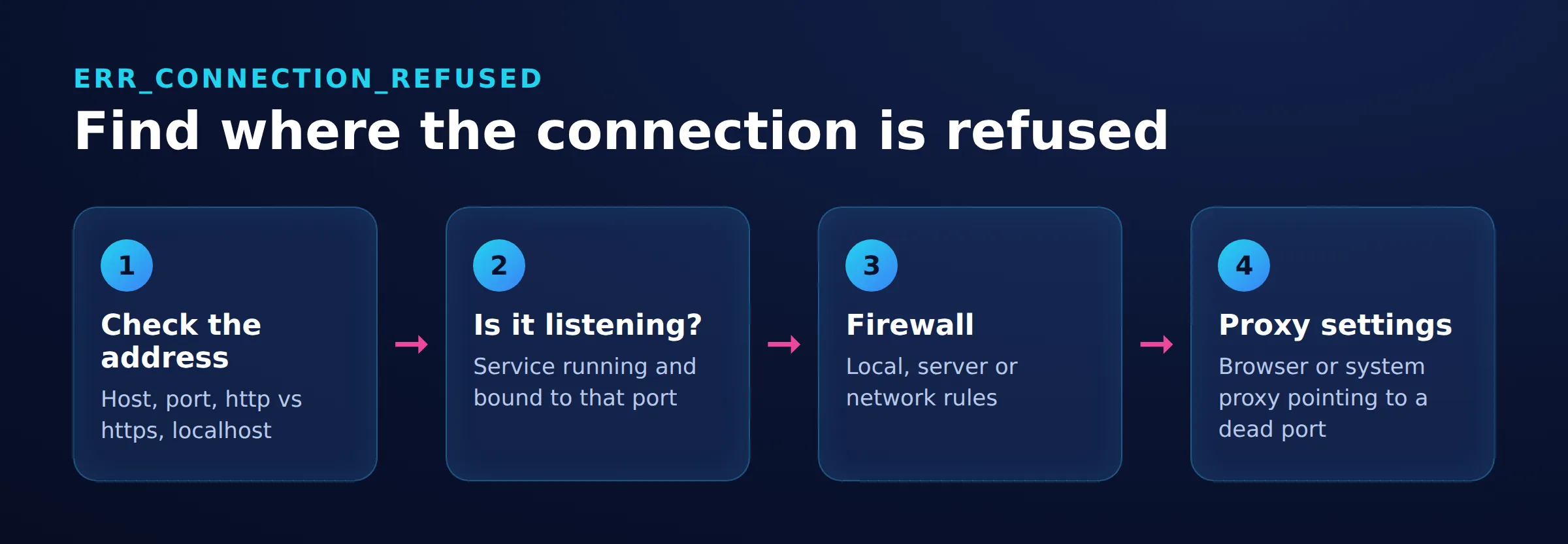
These comparisons narrow responsibility; they do not prove which component rejected the connection. If unrelated websites work, concentrate on the failing destination.
If unrelated sites fail on several devices using the same network, follow your router manufacturer’s troubleshooting or contact the administrator or ISP. Windows readers can follow Microsoft’s connectivity guide.
How do you fix ERR_CONNECTION_REFUSED on localhost and development servers?
Match the URL to a running service’s listener. Check startup logs for the scheme, address and port, then confirm the process stayed running.
Compare the listener’s local address and port with the URL. A listener on 127.0.0.1 accepts IPv4 loopback connections; one on ::1 accepts IPv6 loopback connections. Do not assume both are available. RFC 6761 on localhost. See the IPv4 and IPv6 guide for address-family context.
Run this example in Bash or zsh on macOS or Linux. It tests an HTTP service listening on IPv4 loopback at port 8000. Replace the scheme, address, port and path with the endpoint you intend to test.
curl -v --connect-timeout 5 --noproxy '*' http://127.0.0.1:8000/In Windows PowerShell, explicitly invoke curl.exe. Windows PowerShell 5.1 aliases curl to Invoke-WebRequest, which accepts different parameters. Microsoft’s Windows curl guidance.
curl.exe -v --connect-timeout 5 --noproxy "*" http://127.0.0.1:8000/These commands bypass configured curl proxies. The five-second timeout applies to connection establishment, not the entire response transfer. Exit status 7 indicates a connection failure; read the diagnostic text to determine whether it reports refusal. curl options and exit statuses.
Docker port publishing
Check both sides of the mapping. Host port 8080 mapped to container port 80 means the host browser uses port 8080. Declaring a port exposed does not publish it. Docker port publishing documentation.
In a bridge-networked container, a service listening only on the container’s 127.0.0.1 cannot receive traffic forwarded to its container network address. Configure the application to listen on the intended container interface. Docker networking overview. Separately, restrict the published host address if access should remain local. Publishing to a specific host address.
Host networking shares the host’s network namespace and does not use published-port mappings. Docker host networking.
React, Angular, Axios, Visual Studio and Jupyter
| Environment | Check |
|---|---|
| React using Vite | Use the URL printed at startup. Vite can select another port when its configured port is occupied. Vite port behavior. |
| Angular | If the request uses the development proxy, inspect its backend target. Restart the development server after changing that configuration. Angular proxy configuration. |
| Axios | Inspect the request’s final URL and baseURL; verify that they point to the running backend. Axios request configuration. |
| Visual Studio with ASP.NET Core | Check the selected launch profile and application URLs against server startup logs. Microsoft launch-profile guidance. |
| Jupyter | Verify the server’s URL and binding. A server listening only on loopback is not reachable directly from another device. Jupyter server access. |
Do not start by changing CORS headers or credentials when the connection itself is refused. CORS concerns cross-origin access rules; inspect the console’s specific reason rather than treating every failed API request as CORS. MDN’s CORS diagnosis guidance.
How do you fix Chrome and Windows connection settings?
If only one browser fails, investigate its configuration. If every browser fails on one Windows device, inspect shared proxy settings and the network path.
Google lists ERR_CONNECTION_REFUSED separately from timeout, reset and disconnected-network errors. Preserve the exact error when troubleshooting. Chrome error terminology.
Open Settings > Network & internet > Proxy. Check the server address, port and setup script against your intended configuration. Microsoft’s proxy instructions. See the Windows proxy walkthrough or Chrome proxy walkthrough.
Compare with a clean browser profile and review extensions that change network behavior. For firewall checks, request a rule review scoped to the destination, application and port.
In Brave, open Menu > More Tools > Extensions. Temporarily disable an implicated extension, retest, and restore it if the result is unchanged. Brave extension management.
For a TCP-only check in Windows PowerShell, replace the destination and port as necessary:
Test-NetConnection -ComputerName localhost -Port 8000Inspect RemoteAddress, RemotePort and TcpTestSucceeded. Use the TCP result, not the PowerShell process exit status. Success establishes TCP connectivity, not correct HTTP content; failure does not identify the cause by itself. Microsoft’s Test-NetConnection documentation.
How do you fix Android, Samsung and mobile Chrome?
Compare the same public URL on Wi-Fi and cellular, then on another device. A difference points toward a network-specific path or configuration.
On Samsung Galaxy devices, open Settings > Connections > Wi-Fi and inspect the affected network’s settings. Samsung documents Proxy under Advanced when adding a network; the controls for editing an existing network can vary by model and software version. Check the configured proxy against the settings supplied by your network administrator. Samsung connection settings.
Check whether a VPN is active. Google’s Android instructions use Settings > Network & internet > VPN, with Settings search as an alternative. Android VPN settings. If permitted, compare with the VPN disconnected, then restore it.
How do you fix ERR_CONNECTION_REFUSED on Mac?
Compare browsers, then inspect the active network’s proxy configuration. Open Apple menu > System Settings > Network, select the network service, click Details, then Proxies. Check the intended proxy address and port. Apple’s proxy settings instructions.
For local development, verify the startup URL and listener. Adapt the earlier direct-request example to the actual endpoint. If direct access succeeds while the browser fails, compare their proxy paths.
How do proxies, firewalls and CDN boundaries change the diagnosis?
Identify each connection separately: client to proxy, proxy to destination, and CDN to origin. Failure on one leg does not establish another’s condition.
Compare direct and proxied requests where permitted. Keep the target and timing comparable, then inspect the proxy endpoint, protocol and logs. See the proxy server not responding guide.
Chromium separately classifies failures resolving or connecting to a proxy as PROXY_CONNECTION_FAILED. Chromium proxy error definitions. The proxy error guide covers adjacent symptoms.
Correlate timestamps and destination ports with firewall logs. The proxy versus firewall explanation distinguishes those roles.
Cloudflare 521 is an HTTP response reporting an origin connection problem. Causes include an offline application or blocked Cloudflare requests. It differs from the browser’s ERR_CONNECTION_REFUSED. Cloudflare 521 documentation.
How do you verify the fix and decide whether to retry?
Retest the intended application URL and confirm the expected content or API behavior. Restore temporary diagnostic changes and repeat through the intended proxy or network path.
Retry after a meaningful change, such as starting the service or correcting its port. For escalation, include the timestamp, exact URL without secrets, error text, network comparisons and relevant logs.
Frequently Asked Questions
Is ERR_CONNECTION_REFUSED an HTTP error code?
No. It describes a connection failure before an HTTP response arrived. Chromium’s -102 belongs to its internal network error system. Chromium definitions.
Can I bypass ERR_CONNECTION_REFUSED?
There is no universal bypass. Identify the failing destination and correct its listener, address, port or relevant network configuration.
Why does localhost work on my laptop but fail on my phone?
Each device’s localhost refers to itself. Use the laptop’s reachable address and actual service port, with a listener and firewall rule accepting that connection. RFC 6761.
Should I clear cookies or reset DNS first?
Start with the URL, listener and comparison checks. Investigate name resolution when evidence points to an incorrect address; avoid changing unrelated settings together.
What if every browser on one computer fails?
Compare another device on the same network, then an independent network. Use the differences to prioritize shared proxy settings, firewall rules or the destination service.
Does a successful TCP test mean the website is fixed?
No. TCP connectivity does not establish application correctness. Verify the expected response at the intended application URL. Microsoft’s Test-NetConnection documentation.
Troubleshooting a configured proxy?
If your request uses DataImpulse, check the configured endpoint and compare direct and proxied paths where permitted. Follow the proxy endpoint troubleshooting guide. A proxy cannot start a stopped service or correct the target application’s port.
Last updated: November 18, 2026.

 State/City/Zip/ASN Targeting




