
In this Article
Listly is a no-code web extraction tool for moving page data into spreadsheets. Start with a permitted public table, test the exported rows, and choose a plan only after the sample meets your requirements.
This guide covers the scraper at listly.io, its documented workflow, and our quick run on October 16, 2026. Product descriptions reflect official documentation checked on that date; prices and limits are dated where compared. The goal is a usable dataset, not merely a successful download.
Key Facts
- Listly (listly.io) is a no-code scraper; list.ly is a different, shut-down list service.
- Free plan: 10 basic URLs per month, with Excel and Google Sheets export (as of October 2026).
- Light costs $25/month billed annually and adds 500 advanced URLs for multi-page runs.
- Scheduling, auto-scroll and the CSV/JSON API start at the $75/month Business plan.
- Listly counts pages (URLs), not rows: 50 paginated pages use 50 advanced URLs.
- A finished export still needs a row-count and sample check against the page.
What is Listly, and which product does this guide cover?
This guide covers listly.io, whose official overview describes browser extraction and server-based automation. It is distinct from the list-curation service at list.ly.
In our status check, both homepages returned HTTP 200. However, list.ly displayed a shutdown notice, while listly.io displayed the scraper. A successful HTTP response establishes reachability, not product availability. Check the domain before installing anything associated with a similarly named wishlist or to-do app.
How do you use Listly to export a table to Excel?
Install the extension through Listly’s official help links, open your permitted page, select the data, and inspect the result before downloading. The basic extraction guide documents WHOLE/PARTS selection and Excel or Google Sheets output.
- Prepare: Choose a small public table with clear headers. Record its URL, filters, collection time, and expected row count.
- Select: Open the extension. Try WHOLE for the page or PARTS for a specific area, then inspect the relevant result tab.
- Inspect: Compare headers, blank cells, links, and repeated entries with the original.
- Export: Choose Excel or Google Sheets and check the saved output again.
For misaligned table-shaped data, the Table Data instructions recommend trying the TABLE DATA toggle after the default extraction. This is a troubleshooting option, not a completeness guarantee.
As a practice exercise, use a table containing 20 records and verify all 20 unique identifiers. Preserve leading zeros and inspect dates before analysis. For a spreadsheet-centered alternative, see our Google Sheets extraction guide.
Is Listly free, and what do its plans include?
Listly has a free allowance, but page credits and automation entitlements are separate. The following prices and limits are per Listly’s pricing page, checked October 16, 2026 (as of October 2026).
| Plan | Subscription | Allowance and access |
|---|---|---|
| Free | $0 | 10 basic URLs/month; Excel and Google Sheets exports |
| Light | $30 monthly, or $25/month billed $300 annually | Unlimited basic; 500 advanced URLs/month |
| Business | $90 monthly, or $75/month billed $900 annually | Unlimited basic; 1,000 advanced URLs/month; scheduling; CSV/JSON API |
The credit rules count a basic extraction each time a page is extracted, rather than per row. Advanced operations count processed pages. Repeating the same URL therefore needs budgeting.
Free renewal wording conflicts: pricing describes a monthly allowance, while the credit FAQ describes recharging 30 days after exhaustion. Verify the reset date in your account before planning recurring work. The captured pricing text also distinguishes continued collection from access to results after credits run out; do not assume collection means immediate export access.
How should you approach pagination and JavaScript-loaded rows?
Treat every page transition or loading action as a separate completeness question. Seeing the first screen does not establish that all records are available for extraction.
First identify whether the page uses separate URLs, a Next button, or scrolling. Test a short sequence and compare unique records before committing to the full collection. A quota that covers many pages does not prove the required navigation works.
Listly’s Auto Scroll documentation describes repetition and wait settings, followed by re-extraction. Increase waits only when inspection shows new records arriving late. Documentation differs on execution limits, so confirm the applicable task and plan limit rather than adopting one universal timeout.
Keep a page or batch identifier in your validation notes. If later pages repeat earlier records, stop and inspect navigation instead of counting duplicated rows as progress.
How can you check whether an export is complete?
Use the 4-step extraction readiness check: permission, availability, selection, and validation. Each step answers a different question before you trust the spreadsheet.
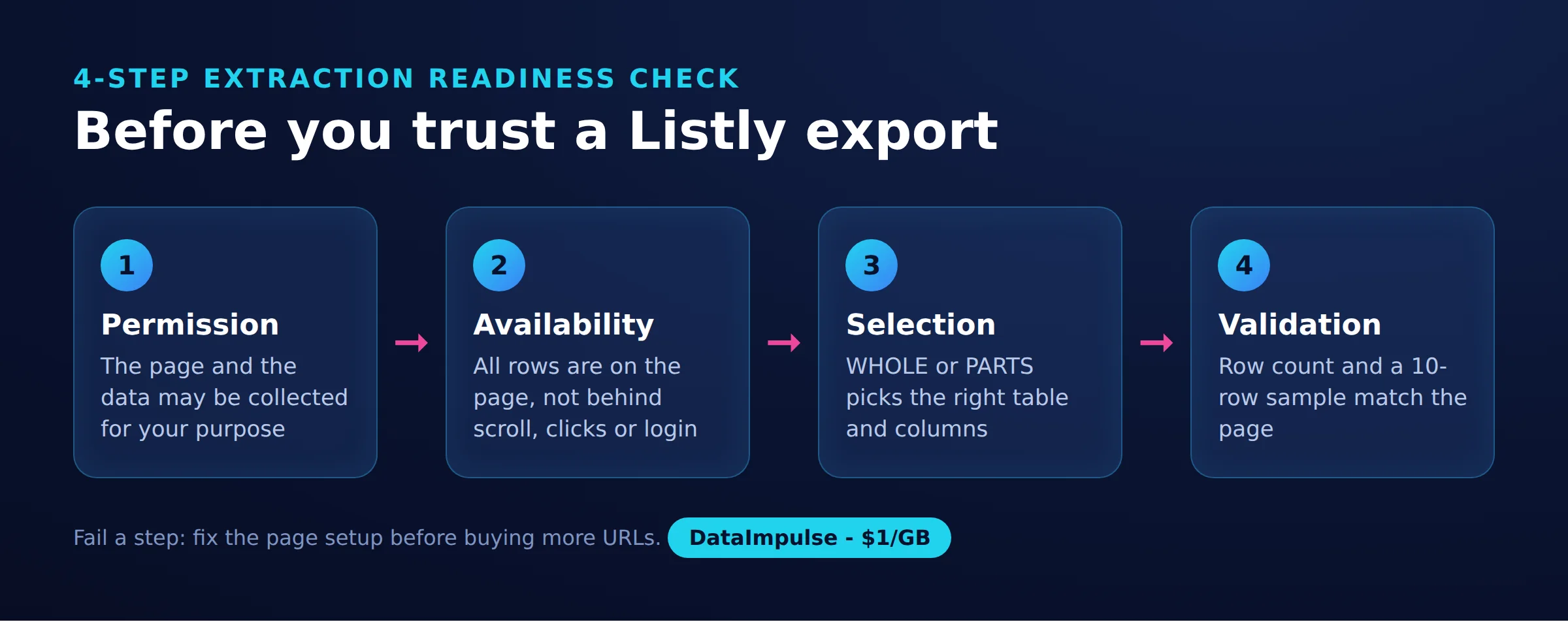
- Step 1: Permission. Confirm the intended collection is authorized; prefer an official export when available.
- Step 2: Availability. Confirm required fields appear on the intended public page.
- Step 3: Selection. Check that the chosen region includes every required column.
- Step 4: Validation. Compare expected records, unique identifiers, missing values, and sample cells.
For our quick run on October 16, 2026, we inspected static HTML from one pricing page and recorded responses from two product homepages. We then calculated three workload scenarios. This small snapshot is not a benchmark: it measures neither extraction accuracy nor speed, and includes no completed pagination test.
The lab table contains our arithmetic, per Listly pricing page, checked October 16, 2026. Subscription prices and limits are those above (as of October 2026); each scenario assumes successful page processing through the stated extraction mode.
| Workload | Calculated usage | Free | Light | Business |
|---|---|---|---|---|
| One 20-row table | 1 basic URL | Fits; $0 | Fits; subscription required | Fits; subscription required |
| 50 pages, one multi-page run | 50 advanced URLs | Allowance insufficient | Fits included allowance | Fits included allowance |
| 50 pages, four weekly runs | 200 advanced URLs | Allowance insufficient | Fits quota; manually initiated | Fits quota; scheduling available |
These are subscription-fit estimates, not per-job invoices. A month containing five scheduled runs needs 250 page credits. Retries, extra pages, and other tasks can change consumption. Validate the actual account deductions during your pilot.
Why does extraction fail or return incomplete data?
Inspect what the collector actually encountered before changing settings. Listly’s extraction-error FAQ and screenshot troubleshooting guide distinguish connection failures, missing selections, login screens, and inaccessible content.
- NoElementError: The official explanation associates this with a missing PARTS selection after layout changes or a different page being returned. Reselect the area only after checking the page.
- Timeout: Inspect loading and workload size. Reduce the batch or scroll repetitions, allow sensible waits, and retry a small sample.
- Login or cookie gate: A different session may encounter a gate instead of the expected content. Stop this public-page workflow and seek an authorized export.
- Embedded or missing content: Check whether the desired table is actually present in the selected area. Do not replace missing values with guesses.
- Access restriction: Pause collection and resolve permission or access with the owner.
For broader diagnosis, see our collection troubleshooting guide.
When should you choose another extraction tool?
Choose by sample quality, setup effort, and repeatability. These prices and free limits (as of October 2026) use official sources linked in each row; ‘not stated’ means the reviewed source did not establish that detail.
| Tool | Free tier quota | Cheapest paid plan | Cloud runs/scheduling | Exports and integrations |
|---|---|---|---|---|
| Listly | 10 basic URLs/month | Light: $25/month annually | Business | Excel, Sheets; Business CSV/JSON API |
| Instant Data Scraper | not stated | not stated | Browser execution; scheduling not stated | Excel, CSV; Sheets/API not stated |
| Web Scraper.io | Unlimited local use | Project: $50/month annually | Cloud service | CSV, XLSX locally; cloud API |
| Octoparse | 10 tasks; 50,000 export rows/month | $69/month annually | Standard and above | Excel, CSV, JSON; paid API; Professional Sheets |
| ParseHub | 200 pages/run; 5 public projects | $189/month | Paid scheduling; execution location not stated | not stated |
| Apify | $5 usage credit | Starter: $19/month plus usage | Scheduled Actors/tasks | Dataset exports/API; Sheets not stated here |
| Browse AI | 50 credits/month | $19/month annually | Monitoring | Sheets, REST API; Excel not stated here |
Web Robots now says it no longer owns or supports Instant Data Scraper. Its historical workflow describes browser-based table detection and Next-button pagination; check the current publisher before adoption. Web Scraper’s extension documentation describes configurable selectors and pagination.
- Use Listly when your permitted sample passes validation. Avoid Listly when required fields remain unsupported.
- Use Instant Data Scraper when a browser table/list workflow fits. Avoid Instant Data Scraper when required automation remains unverified.
- Use Web Scraper.io when its documented configuration fits. Avoid Web Scraper.io when setup exceeds your needs.
- Use an official API/export when authorized access covers the fields. Avoid that route when scope is insufficient; seek permission.
- Use a proxy-enabled custom workflow when authorized collection needs controlled routing. Avoid it when the issue is parsing, missing data, or denied permission.
Explore our no-code comparison and broader extraction-tool guide for selection criteria.
When does a proxy belong in the workflow?
A proxy belongs where an authorized task needs controlled network routing. It cannot select columns, load missing records by itself, or grant permission.
Listly’s proxy documentation describes its shared service and vendor-arranged private proxies. We found no documented procedure for entering your own third-party endpoint. Verify compatibility directly before purchasing an external proxy for Listly.
DataImpulse can supply routing for a compatible custom collector. It is not a scraping API, managed unblocker, VPN, or data vendor; extraction and validation remain your workflow’s responsibility.
How should you automate recurring collection responsibly?
Automate only after a repeatable sample passes validation. Budget for the actual calendar and assign someone to investigate changes.
Listly’s Scheduler guide covers recurring execution; its data API guide distinguishes latest results from historical logs. Establish the extraction, configure its schedule, then connect the intended result endpoint to your downstream process.
Record timestamps, counts, and schema checks at every refresh. Keep the last validated result, flag unexpected changes, and stop on repeated failures, permission changes, or sensitive fields outside scope. A scheduled job without review can silently publish incomplete data.
Frequently Asked Questions
What is Listly, and is it the same as list.ly?
This guide concerns the scraper at listly.io. Our October 16 status check found a shutdown notice at the separate list.ly domain, so verify the address before following branded search results.
Is Listly free, and what counts toward its limits?
A free plan exists, with the dated allowance detailed above. Budget around page extraction events rather than spreadsheet rows, and confirm renewal timing because the official pages disagree.
How do you export a website table to Excel with Listly?
Follow the official basic workflow linked above, then inspect the saved workbook against the source. Check blank cells and unique identifiers as well as the total number of rows.
Why might Listly miss rows or fail on a page?
Separate inaccessible content from content that loaded late or fell outside your selection. Inspect the failure screen before retrying; the same symptom can have different causes.
When should I choose another scraper or a proxy-enabled workflow?
Change extractors when your sample cannot meet the required fields or repeatability. Consider proxy routing only for an authorized network requirement in a compatible collector.
Did the quick run test extraction accuracy?
No. It checked pricing and homepage status, then calculated workload scenarios; it did not measure exported-row accuracy, runtime, or site success rates.
Need controlled routing for your own collector?
If your validated workflow needs proxy routing, explore DataImpulse residential proxies. Confirm collector compatibility first, then test a small authorized job before increasing volume.
Last updated: October 16, 2026.

 State/City/Zip/ASN Targeting



