
In this Article
To scrape a website that requires login with Python, complete an authorized sign-in, retain its cookies or browser state, verify protected content, and extract the permitted records. Use Requests for an inspected HTTP workflow or Playwright for browser-based interaction, and check saved authentication before submitting another login.
Work only with your own accounts or sites you are authorized to access, and confirm that automated collection is within that permission. Prefer the site’s official API or account export when it covers your task; for example, use the GitHub REST API authentication workflow for authorized GitHub integrations. Review the site’s terms and robots.txt before collecting data, and see our web scraping legal guide for further context.
Key Facts
- A successful HTTP response does not prove that authentication succeeded.
- Verify a protected marker before accepting extracted records.
- Saved authentication state must be treated as a credential.
- Reusing saved state cannot extend a session’s server-side validity.
- A CSRF token does not replace account authentication.
- Proxy routing does not grant access to an account.
How to scrape a website that requires login with Python
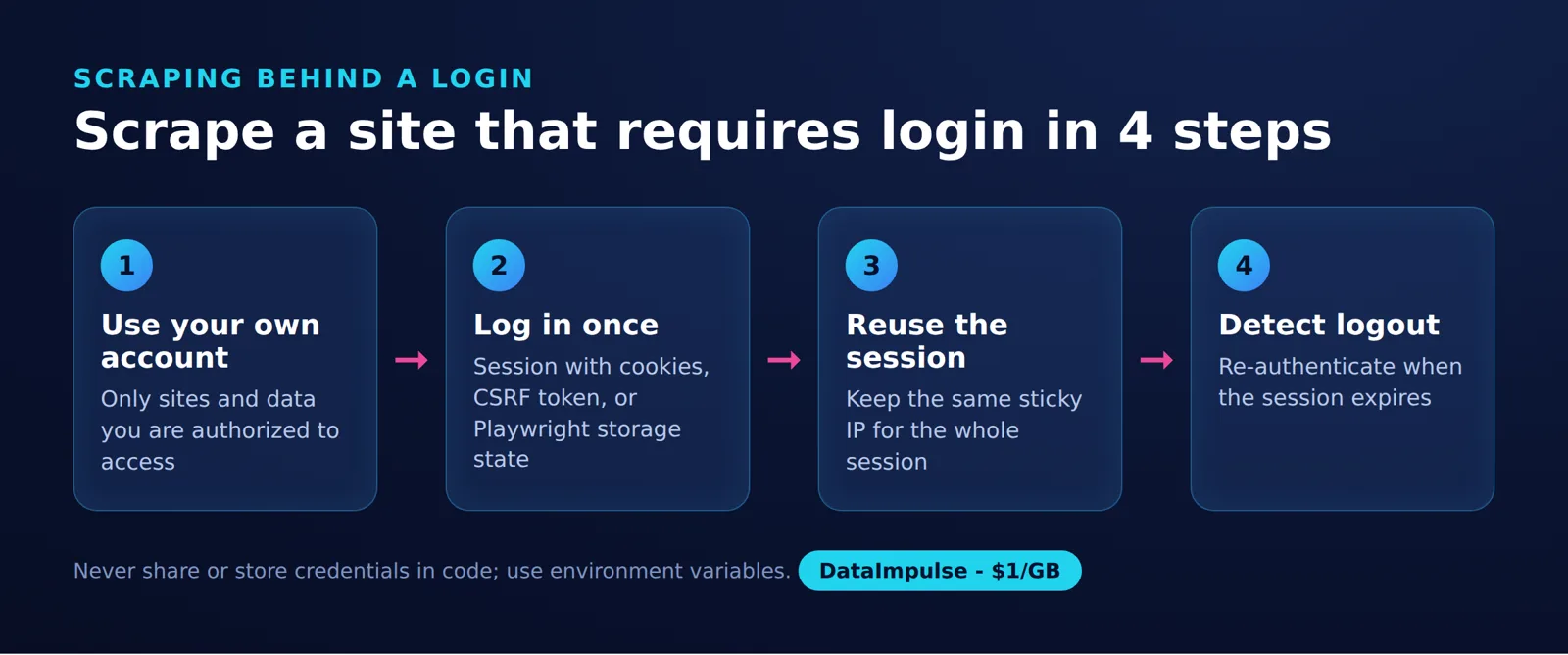
The Session Lifecycle framework is a four-part routine: log in once, keep one sticky IP per session, detect logout, and re-authenticate only when needed.
Inspect the login request’s URL, method, field names, CSRF token and redirects. Identify a marker that appears only after login and the fields required in each exported record.
In a cookie-based login, the client retrieves the form, submits credentials with any required CSRF token, and receives session cookies. Later requests return the relevant cookies; the server decides whether the session is still valid. The examples below target the official scraping practice sandbox and use its login form, logout link and quote containers as implementation assumptions.
The authenticated selectors and both extraction pages still require verification. Markup changes can invalidate selectors. Inspect the current practice page before running it, and use dummy practice credentials there, never credentials belonging to another service.
Requests login example: CSRF, cookies and JSON extraction
Load saved cookies, check for authenticated content, and submit the current login form only if that check fails. After one login attempt, require authentication before exporting JSON.
Session reuse: A Requests Session preserves cookies between requests. Reusing authentication across separate runs requires saving and reloading cookies, then verifying protected content. See the Requests session documentation.
Install the dependencies with this example command. The browser installation is needed only for the Playwright workflow; see the official Playwright installation instructions.
python -m pip install requests beautifulsoup4 playwright
python -m playwright install chromium
Start either workflow with this shared setup and parser. No registration is required for this sandbox. Set SCRAPE_USERNAME and SCRAPE_PASSWORD through your environment or secret manager to non-empty dummy values, such as practice; do not use credentials from another service. The parser requires a logout marker and a Goodreads author link inside every quote, rather than accepting a public footer link as proof of login. Its selector methods follow the Beautiful Soup documentation.
import json
import os
from pathlib import Path
from bs4 import BeautifulSoup

BASE = "https://quotes.toscrape.com"
MARKER = 'a[href="/logout/"]'
GOODREADS = 'a[href*="goodreads.com/author/"]'
if os.name == "posix":
    os.umask(0o077)

def parse(html):
    return BeautifulSoup(html, "html.parser")

def records(html):
    soup = parse(html)
    quotes = soup.select(".quote")
    if not soup.select_one(MARKER) or not quotes:
        raise RuntimeError("Authentication or content check failed")
    result = []
    for quote in quotes:
        link = quote.select_one(GOODREADS)
        if link is None:
            raise RuntimeError("Authenticated field missing")
        result.append({
            "text": quote.select_one(".text").get_text(strip=True),
            "author": quote.select_one(".author").get_text(strip=True),
            "tags": [t.get_text() for t in quote.select(".tag")],
            "goodreads_url": link["href"],
        })
    return result
Append this Requests example to the shared setup. It checks saved state before login, extracts the first two pages, and emits one JSON array to standard output. The two-page scope is an example collection budget, not a measured result.
import requests
from http.cookiejar import MozillaCookieJar, LoadError

jar = MozillaCookieJar("cookies.txt")
if Path("cookies.txt").exists():
    try:
        jar.load(ignore_discard=True)
    except LoadError:
        jar.clear()

with requests.Session() as session:
    session.cookies = jar

    def get(route):
        response = session.get(BASE + route, timeout=30)
        response.raise_for_status()
        return response.text

    if not parse(get("/")).select_one(MARKER):
        jar.clear()
        form = parse(get("/login"))
        token = form.select_one('input[name="csrf_token"]')
        if token is None:
            raise RuntimeError("Inspect the changed login form")
        response = session.post(BASE + "/login", data={
            "username": os.environ["SCRAPE_USERNAME"],
            "password": os.environ["SCRAPE_PASSWORD"],
            "csrf_token": token["value"],
        }, timeout=30)
        response.raise_for_status()
        if not parse(get("/")).select_one(MARKER):
            raise RuntimeError("Login failed; stopping")

    output = []
    for route in ("/page/1/", "/page/2/"):
        output.extend(records(get(route)))
    jar.save(ignore_discard=True)
    print(json.dumps(output, ensure_ascii=True, indent=2))
The cookie persistence methods are documented in Python’s cookie jar reference. Here, ignore_discard=True retains session cookies between runs; it does not override expiration or server-side revocation. HTTP errors stop the example instead of triggering repeated credential submissions.
Playwright login example: authenticate and export records
Load saved browser state when available, check the page for authenticated evidence, and sign in once if the state is missing or stale. Export actual records after validation, rather than treating a link count as the result.
Browser state reuse: Playwright can load saved authentication through storage_state. Treat state files as credentials and verify authentication before extraction. The official authentication guide documents saving and restoring state; page navigation and form interaction are documented in the Page API reference.
Append this alternative example to the shared setup instead of the Requests block. It prints the same JSON fields and saves state after successful extraction. A malformed JSON state file is discarded; a valid but expired state reaches the bounded login branch. Check the response status after both startup navigations, before checking authentication or filling credentials.
from playwright.sync_api import sync_playwright

state = Path("browser-state.json")
saved = None
if state.exists():
    try:
        saved = json.loads(state.read_text(encoding="utf-8"))
    except json.JSONDecodeError:
        state.unlink()

with sync_playwright() as playwright:
    browser = playwright.chromium.launch()
    context = browser.new_context(storage_state=saved)
    page = context.new_page()
    response = page.goto(BASE)
    if response is None or not response.ok:
        raise RuntimeError("Startup request failed; stopping")
    if page.locator(MARKER).count() == 0:
        context.close()
        context = browser.new_context()
        page = context.new_page()
        response = page.goto(BASE + "/login")
        if response is None or not response.ok:
            raise RuntimeError("Startup request failed; stopping")
        page.locator('[name="username"]').fill(
            os.environ["SCRAPE_USERNAME"])
        page.locator('[name="password"]').fill(
            os.environ["SCRAPE_PASSWORD"])
        page.locator('input[type="submit"]').click()
        page.locator(MARKER).wait_for(state="visible")

    output = []
    for route in ("/page/1/", "/page/2/"):
        response = page.goto(BASE + route)
        if response is None or not response.ok:
            raise RuntimeError("Page request failed")
        page.locator(MARKER).wait_for(state="visible")
        output.extend(records(page.content()))
    context.storage_state(path=str(state))
    print(json.dumps(output, ensure_ascii=True, indent=2))
    browser.close()
The wait for a logout link is specific to this example. For a JavaScript application, also wait for the application’s authenticated data to finish loading before extraction. A timeout, invalid state structure or missing required field should stop the run for diagnosis.
How do cookies, tokens and CSRF work together?
Cookies carry state between requests, authentication credentials establish identity, and CSRF defenses help reject unwanted cross-site actions. These mechanisms serve different purposes and are not interchangeable.
- Session cookies: The client returns applicable cookies on later requests, allowing the server to recognize a session.
- Authentication tokens: Some applications expect a token in an authorization header rather than relying only on cookies.
- CSRF tokens: A form or request may need a token associated with the current session or interaction.
Fetch the login form and submit its token through the same session. Do not copy a token from an unrelated browser session or assume yesterday’s token is still valid. The OWASP CSRF prevention guidance explains token validation patterns and their relationship to authenticated requests.
Inspect the actual exchange: field names, request method, content type, redirects and authenticated response. An endpoint visible in browser network tools is not automatically authorized for unrestricted collection.
Save, reload and refresh sessions to scrape a website that requires login
Reload authentication before attempting a new login, then verify that the server still accepts it. Persistence can avoid unnecessary sign-ins, but cannot extend server-side validity.
Use this recovery sequence in an authorized workflow:
- No saved state: Authenticate once, verify the result and save state.
- Valid saved state: Skip login, extract permitted records and retain any updated state.
- Expired state: Start a clean session, make one authorized login attempt and verify again.
- Failed recovery: Stop and diagnose the failure instead of looping.
The examples limit recovery to startup. If authentication disappears during extraction, they stop without printing a partial JSON result. For longer jobs, checkpoint completed work and define an explicit recovery budget before restarting.
Store cookies and browser state in a private location excluded from version control, shared backups and public build artifacts. The examples restrict newly created files on POSIX systems; existing files need appropriate permissions too. On Windows, configure access controls for the account running the job. Use separate state for separate accounts and environments, and avoid concurrent writers.
Do not assume a cookie file captures every authentication mechanism. Playwright’s saved state does not automatically persist sessionStorage (as of November 2026), as explained in its session storage guidance. If the application stores authentication tokens in IndexedDB, save state with context.storage_state(path=str(state), indexed_db=True). IndexedDB is not included by default; see the storage_state reference. Inspect where the application keeps authentication before choosing a persistence strategy.
Reuse browser cookies with Playwright APIRequestContext
Use context.request when a browser login establishes cookies that an authorized HTTP endpoint also accepts. This can support HTTP extraction after browser authentication without manually copying cookie values.
Shared versus isolated cookies: Playwright’s context.request shares cookies with its browser context. A standalone request context created with playwright.request.new_context() has isolated cookie storage. See the APIRequestContext cookie management documentation.
Inside the existing with sync_playwright() block, replace only the extraction loop with the loop below, preserving its four-space indentation. Keep the existing context.storage_state(...), print(...), and browser.close() statements after it. This example fetches HTML through the browser context’s request client and exports records through the same validation function.
    output = []
    for route in ("/page/1/", "/page/2/"):
        response = context.request.get(BASE + route)
        if not response.ok:
            raise RuntimeError("Authenticated HTTP request failed")
        output.extend(records(response.text()))
Cookie sharing is not a general replacement for the application’s request logic. If an endpoint needs a separate authorization header or CSRF header, follow its documented contract. For an official JSON API, validate the response schema and account scope before accepting its records.
Troubleshoot login redirects, missing fields, 2FA and blocks
Diagnose the failed authentication check before changing routing or submitting credentials again. A redirect, missing field and verification challenge need different responses.
| Symptom | Check | Next action |
|---|---|---|
| Successful response containing a login form | Final destination and protected marker | Verify saved state; allow one authorized recovery attempt |
| CSRF rejection | Current token, field name and session continuity | Inspect the form and preserve its session during submission |
| Public records but no authenticated fields | Account permissions, required fields and selectors | Reject the incomplete result and investigate |
| 2FA or CAPTCHA | Approved interactive login process | Pause for account-holder completion or use an approved integration |
| Access denied or rate restriction | Service response and permitted request budget | Stop or wait according to the site’s guidance |
A footer link or ordinary quote text is weak evidence of authentication. Prefer a marker absent from the logged-out page, then verify each required field. If a selector stops matching, distinguish a markup change from a session failure before attempting another login.
For verification prompts, use an authorized human workflow rather than treating the prompt as permission to bypass access controls. Our guide to CAPTCHA types can help classify the interruption. A proxy cannot complete a second factor or restore revoked permission.
Requests versus Playwright: methods and result validation
Choose the simplest authorized workflow that returns the required fields and makes authentication verifiable. The examples here do not establish a measured speed, reliability or residential-routing advantage.
| Method | Use when | Avoid when |
|---|---|---|
| Requests | Use Requests when the inspected login and extraction sequence can be expressed as HTTP requests | Avoid Requests when required browser interaction is missing from that sequence |
| Playwright | Use Playwright when the authorized workflow needs browser execution or interaction | Avoid Playwright when a simpler approved API or HTTP workflow already meets the task |
| Browser login plus context.request | Use this combination when browser-established cookies also authorize the extraction endpoint | Avoid this combination when cookie sharing alone does not satisfy the endpoint’s authentication requirements |
Competitor data: taken from each provider’s official pricing and documentation pages linked in this article, collected on November 10, 2026.
Before using the scraper, test a fresh login, saved-state reuse and expired-state recovery. Confirm that each run exports the required fields and submits credentials no more than once.
Proxy routing during authenticated scraping
A proxy changes the network route; it does not authenticate the account or extend the website session. For a proxy scrape login workflow, keep routing decisions separate from cookies, credentials and protected-content checks.
DataImpulse is our proxy product. Its residential proxies include free country targeting and support sticky sessions. Sticky sessions average 30 minutes, with a maximum of 120 minutes; these durations describe proxy sessions, not website authentication validity.
DataImpulse supplies proxy routing, not account authentication or ISP/static residential proxies. It cannot guarantee access.
Use sticky sessions when your authorized workflow needs a consistent route across login and extraction. Sticky sessions do not guarantee an unchanged IP for the requested duration. If the residential peer goes offline, the IP can change, as explained in the sticky session troubleshooting guide. Avoid changing routes mid-session when you have not established how the target handles that change. Review sticky versus rotating sessions before setting the rotation policy.
Start by validating the direct workflow. Add routing only for a defined project requirement, and measure authenticated-field completeness, interruptions and transfer cost under comparable conditions. Our proxy selection guide for web scraping offers additional selection criteria; a proxy category alone is not evidence of better login success.
Frequently Asked Questions
How can Python scrape a website requiring login?
Use an authorized account to complete the normal sign-in sequence, then retain the resulting authentication state. Check a protected page marker and required fields before exporting records. Prefer an official API or account export when it meets the task.
Can a second run skip login?
Yes, if saved authentication is still accepted by the site. Load it and request a page that distinguishes authenticated access from public access. If verification fails, allow one authorized login attempt and stop if that fails too.
When should I choose Requests instead of Playwright?
Choose Requests when your inspected login and extraction sequence can be reproduced through HTTP requests. Choose Playwright when the authorized sequence requires browser interaction. Make the decision around required behavior and maintenance cost rather than an assumed performance advantage.
Why does my scraper return quotes but no Goodreads author links?
The presence of public quote text does not establish that you are logged in. Check the logout marker, account permissions and the current quote markup. The example rejects records without the expected author link so incomplete output is not mistaken for success.
What should happen when authentication expires during extraction?
Stop accepting records when protected-content checks fail. Preserve a safe checkpoint if the job supports one, then follow a bounded recovery policy. The examples stop on a mid-run failure rather than repeatedly submitting credentials.
Can a proxy solve authentication, 2FA or CAPTCHA?
No. Network routing does not replace credentials, account permission or an additional verification step. Pause for authorized completion or use an approved integration when the login flow requires it.
Does residential routing improve login success?
That depends on the target and workflow, and no improvement is established here. Compare routes only within an authorized task using the same authentication and field-validation checks. Report a limited snapshot without treating it as a general performance claim.
Is owning the account enough permission to scrape behind a login?
Account ownership alone does not define the scope of permitted automated collection. Check the service’s terms, your authorization and the intended use of the records. Resolve uncertainty before collecting restricted or sensitive information.
Keep authentication and routing decisions separate
Build a direct workflow that verifies login, reuses valid state and stops cleanly on failure. If the authorized project also needs residential routing, evaluate DataImpulse residential proxies with a small, clearly scoped sample. Compare complete records and total transfer cost before expanding the job.
Last updated: November 10, 2026.

 State/City/Zip/ASN Targeting




