
In this Article
Thunderbit is an AI web scraper for turning webpage content into structured tables without writing extraction code, according to its official website, checked October 15, 2026. For a small, authorized webpage-to-spreadsheet job, it is worth testing before building a scraper yourself.
The practical questions are whether the output is accurate, how many credits the complete job consumes, and where execution happens. Our test on October 15, 2026 also measures a separate DIY network workload to explain what a proxy purchase covers.
Key Facts
- Estimate workload from output rows, enrichment, and repeat runs.
- A successful export still needs an accuracy check.
- Our test on October 15, 2026 extracted 1,000 product rows.
- Our sequential sandbox run recorded zero failed requests.
- Estimated network traffic cost was approximately $0.0026.
- This measurement is a snapshot, not a Thunderbit benchmark.
What is Thunderbit, and who is it for?
Thunderbit suits sales, operations, and research users who need tables from webpages. Its official product walkthrough, checked October 15, 2026, describes a browser extension that analyzes a page, proposes columns, and extracts results.
Start at the official Thunderbit website for its installation link, then sign in through the extension. This avoids confusing similarly named products with the scraper.
A useful first job is a public product list with clearly visible names, prices, and links. Define what one row represents before extraction: one product, one variant, or one listing. AI-generated structure still needs review, especially when a column summarizes or interprets content. Our explanation of AI web scraping covers that distinction.
Is Thunderbit free, and how do credits work?
Thunderbit has a free allowance of six pages per month, capped at 30 credits per page (as of October 2026). Those are separate restrictions, according to the vendor pricing page, checked October 15, 2026.
The vendor credit explanation states that standard output rows consume one credit and subpage-enriched rows consume two (as of October 2026). Budget additional operations separately; do not assume every enrichment feature uses the subpage rate.
Monthly Starter is $15 for 500 monthly credits; annual Starter is $9 per month billed yearly, with 5,000 annual credits issued upfront. Monthly Pro starts at $38 for 3,000 monthly credits (as of October 2026). Source: vendor pricing page, checked October 15, 2026.
The following calculations assume standard extraction unless enrichment is specified. Subscription spending is different from allocating part of an existing allowance to a job.
| Job | Calculated credits | Budget implication |
|---|---|---|
| 500 product rows from lists | 500 | Fits monthly Starter: $15 subscription spending. |
| 500 rows with subpage enrichment | 1,000 | Fits monthly Pro: $38 subscription spending; exceeds monthly Starter. |
| 5,000 standard rows each month | 5,000 monthly; 60,000 annually | Exceeds the entry monthly Pro allowance; obtain a higher-capacity price. |
All table inputs are per vendor pricing page and credit explanation, checked October 15, 2026 (as of October 2026); credit totals are our arithmetic. Annual Starter costs $108 upfront: allocating its entire allowance gives $10.80 for the first job or $21.60 for the second, but neither figure is a standalone purchase price.
A full annual allowance available immediately is not a monthly refill. Estimate repeat runs before choosing annual billing, and check checkout terms for promotions, upgrades, and credit exhaustion.
How do you export a website to Google Sheets?
Define the fields, extract a small sample, check the results, then authorize the spreadsheet export. Thunderbit’s official Sheets guide, checked October 15, 2026, documents Google account authorization and destination selection.
Choose the source and columns. Open a page you are authorized to collect. Specify fields such as product title, displayed price, stock text, and source URL. Preserve original values before requesting transformations.
Start a small extraction. The newer official walkthrough uses One Click Extract and Run Now, while the Sheets guide uses AI Suggest Fields and Scrape. Follow the interface you see; the documents use different labels.
Validate the table. Compare several rows with their source pages. Check currency, missing values, duplicate products, and whether a promotional price displaced the regular price. A plausible-looking table can still contain incorrect associations.
Authorize and export. Choose Export, then Google Sheets, connect the intended Google account, and select or create the destination. Review the requested permissions before authorizing access.
Check the destination. Compare row counts and inspect identifiers for lost leading zeros. Keep a source URL and collection date so another person can audit the result. For adjacent approaches, see our spreadsheet scraping guide.
How do pagination, subpages, and recurring runs affect the workflow?
Each expands the work beyond the first visible table. Thunderbit documents pagination, linked-page enrichment, and scheduled extraction in its product walkthrough, checked October 15, 2026.
Pagination moves through listing pages; subpages add information from individual detail pages. Before enabling either, define a stopping condition and inspect the final page. Otherwise, a clean sample can conceal missing records or repeated listings.
Recurring jobs multiply the extraction budget. Collecting 500 standard rows ten times means planning for 5,000 output rows, even if your final spreadsheet keeps only the latest version.
Confirm your plan’s pagination scope, scheduler allowance, frequency, and retention before relying on unattended runs. Also test whether repeated exports append, replace, or otherwise update the destination. Do not infer that behavior from a successful one-time export.
What changes between browser and cloud scraping?
Execution location changes the session context available to the scraper. Thunderbit’s official browser/cloud explanation, checked October 15, 2026, says browser mode uses the active browser session, while cloud mode targets public pages and does not carry that session.
For evaluation, use an authorized public page and compare the resulting fields. Check location-dependent content and whether the complete listing is visible in each execution environment.
A browser setting alone is not evidence of how a remote job routes requests. If your organization requires a particular network path or execution location, resolve that requirement before scheduling production work.
Can you use custom proxies, and what happens when requests fail?
We could not verify a documented bring-your-own-proxy configuration for the extension in the official material checked October 15, 2026. That leaves compatibility unresolved; it does not establish incompatibility.
Ask support whether your required execution mode accepts an external proxy endpoint and how routing can be verified. Keep that question separate from whether the vendor manages networking internally.
When a run fails, first identify the stage: page access, extraction, or export. Record the URL, time, visible error, and whether ordinary authorized browsing still works. Missing columns after a successful page load call for a different investigation than a refused request.
A proxy cannot guarantee access or repair incorrect extraction logic. Review our guide to scraping failures and blocking before changing infrastructure. DataImpulse sells network access; it is not a scraping API, managed unblocker, or VPN, and this article establishes no Thunderbit integration.
What did our controlled network test show?
Our test on October 15, 2026 estimated roughly $0.0026 in network traffic for a simple DIY extraction. This is a snapshot of one sandbox workload, not a Thunderbit benchmark.
At 16:12 UTC, we used Python requests and BeautifulSoup to fetch 50 list pages sequentially from Books to Scrape, a public scraping sandbox. Requests passed through a DataImpulse rotating residential US proxy; the parser collected title, price, and stock fields.
| Measurement | Observed result |
|---|---|
| Sample | 50 list pages |
| Parsed product rows | 1,000 |
| Failed requests | 0 |
| Wall time | 18.4 seconds |
| Estimated transferred data | Approximately 2.59 MB |
| Estimated traffic cost at $1/GB | Approximately $0.0026 |
Source: our test on October 15, 2026. HTML arrived uncompressed; the transfer estimate includes estimated headers. Using decimal units, 2.59 MB divided by 1,000 and multiplied by $1 gives $0.00259.
Actual proxy billing counts all traffic, including TLS and headers, so this estimate is not an invoice measurement. The run excludes browser assets, JavaScript rendering, subpage enrichment, and repeated trials across other sites.
The residential proxy service starts at $1 per GB. That purchases the network layer. Engineering time is still needed to write selectors, handle pagination, validate output, and maintain the scraper; we did not measure those hours. For small no-code jobs, avoiding that work can justify a subscription.
When should you choose an alternative?
Choose by the work you need to own: validation, structured access, or a maintained extraction pipeline. Use this decision matrix before comparing headline prices.
| Option | Use X when… | Avoid X when… |
|---|---|---|
| Thunderbit | Use Thunderbit when its documented extraction/export workflow fits a small validated job. | Avoid Thunderbit when required routing or execution controls remain unverified. |
| Official API/export | Use an official API/export when authorized structured access meets the requirement. | Avoid an official API/export when required fields or permissions are unavailable. |
| Custom scraper with proxies | Use a custom scraper with proxies when you need routing control and can maintain extraction code. | Avoid a custom scraper with proxies when you expect proxies to extract data or guarantee access. |
For broader discovery, consult our AI web scraper comparison. Compare total work per usable dataset, including review and maintenance, rather than treating different vendors’ credits as interchangeable.
How should you validate a workflow before scaling?
Use the 4-step workflow fit check to turn a successful sample into a practical operating decision. Proceed only when each step has a clear answer.
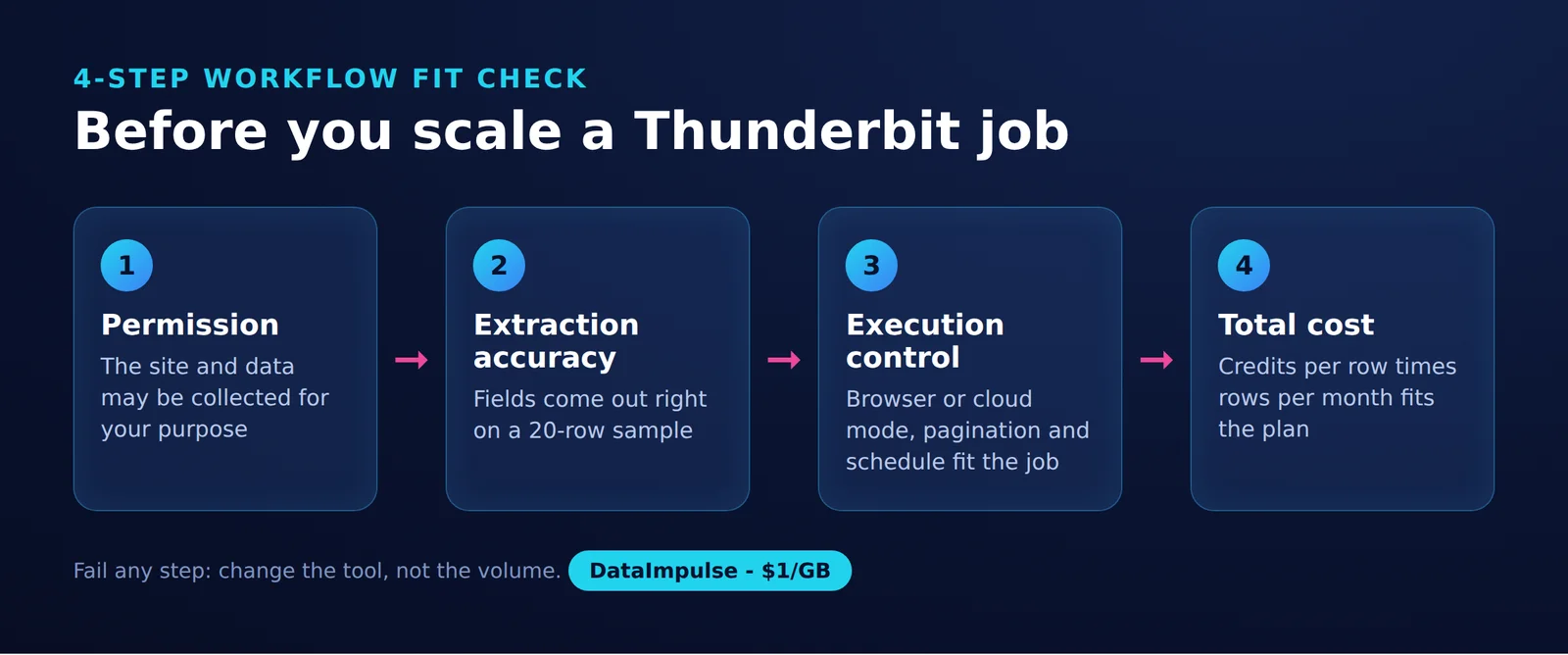
Step 1: Permission. Confirm authorization for the source, intended collection, and destination. Access to a page alone does not settle every permission question.
Step 2: Extraction accuracy. Compare sampled records against the source. Define acceptable missing fields and duplicates, and retain traceable URLs.
Step 3: Execution control. Confirm session needs, execution location, scheduling behavior, and required routing. Treat an unresolved requirement as a reason to limit the pilot.
Step 4: Total cost. Count rows, enrichment, repeat runs, review time, and maintenance. Set a spending ceiling and identify who investigates incomplete output.
Frequently Asked Questions
What is Thunderbit, and how does it extract data?
Thunderbit analyzes webpage content and organizes selected information into table columns. Its official website, checked October 15, 2026 and linked above, describes this browser-to-spreadsheet workflow; users should still verify extracted values.
Is Thunderbit free?
Yes. The official pricing page lists six pages monthly with a maximum of 30 credits per page (as of October 2026), checked October 15, 2026. Treat that allowance as a pilot budget rather than unlimited extraction.
How do I export results to Google Sheets?
The official Sheets guide, checked October 15, 2026 and linked above, directs users to choose Google Sheets during export and authorize their Google account. Check the destination account and inspect the resulting sheet before sharing it.
Can Thunderbit use my custom proxy?
Custom proxy configuration remains unverified in the official material we checked. Request confirmation for the specific execution mode before purchasing infrastructure for that integration.
Can proxies prevent every scraping block?
No proxy guarantees successful access. A network change also cannot correct missing fields, inaccurate parsing, or an export authorization error.
Which workflow should I choose?
Start with an authorized official export if it contains the required fields. Test Thunderbit for a small spreadsheet job, and consider custom code when execution control justifies ongoing maintenance.
Need network control for a DIY scraper?
If your workflow requires custom code and routing control, consider DataImpulse for the network layer. Estimate traffic with a small authorized test, then budget separately for extraction, validation, and maintenance.
Last updated: October 15, 2026.

 State/City/Zip/ASN Targeting



