
In this Article
A web unblocker for AI is a managed service that fetches public web pages on demand and returns clean HTML or rendered content, so language models, retrieval pipelines, and autonomous agents can read the live web without getting blocked. This article explains what a web unblocker actually does, why AI teams need dependable web access, and how the build-versus-buy choice plays out once you look under the hood.
It also draws an honest line that vendors often blur. A web unblocker is a full fetching stack; a proxy provider like DataImpulse is the network layer that sits inside it. Knowing which part you are buying changes both your cost and your control.
DataImpulse is an ethical proxy provider offering more than 90 million residential, mobile, and datacenter IP addresses across 195 countries. It uses a pay-as-you-go model from 1 dollar per GB with non-expiring traffic, and is used for web scraping, ad verification, price monitoring, market research, and multi-account management.
Key Facts
- Web unblocker for AI: a web unblocker is a managed scraping API that bundles JavaScript rendering, CAPTCHA handling and proxy rotation to fetch public web pages for AI training, RAG, and agent pipelines; the proxy layer underneath it is a separate, swappable component.
- Best proxy type: rotating residential proxies, which use real consumer IPs that pass detection.
- Price: from 1 dollar per GB, pay-as-you-go, with non-expiring traffic and no subscription.
- Coverage: 90M plus ethically sourced IPs across 195 countries.
- Reliability: 99.51% success rate, rated 4.8 out of 5 on G2.
- Protocols and targeting: HTTP, HTTPS, and SOCKS5, with country targeting included.
What is a web unblocker for AI?
A web unblocker is a managed scraping API that takes a target URL, does the work needed to load and pass the site’s defenses, and returns the page content ready for parsing. Marketed for AI, it is the data-acquisition front door that keeps training crawlers, retrieval-augmented generation (RAG) jobs, and browsing agents supplied with fresh public web data.
Under one endpoint, a typical web unblocker bundles several things that used to be separate tools:
- Proxy rotation: it cycles requests across a large pool of IP addresses so no single address draws rate limits or bans.
- JavaScript rendering: it runs a real or headless browser so content injected by client-side scripts is present in the returned HTML.
- CAPTCHA and challenge handling: it detects and works through interstitials, bot checks, and anti-automation challenges.
- Fingerprint and header management: it sets realistic browser fingerprints, TLS profiles, and headers so requests look like ordinary traffic.
The important distinction is scope. A web unblocker is the whole fetching pipeline sold as a service. A proxy provider supplies only the IP network that rotation runs on. DataImpulse is a proxy layer, not a managed web unblocker, so it is one input to that stack rather than the stack itself.
Why do AI teams need reliable web access?
AI teams need reliable web access because most of their data comes from the live public web, and any gap in fetching becomes a gap in the model’s knowledge or an agent’s ability to act. Three workloads drive the demand.
Training data. Large text corpora are assembled by crawling public pages at scale. If a crawler is blocked on a class of sites, those sources are silently missing from the dataset, which skews coverage.
Retrieval-augmented generation. RAG systems fetch current pages at query time to ground answers in fresh facts. A blocked fetch here does not just lose data; it degrades the answer the user sees right now.
Browsing agents. Autonomous agents load pages to read prices, check availability, or complete tasks. They need consistent access across many domains, often from specific countries, and a failed load can stall a whole multi-step workflow.
In all three cases the failure mode is the same: a request that a normal browser would complete gets challenged or refused because it looks automated or comes from a flagged network. For the fetching side of dynamic sites, our guide to scrape dynamic web pages covers the rendering problem in more depth.
How does a web unblocker work?
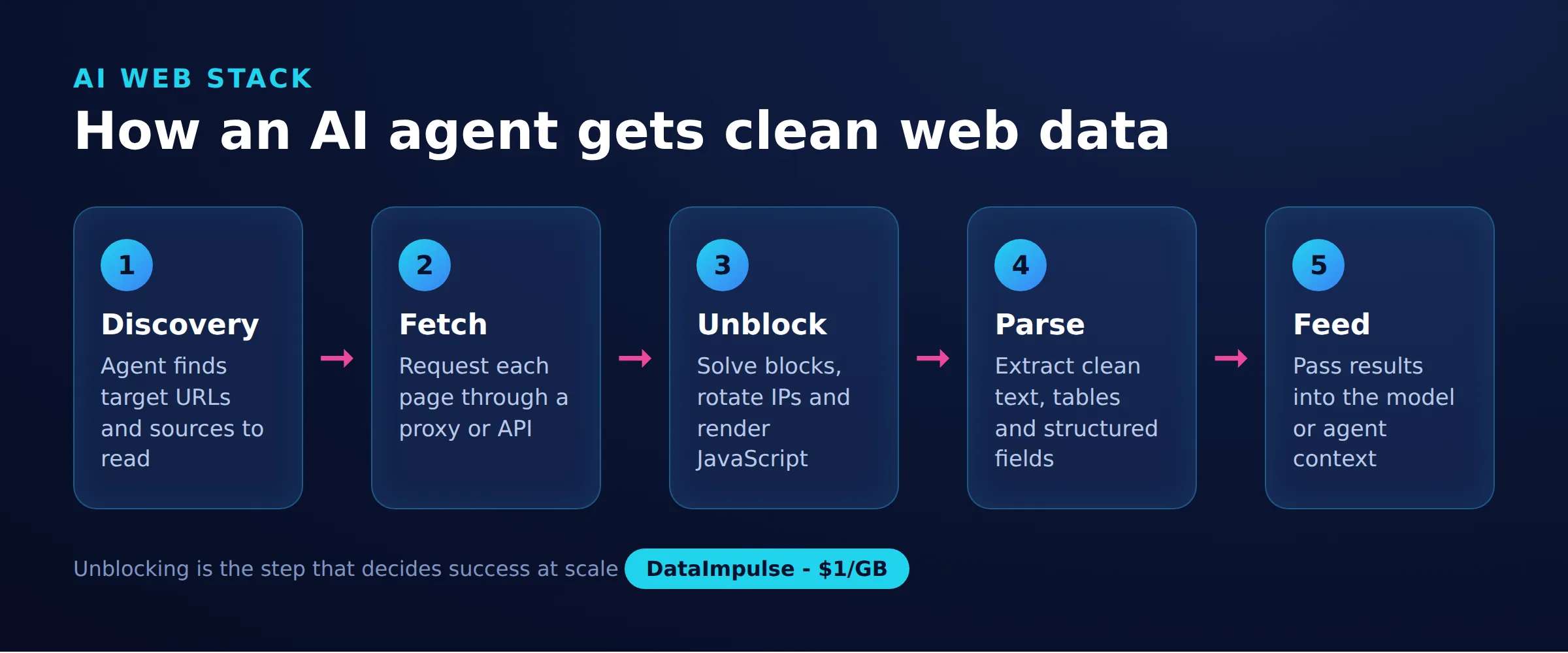
A web unblocker works by chaining a fixed sequence of steps between your AI system and the target site. We call this sequence the 5-stage AI web-access model, and it is a useful map whether you buy the stack or assemble it yourself.
- Discovery: decide which URLs to fetch, from a seed list, a sitemap, a crawl frontier, or an agent’s live decision.
- Fetch: send the request through a proxy so the exit IP, not your server, is what the target sees.
- Unblock: render JavaScript, set a realistic fingerprint, and solve any challenge so the page loads fully.
- Parse: extract the useful content and strip navigation, ads, and boilerplate into clean text or structured fields.
- Feed: hand the cleaned content to the consumer, a training set, a vector store for RAG, or an agent’s context window.
A managed web unblocker collapses the fetch and unblock stages into one API call. When you build your own, those two stages are where most of the engineering effort goes, and the proxy network is the foundation the fetch stage stands on. Everything upstream (discovery) and downstream (parse, feed) is broadly the same either way.
Should you buy a managed unblocker or build your own?
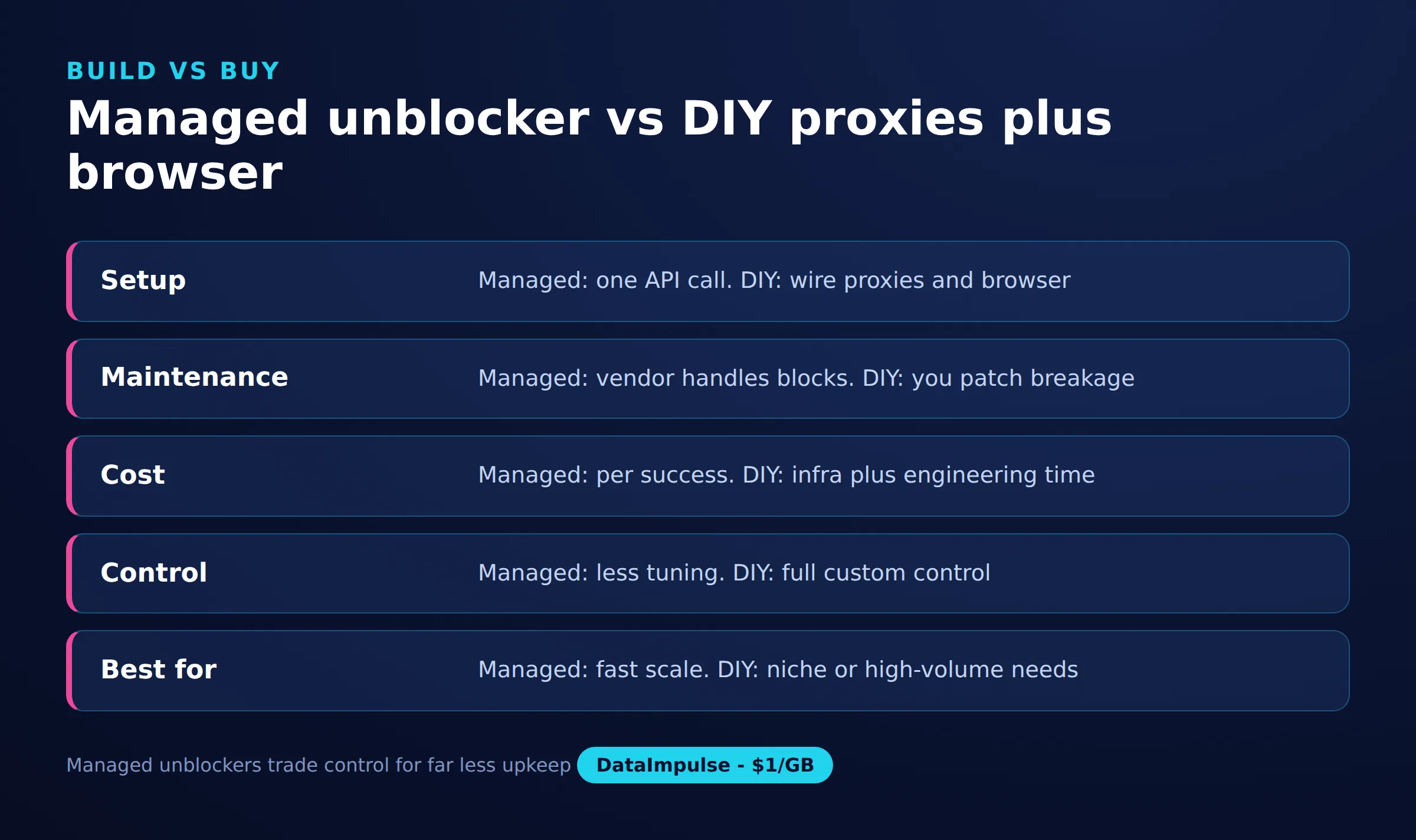
Buy a managed unblocker when speed and low maintenance matter more than cost and control; assemble proxies plus a headless browser yourself when you need transparency, tighter unit economics at scale, or custom fetching logic. The two approaches differ mainly on who owns the unblock stage.
| Factor | Managed unblocker API | DIY proxies plus headless browser |
|---|---|---|
| Control | Low; vendor decides rendering and challenge logic | High; you tune every request and header |
| Cost model | Priced per successful request, higher per unit | Priced per GB of proxy traffic plus your compute |
| Maintenance | Vendor absorbs anti-bot changes | You patch fingerprints and rendering yourself |
| Transparency | Opaque; hard to audit how a page was fetched | Full visibility into the whole request path |
| Time to first fetch | Fast; one API call | Slower; you wire browser plus proxy first |
The decision matrix in short:
- Use a managed unblocker when your team lacks scraping infrastructure, targets are heavily defended, volumes are moderate, and engineering time is the scarce resource.
- Assemble proxies plus a browser yourself when you run high volume, need to control cost per record, want to audit exactly how each page was fetched, or have unusual rendering needs.
- Avoid a managed unblocker when per-request pricing at your scale exceeds the cost of running your own proxies and compute, or when opacity blocks a compliance review.
Many teams run a hybrid: their own web scraping proxy plus a headless browser for the bulk of easy targets, and a managed unblocker only for the hardest sites.
Where do proxies fit, and why do residential IPs matter?
Proxies are the network layer of the fetch stage: they give each request a different exit IP so the target sees ordinary traffic instead of a burst from one server. Whether you buy an unblocker or build one, a proxy pool is doing the rotation underneath. This is the layer DataImpulse provides.
Residential IPs matter for AI web access because they are addresses assigned by internet service providers to real homes, so they blend in where datacenter ranges are often pre-flagged. For crawlers that hit consumer-facing sites, that difference is frequently what separates a loaded page from a block. DataImpulse offers residential proxies for this case, plus datacenter proxies for cheaper targets and mobile proxies for the hardest ones.
Here is the DIY fetch stage in its simplest form: one HTTP request through a rotating residential proxy, ready to feed an AI pipeline. DataImpulse supports HTTP, HTTPS, and SOCKS5, with country targeting included in the base rate.
import requests

proxy = "http://USERNAME:[email protected]:823"
resp = requests.get(
    "https://example.com/product/123",
    proxies={"http": proxy, "https": proxy},
    timeout=30,
)
html = resp.text  # hand this to your parser, then your RAG store
For pages that only assemble their content in the browser, add a headless browser so JavaScript runs before you read the DOM. The same rotating proxy is passed straight to the browser context.
from playwright.sync_api import sync_playwright

proxy = {
    "server": "http://gw.dataimpulse.com:823",
    "username": "USERNAME",
    "password": "PASSWORD",
}
with sync_playwright() as p:
    browser = p.chromium.launch(proxy=proxy, headless=True)
    page = browser.new_page()
    page.goto("https://example.com/product/123", wait_until="networkidle")
    content = page.content()  # rendered HTML for the AI pipeline
    browser.close()
Rotating sessions give each request a fresh IP, which suits broad crawling, while sticky sessions hold one IP across a multi-step flow such as a logged-in agent task. DataImpulse supports both.
What are the ethical and legal limits of web unblocking for AI?
Web unblocking for AI should be limited to public data, collected at a respectful rate, from IPs sourced with consent. Bypassing a technical block is not a licence to ignore the rules around the data itself, and AI teams carry that responsibility even when a vendor does the fetching.
A few durable principles apply regardless of the tool:
- Public data only: fetch pages that are openly reachable without logging in or defeating access controls; do not scrape private or paywalled content you are not authorized to see.
- Respect robots and terms: read each site’s robots.txt and terms of service, and treat them as signals about what the operator permits.
- Rate-limit yourself: space requests so you do not degrade the target’s service, even when rotation would let you go faster.
- Source IPs ethically: the proxy network you rely on should be built from users who opt in and are compensated, not from hijacked devices.
The IP layer is where the ethics of a pipeline are decided in practice. DataImpulse sources its IPs from users who opt in and are compensated, is GDPR aligned, and offers a data processing agreement; our overview of ethical proxies explains that sourcing model. Ethical sourcing does not, by itself, make any given scrape lawful, so treat legal review as a separate step.
What are the limitations of a web unblocker for AI?
A web unblocker removes fetching friction, but it does not remove the harder problems of data quality, cost control, and compliance, and no proxy layer alone is a full unblocker. Knowing the boundaries keeps expectations honest.
- It does not judge data quality: a page can load perfectly and still be spam, stale, or wrong; parsing and validation stay your job.
- It does not grant legal permission: defeating a bot check says nothing about whether you may collect or reuse that content.
- Managed APIs are opaque and priced per request: you trade visibility and unit cost for convenience, which can hurt at high volume.
- Hard targets still fail sometimes: no unblocker reaches a 100 percent success rate, and heavily defended or login-walled sites may stay out of reach.
- A proxy is not the whole stack: rotation handles the network layer, but you still need rendering, parsing, and orchestration around it.
On that last point, be precise about what DataImpulse is. It provides the proxy layer, over 90 million residential, mobile, and datacenter IPs across 195 countries with a 99.51 percent success rate, from 1 dollar per GB. It does not sell static ISP proxies, is not a managed scraping API or web unblocker, and is not a free web-proxy service. For the broader anti-blocking playbook around it, see our guide on scraping without getting blocked.
Frequently asked questions
Is a web unblocker the same as a proxy?
No. A web unblocker is a managed API that bundles proxy rotation with JavaScript rendering and CAPTCHA handling to return a finished page. A proxy provider supplies only the rotating IP network that the fetch step runs on, which is one component inside an unblocker.
Do I need residential proxies for AI web access?
Often yes for consumer-facing sites, because residential IPs are assigned to real homes and blend in where datacenter ranges are frequently pre-flagged. For lightly defended or internal targets, cheaper datacenter proxies may be enough.
Can DataImpulse act as a web unblocker for my AI pipeline?
DataImpulse provides the proxy layer, not a managed unblocker. It supplies rotating and sticky residential, mobile, and datacenter IPs that you pair with your own headless browser and parser, or feed into a managed unblocker as its network component.
Is scraping public web data for AI legal?
It depends on the jurisdiction, the site’s terms, and how the data is used, so treat legal review as its own step. Limiting collection to public data, respecting robots.txt and rate limits, and using ethically sourced IPs reduces risk but does not replace legal advice.
When should I build my own fetching stack instead of buying an unblocker?
Build your own when volume is high enough that per-request pricing hurts, when you need to audit exactly how each page was fetched, or when you have custom rendering needs. Assembling rotating proxies plus a headless browser gives you that control at proxy-traffic cost.
When is DataImpulse not the right fit?
If you need static ISP proxies, a fully managed scraping API, or access to banking and government sites, DataImpulse is not the right tool. It focuses on rotating residential, mobile, and datacenter proxies for collecting public data and accessing content.
Get the proxy layer for your AI pipeline
If you are building the fetch stage yourself, the network underneath it is the part to get right. You can create a DataImpulse account and route your crawler or agent through rotating residential, mobile, or datacenter IPs, pay-as-you-go from 1 dollar per GB with country targeting included.

 State/City/Zip/ASN Targeting



