

In this Article
An apollo scraper is a tool or workflow intended to extract Apollo prospect information into a reusable file. For a CRM import, start by evaluating authorized CSV exports or API access against the fields, volume, and permissions your task requires.
The useful outcome is a traceable contact file, not simply more rows. This guide separates export mechanics, enrichment costs, account restrictions, and validation, with our synthetic test on October 15, 2026 showing why a successful download still needs inspection.
Key Facts
- Our synthetic test used 1,000 fictional contact records.
- Both tested formats contained 1,050 parsed rows after duplicate injection.
- Stable-ID deduplication identified 50 duplicate rows.
- Each format contained 40 blank email values.
- Each format contained 20 malformed email values.
- The validator retained 940 unique records with syntactically valid emails.
What does an apollo scraper actually export?
An apollo scraper aims to turn prospect information into structured records, but its label does not establish which fields it can retrieve or whether extraction is authorized. Evaluate the actual output and access method against Apollo’s terms.
Separate four things: information displayed on screen, records saved to an account, additional enrichment, and a tool vendor’s promises. A screenshot of a populated profile is not an acceptance test for a downloadable dataset.
Define your minimum schema before choosing software: stable contact ID, name, company, title, email, source, and collection date. Mark optional fields separately. Require an explanation of missing values instead of accepting an empty cell as proof that no information exists.
Contact details also differ from evidence of purchase interest. See our guide to B2B intent data collection when your actual requirement is identifying buying signals.
Do you need an apollo scraper or Apollo’s official export?
Choose the simplest authorized route that meets your output requirements. Use this 4-step export readiness check before purchasing a tool or scheduling a recurring job.
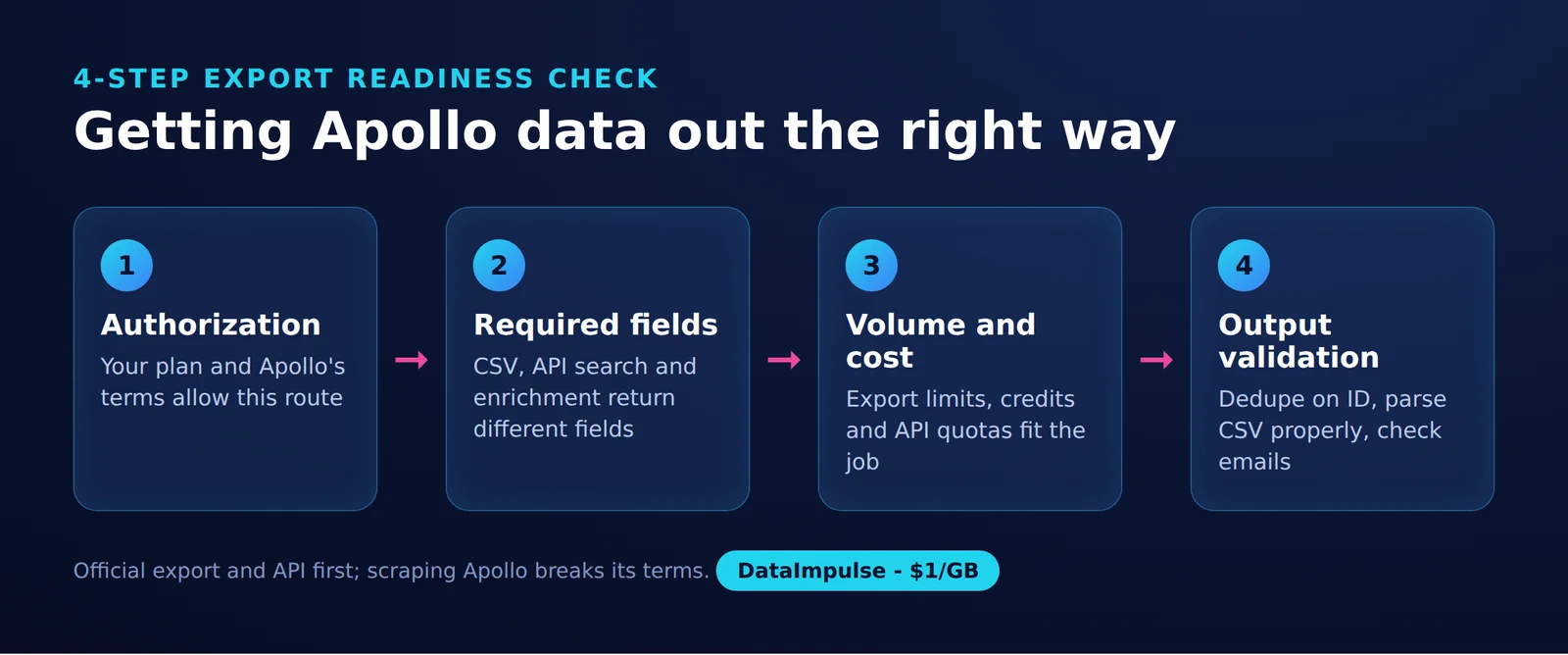
- Step 1: Authorization. Confirm who owns the account, who may access it, and whether the intended extraction and downstream use are permitted.
- Step 2: Required fields. Define essential columns and acceptable missingness. Keep extraction separate from requests for additional information.
- Step 3: Volume and cost. Estimate unique usable contacts, refresh frequency, credits, vendor fees, and maintenance time.
- Step 4: Output validation. Test parsing, stable IDs, duplicates, email syntax, and provenance before importing.
| Option | Use X when… | Avoid X when… |
|---|---|---|
| Native CSV | Use native CSV when occasional authorized exports suffice. | Avoid native CSV when recurring integration requires automation. |
| Official API | Use the official API when documented access supports required fields and volume. | Avoid the official API when required access or budget is unavailable. |
| Third-party tool | Use a third-party tool when authorization and data handling are documented. | Avoid a third-party tool when it requires circumventing controls or surrendering session cookies. |
| Proxies | Use proxies when a permitted external collection task needs routing. | Avoid proxies when the objective is bypassing Apollo restrictions. |
How do you export contacts through Apollo?
You can export Apollo leads without third-party scraping through its native CSV workflow. Saved-contact exports consume no credits (as of October 2026), but exporting existing records does not automatically enrich emails or mobile numbers. Follow Apollo’s CSV export instructions.
- Open Search, then People, and apply filters, a saved search, or a list.
- Select contacts and choose Export.
- Choose all selected contacts’ emails or only verified emails.
- Review export settings and include the required fields.
- Choose Export records, then Download when the job completes.
For net-new people, Apollo saves records before exporting; each net-new person with a verified email uses one credit. A blank column can reflect export settings, so check field selection before assuming enrichment is necessary.
Keep the original download unchanged. Record the export time, selection criteria, and intended CRM destination alongside a separate cleaned copy. This makes a later discrepancy easier to investigate.
When should you use Apollo’s API?
Apollo’s API can replace manual extraction when documented access covers your workflow. People API Search excludes emails and phone numbers and has a 50,000-record display ceiling (as of October 2026); search alone is therefore insufficient for an email contact file. See the People API Search reference.
The documented search endpoint is POST /api/v1/mixed_people/api_search. Its pagination permits 100 records per page across up to 500 pages, and the documentation directs users to people enrichment or bulk people enrichment for additional contact data.
Before implementation, confirm account eligibility and key permissions. Treat discovery, enrichment, validation, and CRM loading as separate operations, each with its own failure handling.
Save progress after successful pages, deduplicate before requesting enrichment, and make imports safe to repeat without creating duplicate contacts. Plan for key storage, retries, schema changes, and monitoring. Use filters to define the intended audience, not to circumvent allowances.
Which limits and costs apply?
Selection size, data credits, request quotas, and third-party fees are separate constraints. Apollo’s API quotas depend on endpoint and plan (as of October 2026), so there is no single request allowance suitable for every integration. Check the rate-limit documentation.
- Selection: Confirm what your account permits you to select and export.
- Credits: Identify the chargeable action and returned data.
- Requests: Budget calls independently of contact counts.
- Vendor fees: Include subscriptions, processing, storage, and engineering time.
Apollo’s API pricing documentation distinguishes credit-consuming endpoints and warns that repeated requests or pagination can increase consumption. Verify the account’s entitlements and test a small authorized request before estimating a larger job.
Compare cost per retained unique record, rather than cost per downloaded row. Include cleanup time and rejected records. If the necessary fields remain unavailable, reconsider sourcing through our guide to B2B data providers.
How should you evaluate free extensions and cloud tools?
Evaluate authorization and data handling before speed or price. Apollo restricts automated extraction and circumvention of usage limits (as of October 2026), except for expressly included functionality or written approval for automated access. Its terms also restrict publishing platform benchmarks without prior written consent.
For a free apollo scraper, an extension, Scrupp versus Thunderbit, or an Apify-based option, use the same checklist without assuming a product name establishes permission:
- Which browser permissions, credentials, or session access does it request?
- What evidence establishes authorization for its collection method?
- Where are records processed, retained, and deleted?
- Does a sample preserve IDs, sources, and missing-value distinctions?
- What happens to billing and stored data after cancellation?
Reject workflows that depend on sharing session cookies or bypassing controls. Our lead scraping tools guide offers broader evaluation context.
API access does not settle privacy or outreach obligations. The ICO’s lead-generation guidance explains that publicly accessible information still requires fair, lawful, transparent handling. Check applicable outreach rules, privacy notices, and suppression lists separately from contractual permission.
What should you do about blocks, 403s, and 429s?
Diagnose the response before retrying. A 403 means the server refuses the request; a 429 indicates too many requests.
For a 403, inspect the response body, credentials, permissions, and requested operation. Stop if the workflow lacks authorization. Repeated attempts from different accounts or addresses do not resolve that problem.
Apollo documents quota windows and a retry-after response for endpoint rate-limit 429s (as of October 2026). Follow its rate-limit recovery guidance, pause for the stated interval, and reduce concurrent work.
Log the timestamp, endpoint, status, and any request identifier without storing secrets. Escalate unexplained failures to the account administrator or support with a minimal reproducible request. Set a retry ceiling so a failed job cannot loop indefinitely.
How can you validate exported data?
Parse the format correctly, deduplicate by stable ID, and check required fields before import. Our test on October 15, 2026 found identical record-quality counts in CSV and JSON, despite different file sizes.
This Linux snapshot used Python 3.12.3 and seed 20261015: 1,000 fictional contacts with example.com addresses, followed by 50 duplicate rows. Separate records contained 40 blank emails and 20 malformed emails; 100 company names contained commas and 40 job titles contained embedded newlines. No accounts, real personal data, or third-party scraping were involved.
| Format | Run date | Python | Parsed rows | Unique IDs | Duplicate rows | Blank emails | Malformed emails | Retained unique valid records | Bytes |
|---|---|---|---|---|---|---|---|---|---|
| CSV | 2026-10-15 | 3.12.3 | 1,050 | 1,000 | 50 | 40 | 20 | 940 | 71,313 |
| JSON | 2026-10-15 | 3.12.3 | 1,050 | 1,000 | 50 | 40 | 20 | 940 | 132,977 |
Source: our test on October 15, 2026. The 940 retained records represent 89.5% of input rows. JSON occupied approximately 1.9 times the CSV bytes. Naive newline-and-comma splitting counted 1,093 apparent rows because embedded newlines created false boundaries; quoted commas also disrupted columns.
This is synthetic format/validation evidence, not an Apollo benchmark, a deliverability test, or a measurement of real lead quality.
The following standalone generator and validator recreates the defect counts and emits SHA-256 hashes for its generated fixtures. We ran it on October 15, 2026: it reproduces the counts in the table above (1,050 rows, 1,000 IDs, 50 duplicates, 40 blank, 20 malformed, 940 retained).
import csv
import hashlib
import json
import random
import re
import sys
from pathlib import Path

SEED = 20261015
rng = random.Random(SEED)
rows = []
for i in range(1, 1001):
    email = f'person{i}@example.com'
    if 101 <= i <= 140:
        email = ''
    elif 141 <= i <= 160:
        email = f'person{i}.example.com'
    rows.append({
        'id': str(i),
        'name': f'Person {i}',
        'company': f'Example Co {i}, Inc.' if i <= 100 else f'Example Co {i}',
        'title': 'Sales\nManager' if i <= 40 else 'Manager',
        'email': email,
    })
duplicate_indexes = [0, 1, 2] + rng.sample(range(160, 1000), 47)
rows.extend(dict(rows[i]) for i in duplicate_indexes)
rng.shuffle(rows)

with open('synthetic.csv', 'w', encoding='utf-8', newline='') as f:
    writer = csv.DictWriter(f, fieldnames=list(rows[0]))
    writer.writeheader()
    writer.writerows(rows)
Path('synthetic.json').write_bytes(
    json.dumps(rows, ensure_ascii=True, indent=2).encode('utf-8')
)

# Deliberately narrow syntax check for these fictional fixtures.
pattern = re.compile(r'[^\s@]+@[^\s@]+\.[^\s@]+')
def validate(records):
    seen, usable = set(), set()
    blank = malformed = duplicates = 0
    for row in records:
        ident, email = row['id'], row['email'].strip()
        duplicates += int(ident in seen)
        seen.add(ident)
        if not email:
            blank += 1
        elif not pattern.fullmatch(email):
            malformed += 1
        else:
            usable.add(ident)
    return (len(records), len(seen), duplicates, blank, malformed, len(usable))

print('Python:', sys.version.split()[0], 'seed:', SEED)
print('Counts: rows, IDs, duplicates, blank, malformed, retained')
manifest = {}
for filename in ('synthetic.csv', 'synthetic.json'):
    path = Path(filename)
    if path.suffix == '.csv':
        with path.open(encoding='utf-8', newline='') as f:
            parsed = list(csv.DictReader(f))
    else:
        parsed = json.loads(path.read_text(encoding='utf-8'))
    counts = validate(parsed)
    assert counts == (1050, 1000, 50, 40, 20, 940)
    raw = path.read_bytes()
    manifest[filename] = {
        'bytes': len(raw),
        'sha256': hashlib.sha256(raw).hexdigest(),
    }
    print(filename, counts)
print(json.dumps(manifest, indent=2))
Save the code as export_quality.py and run it in an empty working directory:
python3 --version
python3 export_quality.py > validation-results.txt
For production files, quarantine conflicting records with the same ID instead of silently overwriting them. Preserve source timestamps and record rejection reasons. The example checks simple syntax only; it does not establish mailbox existence or consent. See bulk email verification workflows and email deliverability testing for downstream considerations.
Where do proxies fit in an authorized workflow?
Proxies cannot grant Apollo export allowances or guarantee protection from account restrictions. Network routing does not change your contractual permissions; Apollo’s terms govern permitted access and circumvention.
A proxy may fit a separate, permitted collection task that needs controlled routing. Document the destination’s permission, geographic requirements, and expected traffic before adding that infrastructure.
DataImpulse supplies proxy infrastructure, not a scraping API, managed unblocker, VPN, or contact-data vendor. Adding a proxy does not enrich a missing email, repair malformed CSV, or create access rights. Resolve the data and authorization requirements before choosing network infrastructure.
Frequently Asked Questions
What should I request before buying an Apollo lead scraper?
Ask for an authorized sample export, a field dictionary, and a description of the collection method. Require retention and deletion terms before granting access.
Is a free apollo scraper necessarily the cheapest option?
No. Include cleanup, failed jobs, security review, and maintenance when comparing costs. Measure cost per usable unique contact.
Should I choose CSV or JSON for a CRM import?
Choose the format your destination accepts reliably. Our synthetic snapshot produced identical validation counts in both formats, so file format alone did not improve record quality.
Does a syntactically valid email mean I can reach that person?
No. Syntax checks only whether the address matches the validator’s accepted structure. They establish neither mailbox availability nor permission to send marketing.
Why deduplicate by ID instead of name?
Names can collide or change. A stable source ID gives a clearer basis for matching repeated exports, while conflicting values still require review.
Can the synthetic results predict Apollo export performance?
No. The test assessed fictional file parsing and validation, without contacting Apollo. It says nothing about platform speed, coverage, or real contact accuracy.
Match routing infrastructure to a permitted task
If your workflow includes authorized external collection that needs proxy routing, explore DataImpulse residential proxies. Choose infrastructure after confirming permissions and output requirements.
Last updated: October 15, 2026.

 State/City/Zip/ASN Targeting



