

In this Article
An IMDb scraper can turn accessible movie metadata and aggregate ratings into CSV or JSON with Python. The first task is checking whether a response contains usable data and whether your intended collection and reuse are permitted.
In our quick run on October 17, 2026, HTML title pages returned challenges, while a website JSON endpoint returned five title records and 50 chart rows. This tutorial preserves the tested script, explains its limitations, and separates that observation from a supported, licensed API integration.
Key Facts
- Our quick run on October 17, 2026 was a small snapshot, not a benchmark.
- HTML title requests encountered challenges on both direct and residential routes.
- Five title queries returned all nine requested metadata field groups.
- Two chart queries returned 50 rows in our run.
- The downloaded ratings dataset contained 1,721,932 rows.
- Successful transport does not establish permission to collect or reuse data.
What can an IMDb scraper collect?
An IMDb scraper can collect the fields present in an accessible response, subject to permission and reuse restrictions. Define the output schema before choosing selectors or a transport route.
Our five title responses contained ID, title, release year, aggregate rating, vote count, genres, runtime, directors, and plot description. For tt0111161, we recorded The Shawshank Redemption, 1994, rating 9.3, 3,253,775 votes, Drama, and 142 minutes, with a director present.
Keep the title ID as the join key. Names alone invite collisions between remakes, translations, and similarly named films. Store ratings and vote counts separately, and attach a collection timestamp in downstream storage so later changes remain explainable.
Missing data should remain missing. An absent rating is not zero, an empty director list does not prove that no director exists, and missing plot text should not become an invented summary. Our sample had complete fields, but five familiar films cannot establish coverage for obscure titles or unreleased productions.
How do you build an IMDb scraper in Python?
Fetch an authorized response, inspect its actual structure, map fields into a stable schema, and export validated records. Our tested Python script uses JSON because the HTML requests never reached verifiable movie markup.
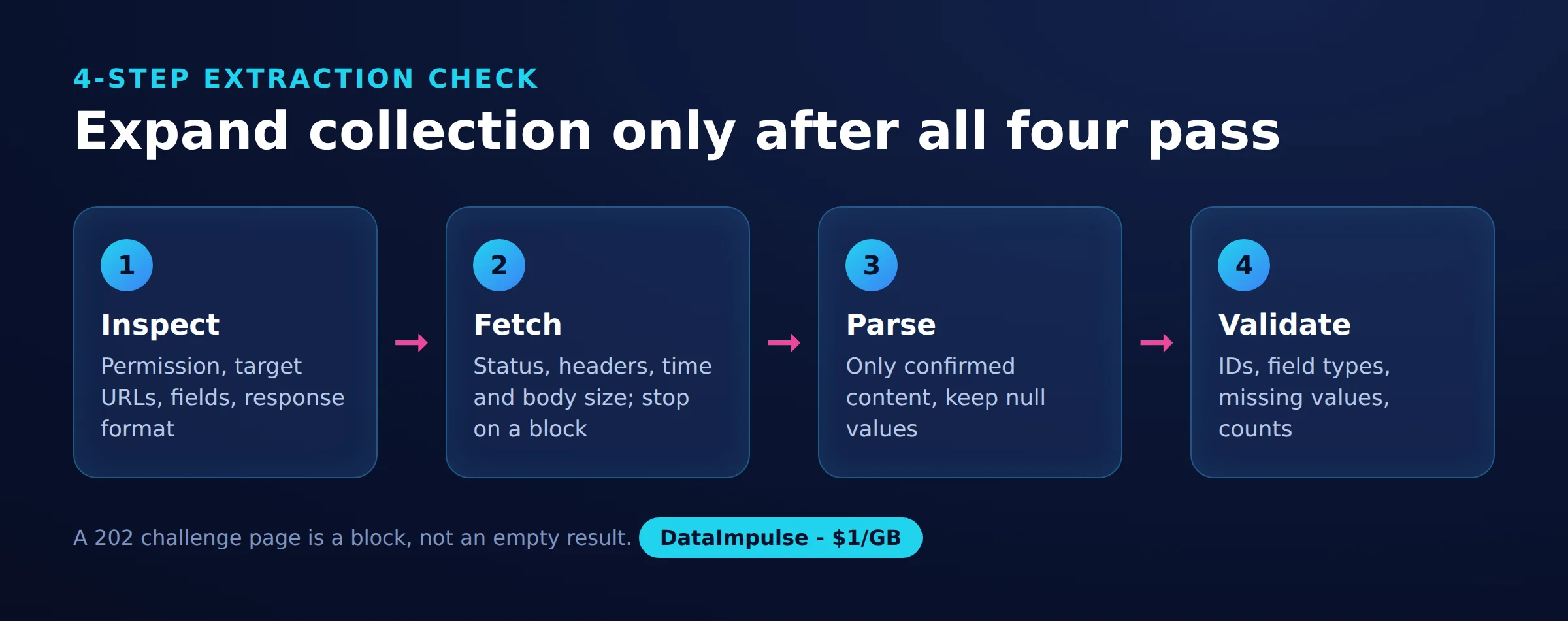
Use the 4-step extraction check before expanding collection:
- Step 1: Inspect. Confirm permission, target URLs, expected fields, and response format.
- Step 2: Fetch. Record status, headers, elapsed time, and body size. Stop an explicitly blocked route.
- Step 3: Parse. Extract only from confirmed content, preserving null values.
- Step 4: Validate. Check IDs, field types, missing values, and output counts before accepting the export.
On Linux, create an environment with python3 -m venv .venv, activate it with source .venv/bin/activate, and install the dependency with python -m pip install requests. Save the script as imdb_scraper.py and run python imdb_scraper.py only within your authorized scope.
The recorded environment was Python 3.12 and Requests 2.x. Exact patch versions were not recorded, so this is a reproducible procedure rather than a locked dependency environment. Consult the Requests implementation documentation when reviewing transport configuration.
The public HTML check targets https://www.imdb.com/title/tt0111161/. JSON requests target https://caching.graphql.imdb.com/, the website endpoint observed in our run. Its response warned against public, commercial, or non-private reuse; a successful response is not a license.
Read before running: the script below preserves the tested behavior. Its HTML check does not terminate execution after a challenge, and its JSON function retries non-200 responses. Do not treat it as an unattended collector or run it where those behaviors conflict with access restrictions. The proxy comment contains illustrative placeholders, not working credentials.
import csv, json, os, time
import requests  # pip install requests

PROXY = os.environ.get("PROXY_URL")  # e.g. http://USER__cr.us:[email protected]:823
PROXIES = {"http": PROXY, "https": PROXY} if PROXY else None
UA = ("Mozilla/5.0 (Windows NT 10.0; Win64; x64) AppleWebKit/537.36 "
      "(KHTML, like Gecko) Chrome/141.0.0.0 Safari/537.36")
GRAPHQL = "https://caching.graphql.imdb.com/"   # the JSON endpoint imdb.com pages call
HEADERS = {"User-Agent": UA, "Content-Type": "application/json",
           "x-imdb-client-name": "imdb-web-next"}  # without this header: 403
TITLE_IDS = ["tt0111161", "tt0068646", "tt0468569", "tt0137523", "tt1375666"]

TITLE_QUERY = """query ($id: ID!) { title(id: $id) {
  id titleText { text } releaseYear { year }
  ratingsSummary { aggregateRating voteCount }
  runtime { seconds } genres { genres { text } }
  plot { plotText { plainText } }
  directors: credits(first: 5, filter: {categories: ["director"]}) {
    edges { node { name { nameText { text } } } } } } }"""

CHART_QUERY = """query ($after: String) {
  chartTitles(first: 25, after: $after, chart: {chartType: TOP_RATED_MOVIES}) {
    pageInfo { hasNextPage endCursor }
    edges { currentRank node { id titleText { text } releaseYear { year }
            ratingsSummary { aggregateRating voteCount } } } } }"""


def check_title_page(title_id):
    """The HTML title page: in our run it always answered 202 + AWS WAF challenge."""
    r = requests.get(f"https://www.imdb.com/title/{title_id}/",
                     headers={"User-Agent": UA}, proxies=PROXIES, timeout=30)
    challenge = r.headers.get("x-amzn-waf-action") == "challenge"
    print(f"HTML {title_id}: HTTP {r.status_code}, {len(r.content)} bytes, challenge={challenge}")
    return r.status_code == 200 and not challenge


def graphql(query, variables, retries=3):
    for attempt in range(1, retries + 1):
        try:
            r = requests.post(GRAPHQL, headers=HEADERS, proxies=PROXIES, timeout=30,
                              json={"query": query, "variables": variables})
            if r.status_code == 200:
                return r.json()["data"]
            print(f"GraphQL -> HTTP {r.status_code}, retry {attempt}")
        except requests.RequestException as exc:
            print(f"GraphQL -> {type(exc).__name__}, retry {attempt}")
        time.sleep(5 * attempt)
    return None


def parse_title(t):
    rating = t.get("ratingsSummary") or {}
    runtime = (t.get("runtime") or {}).get("seconds")
    return {
        "id": t["id"],
        "title": t["titleText"]["text"],
        "year": (t.get("releaseYear") or {}).get("year"),
        "rating": rating.get("aggregateRating"),
        "votes": rating.get("voteCount"),
        "genres": ", ".join(g["text"] for g in (t.get("genres") or {}).get("genres", [])),
        "runtime_min": runtime // 60 if runtime else None,
        "directors": ", ".join(e["node"]["name"]["nameText"]["text"]
                               for e in (t.get("directors") or {}).get("edges", [])),
        "description": ((t.get("plot") or {}).get("plotText") or {}).get("plainText"),
    }


if __name__ == "__main__":
    check_title_page(TITLE_IDS[0])

    titles = []
    for title_id in TITLE_IDS:
        data = graphql(TITLE_QUERY, {"id": title_id})
        if data and data.get("title"):
            titles.append(parse_title(data["title"]))
            print(titles[-1]["title"], titles[-1]["year"], titles[-1]["rating"])
        time.sleep(3)
    with open("imdb_titles.csv", "w", newline="", encoding="utf-8") as f:
        writer = csv.DictWriter(f, fieldnames=titles[0].keys())
        writer.writeheader()
        writer.writerows(titles)

    chart, cursor = [], None
    for page in range(2):  # 2 pages x 25 = top 50 of the Top 250 chart
        data = graphql(CHART_QUERY, {"after": cursor})
        if not data:
            break
        block = data["chartTitles"]
        for edge in block["edges"]:
            row = parse_title(edge["node"])
            chart.append({"rank": edge["currentRank"], **{k: row[k] for k in
                          ("id", "title", "year", "rating", "votes")}})
        if not block["pageInfo"]["hasNextPage"]:
            break
        cursor = block["pageInfo"]["endCursor"]
        time.sleep(3)
    with open("imdb_top_chart.json", "w", encoding="utf-8") as f:
        json.dump(chart, f, indent=2, ensure_ascii=False)
    print(f"Saved {len(titles)} titles and {len(chart)} chart rows")
The outputs are imdb_titles.csv and imdb_top_chart.json. Our run produced five title records and 50 chart rows. The script assumes at least one successful title: an empty result makes titles[0] fail. It also lacks complete handling for malformed JSON, GraphQL errors, and partial responses.
No Beautiful Soup selector is claimed to work here. We could not inspect title-page JSON-LD or __NEXT_DATA__. Use the Beautiful Soup documentation for an authorized HTML workflow and our data parsing guide for separating extraction from validation.
How do you extract ratings and handle pagination?
Extract aggregate rating and vote count together, then paginate collections separately. Our title queries returned one aggregate per film; chart pagination returned additional titles.
Public title URLs and the Top 250 chart were our inspection targets, but their HTML responses contained challenges. Consequently, this run cannot establish where ratings appear in their delivered HTML or which structured-data selectors work.
In the successful JSON responses, the script reads ratingsSummary.aggregateRating and ratingsSummary.voteCount. Its chart query requests 25 rows and passes pageInfo.endCursor into the next request. Two calls returned 50 rows; 25 is the tested request size, not an established endpoint limit.
Do not apply this cursor to searches or reviews without inspecting those responses separately. Individual reviews, personal scores, and title aggregates represent different records. Validate unique title IDs, nonnegative integer vote counts, and expected numeric rating values. Preserve chart rank alongside ID so ranking changes do not look like identity changes.
For repeated collection, compare counts and missing fields before replacing existing output. A valid JSON file containing fewer rows than expected is still a partial extraction.
Why does extraction fail, and when should you use proxies?
An empty result can mean blocked transport, unexpected content, or a parsing error. Diagnose the response before changing selectors or buying another route.
- Challenge response: our HTTP 202 bodies carried
x-amzn-waf-action: challenge. They were not usable title pages. - Explicit rejection: default curl and Python Requests user agents received HTTP 403 in our tests.
- Browser verification: a normal Chrome user agent reached a puzzle CAPTCHA in headless Chromium. We stopped without solving it.
- Parsing failure: inspect a permitted response for missing keys, changed structure, or an error object before classifying it as empty metadata.
- Timeout: distinguish connection failures from slow responses and avoid unlimited retries.
Use our 403 diagnosis guide and bounded retry guidance to classify failures. For an authorized rendering workflow, Playwright extraction guidance is relevant, but our browser test did not establish access.
A proxy changes the network route; it does not fix selectors or grant permission. DataImpulse supplies proxies, not a scraping API, managed unblocker, VPN, or data vendor. Residential routing did not remove the HTML challenge in this snapshot.
Use a proxy when an authorized task requires a particular network route. Avoid it when the real problem is an access restriction, missing rights, or incorrect parsing. Our Python Requests proxy configuration guide explains configuration. Proxy authentication belongs to the proxy connection and is separate from site login.
What did our small public-page run return?
Our quick run on October 17, 2026 found challenged HTML and successful JSON queries. It was a small snapshot, not a benchmark or a guarantee of future access.
Method: a Linux server, Python 3.12, Requests 2.x, curl_cffi, and headless Playwright Chromium; no login or cookies; 3-5 second pauses; approximately 45 requests to IMDb hosts. Routes included a known datacenter server, DataImpulse US residential proxies, and datacenter proxies. HTML targets included tt0111161, tt0068646, and the Top 250 chart.
| Target | Client | Route | HTTP | Approximate body | Outcome |
|---|---|---|---|---|---|
| Title page | Requests, Chrome UA | Direct/residential | 202 | 2 KB | AWS WAF challenge |
| Title page | curl_cffi, Chrome | Direct | 202 | 2 KB | Challenge |
| Title page | curl_cffi, Chrome | Residential | 202 | 2 KB | Challenge |
| Title page | Playwright headless | Direct/residential | 202 | 9 KB | Puzzle CAPTCHA, stopped |
| GraphQL | Requests with client header | Direct | 200 | 0.9 KB | Content |
| GraphQL | Requests with client header | Residential | 200 | 0.9 KB | Content |
The browser matrix describes the challenge attempt; default HeadlessChrome separately received 403. Some HTML bodies were empty. JSON queries took approximately 500 ms directly and 900 ms through residential routing. These approximate observations are not per-request timing distributions.
All five title queries returned the requested fields, and two chart responses were about 5 KB each. Evidence here is the run summary and tested imdb_scraper.py, whose exports are named above. Per-request UTC timestamps, exact byte logs, and complete package versions were not recorded, limiting independent audit and exact reproduction.
A separate download of title.ratings.tsv.gz was about 8.7 MB compressed and contained 1,721,932 rows. Its Last-Modified value was October 17, 2026, 00:45 GMT. The Shawshank Redemption had 3,253,477 votes there, 298 fewer than the queried record, while both ratings were 9.3.
At $1 per GB, the body-only estimate is 900 bytes x 1,000 / 1,000,000,000 x $1 = $0.0009 per 1,000 title queries, approximately $0.001. This uses rounded response size, not an exact measured mean. Billing overhead, retries, and browser assets differ; blocked HTML gives us no successful HTML page-size estimate.
Is scraping IMDb legal?
Permission and applicable law must be assessed separately. IMDb’s Conditions of Use require express written consent for scraping; personal use alone does not waive that restriction.
Check the relevant user agent and path in IMDb’s robots.txt, alongside contractual terms. Robots directives are not a data license. Written permission can authorize specified collection and reuse, but it does not erase privacy, copyright, or other legal obligations.
The hiQ v. LinkedIn opinion addressed public-access CFAA reasoning in a preliminary-injunction dispute, not blanket permission to scrape. EU database rights can restrict extraction and reutilization. The U.S. Copyright Office distinguishes facts from protected expression; plot prose and images need separate attention.
Minimize personal data and assess the applicable privacy rules. AI scraping requires the same permissions analysis, including intended training or redistribution. A licensed internal research project or permitted personal ratings analysis may fit its license; public republication may not. For broader context, read our web scraping legal overview. Ultimately, the reader decides, check local law
When should you choose datasets, exports or an API?
Choose the access route around required fields, permitted use, and operational reliability. An accessible endpoint is a weak production dependency without an agreed schema and license.
| Option | Use X when | Avoid X when |
|---|---|---|
| Public-page code | Use public-page code when small, permitted extraction needs page-specific fields. | Avoid public-page code when access restrictions or licensing conflict. |
| IMDb datasets | Use IMDb datasets when scope and usage terms fit. | Avoid IMDb datasets when required fields or commercial rights are absent. |
| Licensed API | Use a licensed API when its contract and schema fit production needs. | Avoid a licensed API when cost or coverage fails requirements. |
| Independent API | Use an independent API when its metadata and license fit. | Avoid an independent API when exact IMDb coverage is assumed. |
IMDb datasets are limited to personal and non-commercial use (as of October 2026). Downloads refresh daily; title.ratings.tsv.gz contains tconst, averageRating, and numVotes. Join ratings to title metadata by ID instead of fetching every film individually.
The official IMDb GraphQL API follows a separate AWS Data Exchange subscription and authentication process. Access requires an AWS account and subscription-specific credentials (as of October 2026). Do not mistake the website endpoint in our experiment for that licensed service. Obtain price, quota, retention, and redistribution terms for your actual contract.
OMDb supports IMDb-ID lookup, identifies itself as unaffiliated with IMDb, and lists a non-commercial content license; its dedicated Poster API is patron-only (as of October 2026). Treat metadata access and image reuse rights as separate checks.
TMDB permits free non-commercial API use with attribution, while commercial licensing requires contact. Its rate guidance describes changeable upper limits around 40 requests per second (as of October 2026), not guaranteed throughput. During migration, retain source IDs, validate mappings, compare field meanings, and preserve attribution rather than relabeling another source’s rating as IMDb’s.
For narrower requirements, review TVmaze’s TV metadata documentation, Watchmode’s streaming availability documentation, TheTVDB’s API licensing information, and Trakt’s watchlist and history documentation. Evaluate each license and account limit before choosing.
For account-owned lists, first investigate an authorized export route and inspect its columns. A CSV export is useful only if its contents and reuse terms fit. For any marketplace listing, including an Apify actor or RapidAPI service, identify the actual operator and license instead of assuming official IMDb affiliation.
Frequently Asked Questions
How do you pull IMDb movie metadata with Python?
Choose an authorized source, fetch a response, and map its fields into a consistent record before exporting CSV or JSON. Our tested example extracted five records from website JSON responses; HTML parsing remained unverified because challenges blocked inspection.
Which public IMDb pages contain aggregate ratings?
Title pages and ranking charts were the intended public-page targets in our run. Their HTML was challenged, so we cannot verify a working rating selector from this experiment. The successful title and chart JSON responses contained aggregate ratings and vote counts.
Why does an IMDb scraper return no data or a block?
The response may be a challenge, an explicit rejection, or content that no longer matches the parser. Inspect status, headers, body size, and structure before treating an empty export as missing movie data. Stop explicit blocks rather than retrying indefinitely.
Does IMDb offer a free API?
Do not interpret our successful website JSON requests as a free API entitlement. IMDb documents a separate licensed API access process, while its downloadable datasets have their own usage restrictions. Select a route based on its applicable terms.
Is scraping IMDb legal, and what does permission change?
IMDb’s terms require written consent for scraping, and legality depends on jurisdiction and conduct. Permission can define authorized collection and reuse, but privacy, copyright, and database rights still require assessment.
Will a residential proxy make the scraper work?
Our residential route encountered the same HTML challenges as the direct route. A different route cannot guarantee access, repair a parser, or authorize collection.
Why did the dataset and queried vote counts differ?
Our two observations differed by 298 votes for the same title, while the rating remained 9.3. Different collection and refresh times can make comparisons misleading, so retain timestamps and source identity rather than silently replacing one count with another.
Need proxy routing for an authorized Python workflow?
Consider DataImpulse when your permitted workflow needs a proxy connection. Start with a small test, inspect the response, and measure actual traffic before scaling. This run found no residential-proxy advantage for accessing IMDb HTML.
Last updated: October 17, 2026.

 State/City/Zip/ASN Targeting



