
In this Article
Microsoft’s Playwright MCP server lets an AI assistant control a browser through the Model Context Protocol, using accessibility snapshots and browser tools. Connect Playwright MCP to your coding client, then configure a proxy only if its browser needs a particular outbound route. Start by checking navigation and the browser’s observed exit IP. Microsoft’s introduction explains the snapshot-based interface.
The examples below cover four client configuration formats, browser proxy authentication and destination bypass rules. The November 19, 2026 Linux results distinguish browser routing from client configuration loading. For the broader workflow, see how to run AI browser agents.
Key Facts
- Playwright MCP exposes browser actions to an MCP-compatible coding client.
- Tool discovery, browser launch and navigation are separate checks.
- Browser proxy settings do not configure model-provider connections.
- Server-side code execution inherits the server process’s access.
- An exit-IP response identifies the route used by that specific browser request.
What Is Playwright MCP?
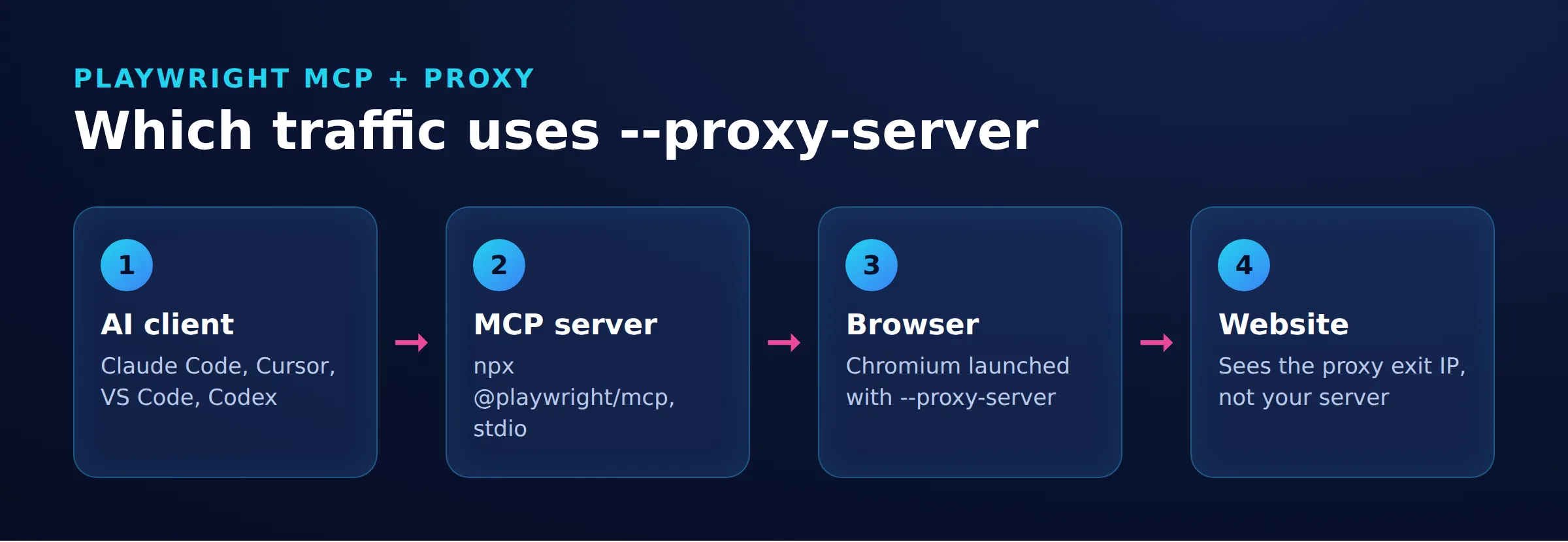
Playwright MCP exposes browser actions as tools an assistant can call. Structured accessibility snapshots support navigation, clicking and typing without requiring a vision model. The client coordinates tool calls, the server controls the browser, and the browser requests pages. Playwright MCP architecture
An MCP gateway routes access to MCP servers; it is separate from the browser’s outbound forward proxy.
Which Traffic Uses the Proxy?
The Browser Egress Test: distinguish browser requests, server-process requests and client-to-model requests before configuring a proxy.
The browser route is Coding Client -> Playwright MCP Server -> Browser -> Optional Forward Proxy -> Public Page. Browser bypass rules can exclude destinations. A separate Coding Client -> Model Provider connection carries model requests.
Browser proxy settings configure browser traffic, not every operation an MCP tool can perform. Code executed through browser_run_code_unsafe runs in the server process and can make separate network requests. Use browser navigation and page-context browser_evaluate results for the exit-IP check. Server-side and page-context execution
Built-in search, shell commands, package downloads and other MCP servers need their own networking configuration. See proxies for AI coding agents and proxies for MCP servers.
Install and Connect Playwright MCP
Playwright MCP requires Node.js 20 or newer. The pinned examples use @playwright/[email protected]. Check Node and the available options first. Installation prerequisites
node --version
npx -y @playwright/[email protected] --help
The default browser channel expects Google Chrome. The pinned configurations below explicitly select chromium, headless operation and isolated sessions to match the Linux routing setup. Install the matching Chrome for Testing browser before connecting a client:
npx -y @playwright/[email protected] install-browser chrome-for-testingThe installer can print a warning about installing project dependencies first; that warning also appeared when installation completed successfully. The pinned launcher supports install-browser. Version 0.0.86 launcher
Claude Code
Choose one registration command. The upstream example uses @latest and the default browser settings, which require Google Chrome:
claude mcp add playwright npx @playwright/mcp@latestFor the pinned package and browser setup above, use:
claude mcp add playwright -- npx -y @playwright/[email protected] --browser chromium --headless --isolatedStart a fresh session and inspect /mcp for the connection. Claude Code MCP controls
Prompt: Use Playwright MCP to open https://api.ipify.org?format=json and report the response body.
Cursor
Save this definition in project-root .cursor/mcp.json. Cursor MCP configuration
{
  "mcpServers": {
    "playwright": {
      "type": "stdio",
      "command": "npx",
      "args": ["-y", "@playwright/[email protected]", "--browser", "chromium", "--headless", "--isolated"]
    }
  }
}
Restart Cursor, open its MCP settings, and confirm that the server is enabled and its tools appear.
Prompt: Use Playwright MCP to open https://api.ipify.org?format=json and report the response body.
VS Code and Copilot
For a new Copilot setup in VS Code, use .mcp.json at the workspace root or ~/.copilot/mcp-config.json for personal configuration. If COPILOT_HOME is set, the personal configuration is $COPILOT_HOME/mcp-config.json. These files use the top-level mcpServers object. Microsoft MCP configuration reference
{
  "mcpServers": {
    "playwright": {
      "type": "stdio",
      "command": "npx",
      "args": ["-y", "@playwright/[email protected]", "--browser", "chromium", "--headless", "--isolated"],
      "tools": ["*"]
    }
  }
}
Select the Copilot harness in the intended chat session. Run Chat: Open Customizations, open MCP Servers, and confirm that Playwright is available. Then run the navigation prompt below and inspect the actual tool result.
Existing Local harness configurations use .vscode/mcp.json with a top-level servers object. This format is deprecated for new Copilot setups. Eligible existing definitions can be forwarded, but native Copilot does not read that file directly:
{
  "servers": {
    "playwright": {
      "type": "stdio",
      "command": "npx",
      "args": ["-y", "@playwright/[email protected]", "--browser", "chromium", "--headless", "--isolated"]
    }
  }
}
Prompt: Use Playwright MCP to open https://api.ipify.org?format=json and report the response body.
Codex CLI
Add this table to ~/.codex/config.toml. Codex uses mcp_servers. Official Codex MCP documentation
[mcp_servers.playwright]
command = "npx"
args = ["-y", "@playwright/[email protected]", "--browser", "chromium", "--headless", "--isolated"]
Restart Codex and run /mcp to inspect active servers and available tools.
Prompt: Use Playwright MCP to open https://api.ipify.org?format=json and report the response body.
For every client, inspect the actual tool result: connection and tool discovery alone do not prove browser launch or navigation. The ipify response contains an ip string. ipify response formats
How Do You Configure Browser Behavior?
Remove --headless from the examples for a visible browser on a desktop. Keep --browser chromium aligned with the installed browser. Browser configuration options
Persistent profiles retain cookies and login state between sessions. The examples use --isolated for fresh profile state; use a dedicated persistent profile for approved login workflows. Profile behavior
Screenshots are available through browser_take_screenshot. Coordinate-based interaction requires --caps=vision and a vision-capable model. Vision capabilities
Video tools require --caps=devtools; assertions and locator generation use --caps=testing. Device emulation changes browser settings rather than using a physical mobile device. Available capabilities
The --extension mode attaches to an existing browser. Confirm that browser’s exit IP instead of assuming launch settings changed an already running instance. Existing-browser connections
How Do You Add and Verify a Browser Proxy?
Compare a direct browser request with a proxied request to the same destination. Restart the configured browser after changing its proxy settings.
Use --proxy-server and --proxy-bypass, or their environment equivalents PLAYWRIGHT_MCP_PROXY_SERVER and PLAYWRIGHT_MCP_PROXY_BYPASS. Endpoint formats include authenticated HTTP URLs and socks5://. Pinned proxy options
For Codex, replace the existing Playwright table in ~/.codex/config.toml with this definition; do not add a duplicate:
[mcp_servers.playwright]
command = "npx"
args = ["-y", "@playwright/[email protected]", "--browser", "chromium", "--headless", "--isolated"]
env_vars = ["PLAYWRIGHT_MCP_PROXY_SERVER", "PLAYWRIGHT_MCP_PROXY_BYPASS"]
The env_vars list allows Codex to forward these variables to its server process. Environment-variable forwarding
Use the template http://LOGIN:[email protected]:823, replacing the placeholders with your credentials. Percent-encode reserved characters in the username or password. The DataImpulse residential proxy page provides endpoint examples. Enter the completed URL at this hidden Bash prompt:
read -r -s -p 'Authenticated HTTP proxy URL: ' PLAYWRIGHT_MCP_PROXY_SERVER
printf '\n'
export PLAYWRIGHT_MCP_PROXY_SERVER
export PLAYWRIGHT_MCP_PROXY_BYPASS=localhost
codex
Start Codex from this shell so it inherits the variables. Exit an existing Codex session first. Keep the authenticated URL out of prompts, shared configuration and diagnostic output.
Run /mcp, then navigate to https://api.ipify.org?format=json. If the navigation result omits the body, call browser_evaluate with this argument:
{
  "function": "() => document.body.innerText"
}
The returned body contains JSON with the public IPv4 address observed by ipify for that request. It does not establish the route used by other destinations or processes. Evaluation schema and ipify endpoint formats
Version 0.0.84 fixed forwarding credentials embedded in proxy URLs to browser proxy authentication settings. The version 0.0.86 residential results below use URL authentication. Authentication fix
What Did the Routing Snapshot Show?
The November 19, 2026 Linux snapshot compared direct browser navigation, fresh authenticated residential proxy runs, repeated navigation within one session, and a relay with a destination bypass rule.
| Experiment | Observed Result | Meaning |
|---|---|---|
| Direct browser request | 81.17.103.182 | Matched the host’s direct curl result. |
| Three fresh authenticated residential runs | 172.58.167.2; 99.63.197.46; 99.129.196.154 | Each run returned a different exit IP. |
| Two navigations in one session | 172.58.254.108 both times | Navigation did not guarantee a new IP. |
| Residential relay with destination bypass | 172.59.209.206 from ipify; Example Domain loaded | The relay recorded CONNECT api.ipify.org:443 and no connection to example.com. |
A separate November 19 check used a local logging proxy with direct egress: ipify returned {"ip":"81.17.103.182"}, and the proxy logged CONNECT api.ipify.org:443. With example.com in PLAYWRIGHT_MCP_PROXY_BYPASS, Example Domain loaded without appearing in the proxy log. Here, the connection log proved routing even though the exit IP stayed the same.
On November 19, 2026, Codex 0.153.4 loaded the basic and proxy TOML configurations, and codex mcp get playwright listed the proxy environment variables. Claude Code 2.1.326 registered the server through claude mcp add.
These results establish configuration loading, registration and the stated Linux browser routes. They are not end-to-end results for all four clients, a cross-platform comparison or a proxy success-rate benchmark.
Cookies and Exit IPs Are Separate
Two navigations in one browser session returned the same IP. Keeping cookies preserves application state; it does not instruct a proxy to retain an exit IP. Choose a sticky session when IP continuity is required, and verify its behavior. See sticky versus rotating sessions.
DataImpulse residential proxies start at $1/GB; proxy bandwidth and model usage are separate costs.
How Do You Troubleshoot Playwright MCP Errors?
Identify the failing stage before changing settings. Keep the package version fixed and change one variable per attempt.
| Symptom | Check | Next Action |
|---|---|---|
| No tools or connection closed | Configuration wrapper, executable availability and server stderr |
Correct the client definition, restart and inspect discovery. |
| Browser launch fails | Selected browser and installed executable | Match --browser chromium with the Chrome for Testing installation above. |
| Unexpected IP | Bypass rules, active browser and attachment mode | Restart the configured browser and repeat the IP navigation. |
| Timeout | Browser launch, proxy reachability, DNS and destination | Compare direct and proxied requests. |
| Sandbox block | Host and client execution policy | Use an approved runtime with the required permissions. |
| Browser already in use | Concurrent profile ownership | Close the owning process or use --isolated. |
Playwright documents limits on concurrent profile ownership.
For HTTP 407, check credentials and authentication handling. For certificate trust errors, identify the failing process and repair its certificate chain or approved trust configuration.
NODE_EXTRA_CA_CERTS extends Node’s CA trust when Node starts; it is not a browser trust-store setting. Node certificate configuration
How Do Browser Automation Options Compare?
| Option | Execution and Control | Suitable Task |
|---|---|---|
| Playwright MCP | Microsoft server; assistant-directed snapshots and actions; browser proxy options | Interactive application inspection |
| Puppeteer reference MCP | Archived reference implementation; selectors, screenshots and JavaScript; separate launchOptions configuration |
Maintaining an existing reference-server integration |
| Browser Use MCP | Local tools or hosted task delegation; routing depends on deployment | Local browser work or delegated cloud tasks |
Sources: Microsoft’s server, Puppeteer reference documentation, Browser Use local MCP and Browser Use hosted service.
Playwright CLI with skills exposes browser operations through commands. Playwright Test provides a test runner and assertions. Use MCP for successive assistant-directed actions; encode fixed regression expectations in repeatable tests. For library configuration, see the plain Playwright proxy setup.
What Are the Security Limits and Costs?
Playwright MCP exposes browser-session access and server-side code execution. In version 0.0.86, the default browser_run_code_unsafe tool executes arbitrary JavaScript in the Playwright server process, with access to that process’s permissions and environment. Microsoft describes this as equivalent to remote code execution. Pinned tool definitions and default capabilities
Use dedicated browser accounts and an approved runtime with appropriate filesystem and network restrictions. Treat page instructions as untrusted and require approval for consequential actions.
The --allowed-origins option is not a security boundary and does not cover redirects. Enforce required network restrictions outside the browser tool. Microsoft’s security limitations
Using a proxy is lawful for legitimate purposes. It does not grant authorization to access a destination; applicable law and the site’s terms still govern the activity. DOJ material on lawful proxy services. The robots.txt protocol is not access authorization. RFC 9309. Review web scraping legality before collecting data.
The local server runs as a process started by your client; the client handles model authentication and billing. Budget separately for model usage, browser compute and optional proxy bandwidth. Local installation
Frequently Asked Questions
Is Playwright MCP a replacement for Playwright tests?
Use it for interactive exploration with an assistant. Turn stable expectations into repeatable assertions with Playwright Test.
Does a successful connection prove that the browser works?
No. Tool discovery, browser launch and navigation are separate checks. Inspect an actual browser response before treating setup as complete.
Should I use @latest or pin the package?
Pin the package when reproducing an issue or comparing routes. Review release changes and repeat the navigation check before adopting an update.
Does a rotating proxy change IP on every navigation?
No. The November 19 snapshot returned the same IP for two navigations in one session. Check the browser response instead of assuming each navigation changes the route.
Can I check browser routing with curl?
Use curl as a separate host-network baseline. Verify browser routing through Playwright browser responses and, where available, proxy connection logs.
Does the Linux snapshot cover Windows, macOS or Docker?
Its results apply to the stated Ubuntu environment. For other deployments, follow the official operating-system and WSL requirements or Docker guidance, then check browser launch, authentication and routing.
Choose Browser Routing for a Concrete Requirement
Start with direct browser navigation. If approved geographic testing or egress needs a residential route, configure the proxy and repeat the same exit-IP check.
Last updated: November 19, 2026.

 State/City/Zip/ASN Targeting




