
In this Article
An AliExpress scraper collects product information into structured rows for analysis. The Python example below extracts search-page titles, prices, currencies, ratings and sold counts into CSV; variants and review details require a separate browser workflow.
In our quick run on October 16, 2026, two search pages yielded 117 products. This was a small snapshot, not a benchmark: search-page extraction worked, while product-page rendering was inconsistent. Start with the fields you can verify, then add detail collection only where necessary.
Key Facts
- Our quick run collected 117 products across two search pages.
- All 117 collected products had a listed price.
- Star ratings were missing for 16 products.
- Sold counts were missing for 6 products.
- A product page rendered in one of three browser attempts.
- Search-page HTML weighed approximately 0.83-0.96 MB per page.
- About 15 MB of search-page HTML would cost $0.015 at $1 per GB.
What data can an AliExpress scraper collect?
Our search-page scraper collected product IDs, titles, listed prices, currencies, discounts, ratings and displayed sold counts. It did not export variants or individual reviews.
| Source | Fields observed | Where they appeared | Limit |
|---|---|---|---|
| Search page | ID, title, sale price, original price, currency, discount, rating, sold count | Embedded JSON inside HTML scripts | Some ratings and sold counts were absent |
| Product page | Title, price, rating, review count, sold count, variants | Rendered browser page | Only one of three browser attempts rendered |
| Individual reviews | No verified extraction | Requires inspection of the loaded review interface | No tested review endpoint or pagination routine |
The search payload used itemList.content. Useful paths included title.displayTitle, prices.salePrice.minPrice, prices.salePrice.currencyCode, trade.tradeDesc and evaluation.starRating. We also observed a schema.org ItemList containing 60 product URLs.
Keep values such as 2K+ sold as text. They are display labels, not exact order totals. Likewise, a missing rating means unknown, not zero.
Measurement source: our aliexpress_scraper.py run and its aliexpress_products.csv output. We used Linux, Python 3.12 and requests, public pages without login, and 4-8 second pauses. The two-page collection returned 60 and 57 products; separate checks compared five exit contexts and three product-page browser attempts.
How do you build an AliExpress scraper in Python?
Fetch a search page, locate its embedded JSON, decode that object and write the selected fields to CSV. This is the code used in our quick run.
Install requests with python3 -m pip install requests, then save the following as aliexpress_scraper.py. Leave PROXY_URL unset for a direct request, or set it privately to your proxy URL. The example credential values are placeholders.
import csv, json, os, random, time
import requests

PROXY = os.environ.get("PROXY_URL")  # e.g. http://USER__cr.us:[email protected]:823
PROXIES = {"http": PROXY, "https": PROXY} if PROXY else None
HEADERS = {
    "User-Agent": "Mozilla/5.0 (Windows NT 10.0; Win64; x64) AppleWebKit/537.36 "
                  "(KHTML, like Gecko) Chrome/130.0.0.0 Safari/537.36",
    "Accept-Language": "en-US,en;q=0.9",
}


def fetch(url, retries=3):
    for attempt in range(1, retries + 1):
        try:
            r = requests.get(url, headers=HEADERS, proxies=PROXIES, timeout=40)
        except requests.RequestException as exc:  # timeouts, dropped connections
            print(f"{url} -> {type(exc).__name__}, retry {attempt}")
            time.sleep(5 * attempt)
            continue
        # A slider CAPTCHA page has no product data in it
        if r.status_code == 200 and '"itemList":{"content":[' in r.text:
            return r.text
        print(f"{url} -> {r.status_code}, no product data, retry {attempt}")
        time.sleep(5 * attempt)
    return None


def parse_search(html):
    """Search results are embedded as JSON in the page: "itemList":{"content":[...]}."""
    start = html.find('"itemList":{"content":[') + len('"itemList":')
    item_list, _ = json.JSONDecoder().raw_decode(html, start)
    for item in item_list["content"]:
        if "productId" not in item:
            continue
        sale = item.get("prices", {}).get("salePrice", {})
        original = item.get("prices", {}).get("originalPrice", {})
        yield {
            "product_id": item["productId"],
            "title": item.get("title", {}).get("displayTitle"),
            "price": sale.get("minPrice"),
            "currency": sale.get("currencyCode"),
            "original_price": original.get("minPrice"),
            "discount_pct": sale.get("discount"),
            "sold": item.get("trade", {}).get("tradeDesc"),
            "rating": item.get("evaluation", {}).get("starRating"),
            "url": f"https://www.aliexpress.com/item/{item['productId']}.html",
        }


def scrape_search(query, max_pages=2):
    seen, rows = set(), []
    slug = query.strip().replace(" ", "-")
    for page in range(1, max_pages + 1):
        html = fetch(f"https://www.aliexpress.com/w/wholesale-{slug}.html?page={page}")
        if not html:
            break
        new = [r for r in parse_search(html) if r["product_id"] not in seen]
        if not new:
            break
        seen.update(r["product_id"] for r in new)
        rows.extend(new)
        print(f"page {page}: {len(new)} products")
        time.sleep(random.uniform(4, 8))
    return rows


if __name__ == "__main__":
    rows = scrape_search("phone case", max_pages=2)
    if not rows:
        raise SystemExit("No products collected; check fetch() output first.")
    with open("aliexpress_products.csv", "w", newline="", encoding="utf-8") as f:
        w = csv.DictWriter(f, fieldnames=rows[0].keys())
        w.writeheader()
        w.writerows(rows)
    print(f"saved {len(rows)} products")
Run python3 aliexpress_scraper.py. The placeholder __cr.us suffix selects a US exit country. Keep actual credentials out of source control and shared logs.
The decoder reads one JSON object from its starting position, avoiding a regular expression over nested arrays. The headers reproduce our request settings; they do not guarantee access or English output.
One operational limit: the marker requires an exact text match, so a changed page structure can break extraction. The script stops with a clear message when no products were collected, instead of failing on an empty list.
For product details, plain requests returned a 77 KB shell with window._d_c_.isCSR = true; US traffic redirected to aliexpress.us. Headless Chromium through the proxy rendered details once in three attempts: $1.09, a 5.0 rating, two reviews, 500+ sold and variants. The other attempts stayed empty.
We do not publish product-page code because it was unreliable in this run. For a browser implementation, start with the official Playwright Python setup and our Playwright scraping guide. Inspect a successful load before choosing selectors, following the workflow in scraping dynamic pages.
How do you scrape AliExpress search results?
Use the keyword search URL, advance its page parameter and deduplicate by product ID. Our example requests https://www.aliexpress.com/w/wholesale-phone-case.html?page=1 and then page 2.
The script replaces spaces with hyphens, which covers the tested query. Do not assume that transformation handles every punctuation mark or language. Inspect the intended search URL before expanding the input list.
The seen set removes IDs already collected on earlier pages. Pagination stops when fetching fails or a page contributes no new IDs. It does not establish that every matching product has been collected, and duplicates within one response need an additional check.
For recurring exports, record query, page number, exit country and collection time alongside each batch. Preserve product IDs as text when opening the CSV. Our Python eBay tutorial offers another marketplace workflow to compare.
For Google Sheets, import the CSV into a new sheet using the documented file-import workflow. Check identifier formatting and decimal interpretation before using formulas; keep currency in its own column.
How do you scrape AliExpress reviews?
Review extraction needs separate validation against a successfully loaded product page. Our snapshot confirmed a displayed review count, not a working review scraper.
During an authorized browser session, open the reviews interface and inspect the requests it actually makes. Establish whether the response contains review records, how the next page is requested and which fields are present. Do not assume an endpoint copied from an older tutorial still works.
A minimal review dataset should contain product ID, rating, date and relevant non-personal content. Exclude reviewer names, profile links, avatars and identifiers; review text also needs screening for personal information. Stop pagination on an empty response, repeated records or an access challenge.
Keep reviews in a separate table linked by product ID. A product’s aggregate rating cannot substitute for its individual reviews, and our search CSV contains neither review text nor verified review pagination.
Why are prices different from what you see?
Our country checks returned different currencies and different product sets. They demonstrate why collection context matters, but cannot prove a regional price difference for the same product.
| Exit country | Page-one median listed price |
|---|---|
| US | 1.09 USD |
| Germany | 3.19 EUR |
| United Kingdom | 1.00 GBP |
| Brazil | 12.56 BRL |
Each page contained 60 products. The US page shared none with the other contexts; Germany, the UK, Brazil and the direct EU connection overlapped by 13-25 products. Direct requests returned EUR and French titles despite the English language header.
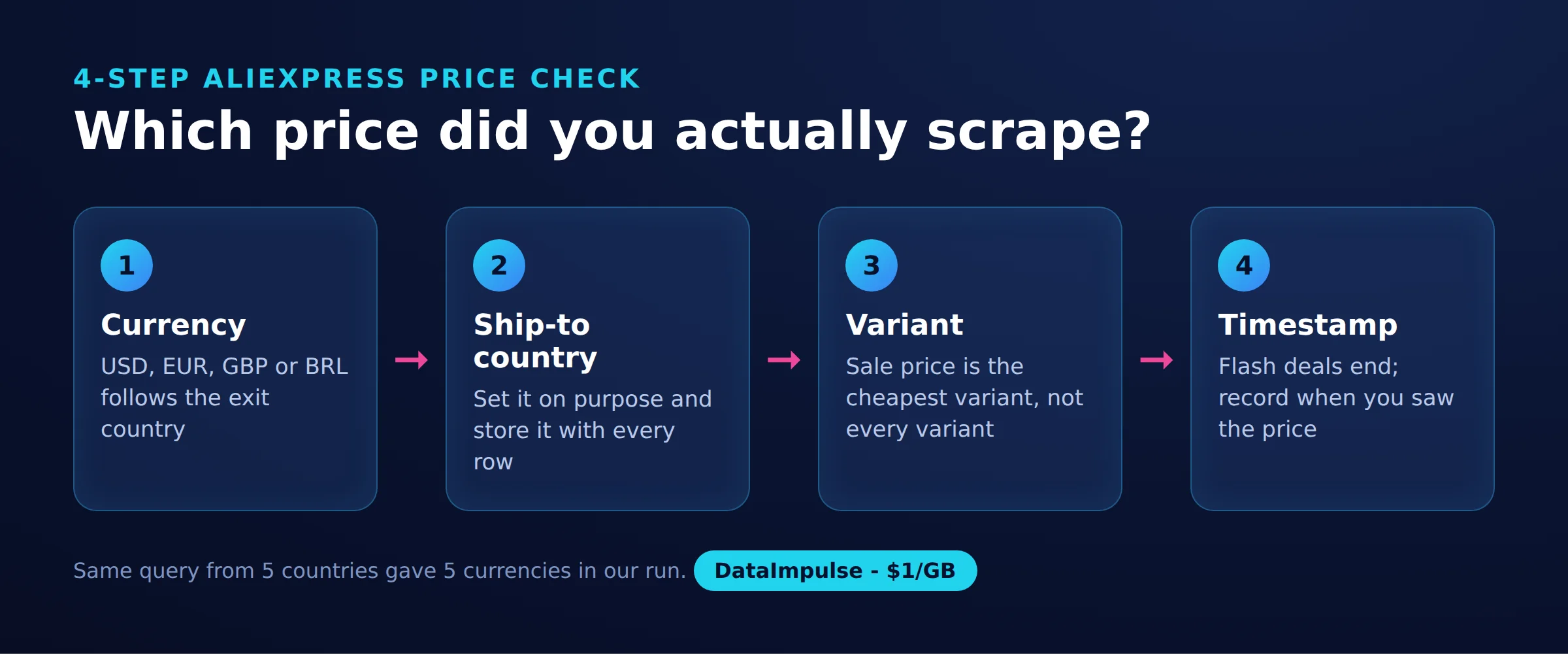
Apply the 4-step AliExpress price check before comparing observations:
Step 1: Currency. Set the intended display currency and record the currency actually returned.
Step 2: Ship-to country. Set the destination explicitly and record it separately from the proxy exit country. Keep locale and cookie state consistent; our snapshot did not isolate their effects.
Step 3: Variant. Match product ID and selected options. Treat the search payload’s minPrice as a listing observation, not a verified price for every variant.
Step 4: Timestamp. Save collection time with each observation. Compare equivalent products and settings before interpreting a change.
Country-targeted residential proxies help control the exit location. They do not set every storefront preference. For a repeatable comparison design, see our price comparison workflow.
How do you avoid getting blocked?
Use a slow, bounded collection process and stop on explicit access challenges. A successful HTTP status alone does not establish that product data arrived.
Our search URL returned HTTP 200 both directly and through residential proxies. The script additionally requires the JSON marker, retries at most three times and waits 5, 10 and 15 seconds after failures. Successful pages are separated by random 4-8 second pauses.
This is bounded linear backoff, not a complete block detector. Missing JSON can mean a changed layout, an empty shell or a challenge. Inspect the response and final URL for a slider CAPTCHA or a punish page; if confirmed, cancel the run instead of repeatedly retrying. We did not establish a CAPTCHA frequency in this snapshot.
Prefer sticky sessions when a browser sequence needs consistent cookies and location. Use rotation between independent jobs while keeping the target country fixed. Neither approach guarantees access. DataImpulse supplies proxy transport, not a scraping API, managed unblocker or VPN. For HTTP failures, use our 403 troubleshooting guide.
How much does it cost to scrape 1,000 AliExpress products?
At $1 per GB, roughly 15 MB of search-page HTML costs $0.015. That is an estimated traffic cost for listing rows, not a quote for 1,000 fully rendered product pages.
We observed approximately 0.83-0.96 MB of HTML per search page containing about 60 products. Seventeen similar pages would transfer roughly 14-16 MB before retries and other overhead. The estimate uses decimal gigabytes and assumes similar page density.
Duplicates and missing fields can increase the cost per usable row. Actual billed traffic can also differ from the HTML size measured by a script, so check usage records before scaling.
Browser collection downloads additional scripts and other assets. Budget substantially more traffic for product details; our run does not support an exact multiplier. Engineering time, hosting, failed loads and review pagination are outside the $0.015 estimate.
Should you use the official API or a ready-made scraper instead?
Choose by required fields, maintenance capacity and acceptable cost per usable row. A low request price is less useful if the result lacks the variant or market context you need.
For an Open Platform key, create a developer account and register an application. Complete the applicable approval and API-permission process before relying on access (as of October 2026), following the official onboarding instructions. Retrieve the app key and secret from the application console and keep the secret private. Inspect the affiliate product query specification and an authorized response to confirm the product and price fields your application can use.
The comparison below describes platform capabilities, not measured AliExpress performance. Here, “not stated” means the cited sources do not establish that specific comparison value.
| Tool | Pricing unit | JavaScript | Proxy rotation included? | Workflow | Exports |
|---|---|---|---|---|---|
| Apify | Starter: $19/month plus usage (as of October 2026); universal price per 1,000 results: not stated | Browser Actors supported | Available; inclusion depends on Actor and billing | Actor configuration or custom code | JSON, CSV; native Sheets export: not stated here |
| Octoparse | Standard from $69/month, billed annually (as of October 2026); universal price per 1,000 results: not stated | Dynamic-page handling | Included on Standard | Visual, no-code | JSON, CSV, Google Sheets; plan conditions apply |
| ScrapingBee | 1,000 classic requests: 1,000 credits without JS, 5,000 with JS (as of October 2026) | Supported | Managed rotation | API/code | Structured JSON; native CSV and Sheets: not stated here |
| Oxylabs | /Scrape from $0.50 per 1,000 results for listed targets, from $1.00 per 1,000 for other targets (as of October 2026); rendering affects cost | Supported | Managed rotation | API/code | Structured JSON; native CSV and Sheets: not stated here |
Do not convert subscription fees into per-result prices without measuring utilization. Request a sample containing your required fields before choosing a managed service.
- Use DIY Python + proxies when search fields meet your needs and you can maintain parsing. Avoid DIY Python + proxies when you need dependable browser details without maintenance.
- Use a ready-made scraper API when a sample demonstrates the required coverage. Avoid a ready-made scraper API when billing units or missing fields make costs unpredictable.
- Use the official affiliate API when approved access and its response schema fit your use case. Avoid the official affiliate API when those permissions or fields do not fit.
- Use a Chrome extension when evaluating a small, supervised export. Avoid a Chrome extension when you need repeatable unattended collection and detailed audit records.
Is it legal to scrape AliExpress?
Public visibility does not establish permission to scrape or reuse content. The answer depends on terms, jurisdiction, collection methods and intended use.
The AliExpress Terms of Use prohibit systematic retrieval to build collections or databases without written permission. Review the applicable terms before collecting.
Check robots.txt for the relevant host, but do not treat it as a license. RFC 9309 expressly distinguishes robots rules from access authorization.
The 2022 hiQ v. LinkedIn decision addressed public-page access under the US CFAA at the preliminary-injunction stage. It was not blanket permission covering contracts, copyright or every scraping activity.
The EU Database Directive protects qualifying databases against extraction or reuse of substantial parts. CNIL guidance also stresses safeguards for personal data collected from public websites; reviewer information can raise separate obligations.
You decide whether to proceed after checking local law and the relevant permissions. For commercial collection, obtain qualified advice where needed. Our web scraping legality guide explains the broader issues.
Frequently Asked Questions
What is an AliExpress scraper?
It is a program that turns marketplace content into structured records. Define whether you need search listings, selected variants or individual reviews before choosing an implementation.
Can I scrape AliExpress with Python requests?
Our requests-based search collection returned 117 products across two pages. Product-detail requests returned an empty application shell, so that result should not be generalized to every page type.
Does this code export variants and reviews?
No. It exports the search fields shown in the script; browser detail collection needs separate implementation and validation.
Why does the CSV price differ from my browser?
First check whether the records describe the same product and variant. Then compare currency, destination, exit country, timestamp and browser state before interpreting a difference.
What should I do when the output contains no rows?
Inspect the response before rerunning. The script stops with a message when no products were found; the usual causes are a changed page structure, an empty shell or a challenge page.
Will rotating proxies guarantee successful collection?
No. A different exit address cannot repair a changed JSON structure or guarantee browser rendering. Stop on explicit access challenges and investigate the failure.
How should I evaluate an AliExpress scraper API?
Give it a small representative list and inspect the actual output. Compare usable records, regional context, missing fields and total billing rather than advertised request counts alone.
Keep the collection country consistent
If your own scraper needs a controlled exit location, DataImpulse residential proxies start at $1 per GB with country targeting included. Start with a small sample, inspect the returned currency and products, and measure actual traffic before expanding.
Last updated: October 16, 2026.

 State/City/Zip/ASN Targeting



