
In this Article
An Eventbrite scraper collects event listings into spreadsheet rows by reading city pages, opening event URLs, and extracting dates, locations, prices, and organizers. This Python example writes a CSV from the structured data we found in public pages.
In our quick run on October 16, 2026, we used Linux, Python 3.12, and requests, without login, with 3-6 second pauses. The script collected two city pages containing 38 events and opened five event pages. This is a small snapshot, not a benchmark; it does not establish completeness or reliable access.
Key Facts
- Our quick run collected 38 listings from two city pages.
- We opened five event pages for additional details.
- The unauthenticated public search API request returned HTTP 404.
- The direct datacenter request encountered Human Verification.
- A residential US proxy request returned the full city page.
- Estimated HTML traffic for 1,000 events plus discovery was about 0.24 GB.
What can an Eventbrite scraper collect?
Our city pages contained listing data; event pages added more precise times, prices, and organizer names. Coverage varied by field.
| Field | City page in our run | Event page enrichment |
|---|---|---|
| Name and URL | Present | Linked event |
| Date and time | Often date only | Exact time and UTC offset when present |
| Location | Venue, city, postal code, coordinates | Check against listing |
| Attendance | Attendance mode | Review ambiguous locations |
| Price | Not extracted | Offer range and currency |
| Organizer | Not extracted | Organization or display name |
We found ItemList JSON-LD on city pages and Event JSON-LD on detail pages. The parser below reads those blocks; consult the Schema.org Event vocabulary for field meanings. It exports a subset, excluding coordinates.
Can you use the Eventbrite API instead?
Use the API for authorized organization or venue workflows, not anonymous city discovery. Our single unauthenticated request to https://www.eventbriteapi.com/v3/events/search/ returned HTTP 404 with “The path you requested does not exist.”
The documented default limits are 2,000 calls/hour and 48,000 calls/day (as of October 2026). For access, open Account Settings, Developer Links, API Keys, request a key, and obtain your private token after approval. Follow the official key instructions and authentication reference; keep the token private.
The API reference documents /organizations/{organization_id}/events/ and /venues/{venue_id}/events/, subject to access permissions. For continuation pagination, repeat the request with pagination.continuation while has_more_items is true. Respect the documented limits and use rate limiting. A token does not turn the failed search route into public discovery.
How do you build an Eventbrite scraper in Python?
Fetch HTML, decode JSON-LD, and merge detail fields into listing rows. The following eventbrite_scraper.py is the script used for our quick run on October 16, 2026.
Install requests with python3 -m pip install requests. Save the script and run python3 eventbrite_scraper.py; configure PROXY_URL privately if needed. The proxy example contains placeholders only.
import csv, json, os, random, re, time
import requests

PROXY = os.environ.get("PROXY_URL")  # e.g. http://USER:[email protected]:823
PROXIES = {"http": PROXY, "https": PROXY} if PROXY else None
HEADERS = {
    "User-Agent": "Mozilla/5.0 (Windows NT 10.0; Win64; x64) AppleWebKit/537.36 "
                  "(KHTML, like Gecko) Chrome/130.0.0.0 Safari/537.36",
    "Accept-Language": "en-US,en;q=0.9",
}
LD_JSON = re.compile(r'<script type="application/ld\+json"[^>]*>(.*?)</script>', re.S)


def fetch(url, retries=3):
    for attempt in range(1, retries + 1):
        try:
            r = requests.get(url, headers=HEADERS, proxies=PROXIES, timeout=30)
        except requests.RequestException as exc:  # timeouts, dropped connections
            print(f"{url} -> {type(exc).__name__}, retry {attempt}")
            time.sleep(5 * attempt)
            continue
        if r.status_code == 200 and "Human Verification" not in r.text[:3000]:
            return r.text
        print(f"{url} -> {r.status_code}, retry {attempt}")
        time.sleep(5 * attempt)
    return None


def json_ld(html):
    for block in LD_JSON.findall(html):
        try:
            yield json.loads(block)
        except json.JSONDecodeError:
            continue


def parse_city_page(html):
    """City pages list events in a schema.org ItemList."""
    for data in json_ld(html):
        if isinstance(data, dict) and data.get("@type") == "ItemList":
            for el in data["itemListElement"]:
                ev = el["item"]
                place = ev.get("location", {})
                addr = place.get("address", {})
                yield {
                    "event_id": ev["url"].rstrip("/").split("-")[-1],
                    "name": ev.get("name"),
                    "start": ev.get("startDate"),
                    "end": ev.get("endDate"),
                    "online": ev.get("eventAttendanceMode", "").endswith("OnlineEventAttendanceMode"),
                    "venue": place.get("name"),
                    "city": addr.get("addressLocality"),
                    "postal_code": addr.get("postalCode"),
                    "url": ev["url"],
                }


def parse_event_page(html):
    """Event pages add exact times, price range and organizer."""
    for data in json_ld(html):
        if isinstance(data, dict) and "Event" in str(data.get("@type")):
            offers = data.get("offers") or []
            offers = offers if isinstance(offers, list) else [offers]
            prices = [float(o[k]) for o in offers for k in ("lowPrice", "price", "highPrice") if o.get(k) not in (None, "")]
            return {
                "start_exact": data.get("startDate"),
                "min_price": min(prices) if prices else None,
                "max_price": max(prices) if prices else None,
                "currency": next((o.get("priceCurrency") for o in offers if o.get("priceCurrency")), None),
                "organizer": (data.get("organizer") or {}).get("name"),
            }
    return {}


def scrape_city(city_slug, max_pages=2):
    seen, events = set(), []
    for page in range(1, max_pages + 1):
        html = fetch(f"https://www.eventbrite.com/d/{city_slug}/all-events/?page={page}")
        if not html:
            break
        new = [e for e in parse_city_page(html) if e["event_id"] not in seen]
        if not new:
            break
        seen.update(e["event_id"] for e in new)
        events.extend(new)
        print(f"page {page}: {len(new)} events")
        time.sleep(random.uniform(3, 6))
    return events


if __name__ == "__main__":
    events = scrape_city("ny--new-york", max_pages=2)
    for ev in events[:5]:
        html = fetch(ev["url"])
        ev.update(parse_event_page(html) if html else {})
        time.sleep(random.uniform(3, 6))
    fields = ["event_id", "name", "start", "end", "online", "venue", "city", "postal_code", "url",
              "start_exact", "min_price", "max_price", "currency", "organizer"]
    if not events:
        raise SystemExit("No events collected; check fetch() output first.")
    with open("eventbrite_events.csv", "w", newline="", encoding="utf-8") as f:
        w = csv.DictWriter(f, fieldnames=fields, restval="")
        w.writeheader()
        w.writerows(events)
    print(f"saved {len(events)} events")
For one event, fetch(url) feeds parse_event_page(html). Our “Nightfall” row returned 2026-10-22T19:00:00-04:00, USD 72.39-97.89, and The Green-Wood Cemetery.
The script writes a fixed list of 14 columns and stops with a message when no events were found. Its JSON-LD matching is narrow: if Eventbrite changes the markup, the parser returns nothing rather than wrong rows, so check the event count after every run.
How do you scrape Eventbrite events by city and date?
Use the city slug to collect listings, then filter the exported dates. This script does not implement a server-side date filter.
Our search URL was https://www.eventbrite.com/d/ny--new-york/all-events/?page=N. Two pages returned 19 events each; the separate /events/ page listed 40. Do not treat either count as a fixed page size.
Change ny--new-york and the page cap deliberately. The script deduplicates against earlier pages using the final URL component as the event ID; check same-page duplicates separately. For a date window, filter local calendar dates after collection. Only five rows receive detail requests unless you change events[:5].
How do you export Eventbrite events to CSV?
The script writes eventbrite_events.csv. Apply the 4-step event data check before importing it into a spreadsheet or feed.
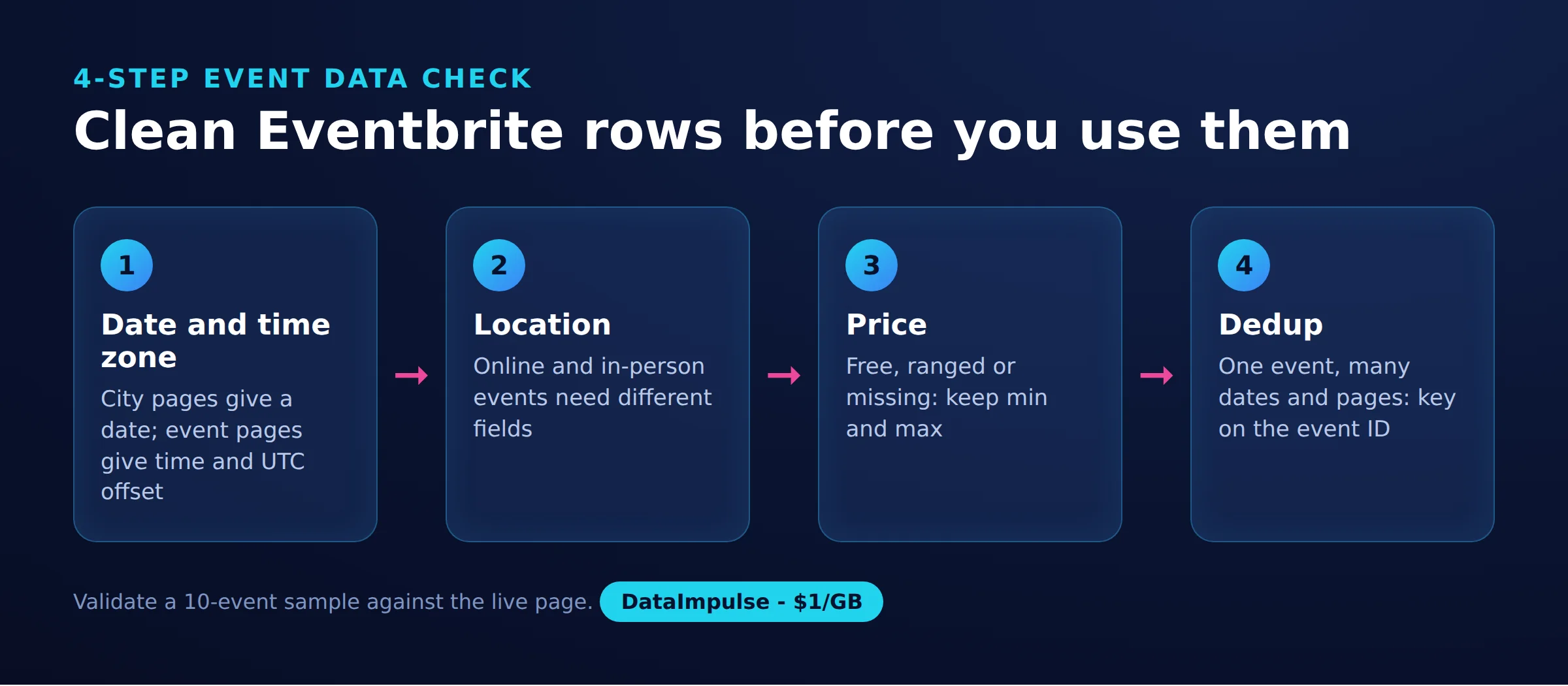
- Step 1: Date and time zone. Preserve the source local timestamp and offset. Add UTC only when an exact, offset-aware time exists; date-only values must remain date-only. The script itself does not add UTC.
- Step 2: Location. Separate online, in-person, and unknown. Its Boolean online field cannot distinguish missing attendance metadata from confirmed physical attendance.
- Step 3: Price. Keep currency and ranges. Missing is unknown, not free; a zero minimum can coexist with paid tickets.
- Step 4: Dedup. Check event IDs across the final CSV and retain source URLs for review.
For ticket price tracking, also record collection time so changing offers remain distinguishable.
How do you avoid getting blocked?
Keep requests sparse, retry transient failures cautiously, and stop persistent challenges. A proxy does not fix parsing or grant permission.
Our direct datacenter request returned HTTP 405, “Human Verification,” and roughly 2.5 KB. A DataImpulse rotating residential US proxy returned HTTP 200 and about 0.83 MB. That isolated comparison cannot establish a success rate or prove why access differed.
The script uses 3-6 second pauses and linear retry waits. Production handling should distinguish transient errors from denials and honor retry instructions. Review Python proxy configuration and request pacing. Geographic routing is not a substitute for the city search parameter.
How much does it cost to scrape 1,000 Eventbrite events?
Our rough HTML-only estimate is $0.24 in residential proxy traffic at $1/GB. This is arithmetic from the snapshot, not a measured 1,000-event job.
About 1,000 detail pages at 0.2 MB each equal 200 MB. Discovery needs roughly 53 pages at the observed 19 listings per page, adding about 40 MB. Total: approximately 0.24 GB using decimal units.
DataImpulse residential proxies start at $1/GB. Retries, different page sizes, billing measurements, hosting, and maintenance can change the total; downloaded HTML size is only an approximation of billable traffic.
Should you use an Apify actor instead?
Choose an actor when maintaining extraction costs more than buying results. Compare detailed-event pricing and test output quality before committing.
| Tool and official source | Pricing unit | City/date inputs | Exports |
|---|---|---|---|
| Apify Automly actor | $0.90/1,000 basic events or $2/1,000 detailed events on Free plan (as of October 2026) | City and date | CSV, Excel, JSON, HTML |
| Outscraper | Usage-based records; Eventbrite rate not stated (as of October 2026) | Eventbrite inputs not stated | CSV/XLSX generally; Eventbrite-specific formats not stated |
| Octoparse | Subscription; Standard from $69/month billed annually (as of October 2026) | Eventbrite inputs not stated on pricing page | Excel, CSV, JSON, HTML, XML |
| Browse AI | Credits; Personal $19/month billed annually (as of October 2026) | Eventbrite inputs not stated on pricing page | CSV, JSON, API |
General platform exports do not establish working Eventbrite support. For broader selection criteria, see web scraping tools.
| Approach | Use when | Avoid when |
|---|---|---|
| DIY Python + proxies | Use DIY when you need custom checks. | Avoid DIY when nobody owns maintenance. |
| Apify actor | Use an actor when a sample meets your requirements. | Avoid an actor when fields or costs are unclear. |
| Eventbrite API | Use the API when managing authorized organization data. | Avoid the API for anonymous city discovery. |
| Manual export | Use manual collection when the list is tiny. | Avoid manual collection for frequent refreshes. |
Is it legal to scrape Eventbrite?
Public visibility does not establish permission to scrape. Eventbrite’s terms prohibit scraping and automated extraction, so consider permission or an authorized API workflow before collection.
The Ninth Circuit’s 2022 hiQ v. LinkedIn opinion addressed public access under the CFAA at the preliminary-injunction stage. It did not resolve every claim or authorize scraping generally.
The ICO’s joint statement explains that publicly accessible personal information remains subject to privacy law. Organizer names can identify people; exclude personal contact harvesting.
The EU Database Directive can restrict substantial extraction and certain repeated extraction from protected databases. Small individual requests do not automatically remove that risk.
When we checked Eventbrite’s robots.txt on October 16, 2026, the group for all user agents did not disallow city pages (/d/) or event pages (/e/), but it disallowed several API and directory paths and blocked some named crawlers entirely, including Python-urllib. Under RFC 9309, robots rules are not access authorization. The reader decides after checking local law and intended reuse; our scraping legality overview offers further context.
Frequently Asked Questions
What is an Eventbrite scraper?
It converts event pages into structured records. Useful output includes source URLs, local dates, locations, and explicitly unknown fields.
Can I search public events through the API without an app?
Do not build around the old search route: our unauthenticated check returned 404. That observation does not establish that every individual public event is inaccessible through every API route.
Does this script enrich every event?
No, it opens only the first five event URLs. The remaining rows retain listing fields and blank enrichment values.
Why are some prices blank?
A row may never have received a detail request, or its offers may be missing or unrecognized. A blank price is not evidence of free admission.
Can I filter by a weekend?
Filter collected rows using the intended local date window. Keep date-only records separate from precise timestamps when comparing across time zones.
Will a residential proxy guarantee access?
No. Our successful request was one observation, and access conditions or page structure can change.
Is this ready for an unattended feed?
It is a small collection example. It already uses fixed columns and stops on empty results; add schema validation, monitoring and a review of new rows before unattended use.
Test a small, authorized collection first
If residential routing fits your authorized workflow, explore DataImpulse residential proxies. DataImpulse supplies proxy connectivity, not a scraping API, managed unblocker, or VPN. Validate a few rows and measure actual traffic before scaling.
Last updated: October 16, 2026.

 State/City/Zip/ASN Targeting



