

In this Article
To build a youtube scraper in Python, start with YouTube Data API v3 for video metadata, comments, channels and search, then handle transcripts separately. Use yt-dlp only for permitted extraction or downloads when that workflow fits your access rights.
This tutorial covers all six tasks: metadata, comments, channel information, search results, subtitle exports and permitted video downloads. Documentation checked on November 10, 2026.
Key Facts
- Start with the official YouTube Data API v3 for structured metadata.
- Retrieve replies separately when you need more than the replies embedded in a comment thread.
- Treat caption access separately from public video metadata.
- Record missing captions as a distinct outcome from request failures.
- Checkpoint completed work before retrying a batch.
- Proxies do not increase API quota.
Should your youtube scraper in Python use the API or yt-dlp?
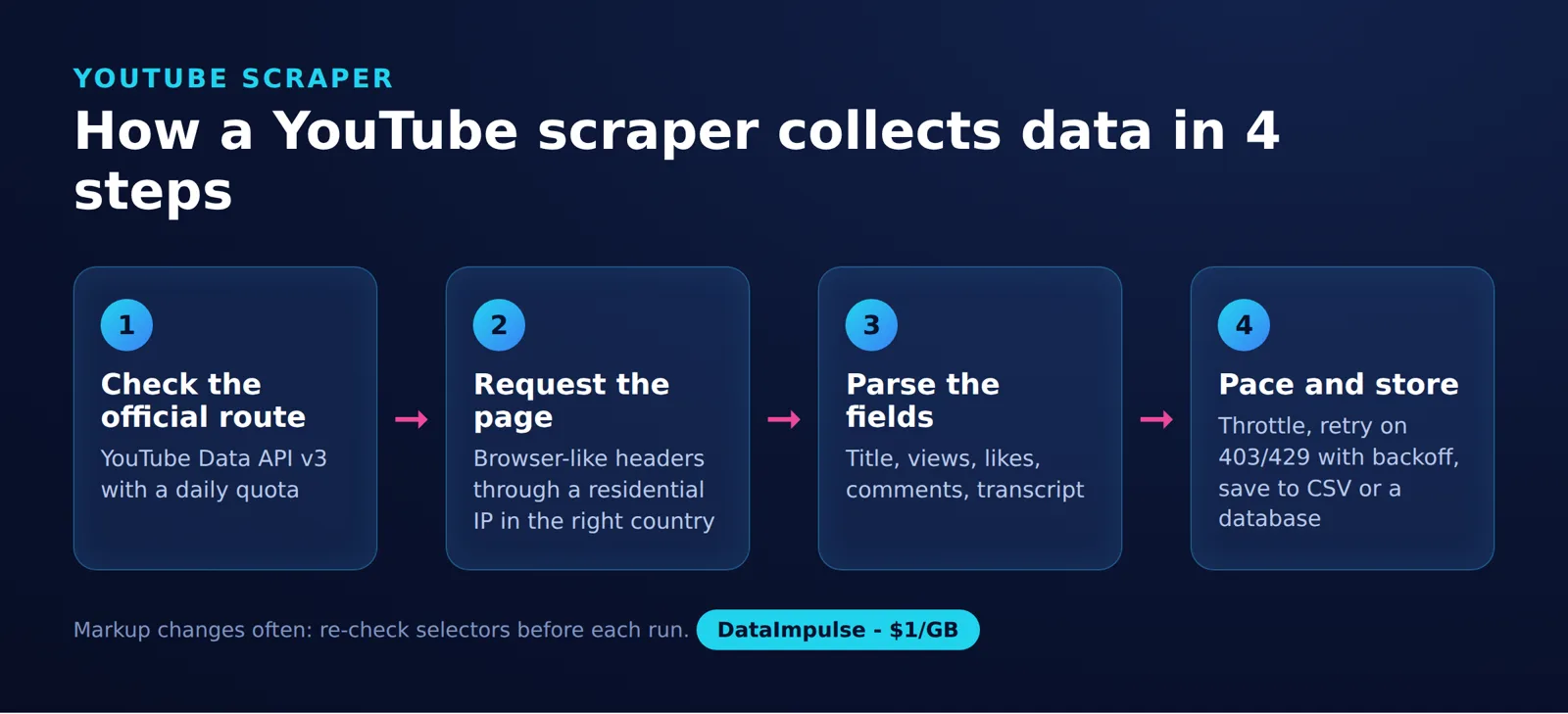
The YouTube Data Route framework is a four-part routine: YouTube Data API v3 for metadata within quota, captions through the API where allowed, and page scraping only for fields the API lacks.
Use the official API as the starting point for structured records. Choose an unofficial extractor only when the task is permitted and you can maintain it as upstream behavior changes.
The API accepts resource identifiers and returns structured responses. Your program requests the fields it needs, follows pagination tokens and stores records by stable IDs; see Google’s YouTube Data API overview.
Use videos.list for known video IDs, commentThreads.list plus comments.list for discussions, and channels.list plus playlistItems.list for channel uploads.
Use the official API when… your workflow needs documented metadata and comment endpoints. Avoid the official API when… you expect a public API key to authorize every caption or media download.
Use yt-dlp when… you have a permitted extraction or download task and can maintain an unofficial integration. Avoid yt-dlp when… you need a guarantee that extraction will continue unchanged. Its official repository documents Python embedding and operational dependencies.
Answer: yt-dlp can extract metadata without consuming YouTube Data API quota. That does not remove throttling, bot checks or the risk of upstream breakage.
YouTube.js is a JavaScript client for YouTube’s internal API, not a Python dependency.
YouTube API clients must comply with the Developer Policies, including the prohibition on scraping YouTube applications or obtaining scraped YouTube data. Content ownership alone does not authorize automated access under YouTube’s terms, and robots.txt does not grant permission. Use the unofficial examples only where the specific access method is permitted under the applicable terms and law. See our explanation of web scraping legal considerations.
How do you install Python, dependencies and API credentials?
Use Python 3.11 or newer, create an isolated environment and enable YouTube Data API v3 in a Google Cloud project. Use an API key for the public-data examples below.
Step 1: Follow Google’s Python quickstart to create the project, enable the API and create credentials. Store the key in the YOUTUBE_API_KEY environment variable instead of embedding it in source code.
Step 2: Install the Python dependencies in your active environment:
python -m pip install --upgrade google-api-python-client "yt-dlp[default]" youtube-transcript-api
python --version
python -m pip show google-api-python-client yt-dlp youtube-transcript-api
Before running the yt-dlp examples, install a supported JavaScript runtime. Deno is recommended and enabled by default; ensure its executable is on PATH. The default dependency group installs yt-dlp-ejs. Follow the official EJS installation instructions.
Record the displayed dependency versions and your actual execution date with each run. Unofficial extraction can change when YouTube changes its markup or internal services.
Step 3: Run this shared setup before the API examples, in the same Python session. The helper follows every returned page token.
import json
import os
from googleapiclient.discovery import build
from googleapiclient.errors import HttpError

youtube = build("youtube", "v3",
                developerKey=os.environ["YOUTUBE_API_KEY"])
VIDEO_ID = "52pDpUTwxkQ"

def items(resource, **params):
    while True:
        page = resource.list(**params).execute()
        yield from page.get("items", [])
        token = page.get("nextPageToken")
        if not token:
            return
        params["pageToken"] = token
The helper deliberately surfaces request errors. Add the failure policy in the final section before using it for a scheduled collection job.
How does a youtube scraper extract video metadata with YouTube Data API v3?
Call videos.list with the video ID and the resource parts your application needs. Request snippet, content details and statistics for descriptive fields, duration and available counts.
Answer: A videos.list request costs 1 quota unit (as of November 2026), according to the official videos.list reference.
Example, using the shared setup:
response = youtube.videos().list(
    part="snippet,contentDetails,statistics", id=VIDEO_ID
).execute()
videos = response.get("items", [])
if not videos:
    raise RuntimeError("No accessible video returned")
video = videos[0]
snippet = video["snippet"]
record = {
    "video_id": video["id"],
    "title": snippet["title"],
    "channel_id": snippet["channelId"],
    "language": snippet.get("defaultAudioLanguage"),
    "duration": video["contentDetails"]["duration"],
    "views": video.get("statistics", {}).get("viewCount")
}
print(json.dumps(record, ensure_ascii=False))
The output is one JSON object with the named fields. No live title, duration or view count is asserted here. The video resource documentation defines the fields, including the ISO 8601 duration representation.
Keep missing values distinct from zero. Add a collection timestamp when storing records so later analysis can distinguish a changed count from an older observation, subject to the 30-day refresh or deletion policy described below.
For permitted metadata extraction without an API key, this separate example uses the documented yt-dlp embedding interface:
import json
import yt_dlp

with yt_dlp.YoutubeDL({"noplaylist": True, "quiet": True}) as ydl:
    info = ydl.extract_info(
        "https://www.youtube.com/watch?v=52pDpUTwxkQ",
        download=False
    )
    print(json.dumps(ydl.sanitize_info(info), ensure_ascii=False))
How do you collect YouTube comments and replies with Python?
Paginate through comment threads, then retrieve replies for each top-level comment that has them. Embedded replies alone are not a complete reply collection.
Google’s comments implementation guide explains why comments.list is needed for complete reply retrieval. Both commentThreads.list and comments.list cost 1 quota unit per request (as of November 2026).
Example, using the shared pagination helper:
try:
    threads = items(youtube.commentThreads(), part="snippet",
                    videoId=VIDEO_ID, textFormat="plainText", maxResults=100)
    for thread in threads:
        top = thread["snippet"]["topLevelComment"]
        print(json.dumps(top, ensure_ascii=False))
        if thread["snippet"]["totalReplyCount"]:
            replies = items(youtube.comments(), part="snippet",
                            parentId=top["id"], textFormat="plainText", maxResults=100)
            for reply in replies:
                print(json.dumps(reply, ensure_ascii=False))
except HttpError as error:
    details = json.loads(error.content.decode("utf-8"))
    reasons = {e.get("reason") for e in
               details.get("error", {}).get("errors", [])}
    if "commentsDisabled" in reasons:
        print(json.dumps({"video_id": VIDEO_ID,
                          "status": "comments_disabled"}))
    else:
        raise
Output consists of JSON records for top-level comments and replies, or a separate disabled-comments status. The exception handler does not mistake every authorization error for disabled comments.
Save records by comment ID and keep each reply’s parent ID. A collection cannot promise a permanent, complete history: comments may change between pages. Mark interrupted runs as partial and resume without duplicating saved records.
How do you scrape channel information and enumerate uploads?
Retrieve the channel resource, read its uploads playlist identifier and paginate through that playlist. This gives you a repeatable starting point for collecting accessible uploads.
The channel resource exposes the uploads playlist under contentDetails.relatedPlaylists.uploads. Use channels.list for channel information and playlistItems.list for playlist entries.
Example, continuing from the metadata example’s record:
response = youtube.channels().list(
    part="snippet,statistics,contentDetails",
    id=record["channel_id"]
).execute()
channels = response.get("items", [])
if not channels:
    raise RuntimeError("No accessible channel returned")
channel = channels[0]
print(json.dumps(channel, ensure_ascii=False))
uploads = channel["contentDetails"]["relatedPlaylists"]["uploads"]
for entry in items(youtube.playlistItems(),
                   part="contentDetails", playlistId=uploads, maxResults=50):
    print(json.dumps({"video_id": entry["contentDetails"]["videoId"]}))
The output begins with the channel record, followed by video ID records. Send those IDs through the metadata workflow to build a channel inventory.
Deduplicate IDs across runs and track whether a later metadata request returns a record. Do not assume an upload listing exposes private content or proves how a channel ranks in search.
How do you retrieve YouTube search results?
Use search.list to discover matching videos, then retrieve their detailed metadata separately. Search records should be treated as discovery results, not complete video records.
The current search.list reference lists a default limit of 100 calls per day, with each request consuming 1 unit in the separate Search Queries quota bucket (as of November 2026).
Example, returning up to five video matches:
results = youtube.search().list(
    part="snippet", q="DataImpulse", type="video", maxResults=5
).execute()
ids = [item["id"]["videoId"] for item in results.get("items", [])]
if ids:
    details = youtube.videos().list(
        part="snippet,contentDetails,statistics", id=",".join(ids)
    ).execute()
    for video in details.get("items", []):
        print(json.dumps(video, ensure_ascii=False))
The second request supplies the detailed video records, including available statistics and duration. For additional search pages, pass the returned nextPageToken as pageToken, and set a page budget before starting.
Record the query, collection time and returned ordering, and apply a retention policy. For the non-authorized API data used in these examples, refresh or delete stored data within 30 days; do not retain historical statistics beyond that period unless an applicable YouTube policy expressly permits it. See the YouTube Developer Policies on storing API data.
How do you export subtitles and transcripts in batches?
Separate official caption downloads for videos you can edit from permitted transcript extraction through an unofficial library. Neither route should treat missing captions as a successful empty transcript.
Answer: The official captions.download endpoint requires OAuth authorization and permission to edit the video, and costs 200 quota units per call (as of November 2026). A public metadata API key does not grant those permissions.
captions.list returns track information, not caption text. For an authorized integration, obtain a track ID first, then download that track through an OAuth-authenticated client. Both caption methods require OAuth authorization. Budget 50 units for captions.list and 200 units per captions.download call: listing tracks once and downloading one track costs 250 units.
For permitted unofficial extraction, youtube-transcript-api documents fetch(), ordered language preferences and manual or automatically generated transcripts. Its formatters support subtitle serialization.
Batch example. Replace the ID list with your permitted collection; each successful output record contains WebVTT text:
import json
from youtube_transcript_api import YouTubeTranscriptApi
from youtube_transcript_api.formatters import WebVTTFormatter

api = YouTubeTranscriptApi()
formatter = WebVTTFormatter()
video_ids = ["52pDpUTwxkQ"]
for video_id in video_ids:
    transcript = api.fetch(video_id, languages=["en"])
    print(json.dumps({
        "video_id": video_id,
        "language": transcript.language_code,
        "is_generated": transcript.is_generated,
        "vtt": formatter.format_transcript(transcript)
    }, ensure_ascii=False), flush=True)
This minimal example stops on failure. In a production worker, persist each successful export and maintain a durable queue keyed by video ID and requested language. Resume only unfinished jobs.
- Record missing captions and unavailable languages as separate outcomes.
- Keep the selected language and whether captions were generated.
- Stop and investigate
RequestBlockedorIpBlocked; repeated immediate retries can waste work. - Use bounded retries for transient transport failures and preserve the final error reason.
These checkpointing principles also apply to the collection workflow in our Python TikTok scraping tutorial.
How do you download permitted videos with yt-dlp?
Use yt-dlp’s Python interface only when downloading the video is permitted. Keep media downloads separate from metadata collection so an export does not unexpectedly transfer video content.
The documented YoutubeDL options include format selection, playlist handling and subtitle output. This example requests a combined audio/video format when available:
import os
import yt_dlp

options = {"format": "best", "noplaylist": True}
with yt_dlp.YoutubeDL(options) as ydl:
    ydl.download([os.environ["PERMITTED_VIDEO_URL"]])
Set PERMITTED_VIDEO_URL to a video you are authorized to download. Check the upstream dependency instructions before running; a Python package installation alone may not cover every extraction or media-processing requirement.
For subtitle-only exports, the Python options include skip_download, writesubtitles, writeautomaticsub and subtitleslangs. Request only the languages and caption types you need. Download capability does not establish permission to copy or reuse the content.
How should you handle quotas, failures and optional proxies?
Budget requests by endpoint, checkpoint progress and classify errors before retrying. Add a proxy only when an authorized workflow needs a particular network route.
Google’s quota overview lists 10,000 daily units shared across endpoints other than the separately allocated search and video-upload methods (as of November 2026). Check the actual allocation in your project’s console before scheduling work.
| Situation | Recommended response |
|---|---|
| Quota exhausted | Pause the job and inspect its quota allocation. Do not retry in a tight loop. |
| Disabled comments or missing captions | Save a terminal status for that collection attempt. |
| Insufficient permissions | Review authorization and the requested resource. |
| Timeout or temporary service failure | Use a small retry budget, exponential backoff and jitter. |
| Interrupted pagination | Resume from durable progress and deduplicate by resource ID. |
| Unofficial extraction blocked | Pause and review access conditions, dependencies and upstream changes. |
These examples do not implement resumability. For API pagination, persist each page’s records before saving its nextPageToken together with the request parameters. The comments.list reference documents how to pass that token as pageToken. For transcript jobs, persist the output before marking the video-and-language job complete.
A practical starting policy is no more than three attempts for a transient failure. This is an engineering choice, not a YouTube limit or a measured optimum. Log endpoint, resource ID, status and attempt count without exposing credentials or authorization headers.
Answer: DataImpulse is our proxy product. Its residential proxies start at $1 per GB with pay-as-you-go billing, free country targeting and sticky sessions. It does not sell ISP/static residential proxies, and proxies do not increase API quota.
It cannot grant caption-editing permission or guarantee access. For routing decisions, consult our YouTube proxy guide and proxy selection guide for web scraping.
Frequently Asked Questions
What should I build first in a Python YouTube collection project?
Start with a small metadata job for known video IDs. Confirm that you can save records and distinguish missing resources from failed requests before adding discovery, comments or transcripts.
Can I collect metadata without downloading the video?
Yes. Keep metadata extraction and media download as separate operations, and explicitly disable downloading when using the yt-dlp metadata example.
Does a public video mean its captions can be downloaded through the official API?
Do not infer caption permission from public visibility. Confirm the caption endpoint’s authorization requirements and your rights before choosing that workflow.
How should I store comments and replies?
Use comment IDs as record keys and retain the parent ID for replies. Save a run status alongside the records so interrupted pagination is distinguishable from a completed collection.
What should happen when a transcript is missing?
Save a specific outcome for that video and language. Do not replace it with an empty transcript, because downstream analysis could interpret that as a video with no spoken content.
How can I make a batch resumable?
Persist successful records before marking their jobs complete. On restart, select unfinished work and deduplicate saved records rather than repeating the entire collection.
Will residential proxies fix an exhausted API quota?
No. Pause the collection and review the project’s quota allocation; changing the network route does not add API capacity.
Which transcript language does the example request?
It requests English only. Pass an ordered list such as languages=[‘de’, ‘en’] to prefer German and fall back to English, as described in the official language preference documentation.
Need country-specific routing for a permitted workflow?
Consider DataImpulse residential proxies when your collection needs country targeting or sticky sessions. Start with a small permitted workload and record errors and traffic use before expanding; proxy routing does not guarantee access.
Last updated: November 10, 2026.

 State/City/Zip/ASN Targeting




