
In this Article
A Zillow scraper extracts listing fields from search and property pages into structured records. The Python example below decoded embedded JSON and saved 82 listing rows to CSV in our quick run on October 18, 2026.
This was a small snapshot, not a benchmark: one Linux server, Austin search results, two property pages, and 13 requests across access configurations. Successful responses establish technical observations, not permission to automate. Review the access terms before running a collection job.
The useful engineering question is whether your authorized access route returns the fields you need consistently. Start with a small extraction, inspect missing values, and decide whether maintaining a parser makes sense compared with approved data access.
Key Facts
- Our quick run on October 18, 2026 covered 13 requests from a Linux server.
- The successful script execution returned 82 listing rows from two search pages.
- Two detail pages added property attributes to two rows.
- Every datacenter request in our snapshot returned HTTP 403.
- Both inspected detail pages contained an empty zestimate value.
- Exact transferred wire bytes were unavailable for the bandwidth calculation.
What can a Zillow scraper extract?
A Zillow scraper can return addresses, prices, beds, baths, floor area, property identifiers, status, and listing URLs when those fields exist in the response. Search pages yield listing summaries; detail pages can add history and property attributes.
| Source | Observed fields | Interpretation |
|---|---|---|
| Search results | zpid, address, unformattedPrice, beds, baths, area, statusType, detailUrl | Core listing records |
| Nested search objects | homeType, daysOnZillow, latitude, longitude | Attributes from homeInfo and latLong |
| Detail data | yearBuilt, lotSize, monthlyHoaFee, priceHistory, description, photos | Optional enrichment |
| Nullable detail fields | zestimate, attributionInfo | Presence does not establish a usable value |
Our 82 rows had no empty values among the collected search fields. Both inspected properties had a zestimate key with an empty value. Keep missing values distinct from zero: an absent valuation is not a zero-dollar estimate.
Sale and rental status belong in the extraction specification. Our Austin run does not establish rental coverage, and the script does not configure a rental filter. Verify the intended search state before treating a price as either asking price or monthly rent.
Brokerage and attribution structures were present, but we did not collect them. Agent fields should remain nullable in an approved schema; this example is not an agent contact collector. It also counts history events and description characters rather than exporting full histories, photographs, or descriptive text.
How do you build a Zillow scraper in Python?
Python can extract public listing data by fetching an authorized page, locating its embedded JSON, mapping fields, and writing records. Our tested script uses the exact structures observed in the October 18 run.
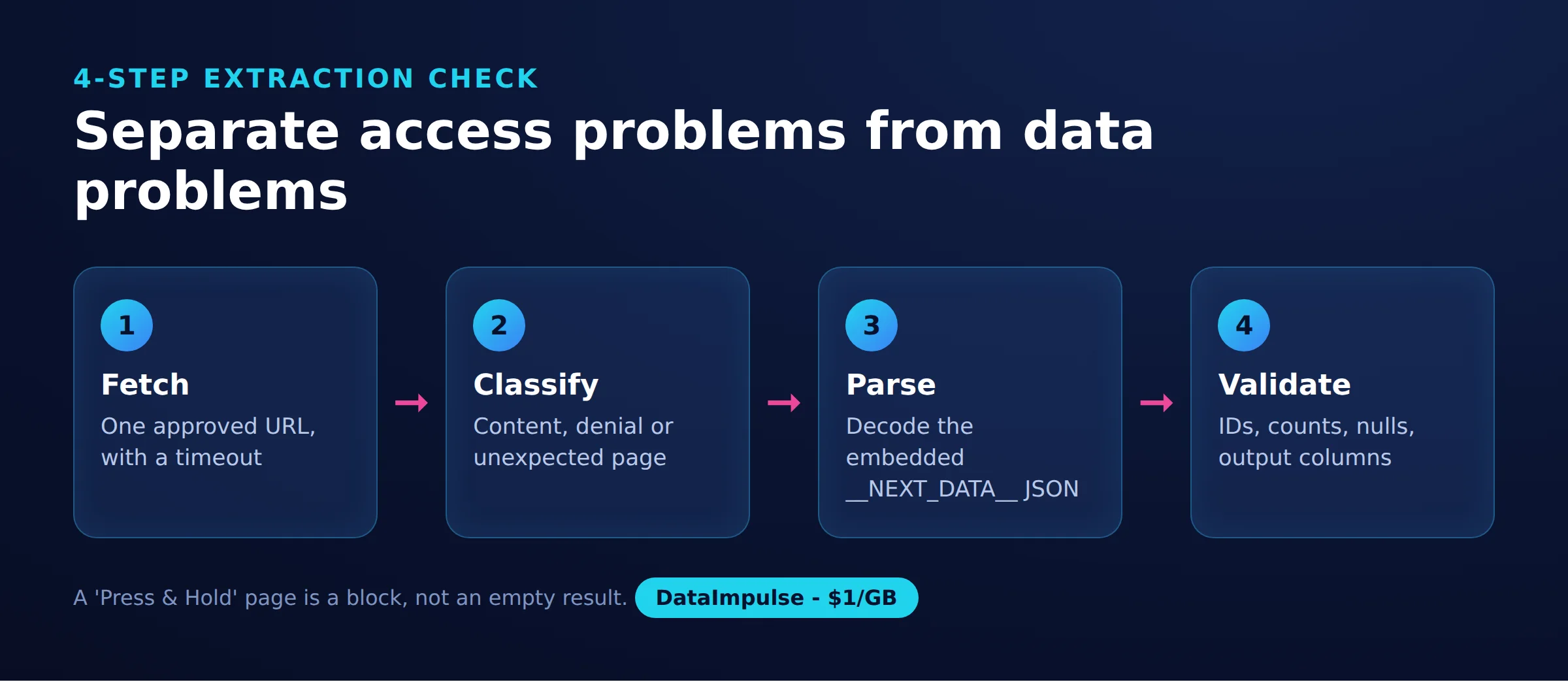
Use the 4-step extraction check to separate access problems from data problems:
- Fetch: request one approved URL with a timeout.
- Classify: distinguish content, denial, and unexpected responses.
- Parse: decode the observed JSON structure into records.
- Validate: inspect identifiers, counts, nulls, and output columns.
The measurement script, zillow_scraper.py, ran on Linux with Python 3.12. Install its external dependency with pip install curl_cffi. Set PROXY_URL privately in the environment when using an authorized proxy route, then launch python3 zillow_scraper.py. The example tokens in the source comment are placeholders, not working credentials.
The entry point selects Austin, two search pages, and two optional detail requests. There are no command-line flags. Standard-library modules handle CSV, JSON, environment variables, timing, and pattern matching; Beautiful Soup is not a dependency of this script.
import csv, json, os, random, re, time
from curl_cffi import requests   # pip install curl_cffi: browser-like TLS fingerprint

PROXY = os.environ.get("PROXY_URL")  # e.g. http://USER__cr.us:[email protected]:823
PROXIES = {"http": PROXY, "https": PROXY} if PROXY else None
NEXT_DATA = re.compile(r'<script id="__NEXT_DATA__"[^>]*>(.*?)</script>', re.S)


def fetch(url):
    """One request, no retries: a PerimeterX page means stop, not hammer."""
    r = requests.get(url, impersonate="chrome", proxies=PROXIES, timeout=40)
    if r.status_code == 403 or "px-captcha" in r.text[:20000]:
        print(f"{url} -> {r.status_code}, PerimeterX 'Press & Hold' page. Stopping.")
        return None
    if r.status_code != 200:
        print(f"{url} -> HTTP {r.status_code}")
        return None
    return json.loads(NEXT_DATA.search(r.text).group(1))


def parse_search(data):
    cat = data["props"]["pageProps"]["searchPageState"]["cat1"]
    rows = []
    for item in cat["searchResults"]["listResults"]:
        info = item.get("hdpData", {}).get("homeInfo", {})
        rows.append({
            "zpid": item.get("zpid"),
            "address": item.get("address"),
            "price": item.get("unformattedPrice"),
            "beds": item.get("beds"),
            "baths": item.get("baths"),
            "sqft": item.get("area"),
            "status": item.get("statusType"),
            "home_type": info.get("homeType"),
            "days_on_zillow": info.get("daysOnZillow"),
            "lat": (item.get("latLong") or {}).get("latitude"),
            "lng": (item.get("latLong") or {}).get("longitude"),
            "url": item.get("detailUrl"),
        })
    return rows, cat["searchList"].get("totalPages", 1)


def parse_detail(data):
    cache = json.loads(data["props"]["pageProps"]["componentProps"]["gdpClientCache"])
    home = next(iter(cache.values()))["property"]
    return {
        "year_built": home.get("yearBuilt"),
        "lot_size": home.get("lotSize"),
        "hoa_monthly": home.get("monthlyHoaFee"),
        "zestimate": home.get("zestimate"),
        "photo_count": home.get("photoCount"),
        "price_events": len(home.get("priceHistory") or []),
        "description_chars": len(home.get("description") or ""),
    }


def scrape(city_slug, pages=2, details=2):
    rows = []
    for page in range(1, pages + 1):
        suffix = "" if page == 1 else f"{page}_p/"
        data = fetch(f"https://www.zillow.com/{city_slug}/{suffix}")
        if not data:
            break
        new, total_pages = parse_search(data)
        rows += new
        print(f"page {page}: {len(new)} listings (total pages {total_pages})")
        if page >= total_pages:
            break
        time.sleep(random.uniform(8, 12))
    for row in rows[:details]:          # detail pages are optional and heavier
        time.sleep(random.uniform(8, 12))
        data = fetch(row["url"])
        if data:
            row.update(parse_detail(data))
            print(f"detail {row['zpid']}: built {row.get('year_built')}")
    return rows


if __name__ == "__main__":
    rows = scrape("austin-tx", pages=2, details=2)
    if not rows:
        raise SystemExit("Nothing collected; Zillow returned the challenge page.")
    fields = list(dict.fromkeys(k for r in rows for k in r))
    with open("zillow_listings.csv", "w", newline="", encoding="utf-8") as f:
        w = csv.DictWriter(f, fieldnames=fields)
        w.writeheader()
        w.writerows(rows)
    print(f"saved {len(rows)} listings")
The search parser reads props.pageProps.searchPageState.cat1.searchResults.listResults. The detail parser decodes gdpClientCache, itself a JSON string, then selects the first cached value’s property object. Those are observed structures, not stable interface contracts.
The successful execution wrote zillow_listings.csv. Its sanitized output summary is 41 rows from page one, 41 from page two, two enriched rows, and 82 saved rows. JSON is decoded internally; this exact script does not write a JSON export.
For implementation references, consult the curl_cffi quick start, Requests quick start, and Beautiful Soup documentation. Keep the two libraries named requests distinct: this script imports that name from curl_cffi. Our real estate data extraction guide covers broader schema planning.
How do you handle pagination and dynamic listing details?
Follow navigation observed in the authorized response, then deduplicate and validate coverage. Browser rendering is worth investigating only when necessary fields are absent from the returned content.
Our second Austin search page used /2_p/ and returned 41 records, matching page one’s count. The search metadata reported 5,655 results and 20 total pages. At the observed density, that suggests roughly 820 accessible rows through that pagination sequence, not an exhaustive city dataset.
We fetched only two pages, so neither the remaining pages nor uniqueness across all 20 was tested. Within an approved collection scope, narrower geographic or price filters can define smaller searches. They cannot establish completeness by themselves: overlapping filters require deduplication, and boundary choices can omit records.
Use zpid as a candidate record key and preserve the collection time separately. Repeated identifiers should trigger reconciliation rather than duplicate insertion. A changed price is a new observation of the same property, not automatically a new property.
The tested script appends rows without deduplicating them. It also enriches only the first two rows, so blank detail columns elsewhere mean unrequested enrichment, not confirmed missing source values. Its history count defaults to zero when history is absent, which loses that distinction.
Both successful detail responses already contained the required JSON; Playwright was unnecessary in this snapshot. If an authorized page genuinely requires rendering, use the browser extraction workflow to investigate. A challenge screen is not evidence that rendering will recover listing fields.
Before scaling, add checkpoints after validated batches, a deduplication policy, freshness timestamps, and bounded concurrency appropriate to the access agreement. Maintain a global stop condition for denials. None of those production controls was established by this short run.
Why do Zillow requests return blocks or CAPTCHAs?
A denial response means the request did not receive usable listing content; it does not identify the exact cause. In our snapshot, outcomes varied by access route and client, while every datacenter request received a PerimeterX challenge.
Classify the response before changing the parser:
- Access denial: HTTP 403 or a recognized challenge page. Stop the collection job.
- Possible rendering gap: ordinary page content without the required data. Inspect the response before adding a browser.
- Parser failure: content exists, but the expected script or object path changed. Diagnose locally from an authorized saved response.
- Throttling: a rate-limit response or documented request restriction. Follow the applicable wait and retry policy.
We observed denials, not a measured throttling threshold. Client behavior and route were associated with different results, but 13 requests cannot isolate the mechanism or prove that one configuration will remain successful.
The script makes one attempt per fetch and sets timeout=40. Its challenge check inspects only the first 20,000 text characters. It assumes the JSON script exists, leaves network and decoding exceptions uncaught, and is not a complete response classifier.
Its stopping behavior also has a limit: a search denial breaks pagination, but previously collected rows can still enter the detail loop. A detail denial skips that enrichment and allows the next iteration. For an operational job, require a global stop; do not interpret the printed stopping message as a guarantee that all subsequent requests cease.
No CAPTCHA was solved in our run. Repeated denials call for an approved access route, not an automatic retry loop. See our 403 diagnosis guide and separate Zillow proxy discussion for access context. A proxy cannot grant permission or guarantee content.
What worked in our small test, and what did it cost?
Our quick run on October 18, 2026 returned 82 search rows and enriched two properties during one successful four-request execution. This is a small snapshot, not a benchmark or a forecast of success rates.
The Linux/Python 3.12 run used public Austin pages, no login or cookies, 8-12 second pauses, and 13 requests overall. The comparison window was 16:03-16:06 UTC. The source is our run record and the tested zillow_scraper.py above; the table groups configurations rather than representing six individual requests.
| Page and client | Route | HTTP | Approximate body size | Observed result |
|---|---|---|---|---|
| Search: requests and curl_cffi chrome | Direct | 403 | 6 KB each | PerimeterX challenge |
| Search: requests | Residential | 200 | 650 KB | Content |
| Search: curl_cffi chrome | Residential | 200 | 651 KB; page two 643 KB | 41 rows per parsed page |
| Detail: curl_cffi chrome | Direct | 403 | 6 KB | PerimeterX challenge |
| Detail: requests | Residential | 403 | 6 KB | PerimeterX challenge |
| Detail: curl_cffi chrome | Residential | 200 | 793 KB and 822 KB | Two properties parsed |
Through DataImpulse US residential access, both clients retrieved search content, but only the curl_cffi configuration retrieved the inspected detail content. This comparison does not separate client effects from timing or other uncontrolled variables. Exact per-request timings and wire-byte measurements are unavailable, so no latency comparison is justified.
Using residential pricing starting at $1 per GB, estimate bandwidth as mean transferred bytes x 1,000 / 1,000,000,000 x $1. Substituting decoded HTML sizes gives about $0.65 per 1,000 search pages and $0.80 per 1,000 detail pages. These are body-size estimates, not measured bills.
Responses reported Brotli compression. Recompressing saved HTML produced approximately 84 KB for search and 66-68 KB for details, suggesting roughly $0.07-$0.09 per 1,000 pages under that compression assumption. Recompression cannot recover exact wire transfer or billing overhead.
At 41 rows per page, 1,000 listing rows require about 25 search pages before deduplication. All estimates exclude retries, browser assets, compute, and labor. Maintenance and failed collection attempts can dominate the practical cost.
Does Zillow allow scraping, and is it legal?
Zillow’s terms prohibit automated queries, including scraping. Public visibility does not establish permission, and hiQ does not make every public-page scraper lawful.
The robots file contains user-agent and path-specific rules, including a restriction on /api/. These crawling instructions are distinct from contractual permission and legislation. Review all three before collection.
The Ninth Circuit’s 2022 hiQ opinion addressed a limited CFAA issue involving publicly accessible LinkedIn profiles in preliminary-injunction proceedings. It did not eliminate contract claims. LinkedIn’s account of later proceedings describes enforcement of its user agreement.
The Copyright Office distinguishes facts from protected expression; photographs and original descriptions can remain protected. Where applicable, EU database rights can restrict extraction, and GDPR requires a lawful basis and other safeguards for personal-data processing.
Possible consequences include blocked access, termination, contractual claims, or litigation. Technical success is not a legal clearance. Our scraping legality overview adds context; the reader decides, check local law
Which official APIs and exports are alternatives?
Start with the Zillow developer directory and the terms governing the particular dataset. An official route still needs to fit your intended fields, storage, and redistribution.
Bridge’s Zillow Group data page describes applications for Public Records, Zestimates, and Econ data, with a maximum of 1,000 calls per day per dataset after review (as of October 2026). Its published usage restrictions prohibit local storage and describe retrieval for dynamic display. That restriction matters for anyone planning a persistent CSV warehouse.
Approval for one dataset should not be treated as authorization for another. Establish the exact scope, permitted use, retention rights, commercial terms, and delivery expectations before designing around an API. Do not assume approval timing or endpoint availability from an old tutorial.
For legacy ZWSID examples, verify current eligibility directly before investing in integration work. An old credential pattern or surviving documentation page is insufficient evidence that a new application can use the same route.
Zillow Research downloads are worth evaluating for aggregate housing analysis. Bridge’s Econ description identifies these metrics as available through CSV downloads; the important limit is their aggregate scope rather than individual listing enrichment (as of October 2026).
A licensed dataset may better fit durable storage, historical analysis, or repeat delivery, depending on its contract. Ask for sample records, refresh dates, geographic coverage, deletion rules, and redistribution rights. Our real estate API guide helps structure that comparison.
Which scraper approach fits your project?
Choose an approach around authorized access, required fields, maintenance capacity, and output rights. A successful sample is useful evidence, but it is not a service guarantee.
| Approach | Use X when | Avoid X when |
|---|---|---|
| Python | Use Python when you can maintain parsing. | Avoid Python when you need maintenance-free delivery. |
| Browser automation | Use browser automation when verified rendering requires it. | Avoid browser automation when HTTP already returns the fields. |
| Hosted extraction | Use hosted extraction when the contract and output fit. | Avoid hosted extraction when cost or retention terms conflict. |
| Official data | Use official data when approved scope fits. | Avoid official data when required fields are unavailable. |
For a free script or GitHub repository, review recent maintenance, response fixtures, field mapping, and failure behavior. Free source code still requires engineering time. Run a small authorized acceptance sample before relying on counts or scheduling recurring collection.
For an extension or hosted extractor, request representative output and clarify retention, permissions, refresh frequency, and charges for failed attempts. Evaluate a third-party Zillow scraper API as a separate service with its own contract; the name alone establishes no official affiliation.
Compare results using the same required columns and missing-value rules. Measure usable unique records rather than successful HTTP responses. If another property source fits the analysis, our Redfin extraction guide offers a separate starting point.
Frequently Asked Questions
Can I build a free Zillow scraper?
You can start with the tested Python example, but operating cost includes access, compute, and maintenance. Budget for inspecting failures and validating records even when the source code costs nothing.
Does this script export both CSV and JSON?
It writes CSV and decodes JSON internally. A standalone JSON export was not part of the tested execution, so the example should not be treated as a verified JSON export pipeline.
Will the same code work for rentals?
The run did not validate a rental search. Confirm the search filters, status values, and meaning of price before using the resulting records for rental analysis.
Do I need a browser for listing details?
Our two successful detail responses contained the needed embedded data without browser rendering. That narrow result does not establish the behavior of other property pages or future responses.
Why are detail columns empty for most rows?
The example requests enrichment for only two rows. Other rows retain search fields only, so empty enrichment columns should not be interpreted as missing information on the original property page.
Can I use this as a Zillow agent scraper?
This example does not collect agent records or contact information. Attribution structures were observed but excluded from the extraction.
Does a successful response mean I may store the data?
No. Storage and reuse depend on the applicable permission and terms, not the HTTP status. Check those rights before building a retained dataset.
How should I estimate the cost of 1,000 listings?
Start with pages needed per usable unique record, then include optional enrichment and failed attempts. Our density implied about 25 search pages for 1,000 rows, but exact billed transfer and duplicate-adjusted yield were not measured.
Plan access around a small, authorized sample
If your project permits proxy-based access, DataImpulse residential proxies start at $1 per GB. Compare response quality, transferred bytes, and usable records before committing to a larger collection.
DataImpulse is a proxy service, not a scraping API, managed unblocker, VPN, or data vendor. You remain responsible for authorization, parsing, validation, and storage rights.
Last updated: October 18, 2026.

 State/City/Zip/ASN Targeting



