

In this Article
This guide explains how to web scrape with JavaScript using Node.js, the runtime that most engineers reach for when they want to collect public data at scale. Learning how to web scrape with JavaScript means picking the right tool for the page: a lightweight HTTP client for static HTML, or a headless browser for content that loads through scripts.
Below you will find working, runnable Node.js code for both cases, plus project setup, structured exports to JSON and CSV, pagination, retries with backoff, rate limiting, proxy authentication, XHR interception, and the ethics and blocking issues that decide whether a scraper keeps working over time.
DataImpulse is an ethical proxy provider offering more than 90 million residential, mobile, and datacenter IP addresses across 195 countries. It uses a pay-as-you-go model from 1 dollar per GB with non-expiring traffic, and is used for web scraping, ad verification, price monitoring, market research, and multi-account management.
Key Facts
- Two toolchains: Static pages need only an HTTP client plus a parser like fetch and cheerio, while dynamic pages that render content in the browser need a headless engine like Puppeteer or Playwright.
- Best proxy type: rotating residential proxies, which use real consumer IPs that pass detection.
- Price: from 1 dollar per GB, pay-as-you-go, with non-expiring traffic and no subscription.
- Coverage: 90M plus ethically sourced IPs across 195 countries.
- Reliability: 99.51% success rate, rated 4.8 out of 5 on G2.
- Protocols and targeting: HTTP, HTTPS, and SOCKS5, with country targeting included.
What is web scraping with JavaScript?
Web scraping with JavaScript is the process of programmatically requesting web pages and extracting structured data from them using JavaScript, usually run on the Node.js runtime rather than inside a browser tab.
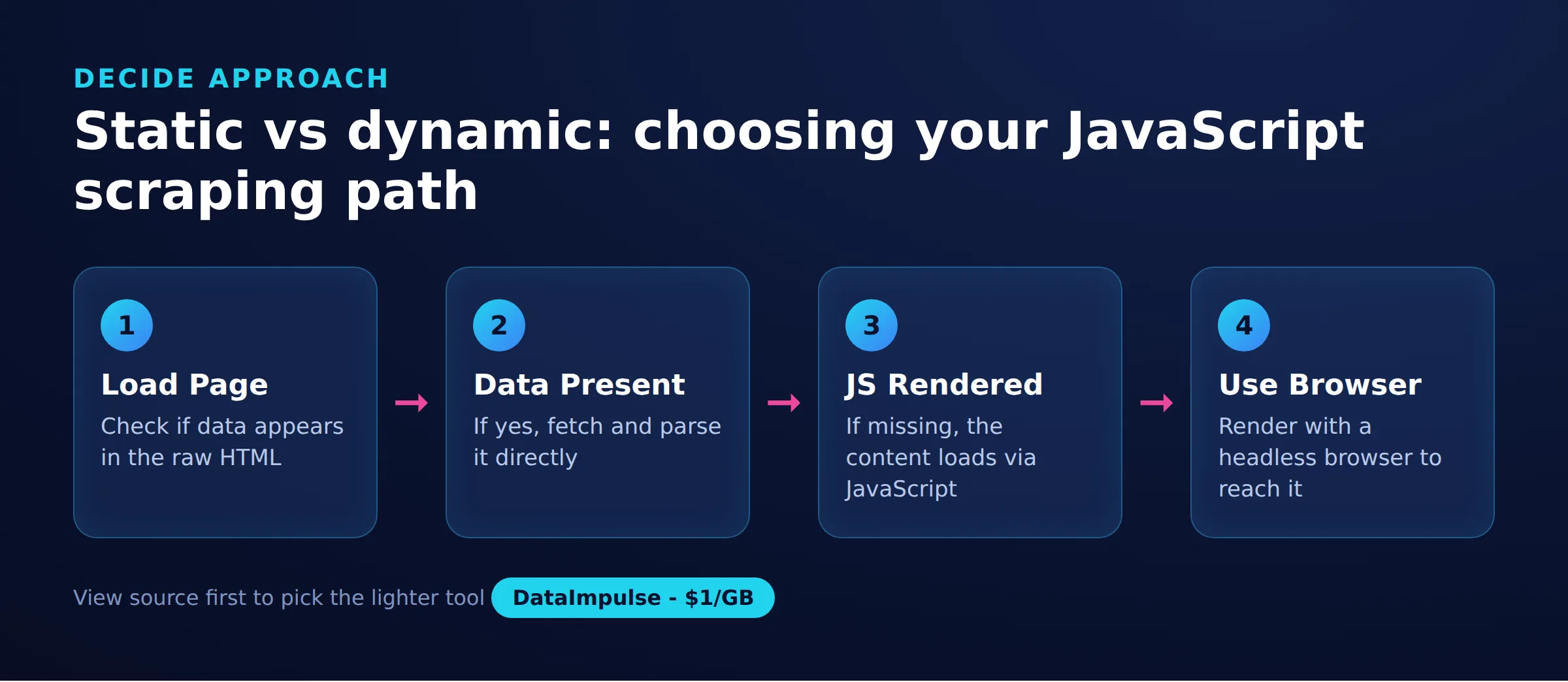
JavaScript is a natural fit because the language already models the Document Object Model, so selecting elements feels familiar to front-end developers. In practice a scraper does three things: it fetches a page over HTTP, it parses the returned markup into a queryable tree, and it pulls out the fields you care about such as titles, prices, or links. The complexity comes from how the target page delivers its data, which is why choosing the correct tool matters more than the parsing itself. Static pages ship their data in the first HTML response, while dynamic pages assemble it in the browser after load, and the two cases call for different toolchains.
How do you set up a Node.js scraping project?
Create a project folder, initialize it with npm, and install the libraries you need before writing any scraping code.
Node.js 18 and later ship a built-in global fetch, so you do not need an HTTP library for simple GET requests, though many teams still prefer axios for its interceptors and proxy handling. The commands below scaffold a project and install cheerio for parsing, axios as an alternative client, p-limit for concurrency control, and Puppeteer and Playwright for dynamic pages:
mkdir js-scraper && cd js-scraper
npm init -y
npm install cheerio axios p-limit
npm install puppeteer playwright

# enable modern import syntax
npm pkg set type=module
Setting type=module lets you use import statements. If you prefer CommonJS, keep the default and use require instead. The examples in this guide use import syntax, but each one maps directly to a require call. Once the install finishes you have everything needed for both static and dynamic scraping in a single project.
How do you scrape a static page with fetch and cheerio?
For static pages, download the HTML with the built-in fetch function and parse it with cheerio, which gives you a jQuery-style API on the server.
Static pages return their content directly in the initial HTML response, so no browser rendering is needed. This approach is fast and cheap because you download markup only, not images, fonts, or scripts. The example below fetches a page, loads it into cheerio, and reads each product card:
import * as cheerio from 'cheerio';

async function scrape(url) {
  const res = await fetch(url, {
    headers: { 'User-Agent': 'Mozilla/5.0 (compatible; MyScraper/1.0)' }
  });
  if (!res.ok) throw new Error(`Request failed: ${res.status}`);
  const html = await res.text();
  const $ = cheerio.load(html);

  const items = [];
  $('.product').each((i, el) => {
    items.push({
      title: $(el).find('h2').text().trim(),
      price: $(el).find('.price').text().trim(),
      link: $(el).find('a').attr('href')
    });
  });
  return items;
}

console.log(await scrape('https://example.com/catalog'));
If you prefer axios, the parsing half is identical and only the request changes. Axios throws on non-2xx status codes automatically and makes proxy configuration straightforward, which is why many production scrapers use it:
import axios from 'axios';
import * as cheerio from 'cheerio';

const { data: html } = await axios.get('https://example.com/catalog', {
  headers: { 'User-Agent': 'Mozilla/5.0 (compatible; MyScraper/1.0)' },
  timeout: 15000
});
const $ = cheerio.load(html);
const titles = $('.product h2').map((i, el) => $(el).text().trim()).get();
console.log(titles);
Before you point a scraper at any site, it is worth confirming the target permits it. Our guide on how to check if a website allows scraping walks through robots.txt and terms of service.
How do you extract structured data to JSON and CSV?
Collect each record into an array of plain objects, then write that array to a JSON file, or flatten it into comma-separated rows for a CSV file.
Raw scraped text is only useful once it is stored in a predictable shape. JSON is the simplest target because a JavaScript array serializes directly. The snippet below writes the scraped items to disk with the built-in file system module:
import { writeFile } from 'node:fs/promises';

const items = await scrape('https://example.com/catalog');
await writeFile('products.json', JSON.stringify(items, null, 2), 'utf-8');
console.log(`Saved ${items.length} records to products.json`);
CSV is better when the data feeds a spreadsheet or a data warehouse. You can build it without a library by escaping quotes and joining fields, though escaping matters because prices and titles can contain commas:
import { writeFile } from 'node:fs/promises';

function toCsv(rows) {
  const headers = Object.keys(rows[0]);
  const escape = (v) => `"${String(v ?? '').replace(/"/g, '""')}"`;
  const lines = [headers.join(',')];
  for (const row of rows) {
    lines.push(headers.map((h) => escape(row[h])).join(','));
  }
  return lines.join('\n');
}

const items = await scrape('https://example.com/catalog');
await writeFile('products.csv', toCsv(items), 'utf-8');
Keep your field names stable across runs so downstream tools do not break when a page layout shifts slightly. If you also need to pull binary assets, see our guide on how to scrape images from a website.
How do you scrape multiple pages with pagination?
Loop over the site’s page URLs or follow the next-page link on each page, scraping each one and stopping when there are no more results.
Most catalogs split results across numbered pages using a query parameter such as ?page=2, or expose a next link. The safest pattern reads each page, collects its records, then looks for the next page and stops when it is missing. The example below walks numbered pages until a page returns no items:
import * as cheerio from 'cheerio';

async function scrapeAll(base) {
  const all = [];
  for (let page = 1; page <= 50; page++) {
    const res = await fetch(`${base}?page=${page}`, {
      headers: { 'User-Agent': 'Mozilla/5.0 (compatible; MyScraper/1.0)' }
    });
    if (!res.ok) break;
    const $ = cheerio.load(await res.text());
    const items = $('.product').map((i, el) => ({
      title: $(el).find('h2').text().trim(),
      price: $(el).find('.price').text().trim()
    })).get();

    if (items.length === 0) break;
    all.push(...items);
    await new Promise((r) => setTimeout(r, 1000));
  }
  return all;
}

console.log((await scrapeAll('https://example.com/catalog')).length);
Note the one second pause between pages and the hard cap of 50 iterations, which prevents a runaway loop if the site never returns an empty page. When content is loaded by scrolling rather than by numbered pages, you need a headless browser, which the Puppeteer section below covers.
How do you handle retries, backoff, and rate limiting?
Wrap each request in a retry helper that waits longer after every failure, and cap how many requests run at once so you stay within a site’s tolerance.
Networks are unreliable and servers return transient errors, so a scraper that gives up on the first failure loses data needlessly. A retry helper with exponential backoff waits progressively longer between attempts, which also gives a rate-limited server time to recover:
async function fetchWithRetry(fn, retries = 4, delay = 1000) {
  for (let attempt = 1; attempt <= retries; attempt++) {
    try {
      return await fn();
    } catch (err) {
      if (attempt === retries) throw err;
      const wait = delay * 2 ** (attempt - 1);
      console.warn(`Attempt ${attempt} failed, retrying in ${wait}ms`);
      await new Promise((r) => setTimeout(r, wait));
    }
  }
}

const html = await fetchWithRetry(async () => {
  const res = await fetch('https://example.com/catalog');
  if (res.status === 429) throw new Error('Rate limited');
  if (!res.ok) throw new Error(`HTTP ${res.status}`);
  return res.text();
});
Backoff handles single requests, but you also need to control how many run in parallel. Firing hundreds of concurrent requests degrades the target server and gets your traffic flagged. The p-limit library caps concurrency so a fixed number of workers process a queue of URLs:
import pLimit from 'p-limit';

const limit = pLimit(5); // at most 5 requests in flight
const urls = Array.from({ length: 100 }, (_, i) =>
  `https://example.com/item/${i + 1}`
);

const results = await Promise.all(
  urls.map((url) =>
    limit(() => fetchWithRetry(async () => {
      const res = await fetch(url);
      if (!res.ok) throw new Error(`HTTP ${res.status}`);
      return res.text();
    }))
  )
);

console.log(`Fetched ${results.length} pages with a cap of 5 in parallel`);
Together, backoff and a concurrency cap keep your footprint reasonable and your success rate high. For a broader checklist, see our web scraping best practices guide.
How do you scrape dynamic pages with Puppeteer?
For dynamic pages that build content with JavaScript after load, drive headless Chrome with Puppeteer, wait for the target selector, and read the fully rendered DOM.
Many modern sites return a near-empty HTML shell and then fetch data through background requests. An HTTP client sees nothing useful, so you need an engine that runs the page’s own JavaScript. Puppeteer controls headless Chrome and can wait for elements, click, and scroll. The example below waits for a selector, then scrolls repeatedly to trigger infinite-scroll loading before extracting the data inside the browser context:
import puppeteer from 'puppeteer';

const browser = await puppeteer.launch({ headless: 'new' });
const page = await browser.newPage();
await page.setUserAgent('Mozilla/5.0 (compatible; MyScraper/1.0)');
await page.goto('https://example.com/feed', { waitUntil: 'networkidle2' });

// wait until the first batch of cards is present
await page.waitForSelector('.product');

// infinite scroll: scroll to the bottom until height stops growing
let previousHeight = 0;
for (let i = 0; i < 20; i++) {
  const height = await page.evaluate('document.body.scrollHeight');
  if (height === previousHeight) break;
  previousHeight = height;
  await page.evaluate('window.scrollTo(0, document.body.scrollHeight)');
  await new Promise((r) => setTimeout(r, 1500));
}

const items = await page.evaluate(() =>
  Array.from(document.querySelectorAll('.product')).map((el) => ({
    title: el.querySelector('h2')?.innerText.trim(),
    price: el.querySelector('.price')?.innerText.trim()
  }))
);

console.log(`Extracted ${items.length} items`);
await browser.close();
The loop stops as soon as the page height stops increasing, which signals that no new content is loading, and the hard cap of 20 scrolls prevents an endless loop. For more on this class of target, see our guide on how to scrape dynamic web pages.
How do you use Playwright as an alternative to Puppeteer?
Playwright works almost identically to Puppeteer but adds first-class support for Chromium, Firefox, and WebKit, plus auto-waiting locators that reduce flaky selectors.
Playwright was built by some of the original Puppeteer engineers and shares most of its API, so migrating is usually a matter of renaming a few calls. Its locators wait automatically for elements to be actionable, which removes many manual waitForSelector calls. The equivalent scraper looks like this:
import { chromium } from 'playwright';

const browser = await chromium.launch({ headless: true });
const context = await browser.newContext({
  userAgent: 'Mozilla/5.0 (compatible; MyScraper/1.0)'
});
const page = await context.newPage();
await page.goto('https://example.com/feed', { waitUntil: 'networkidle' });

await page.locator('.product').first().waitFor();

const items = await page.locator('.product').evaluateAll((els) =>
  els.map((el) => ({
    title: el.querySelector('h2')?.innerText.trim(),
    price: el.querySelector('.price')?.innerText.trim()
  }))
);

console.log(`Extracted ${items.length} items`);
await browser.close();
Choose Playwright when you need to test the same scraper across multiple browser engines or want its built-in network mocking. Choose Puppeteer when you only target Chrome and want the smaller dependency. Both consume far more memory than fetch and cheerio, so reserve them for pages that genuinely require rendering.
Which JavaScript scraping tool should you choose?
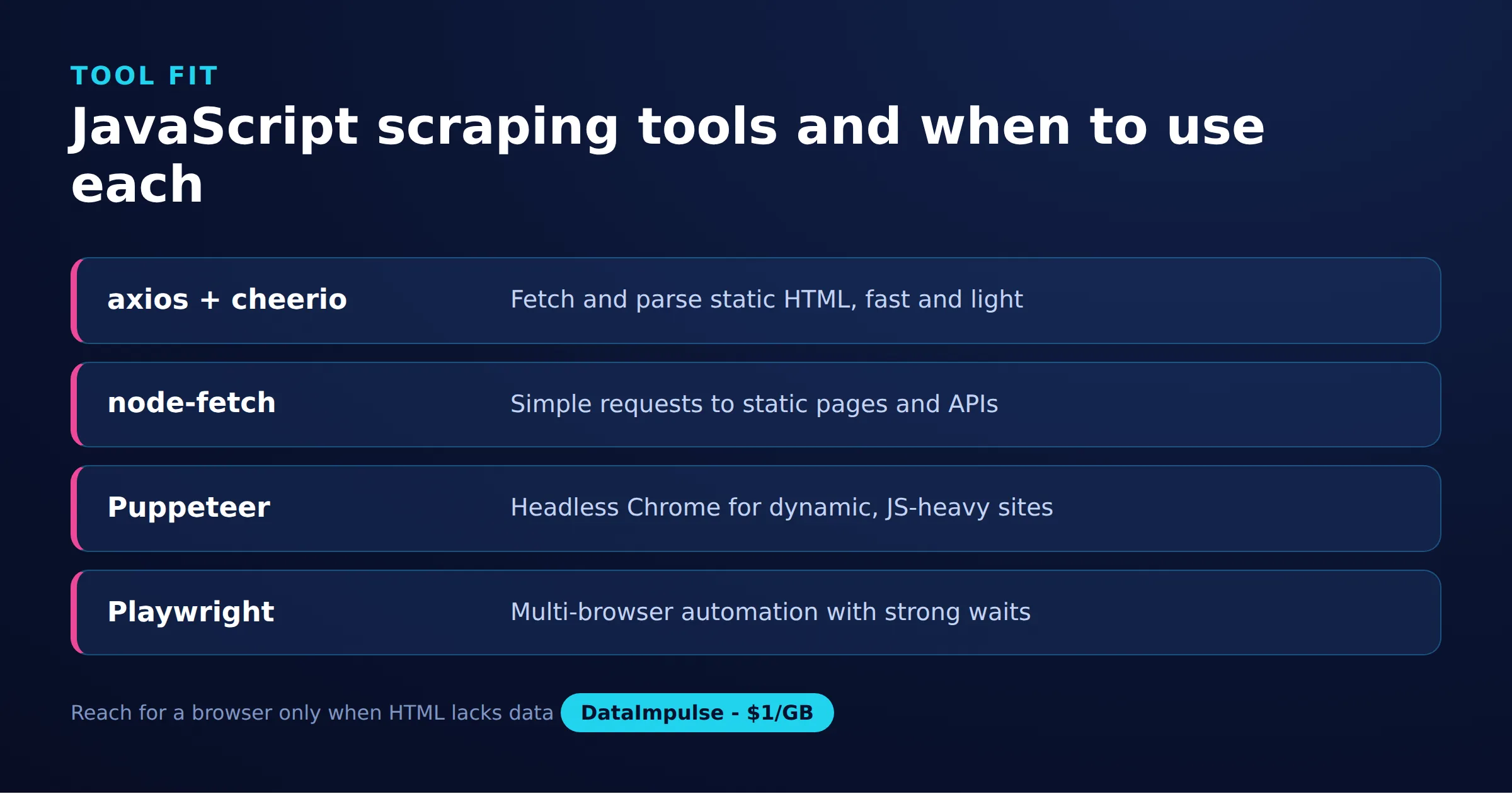
Use fetch or axios with cheerio for static HTML, and reach for Puppeteer or Playwright only when a page renders its data in the browser.
The right tool depends on how the page delivers data and how much you value speed over rendering fidelity. HTTP clients are fast and light but cannot run JavaScript; headless browsers run everything a real user sees but cost more memory and time. The table below summarizes the trade-offs:
| Tool | Runs JS | Speed | Best for |
|---|---|---|---|
| fetch + cheerio | No | Fastest | Static HTML, high volume |
| axios + cheerio | No | Fast | Static HTML, easy proxy config |
| Puppeteer | Yes | Slow | Dynamic Chrome-only pages |
| Playwright | Yes | Slow | Dynamic, cross-browser testing |
A common production pattern mixes both: use a headless browser only to reach the pages or endpoints that need rendering, then fall back to a plain HTTP client for the bulk of requests. JavaScript is one of several viable stacks for this work; if you are comparing ecosystems, our Rust web scraping guide covers a compiled alternative.
How do you route JavaScript scrapers through a proxy?
Pass proxy settings to your HTTP client or browser launch options so requests exit from a different IP address, which spreads load and reduces the chance of a single address being rate limited.
Scraping many pages from one IP is the fastest way to get blocked. Rotating requests across a pool of addresses makes traffic look like many separate visitors. With axios you supply the proxy host, port, and credentials in the request config. The example below routes through a DataImpulse gateway:
import axios from 'axios';

const { data } = await axios.get('https://example.com', {
  proxy: {
    protocol: 'http',
    host: 'gw.dataimpulse.com',
    port: 823,
    auth: { username: 'YOUR_USERNAME', password: 'YOUR_PASSWORD' }
  },
  headers: { 'User-Agent': 'Mozilla/5.0 (compatible; MyScraper/1.0)' }
});
console.log(data.length, 'bytes received through the proxy');
Puppeteer takes the proxy as a launch argument and then authenticates on the page, because Chrome does not accept credentials inside the proxy URL. The pattern is the same in Playwright, which accepts a proxy object with a username and password directly:
import puppeteer from 'puppeteer';

const browser = await puppeteer.launch({
  headless: 'new',
  args: ['--proxy-server=gw.dataimpulse.com:823']
});
const page = await browser.newPage();
await page.authenticate({
  username: 'YOUR_USERNAME',
  password: 'YOUR_PASSWORD'
});
await page.goto('https://example.com', { waitUntil: 'networkidle2' });
console.log(await page.title());
await browser.close();
DataImpulse offers residential proxies, datacenter proxies, and mobile proxies over HTTP, HTTPS, and SOCKS5, with rotating and sticky sessions. Country targeting is included, while state, city, ZIP, and ASN targeting are paid add-ons. If a proxy request returns an authentication error, our note on HTTP error 407 explains the most common cause, and our proxy authentication guide covers credential formats in more detail.
How do you intercept XHR and JSON endpoints?
Instead of scraping the rendered HTML, watch the network traffic in a headless browser and read the JSON responses the page fetches in the background, which is often cleaner and faster.
Dynamic pages usually get their data from a hidden API that returns JSON. Reading that response directly skips DOM parsing entirely and gives you well-structured records. Both Puppeteer and Playwright let you listen for responses and capture the ones you want. The Puppeteer example below captures any JSON response from an API path:
import puppeteer from 'puppeteer';

const browser = await puppeteer.launch({ headless: 'new' });
const page = await browser.newPage();

const captured = [];
page.on('response', async (response) => {
  const url = response.url();
  if (url.includes('/api/') && response.headers()['content-type']?.includes('application/json')) {
    try {
      captured.push(await response.json());
    } catch (err) {
      // non-JSON body, ignore
    }
  }
});

await page.goto('https://example.com/feed', { waitUntil: 'networkidle2' });
console.log(`Captured ${captured.length} JSON payloads`);
await browser.close();
Once you know the endpoint URL and its parameters, you can often drop the browser entirely and call the JSON API with plain fetch, passing the same headers the page sent. That gives you the speed of a static scraper with the completeness of a rendered one, and it is the single biggest performance win available for dynamic sites.
What are the ethics and legal limits of scraping?
Scrape only public data, respect the site’s robots.txt and terms of service, avoid personal data, and never overload a server. These practices keep your project both defensible and sustainable.
Check the robots.txt file at the domain root to see which paths a site asks crawlers to avoid, and treat those requests seriously. Identify your scraper with an honest User-Agent, throttle your requests, and cache responses so you do not re-fetch the same page needlessly. On the infrastructure side, the source of your IP addresses matters. DataImpulse operates ethical proxies sourced from users who opt in and are compensated, aligned with GDPR, with a data processing agreement available. Ethics is not only a compliance question; polite, transparent scrapers are also the ones that keep working. For the principles behind sustainable collection, see our guide on ethical web scraping.
Frequently asked questions
Do I need Node.js to scrape with JavaScript?
For anything beyond a quick one-page test, yes. Node.js lets you run scrapers on a server, loop over many URLs, handle retries, export data, and use proxies, none of which the browser console does well.
When should I use Puppeteer instead of fetch and cheerio?
Use fetch or axios with cheerio when the data is present in the initial HTML response. Switch to Puppeteer or Playwright only when content is rendered by JavaScript after the page loads, because a headless browser is much heavier.
How do I export scraped data to CSV in Node.js?
Collect records as an array of objects, then build comma-separated rows by joining each object’s values and escaping quotes and commas. Write the result to a file with the built-in fs module, or use a library such as csv-stringify.
Why do I get blocked when scraping with JavaScript?
Common causes are too many requests from one IP, a missing or suspicious User-Agent, and no delays between requests. Rotating proxies, realistic headers, retries with backoff, and rate limiting reduce blocks.
What proxy type is best for JavaScript scraping?
Datacenter proxies are fast and cheap for tolerant targets, while residential and mobile proxies look more like real users on strict sites. Rotating sessions help spread requests across many addresses.
When is DataImpulse not the right fit?
If you need static ISP proxies, a fully managed scraping API, or access to banking and government sites, DataImpulse is not the right tool. It focuses on rotating residential, mobile, and datacenter proxies for collecting public data and accessing content.
Start scraping with reliable proxies
Ready to keep your JavaScript scrapers running without constant blocks? DataImpulse gives you ethically sourced residential, mobile, and datacenter IPs from 1 dollar per GB with non-expiring traffic and no subscription. Create an account and route your first scraper through a proxy today.

 State/City/Zip/ASN Targeting



