

In this Article
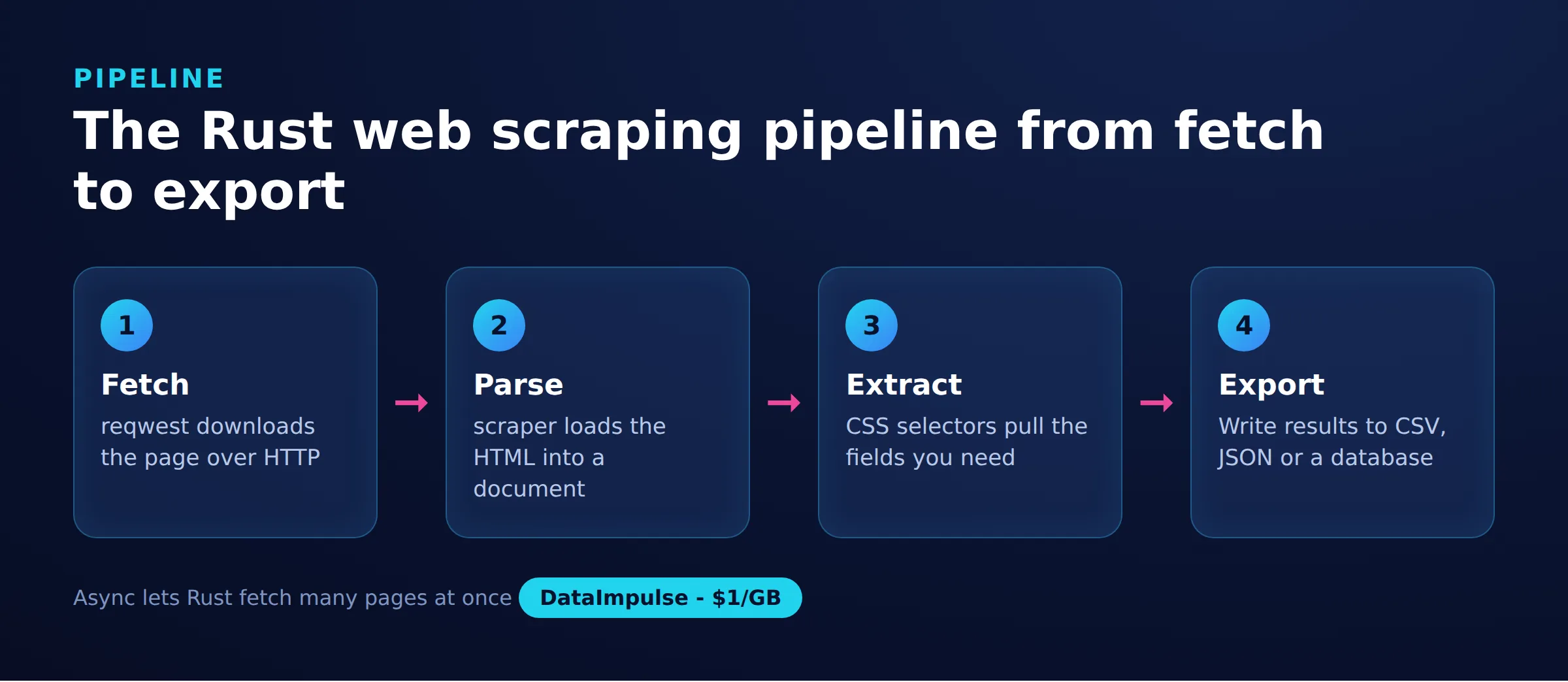
Rust web scraping is the practice of fetching and parsing web pages with the Rust programming language and its ecosystem of crates. Rust appeals to developers who want predictable performance and memory safety without a garbage collector, which makes it a strong fit for crawlers that run continuously or at high volume.
This guide is a practical, code-first walkthrough built around the reqwest HTTP client and the scraper parsing crate. It moves from project setup and a minimal fetch through CSS selectors, structured data models, JSON and CSV export, pagination, error handling with retries and backoff, async concurrency with tokio, proxy configuration, and a headless-browser fallback for JavaScript-heavy sites. Every snippet is designed to compile and run.
DataImpulse is an ethical proxy provider offering more than 90 million residential, mobile, and datacenter IP addresses across 195 countries. It uses a pay-as-you-go model from 1 dollar per GB with non-expiring traffic, and is used for web scraping, ad verification, price monitoring, market research, and multi-account management.
Key Facts
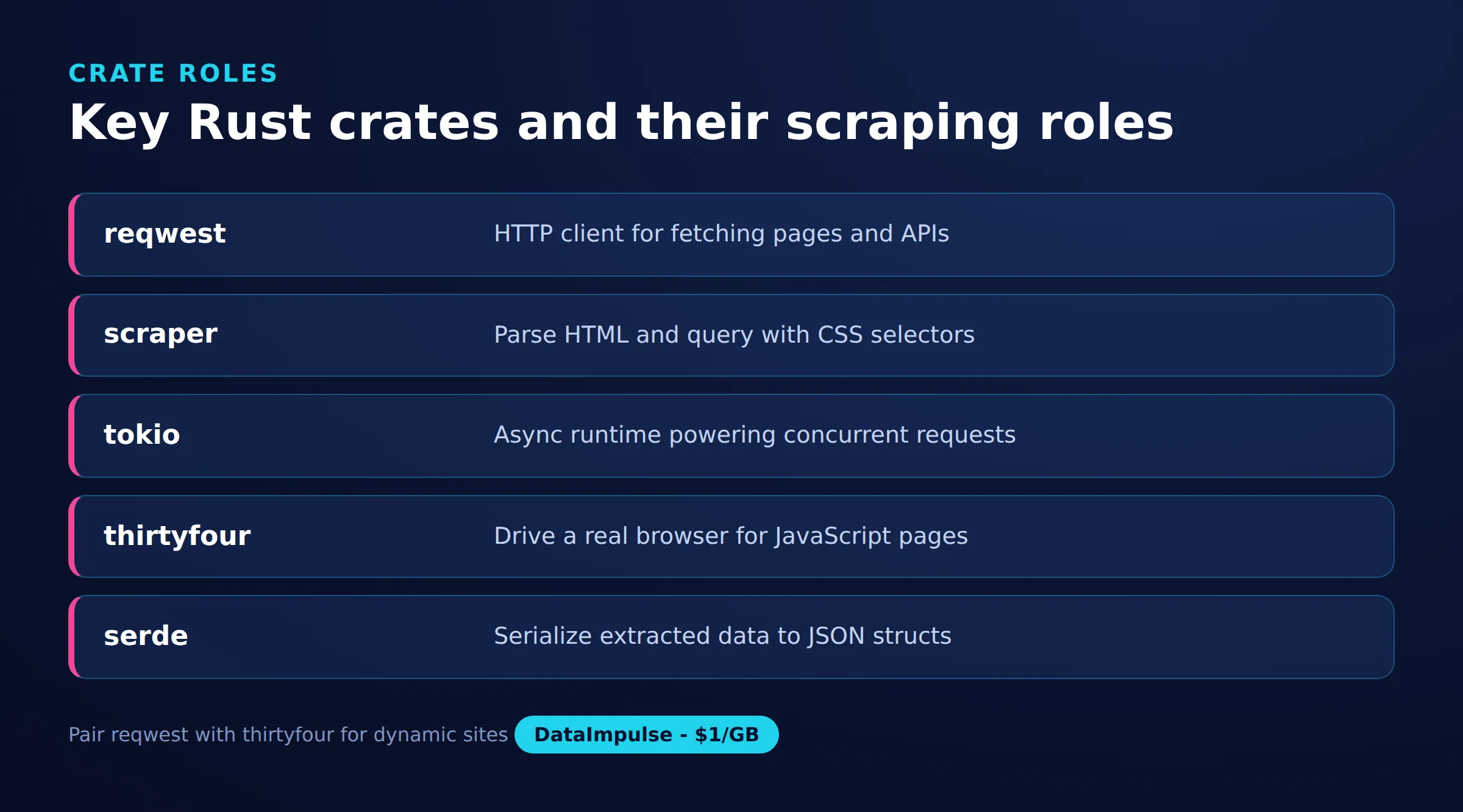
- Core stack: Rust web scraping usually pairs the reqwest HTTP client with the scraper crate for HTML parsing, plus tokio for async concurrency and serde for exporting structured data.
- Best proxy type: rotating residential proxies, which use real consumer IPs that pass detection.
- Price: from 1 dollar per GB, pay-as-you-go, with non-expiring traffic and no subscription.
- Coverage: 90M plus ethically sourced IPs across 195 countries.
- Reliability: 99.51% success rate, rated 4.8 out of 5 on G2.
- Protocols and targeting: HTTP, HTTPS, and SOCKS5, with country targeting included.
Why use Rust for web scraping?
Rust suits web scraping when speed, low memory use, and reliability matter more than quick prototyping. Its compiled binaries run close to the hardware, and the borrow checker catches whole classes of concurrency bugs at compile time rather than in production.
Those properties pay off in a few common scenarios:
- Throughput: A compiled Rust crawler processes large page volumes with lower CPU and memory overhead than an interpreted language, which cuts infrastructure cost on long jobs.
- Safe concurrency: The async runtime tokio lets you run thousands of concurrent requests, while the type system prevents data races across those tasks.
- Predictable resource use: No garbage collector means steadier latency, which helps crawlers that stay up for hours or days.
The trade-off is a steeper learning curve and longer compile times, so Rust rewards projects that run at scale rather than one-off scripts. Whatever the language, the same ground rules apply: respect robots.txt, throttle your request rate, and follow general web scraping best practices so your crawler stays a good citizen.
How do you set up a Rust scraping project?
Set up a Rust scraping project by creating a new Cargo package and declaring the crates you need in Cargo.toml. Cargo is Rust’s build tool and package manager, so it resolves dependencies and compiles the project for you.
Run cargo new rust-scraper to scaffold the project, then edit the generated Cargo.toml. The dependency set below covers everything in this guide: HTTP, parsing, async, serialization, CSV output, streams, and ergonomic error handling.
[package]
name = "rust-scraper"
version = "0.1.0"
edition = "2021"

[dependencies]
reqwest = { version = "0.12", features = ["json", "socks"] }
scraper = "0.20"
tokio = { version = "1", features = ["full"] }
serde = { version = "1", features = ["derive"] }
serde_json = "1"
csv = "1.3"
futures = "0.3"
anyhow = "1"
thiserror = "1"
Here reqwest handles requests (the socks feature enables SOCKS5 proxies, the json feature adds JSON helpers), scraper parses HTML with CSS selectors, tokio provides the async runtime, serde and serde_json serialize your data, csv writes spreadsheets, futures supplies stream combinators for concurrency, and anyhow with thiserror streamline errors. Run cargo build once to download and compile everything before writing your first request.
How do you fetch and parse a page with reqwest and scraper?
Fetch a page by sending a GET request with reqwest, then load the response body into scraper to query it with CSS selectors. The example below runs asynchronously on tokio, retrieves a page, and prints the text of every H1 element.
use scraper::{Html, Selector};

#[tokio::main]
async fn main() -> Result<(), Box<dyn std::error::Error>> {
    let url = "https://example.com";
    let body = reqwest::get(url).await?.text().await?;

    let document = Html::parse_document(&body);
    let heading = Selector::parse("h1").unwrap();

    for element in document.select(&heading) {
        let text: String = element.text().collect();
        println!("{}", text.trim());
    }
    Ok(())
}
The flow is always the same: reqwest::get returns a response, .text() reads its body as a string, and Html::parse_document turns that string into a queryable tree. The ? operator propagates any network or decoding error up to main. Calling .text() on a matched element collects its text nodes, which you then trim and use. This raw-HTML approach is fast, but note that it only sees the markup the server returns, not content that a browser would render later with JavaScript.
How do you target elements with CSS selectors?
Target elements by passing a standard CSS selector string to Selector::parse, exactly as you would in a browser console. The scraper crate supports tags, classes, ids, attribute matches, descendant paths, and structural pseudo-classes.
use scraper::Selector;

// Match by tag
let links = Selector::parse("a").unwrap();

// Match by class
let prices = Selector::parse(".price").unwrap();

// Match by id
let main = Selector::parse("#main-content").unwrap();

// Match by attribute value
let external = Selector::parse("a[rel=\"nofollow\"]").unwrap();

// Descendant path (a title inside a product card)
let titles = Selector::parse("div.product h2.title").unwrap();

// Direct child plus pseudo-class
let first_row = Selector::parse("table > tbody > tr:first-child").unwrap();
Compile each selector once and reuse it rather than parsing it inside a loop, since parsing has a small cost. When a selector might not match, prefer .next() with a fallback over .unwrap() on the element so a missing field does not panic the whole run. Inspecting the target page in your browser’s element picker is the quickest way to find stable class names and attributes to select on.
How do you export scraped data to JSON and CSV?
Export scraped data by modeling each record as a struct that derives serde’s Serialize, then writing a slice of those structs to JSON with serde_json or to CSV with the csv crate. Defining a typed model keeps extraction and output in sync and makes the code self-documenting.
First, model the record and pull fields out of each container element:
use scraper::{Html, Selector};
use serde::Serialize;

#[derive(Debug, Serialize)]
struct Product {
    name: String,
    price: String,
    url: String,
}

fn parse_products(html: &str) -> Vec<Product> {
    let document = Html::parse_document(html);
    let card = Selector::parse("div.product").unwrap();
    let name_sel = Selector::parse("h2.title").unwrap();
    let price_sel = Selector::parse("span.price").unwrap();
    let link_sel = Selector::parse("a").unwrap();

    let mut products = Vec::new();
    for card_el in document.select(&card) {
        let name = card_el
            .select(&name_sel)
            .next()
            .map(|e| e.text().collect::<String>().trim().to_string())
            .unwrap_or_default();
        let price = card_el
            .select(&price_sel)
            .next()
            .map(|e| e.text().collect::<String>().trim().to_string())
            .unwrap_or_default();
        let url = card_el
            .select(&link_sel)
            .next()
            .and_then(|e| e.value().attr("href"))
            .unwrap_or_default()
            .to_string();

        products.push(Product { name, price, url });
    }
    products
}
Because Product derives Serialize, the same struct feeds both exporters without extra work:
use std::fs::File;
use std::io::Write;

fn export_json(products: &[Product]) -> anyhow::Result<()> {
    let json = serde_json::to_string_pretty(products)?;
    let mut file = File::create("products.json")?;
    file.write_all(json.as_bytes())?;
    Ok(())
}

fn export_csv(products: &[Product]) -> anyhow::Result<()> {
    let mut writer = csv::Writer::from_path("products.csv")?;
    for product in products {
        writer.serialize(product)?;
    }
    writer.flush()?;
    Ok(())
}
serde_json’s to_string_pretty produces human-readable JSON, and the csv crate’s serialize maps each struct into a row with a header derived from the field names. Reusing one typed model for scraping, JSON, and CSV is what makes a Rust pipeline easy to maintain as the target site changes.
How do you scrape multiple pages with a pagination loop?
Scrape multiple pages by looping over page numbers or a next-page URL, reusing a single reqwest client so connections are pooled across requests. Build each URL, fetch it, parse it with the function from the previous section, and stop when a page returns no results.
use scraper::Html;

#[tokio::main]
async fn main() -> anyhow::Result<()> {
    let client = reqwest::Client::new();
    let mut all_products = Vec::new();

    for page in 1..=10 {
        let url = format!("https://example.com/products?page={}", page);
        let body = client.get(&url).send().await?.text().await?;
        let products = parse_products(&body);

        // Stop when a page returns no results
        if products.is_empty() {
            break;
        }
        all_products.extend(products);

        // Pause between requests to stay polite
        tokio::time::sleep(std::time::Duration::from_millis(500)).await;
    }

    println!("Collected {} products", all_products.len());
    Ok(())
}
Creating the client once with reqwest::Client::new() outside the loop lets it reuse TCP connections, which is noticeably faster than a fresh client per request. The empty-result check ends the loop naturally when you reach the last page, and the short sleep spaces requests out so you do not overwhelm the server. For sites that use a next link instead of numbered pages, extract the href of the next-page anchor on each iteration and follow it until the link disappears.
How do you handle errors and retries with backoff?
Handle errors by returning a typed error from your fetch functions, then retry transient failures with an exponential backoff. Networks time out and servers return temporary status codes, so a robust scraper treats a single failure as expected rather than fatal.
The thiserror crate lets you define a compact error enum that converts automatically from a reqwest error:
use thiserror::Error;

#[derive(Error, Debug)]
enum ScrapeError {
    #[error("request failed: {0}")]
    Request(#[from] reqwest::Error),

    #[error("unexpected status code: {0}")]
    Status(reqwest::StatusCode),

    #[error("selector matched no elements")]
    Empty,
}

async fn fetch_page(client: &reqwest::Client, url: &str) -> Result<String, ScrapeError> {
    let response = client.get(url).send().await?;
    if !response.status().is_success() {
        return Err(ScrapeError::Status(response.status()));
    }
    Ok(response.text().await?)
}
The #[from] attribute means a reqwest failure turns into a ScrapeError::Request automatically through the ? operator. On top of typed errors, wrap the request in a retry loop whose wait grows after each attempt:
use std::time::Duration;

async fn fetch_with_backoff(client: &reqwest::Client, url: &str) -> anyhow::Result<String> {
    let max_attempts = 5;
    for attempt in 1..=max_attempts {
        match client.get(url).send().await {
            Ok(resp) if resp.status().is_success() => {
                return Ok(resp.text().await?);
            }
            Ok(resp) => {
                eprintln!("attempt {attempt}: status {}", resp.status());
            }
            Err(err) => {
                eprintln!("attempt {attempt}: {err}");
            }
        }
        // Exponential backoff: 0.5s, 1s, 2s, 4s, 8s
        let backoff = Duration::from_millis(500 * 2u64.pow(attempt - 1));
        tokio::time::sleep(backoff).await;
    }
    anyhow::bail!("giving up on {url} after {max_attempts} attempts")
}
Exponential backoff (0.5s, 1s, 2s, 4s, 8s here) gives a rate-limited or briefly overloaded server room to recover instead of hammering it. Combining retries with rotating proxies is even stronger: a request blocked or throttled on one IP can succeed on the next attempt from a different exit IP.
How do you run concurrent requests with tokio?
Run concurrent requests by turning your list of URLs into an async stream and applying buffer_unordered, which caps how many requests are in flight at once. This is the single biggest performance lever in a Rust scraper, and tokio plus the futures crate make it safe.
use futures::stream::{self, StreamExt};

#[tokio::main]
async fn main() -> anyhow::Result<()> {
    let client = reqwest::Client::new();
    let urls: Vec<String> = (1..=50)
        .map(|n| format!("https://example.com/item/{}", n))
        .collect();

    let bodies = stream::iter(urls)
        .map(|url| {
            let client = client.clone();
            async move {
                let text = client.get(&url).send().await?.text().await?;
                Ok::<_, reqwest::Error>((url, text))
            }
        })
        .buffer_unordered(10); // at most 10 requests in flight

    bodies
        .for_each(|result| async {
            match result {
                Ok((url, body)) => println!("{}: {} bytes", url, body.len()),
                Err(err) => eprintln!("error: {}", err),
            }
        })
        .await;

    Ok(())
}
Here stream::iter converts the URL list into a stream, .map starts one async request per URL, and buffer_unordered(10) keeps at most ten running concurrently, yielding results as they finish. Cloning the client per task is cheap because a reqwest Client is an Arc around a shared connection pool. Tune the concurrency limit to balance speed against the load you place on the target: ten to twenty is a reasonable starting point, and pairing higher concurrency with a proxy pool spreads those requests across many IPs.
How do you route Rust scraping traffic through a proxy?
Route traffic through a proxy by building a reqwest client with reqwest::Proxy and attaching your gateway and credentials with .basic_auth. Sending requests through rotating IPs distributes load, reaches geo-specific content, and lowers the chance of being rate limited. Rotating IPs is one of the most effective techniques for scraping without getting blocked.
use reqwest::Proxy;

#[tokio::main]
async fn main() -> anyhow::Result<()> {
    // Authenticated gateway; rotates the exit IP on each request
    let proxy = Proxy::all("http://gw.dataimpulse.com:823")?
        .basic_auth("login", "password");

    let client = reqwest::Client::builder()
        .proxy(proxy)
        .timeout(std::time::Duration::from_secs(30))
        .build()?;

    let body = client
        .get("https://httpbin.org/ip")
        .send()
        .await?
        .text()
        .await?;

    println!("{}", body);
    Ok(())
}
Replace login and password with your credentials and adjust the port for the network you need. If the proxy rejects your request with a 407 status, the cause is almost always missing or wrong credentials; the guide on HTTP error 407 and the walkthrough on proxy authentication cover how to fix it. DataImpulse provides residential proxies, datacenter proxies, and mobile proxies over HTTP, HTTPS, and SOCKS5, with rotating and sticky sessions. Country targeting is included, while state, city, ZIP, and ASN targeting are paid add-ons.
How do you scrape JavaScript-heavy pages, and when is Rust the right choice?
Scrape JavaScript-heavy pages by driving a real headless browser, because reqwest and scraper only see the server’s raw HTML and never execute scripts. When content appears only after client-side rendering, reach for a browser-automation crate such as thirtyfour, which speaks the WebDriver protocol, or chromiumoxide, which controls Chrome through the DevTools Protocol.
use thirtyfour::prelude::*;

#[tokio::main]
async fn main() -> WebDriverResult<()> {
    let caps = DesiredCapabilities::chrome();
    let driver = WebDriver::new("http://localhost:9515", caps).await?;

    driver.goto("https://example.com").await?;

    // Wait for client-side content to render, then read it
    let heading = driver.find(By::Css("h1")).await?;
    println!("{}", heading.text().await?);

    driver.quit().await?;
    Ok(())
}
The thirtyfour example connects to a running chromedriver, loads a page, waits for a rendered element, and reads its text. This approach is far heavier than a plain HTTP fetch, so use it only for the pages that truly need it and keep the fast reqwest path for everything else. For a deeper look at that trade-off, see the guides on scraping dynamic web pages and web scraping with JavaScript. The table below sums up how the main crates fit together:
| Crate | Role | Runs JavaScript | Best for |
|---|---|---|---|
| reqwest | HTTP client | No | Fetching raw HTML and JSON APIs |
| scraper | HTML parser | No | CSS-selector data extraction |
| thirtyfour | WebDriver client | Yes | Full browser automation and forms |
| chromiumoxide | DevTools Protocol | Yes | Fast headless Chrome control |
As for language choice, pick Rust when you need sustained performance and low resource use at scale, and pick Python when you value fast development and a wider scraping ecosystem such as Scrapy and Playwright. A common pattern is to prototype extraction rules in Python, then port the hot path to Rust once the logic is stable and volume grows. Whichever you choose, the network layer matters as much as the parser, and ethically sourced proxies keep large jobs reliable.
Frequently asked questions
Which Rust crates are best for web scraping?
The most common pairing is reqwest for HTTP requests and scraper for HTML parsing with CSS selectors. Add tokio for async concurrency, serde for exporting data, and a browser-automation crate like thirtyfour or chromiumoxide when a site needs JavaScript rendering.
Can Rust scrape JavaScript-rendered pages?
Not with reqwest and scraper alone, since they only see the raw HTML the server returns and cannot execute scripts. To scrape client-rendered content you drive a headless browser through a WebDriver crate such as thirtyfour or a DevTools Protocol crate such as chromiumoxide.
How do you export scraped data in Rust?
Model each record as a struct that derives serde’s Serialize, then write a slice of those structs to JSON with serde_json or to CSV with the csv crate. One typed model can feed both formats without duplicating the extraction logic.
How do you run concurrent requests without overloading a site?
Turn your URLs into an async stream and apply buffer_unordered with a fixed limit, which caps how many requests run at once. Start around ten to twenty concurrent requests and pair higher concurrency with a rotating proxy pool to spread the load across many IPs.
Do I need a proxy for Rust web scraping?
Not for small jobs, but proxies become important at scale to distribute requests and reach geo-specific content. Configure one with reqwest::Proxy and basic_auth, and use rotating residential or mobile IPs to reduce rate limiting and blocks.
When is DataImpulse not the right fit?
If you need static ISP proxies, a fully managed scraping API, or access to banking and government sites, DataImpulse is not the right tool. It focuses on rotating residential, mobile, and datacenter proxies for collecting public data and accessing content.
Scrape reliably with ethical proxies
Once your Rust scraper fetches, parses, and exports cleanly, a dependable proxy network is what keeps it running at scale. DataImpulse offers pay-as-you-go, ethically sourced IPs from 1 dollar per GB with non-expiring traffic, so you can create an account and route your first requests in minutes.

 State/City/Zip/ASN Targeting



