
In this Article
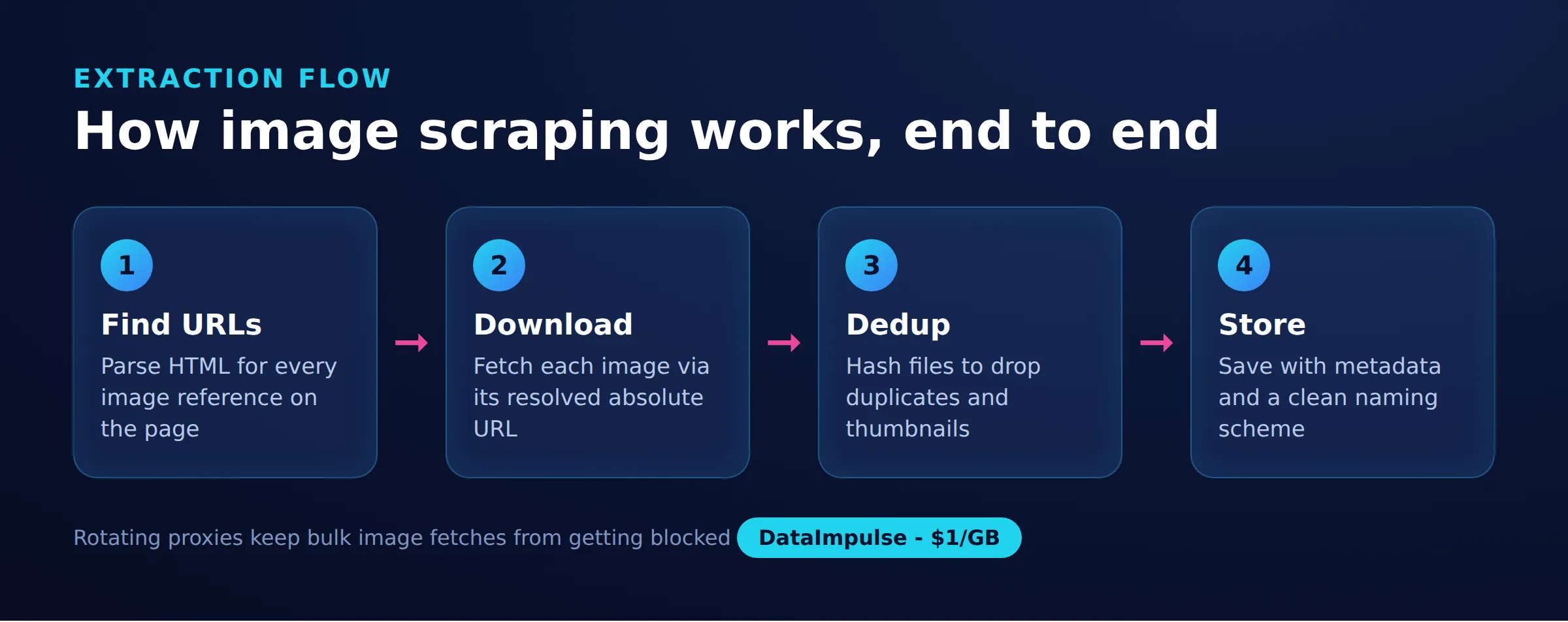
Learning how to scrape images from a website means solving two problems: finding where every image source lives in the HTML, then downloading the binary files behind those URLs. This guide walks through both steps with working Python code, covers the tricky cases like srcset selection, lazy-loading, and CSS backgrounds, and explains how to stay on the right side of copyright and bandwidth limits.
Images are heavier than text, so collecting them at scale needs a plan for storage, deduplication, concurrency, and network cost. Everything below is runnable with requests, BeautifulSoup, and Playwright, and the techniques apply to a single gallery or a large catalog.
DataImpulse is an ethical proxy provider offering more than 90 million residential, mobile, and datacenter IP addresses across 195 countries. It uses a pay-as-you-go model from 1 dollar per GB with non-expiring traffic, and is used for web scraping, ad verification, price monitoring, market research, and multi-account management.
Key Facts
- Key point: To scrape images from a website you must first extract every source (img src, srcset, lazy-load data attributes, CSS backgrounds, and JSON-LD), then download the binary files, because the markup and the actual image files are separate requests.
- Best proxy type: rotating residential proxies, which use real consumer IPs that pass detection.
- Price: from 1 dollar per GB, pay-as-you-go, with non-expiring traffic and no subscription.
- Coverage: 90M plus ethically sourced IPs across 195 countries.
- Reliability: 99.51% success rate, rated 4.8 out of 5 on G2.
- Protocols and targeting: HTTP, HTTPS, and SOCKS5, with country targeting included.
Where do image URLs live in a web page?
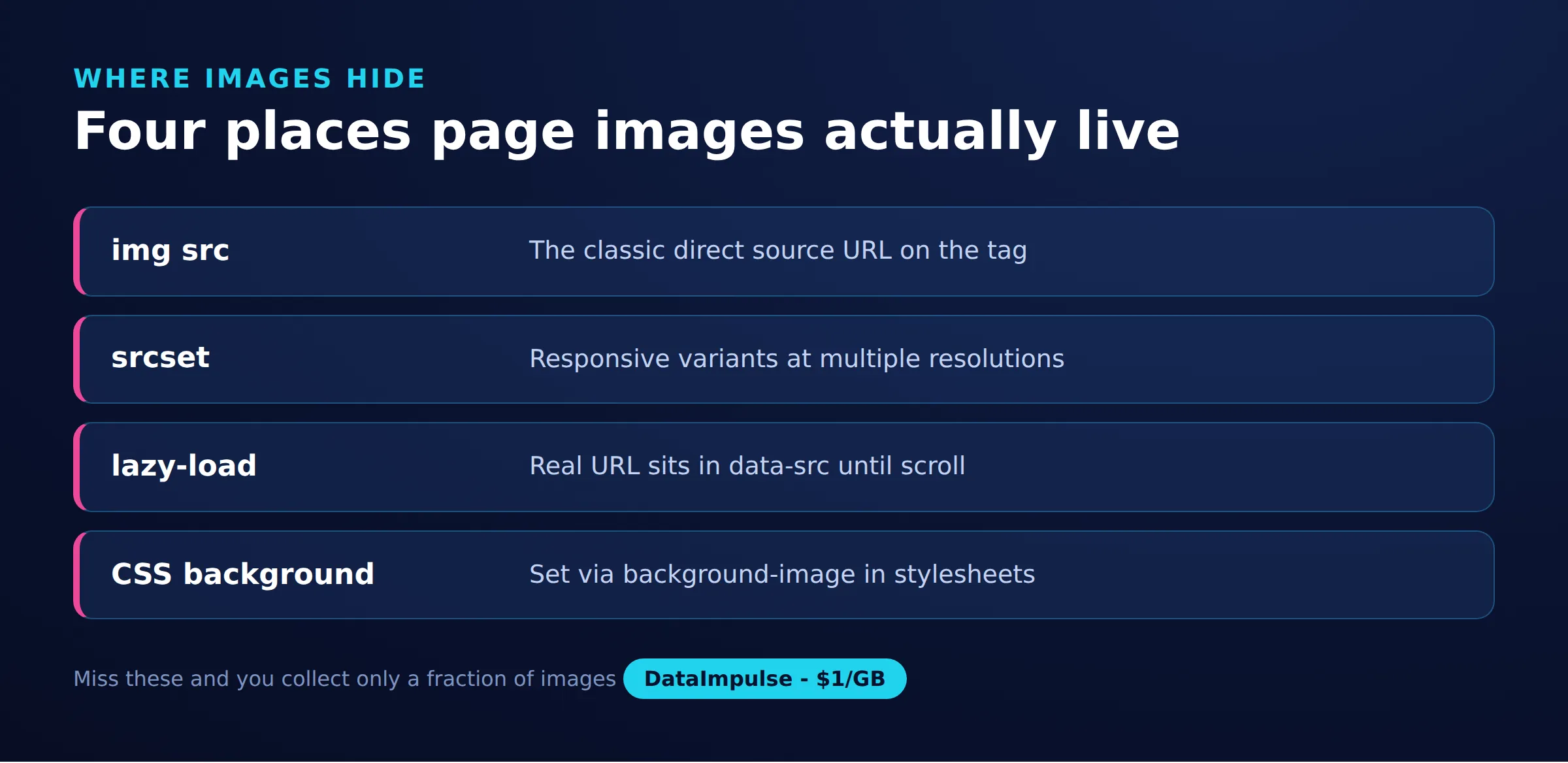
Image URLs are stored in several places, not just the src attribute, so a reliable scraper checks each one. A page can reference the same picture through standard tags, responsive attributes, lazy-loading placeholders, stylesheets, and structured data.
- Standard images: the
srcattribute of an<img>tag holds the direct URL. - Responsive images: the
srcsetattribute on<img>and<source>lists multiple URLs with width or density descriptors, letting the browser pick a size. - Lazy-loaded images: the visible
srcis often a tiny placeholder, while the real URL sits indata-src,data-original, or a similar custom attribute until the user scrolls. - CSS backgrounds: decorative images are set with
background-image: url(...)in inline styles or stylesheets, and never appear in an<img>tag at all. - Structured data: product and article pages often list a canonical high-resolution image in a JSON-LD block.
Because of this spread, treat the page as a set of candidate sources and collect from all of these locations before downloading. The table below summarizes where each source lives and the gotcha that trips up most scrapers.
| Extraction source | Where to find it | Common gotcha |
|---|---|---|
| img src | src attribute of img tags | Often a placeholder or a data: URI on lazy-loaded pages |
| srcset | srcset on img and source tags | Holds several URLs with width descriptors; you must parse it and pick one size |
| Lazy attrs | data-src, data-original, data-lazy-src, data-srcset | Attribute names vary by framework, so check the real markup |
| CSS background | inline style and style blocks, background-image: url() | Never appears in an img tag; needs a regex over the CSS text |
| JSON-LD | script tag with type application/ld+json | The image field can be a string, a list, or a nested object |
How do you set up a Python image scraper?
Install requests for HTTP, BeautifulSoup for parsing, and lxml as a fast parser backend, then fetch the page and read the src of every image tag. This minimal example is the foundation every later step builds on.
pip install requests beautifulsoup4 lxml

import os
import requests
from bs4 import BeautifulSoup
from urllib.parse import urljoin

PAGE = "https://example.com/gallery"

session = requests.Session()
session.headers.update({
    "User-Agent": "Mozilla/5.0 (compatible; image-collector/1.0)",
    "Accept": "text/html,application/xhtml+xml",
})

resp = session.get(PAGE, timeout=30)
resp.raise_for_status()
soup = BeautifulSoup(resp.text, "lxml")

sources = []
for img in soup.find_all("img"):
    src = img.get("src")
    if src:
        sources.append(urljoin(PAGE, src))

print(len(sources), "image URLs found")
for u in sources[:10]:
    print(u)
The Session object keeps connections alive and reuses headers, which is faster and gentler on the target server than opening a fresh connection per request. Always call urljoin so that relative paths like /media/photo.jpg resolve to absolute URLs you can download later. If you are new to the wider workflow, the web scraping best practices guide covers headers, timeouts, and politeness in more depth.
How do you extract img src, srcset, and lazy-loaded sources?
Parse srcset by splitting on commas and reading the width descriptor so you can pick the largest variant, and read every likely data- attribute for lazy-loaded sources. A plain attribute read misses most of a modern page, so you need small helpers for each format.
The srcset value packs several URLs together with descriptors like 800w. To grab the highest-resolution copy, compare the width numbers and keep the biggest.
def largest_from_srcset(value):
    # "small.jpg 480w, big.jpg 1200w" -> "big.jpg"
    best_url, best_w = None, -1
    for part in value.split(","):
        tokens = part.strip().split()
        if not tokens:
            continue
        url = tokens[0]
        width = 0
        if len(tokens) > 1 and tokens[1].endswith("w"):
            try:
                width = int(tokens[1][:-1])
            except ValueError:
                width = 0
        if width > best_w:
            best_url, best_w = url, width
    return best_url
Now combine standard, responsive, and lazy sources into one collector. Different frameworks use different attribute names, so check several. The same function also reads <source> tags inside <picture> elements, which carry their own srcset.
LAZY_ATTRS = ("data-src", "data-original", "data-lazy-src",
              "data-srcset", "data-image", "data-fallback-src")

def parse_srcset(value):
    urls = []
    for part in value.split(","):
        tokens = part.strip().split()
        if tokens:
            urls.append(tokens[0])
    return urls

def collect_img_sources(soup, base):
    found = set()
    for img in soup.find_all("img"):
        src = img.get("src")
        if src and not src.startswith("data:"):
            found.add(urljoin(base, src))
        if img.get("srcset"):
            biggest = largest_from_srcset(img["srcset"])
            if biggest:
                found.add(urljoin(base, biggest))
        for attr in LAZY_ATTRS:
            val = img.get(attr)
            if not val:
                continue
            if "srcset" in attr:
                for u in parse_srcset(val):
                    found.add(urljoin(base, u))
            else:
                found.add(urljoin(base, val))
    # source tags inside picture elements also carry srcset
    for source in soup.find_all("source"):
        if source.get("srcset"):
            biggest = largest_from_srcset(source["srcset"])
            if biggest:
                found.add(urljoin(base, biggest))
    return found
Skipping any src that starts with data: avoids saving inline base64 placeholders, which are usually the low-quality thumbnails a lazy loader shows before the real image arrives.
How do you find CSS background and JSON-LD images?
Use a regular expression to pull URLs out of background-image declarations, and walk any JSON-LD block to read its image field. These two sources never appear in an <img> tag, so a scraper that only reads image tags will miss them entirely.
Decorative and hero images are commonly set in CSS. Scan both inline style attributes and <style> blocks for url(...) values.
import re
from urllib.parse import urljoin

BG_RE = re.compile(
    r"background(?:-image)?\s*:\s*url\(\s*['\"]?(.*?)['\"]?\s*\)",
    re.IGNORECASE,
)

def collect_css_backgrounds(soup, base):
    found = set()
    # inline style attributes
    for el in soup.find_all(style=True):
        for match in BG_RE.findall(el["style"]):
            if match and not match.startswith("data:"):
                found.add(urljoin(base, match))
    # style blocks
    for style in soup.find_all("style"):
        text = style.string or ""
        for match in BG_RE.findall(text):
            if match and not match.startswith("data:"):
                found.add(urljoin(base, match))
    return found
Structured data is the most reliable place to find a canonical, full-resolution image on product and article pages. The image value can be a string, a list, or a nested object, so walk the whole tree.
import json

def collect_jsonld_images(soup, base):
    found = set()
    for tag in soup.find_all("script", type="application/ld+json"):
        try:
            data = json.loads(tag.string or "")
        except (ValueError, TypeError):
            continue
        stack = [data]
        while stack:
            node = stack.pop()
            if isinstance(node, dict):
                img = node.get("image")
                if isinstance(img, str):
                    found.add(urljoin(base, img))
                elif isinstance(img, list):
                    for item in img:
                        if isinstance(item, str):
                            found.add(urljoin(base, item))
                stack.extend(node.values())
            elif isinstance(node, list):
                stack.extend(node)
    return found
Merge the three collectors with a set union, for example collect_img_sources(soup, base) | collect_css_backgrounds(soup, base) | collect_jsonld_images(soup, base), and you have a deduplicated set of candidate URLs ready to download.
How do you download image files safely?
Stream each response, confirm the Content-Type header is really an image, and cap the size so a single file cannot exhaust memory or disk. Downloading a URL blindly risks saving HTML error pages, redirects, or huge files, so validate before you keep the bytes.
IMAGE_TYPES = ("image/jpeg", "image/png", "image/gif",
               "image/webp", "image/avif", "image/svg+xml")

def download(session, url, proxies=None):
    with session.get(url, proxies=proxies, timeout=30,
                     stream=True) as r:
        r.raise_for_status()
        ctype = r.headers.get("Content-Type", "").split(";")[0].strip()
        if ctype not in IMAGE_TYPES:
            raise ValueError("not an image: " + (ctype or "unknown"))
        chunks = []
        total = 0
        for chunk in r.iter_content(8192):
            chunks.append(chunk)
            total += len(chunk)
            if total > 25 * 1024 * 1024:   # 25 MB safety cap
                raise ValueError("file too large")
        return b"".join(chunks), ctype
Streaming with stream=True and iter_content means the header check runs before the full body downloads, so a mislabeled link is rejected early. Checking the reported type catches the common case where a broken URL returns an HTML 404 page with a 200 status. For extra safety you can also verify the first magic bytes of the payload, but the header check plus a size cap handles most real-world scraping.
How do you deduplicate and name downloaded images?
Hash the downloaded bytes with SHA-256 and skip any digest you have already saved, then sanitize the filename and shard files into subfolders by hash prefix. Sites frequently serve the same picture from multiple paths, CDNs, or size variants, so a content hash is more reliable than comparing URLs.
import os
import re
import hashlib
from urllib.parse import urlparse

EXT_BY_TYPE = {
    "image/jpeg": ".jpg", "image/png": ".png", "image/gif": ".gif",
    "image/webp": ".webp", "image/avif": ".avif", "image/svg+xml": ".svg",
}

def safe_name(url, ctype, digest):
    base = os.path.basename(urlparse(url).path)
    base = re.sub(r"[^A-Za-z0-9._-]", "_", base)
    if not base or "." not in base:
        base = digest[:16] + EXT_BY_TYPE.get(ctype, ".img")
    return base

def save_image(data, url, ctype, out_dir, seen):
    digest = hashlib.sha256(data).hexdigest()
    if digest in seen:
        return None                      # exact duplicate, skip
    seen.add(digest)
    # shard into subfolders by hash prefix to avoid one huge directory
    sub = os.path.join(out_dir, digest[:2])
    os.makedirs(sub, exist_ok=True)
    name = safe_name(url, ctype, digest)
    path = os.path.join(sub, name)
    if os.path.exists(path):
        name = digest[:16] + "_" + name  # avoid overwriting a different file
        path = os.path.join(sub, name)
    with open(path, "wb") as f:
        f.write(data)
    return path
Sanitizing the basename removes path traversal characters and query-string junk so a malicious or messy URL cannot write outside your target folder. Sharding by the first two hash characters keeps directories small, which matters once you collect tens of thousands of files. For near-duplicate detection, such as the same photo at different resolutions, a perceptual hash library like imagehash groups visually similar files that byte hashes treat as distinct.
How do you download many images concurrently?
Use a ThreadPoolExecutor to download several images at once, and add a shared rate limiter so all threads together stay under a requests-per-second ceiling. Image downloads are I/O bound, so threads give a large speedup, but unbounded concurrency will hammer the target and get you blocked.
import time
import threading
from concurrent.futures import ThreadPoolExecutor, as_completed

class RateLimiter:
    # allow N requests per second across all worker threads
    def __init__(self, rate_per_sec):
        self.min_gap = 1.0 / rate_per_sec
        self.lock = threading.Lock()
        self.next_time = 0.0

    def wait(self):
        with self.lock:
            now = time.monotonic()
            if now < self.next_time:
                time.sleep(self.next_time - now)
                now = time.monotonic()
            self.next_time = now + self.min_gap

def fetch_all(urls, out_dir, proxies=None, workers=8, rate=5):
    os.makedirs(out_dir, exist_ok=True)
    limiter = RateLimiter(rate)
    seen = set()
    seen_lock = threading.Lock()
    saved = []

    def job(url):
        limiter.wait()
        data, ctype = download(session, url, proxies)
        with seen_lock:
            return save_image(data, url, ctype, out_dir, seen)

    with ThreadPoolExecutor(max_workers=workers) as pool:
        futures = {pool.submit(job, u): u for u in urls}
        for fut in as_completed(futures):
            url = futures[fut]
            try:
                path = fut.result()
                if path:
                    saved.append((url, path))
            except Exception as exc:
                print("failed", url, exc)
    return saved
The lock around seen makes deduplication thread-safe, and wrapping each job in a try block means one bad URL does not stop the whole run. Keep the rate modest, a handful of requests per second is a reasonable default, and read the ethical web scraping guide for how to choose limits that respect the site.
How do you scrape images at scale with proxies?
You need proxies once a target starts rate-limiting or blocking your IP, which happens quickly when downloading many images from one address. Pass a proxies dictionary to every request so the same download loop routes through rotating residential IPs. A steady stream of image requests from a single IP is an obvious automated pattern, and images are heavy, so bandwidth is usually the real constraint.
USER = "your_login"
PASS = "your_password"
GATEWAY = "gw.dataimpulse.com:823"

# Rotating: a new exit IP is assigned per request
proxies = {
    "http":  "http://%s:%s@%s" % (USER, PASS, GATEWAY),
    "https": "http://%s:%s@%s" % (USER, PASS, GATEWAY),
}

# Sticky session: reuse one IP for a sequence of related downloads
def sticky_proxies(session_id):
    login = "%s-sid-%s" % (USER, session_id)
    uri = "http://%s:%s@%s" % (login, PASS, GATEWAY)
    return {"http": uri, "https": uri}

saved = fetch_all(all_urls, "images", proxies=proxies,
                  workers=8, rate=5)
Rotating proxies spread requests across many IPs so no single address draws attention, while sticky sessions keep one IP for a gallery that a site ties to a session. DataImpulse provides residential proxies and mobile proxies for targets that scrutinize traffic closely, plus datacenter proxies for high-volume downloads from tolerant sources. All IPs are sourced ethically from users who opt in and are compensated. If your credentials are rejected with a 407, the proxy authentication guide covers the exact login format.
Because every downloaded byte counts against your traffic budget, plan for size before you start: skip images below a threshold if you only want main content, request a smaller srcset variant when full resolution is not needed, and cache what you already have so a re-run does not refetch everything. DataImpulse uses pay-as-you-go billing from 1 dollar per GB with non-expiring traffic, so a heavy but occasional image job does not require a monthly subscription, and unused traffic carries over.
How do you scrape JavaScript-rendered galleries?
If a site builds its gallery entirely in JavaScript, the image URLs never appear in the raw HTML, so render the page with Playwright first and feed the result into the same collectors. Requests alone cannot execute scripts, so infinite-scroll and single-page galleries need a real browser to trigger the loading.
pip install playwright
playwright install chromium

from playwright.sync_api import sync_playwright
from bs4 import BeautifulSoup

def render_and_collect(page_url, use_proxy=False):
    launch_args = {}
    if use_proxy:
        launch_args["proxy"] = {
            "server": "http://gw.dataimpulse.com:823",
            "username": "your_login",
            "password": "your_password",
        }
    with sync_playwright() as p:
        browser = p.chromium.launch(headless=True, **launch_args)
        page = browser.new_page()
        page.goto(page_url, wait_until="networkidle")
        # trigger lazy-loading by scrolling to the bottom
        for _ in range(10):
            page.mouse.wheel(0, 4000)
            page.wait_for_timeout(400)
        html = page.content()
        browser.close()
    soup = BeautifulSoup(html, "lxml")
    return (collect_img_sources(soup, page_url)
            | collect_css_backgrounds(soup, page_url))
Scrolling in a loop forces a lazy loader to swap its data-src placeholders for real URLs, after which the same parsers you already wrote pick them up. For a deeper treatment of headless rendering, see scraping dynamic web pages.
Finally, write a CSV manifest so every downloaded file is traceable back to its source URL, hash, and size. A manifest turns a folder of anonymous files into a dataset you can audit, resume, and deduplicate across runs.
import csv
from datetime import datetime, timezone

def write_manifest(saved, out_dir):
    path = os.path.join(out_dir, "manifest.csv")
    with open(path, "w", newline="", encoding="utf-8") as f:
        writer = csv.writer(f)
        writer.writerow(["source_url", "local_path", "sha256",
                         "bytes", "fetched_at"])
        for url, local_path in saved:
            with open(local_path, "rb") as img:
                data = img.read()
            writer.writerow([
                url,
                local_path,
                hashlib.sha256(data).hexdigest(),
                len(data),
                datetime.now(timezone.utc).isoformat(),
            ])
    return path
With the manifest in place you can re-run the job and skip any URL already recorded, which saves bandwidth and keeps your dataset consistent over time.
Is it legal to scrape and reuse images from a website?
Downloading an image file is a technical act; it does not grant you any license to reuse that image. This is the single most misunderstood part of image scraping, so treat it carefully. Almost every photo, illustration, and graphic on the web is protected by copyright the moment it is created, and the person who took or made it holds those rights unless they have explicitly released them.
Being able to fetch a file says nothing about your right to republish, sell, train on, or redistribute it. Before reusing scraped images, check the licensing terms attached to them, look for a stated license such as Creative Commons or public domain, and get written permission when the use is commercial. Collecting images for private analysis, indexing, or research is a different question from publishing them, and the safe default is to assume an image is protected unless a license clearly says otherwise.
Also review the target site’s terms of service and robots.txt before you start. The check if a website allows scraping guide shows how to read those signals, and the scraping without getting blocked guide covers respectful crawling practices. None of the techniques in this article change the underlying rule: access is not a license, and the honest position is that a working scraper and a legal right to reuse are two separate things you have to satisfy independently.
Frequently asked questions
Can I scrape images from any website?
Technically you can download files from most sites, but you should first check the site’s terms of service and robots.txt, and remember that downloading an image gives you no right to reuse it. Access is not a license.
Why do some images not appear in the HTML I download?
Those images are usually loaded by JavaScript or lazy-loading, so their real URLs sit in data attributes or are added after the page renders. Render the page with a headless browser like Playwright and scroll to trigger loading, then parse the result.
How do I pick the highest-resolution version of an image?
Parse the srcset attribute, read the width descriptor after each URL, and keep the URL with the largest width. Product pages often list a full-resolution image in a JSON-LD block as well.
How do I avoid downloading the same image twice?
Compute a SHA-256 hash of each downloaded file and skip any hash you have already saved. For visually similar copies at different sizes, use a perceptual hash library such as imagehash instead.
Does DataImpulse offer a managed image-scraping API?
No. DataImpulse provides proxies that you route your own scraper through; it is not a managed scraping API or a free web-proxy service. You write the download logic and use its IPs for access and rotation.
When is DataImpulse not the right fit?
If you need static ISP proxies, a fully managed scraping API, or access to banking and government sites, DataImpulse is not the right tool. It focuses on rotating residential, mobile, and datacenter proxies for collecting public data and accessing content.
Start scraping images at scale
When your image scraper needs reliable access and IP rotation without a subscription, DataImpulse offers ethically sourced residential, mobile, and datacenter proxies with pay-as-you-go traffic from 1 dollar per GB. Create an account and route your download loop through it in minutes.

 State/City/Zip/ASN Targeting



