
In this Article
Configure a Stagehand local browser proxy through the browser launch settings, then verify navigation with an IP endpoint and proxy logs. Stagehand 4.4.0 supports a proxy server and bypass list but rejects local proxy credentials. An authenticated upstream needs a separate authentication path, and page routing does not establish the route of model requests. Browser configuration.
This guide covers local browser launch, proxy selection, authentication diagnostics, and routing checks with the JavaScript interface of the TypeScript SDK.
Key Facts
- Stagehand 4.4.0 supports a local proxy server and bypass list.
- Local proxy credential fields trigger a launch-time rejection.
- Authenticated upstreams require a separate authentication path.
- Proxy logs can demonstrate routing even when the exit IP stays unchanged.
- Page egress and model-provider traffic require separate checks.
What Is Stagehand?
Stagehand is Browserbase’s open-source browser automation SDK. It combines scripted navigation with AI actions and extraction, while Browserbase supplies hosted browser infrastructure. Its v4 runtime operates in a browser extension. SDK overview and architecture.
Stagehand v4 retains act(), extract(), and observe() but removes agent(). Use explicit script flow or build a tool-calling loop when the task requires runtime planning. v4 migration guide.
The Stagehand Routing Test
Use the Stagehand Routing Test to distinguish page traffic, model-provider traffic, and browser-control connections. Record the initiating process and destination for each connection before interpreting proxy logs.
A page IP check measures the route used for that navigation. It does not establish the route used by extension-origin model requests. Test an extraction call separately and correlate its model-provider connection with proxy and direct-egress evidence before using the configuration for AI operations. Stagehand architecture and Chromium network settings.
Local mode runs the browser on your infrastructure; Browserbase runs it remotely. Obtain a browser handle and attach the SDK with Stagehand.create({ browser }). A local launch setting does not configure a hosted browser session. Browser environments.
Browser egress, model-routing gateways, corporate forward proxies, inspection proxies, and MCP gateways control different connections. Use the separate guides to AI coding-agent proxies and MCP proxy networking for those integration boundaries.
Run a Minimal Local Stagehand Routing Example
Use Node v22.22.2 and pin Stagehand 4.4.0. Set CHROME to the browser executable, install the dependency, and retain the generated package-lock.json. See the Stagehand changelog and browser-agent prerequisites.
node --version
npm install --save-exact @browserbasehq/[email protected]
"$CHROME" --version
Save the following block as t.sh. Run bash t.sh direct for the baseline. Run bash t.sh relay after configuring a forward proxy listening on 127.0.0.1:18095. The auth mode checks the expected rejection of local credential fields; inject an authenticated proxy URL into DI_RES_PROXY through your secret manager before running bash t.sh auth.
node --input-type=module - "${1:-direct}" <<'JS'
import assert from "node:assert/strict";
import { localBrowser, Stagehand } from "@browserbasehq/stagehand";

async function main() {
  const mode = process.argv[2];
  assert.ok(["direct", "relay", "auth"].includes(mode), "Use direct, relay, or auth");
  assert.ok(process.env.CHROME, "Set CHROME to the browser executable");
  const opts = { headless: true, executablePath: process.env.CHROME };

  if (mode === "auth") {
    assert.ok(process.env.DI_RES_PROXY, "Set DI_RES_PROXY privately");
    const up = new URL(process.env.DI_RES_PROXY);
    assert.ok(up.username && up.password, "Proxy credentials are required for this diagnostic");
    await assert.rejects(async () => {
      const browser = await localBrowser.launch({
        ...opts,
        proxy: {
          server: `http://${up.host}`,
          username: decodeURIComponent(up.username),
          password: decodeURIComponent(up.password)
        }
      });
      await browser.close();
    }, {
      message: "Authenticated local browser proxies are not supported yet"
    });
    console.log("auth: expected launch-time rejection confirmed");
    return;
  }

  if (mode === "relay") {
    opts.proxy = { server: "http://127.0.0.1:18095", bypass: "example.com" };
  }
  const browser = await localBrowser.launch(opts);
  try {
    const stagehand = await Stagehand.create({
      browser,
      model: { modelName: "openai/gpt-5.4-mini", apiKey: "unused-no-llm-calls" }
    });
    try {
      const [page] = await browser.context.pages();
      assert.ok(page, "Browser has no page");
      await page.goto("https://api.ipify.org?format=json");
      const body = await page.evaluate(() => document.body.innerText);
      const result = JSON.parse(body);
      assert.equal(typeof result.ip, "string");
      console.log(mode, "->", result.ip);
      if (mode === "relay") {
        await page.goto("https://example.com/");
        const title = await page.evaluate(() => document.title);
        assert.equal(title, "Example Domain");
        console.log("bypass page title:", title);
      }
    } finally {
      await stagehand.close();
    }
  } finally {
    await browser.close();
  }
}

main().catch((error) => {
  console.error(error instanceof Error ? error.message : "Unexpected failure");
  process.exitCode = 1;
});
JS
The example performs deterministic navigation. Its placeholder model key does not enable AI extraction. The nested finally blocks attempt SDK and browser cleanup, and unexpected errors set a nonzero exit status through process.exitCode. Stagehand lifecycle and Node exit-code behavior.
The example preserves the default browser sandbox. The November 19 results below used chromiumSandbox: false on a host with an AppArmor restriction. That setting disables a browser security boundary; use an approved browser profile or a suitably configured host for normal operation. Ubuntu user-namespace restrictions.
Keep the v4 Lifecycle Together
Use localBrowser.launch(), then Stagehand.create(), then browser.context.pages(). Avoid combining this sequence with older constructor-and-initialization examples. For AI operations, follow the version-specific Quickstart and migration guide.
Add and Verify a Local Stagehand Proxy
Set proxy.server and optional proxy.bypass on localBrowser.launch(). Stagehand 4.4.0 rejects local username and password fields during launch. Local proxy authentication restriction.
Authenticated Upstreams Need a Separate Forward Proxy
Use a maintained forward proxy for an authenticated upstream connection. Bind its listener to 127.0.0.1, require valid upstream configuration before startup, and record request failures as well as connection attempts. The forward proxy must handle each HTTP request on persistent connections and support HTTPS CONNECT tunnels. HTTP persistent-connection requirements.
The proxy-chain documentation describes upstream chaining, listener binding, failure events, and connection statistics. Pin the implementation you deploy and check HTTP connection reuse, rejected credentials, unreachable upstreams, and shutdown before relying on its logs.
Inject upstream credentials through your secret manager rather than passing an expanded proxy URL as a command-line argument. Protect the process environment and log files. Require the configured URL scheme, port, and authentication to match the forward proxy implementation; an HTTPS or SOCKS5 upstream requires the corresponding protocol support.
DataImpulse supplies the upstream proxy service: its residential proxies start at $1/GB, with 90M+ IPs, 195 countries, HTTP/HTTPS/SOCKS5 support, and rotating or sticky sessions. See its protocol configuration examples.
Model API traffic does not need residential egress. Configure and test its approved route separately from location-specific page traffic.
Using Browserbase Instead
For hosted browsers, follow the separate Browserbase cloud setup. A loopback address identifies the machine running the browser, so a remote browser cannot reach your workstation through that address.
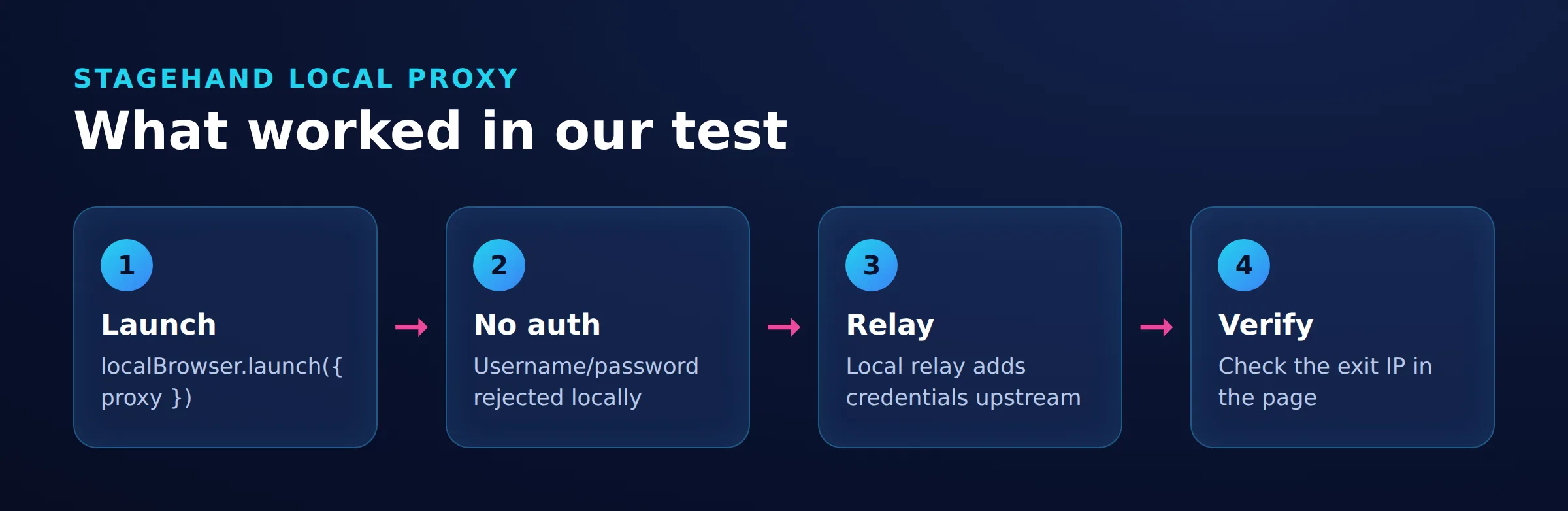
Page route with an authenticated upstream:
Browser --> loopback forward proxy
        --> authenticated upstream --> destination

Configured bypass:
Browser --> bypass destination
Verify the source IP at an owned destination.

Control connection:
Node SDK <--> browser / Stagehand extension

Model connection:
Stagehand extension --> model provider
Verify this route independently.
What Did the Stagehand Routing Checks Show?
Tested on November 19, 2026 with Ubuntu 24.04.4 LTS, Node v22.22.2, Stagehand 4.4.0, and Chrome for Testing 159.0.8154.6. The three browser modes exited with status zero with the sandbox adjustment described above. A local logging proxy used direct egress, so direct and proxied navigation returned the same host IP. The checks covered navigation and local credential rejection, with no model inference or real residential credentials.
| Case | Observed Evidence | Conclusion |
|---|---|---|
| Direct browser | direct -> 81.17.103.182 |
Baseline host egress. |
| Proxy listener | relay -> 81.17.103.182; proxy log contained CONNECT api.ipify.org:443. |
The navigation reached the proxy listener despite an unchanged exit IP. |
| Local credential fields | auth: expected launch-time rejection confirmed |
The diagnostic received the expected rejection. |
| Configured bypass | bypass page title: Example Domain; example.com was absent from the collected relay log. |
Consistent with the configured bypass; the destination-side source IP was not measured. |
An IP endpoint reports the public address of the request that reaches it. It does not describe every browser connection. ipify response scope.
The relay logged attempted requests to www.google.com and clients2.google.com in addition to the scripted destinations. These entries were written before upstream connection success and contain no byte counts, so they do not establish completed transfers or billed bandwidth.
Verify bypass behavior against an owned endpoint that records the connection source IP. Use a unique request identifier and compare the destination record with the direct baseline and proxy logs. An absent hostname alone does not identify the actual network path.
For reproducible routing diagnostics, record the OS release, exact Node and Python versions where used, full Chrome build and executable path, dependency lockfile, script revision, UTC timestamps, launch options, exit status, and correlated browser, proxy, and destination logs. Redact credentials before sharing logs.
Choose Sticky or Rotating Sessions
Choose sticky sessions when a workflow needs continuity and rotating sessions for independent tasks that require different exits. Configure the upstream session policy before starting a multi-page journey.
Record the exit IP at the beginning and end alongside the task identifier. Saved cookies and a stable network address are separate properties, so check both. See sticky versus rotating sessions for selection criteria.
Troubleshoot Stagehand Routing and Browser Failures
Identify whether the failure occurs during browser launch, SDK attachment, navigation, or upstream forwarding.
| Symptom | Evidence to Inspect | Action |
|---|---|---|
WebSocket is not defined |
Exact Node version and startup flags. | Use Node v22.22.2 to match the routing results. |
Browser context is unavailable |
SDK attachment and page-access order. | Await Stagehand.create() before accessing pages. |
| Authenticated local proxy error | Whether rejection occurs during launch. | Remove local credential fields and configure authentication in the upstream forward proxy. |
SIGABRT during launch |
Chrome standard error and AppArmor denial records. | If logs confirm a user-namespace denial, configure an approved profile for the browser executable or use a suitably configured host. |
| Unexpected exit IP | Launch options, bypass entries, upstream route, and proxy logs. | Compare destination records with the direct baseline; a local proxy may share the same egress. |
| Navigation timeout | Browser errors, proxy failures, and destination records. | Separate proxy reachability, DNS, TLS, and target failures before retrying. |
Node exposes the global WebSocket API without its enabling flag from v22.0.0. Record the exact version and flags when diagnosing its absence. Node API history. For browser launch restrictions, consult the Ubuntu release notes.
An upstream HTTP 407 requests proxy authentication and is distinct from Stagehand rejecting launch options. See HTTP authentication semantics and HTTP error 407 troubleshooting.
For certificate errors, identify the failing process and repair its certificate trust configuration. See ERR_CERT_AUTHORITY_INVALID.
Stagehand vs Playwright vs Browser Use
Choose according to who controls the workflow and where the browser runs.
| Tool | Workflow Control | Browser and Proxy Boundary |
|---|---|---|
| Stagehand v4 | Explicit script flow with optional AI operations. | Local or Browserbase browser factories; local authentication has the restriction described above. Configuration. |
| Playwright | Scripted browser operations. | Browser-wide or per-context proxy settings, including HTTP proxy credentials. Networking documentation. |
| Browser Use | A model drives browser work through an agent. | Local and cloud browser choices determine where egress configuration applies. Official repository. |
For a Playwright implementation, use the separate Playwright proxy setup.
Use deterministic assertions for known flows, such as an expected title or saved record. When AI interprets variable content, validate the extracted fields against explicit acceptance criteria. A successful model response alone does not establish workflow correctness.
Limits, Costs, and Responsible Use
A changed exit IP is a routing result, not a guarantee of website access or country accuracy. Keep model usage, browser compute or hosting, and proxy bandwidth as separate budget items. Measure completed proxy transfers and compare them with provider usage records.
Browserbase-managed caching requires the appropriate hosted-browser configuration. With a local browser, the cache option has no effect on AI inference. Caching documentation.
Use direct access for owned fixtures and ordinary development when location-specific egress is unnecessary. Follow approved corporate routing requirements and review access restrictions or CAPTCHA challenges before continuing automation.
Respect authorization, privacy obligations, and website policies. robots.txt is a crawler policy signal, not access authorization. RFC 9309. Review the broader web scraping legality considerations before collecting data.
Frequently Asked Questions
Can I run Stagehand without Browserbase?
Yes. Stagehand supports a local browser. Local execution requires browser installation, compute, isolation, and any model service used by AI operations. Browser environments.
Why did local proxy credentials fail?
Stagehand 4.4.0 rejects local username and password proxy fields during launch. Point the browser at a loopback forward proxy and configure upstream authentication there. Authentication restriction.
Does this routing example perform AI extraction?
No. It uses page.goto() and page.evaluate() for deterministic navigation. AI extraction needs real model credentials, a schema, and a separate check of the model-provider route.
Does the browser exit IP prove that all agent traffic used the proxy?
No. The IP response describes that navigation. Model requests, coding-agent activity, shell networking, and MCP connections require separate routing evidence.
Which Node version matches the routing results?
Use Node v22.22.2. Node exposes the global WebSocket API without its enabling flag from v22.0.0; record the exact version and flags when diagnosing WebSocket is not defined. Node API history.
Does an exit IP change prove the proxy is in the desired country?
No. An exit IP change demonstrates different egress for that request. Country accuracy requires a separate location check.
Can browser background activity consume proxy bandwidth?
Browser background requests can use the configured proxy. The routing results recorded request attempts; use successful-transfer counters and provider usage records to measure their bandwidth.
Match Browser Egress to the Task
Consider DataImpulse when legitimate public-page browsing or geo-testing requires residential egress. Start with a small routing check, verify the destination-visible address, and measure completed transfers before expanding the workload.
Last updated: November 19, 2026.

 State/City/Zip/ASN Targeting




