

In this Article
cURL is widely used, whether for testing API responses prior to production or checking if a website is available. We cover what it is and how to use this product with proxy servers here. To understand the potential of cURL, keep reading our brief beginner-friendly tutorial.
Key Facts
- cURL is a free tool for uploading and downloading files
- On macOS and some Linux distributions, cURL is installed by default
- For older Windows versions (pre-Windows 10), download cURL from the official website
- To use cURL with the proxy, save credentials such as post, host, login and password from your DataImpulse dashboard
- -x, –proxy-type, –proxy-user are the most common proxy parameters
What is cURL
Released by a Swedish developer in 1996, cURL, or Client URL, is a command-line tool that is used to make HTTP requests or simply to send and retrieve data via the URL. It’s an open-source project and supports a range of other network protocols, such as FDP or POP3. cURL also supports HTTPS and automatically checks SSL and TLS certificates.
cURL can be used with residential, mobile, or datacenter proxies as long as they support HTTP(S) or SOCKS5 protocols.
How to install cURL
Open your terminal and run the following command:
curl --version
The output will show if your computer has cURL installed or not. If yes, you’ll see the version and release date of cURL.
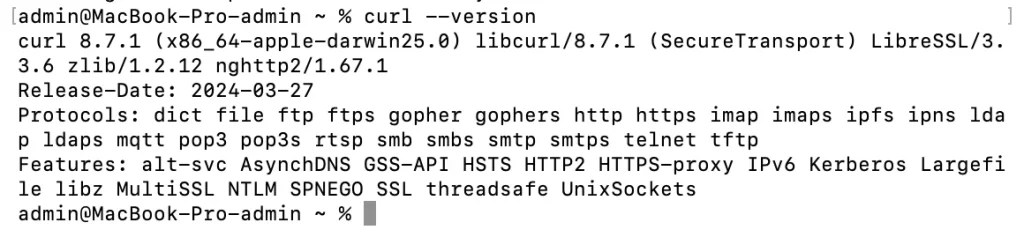
In case you don’t have cURL installed, you can install it yourself.
macOS
On macOS, cURL is usually pre-installed. However, if you find it’s missing, install it with a tool called Homebrew using this command:
brew install curl
Windows
Windows 10+ typically has it. For earlier versions, visit the cURL official website, choose the correct version for your system architecture, and download it. The next step is to extract the downloaded archive and add the bin folder to your system path.
Linux
Ubuntu and Fedora often include it by default, so it is available in the terminal out of the box. For distributions where it’s not pre-installed, cURL can be added via the package manager. For Debian-based systems, the installation command is:
sudo apt install curl
For Fedora-based systems, it is:
sudo dnf install curl
Connect to DataImpulse proxy using cURL
After installing cURL, you can start routing requests through proxies. Go to your DataImpulse dashboard, copy your proxy credentials like login/password/port/host, and paste them into the code:
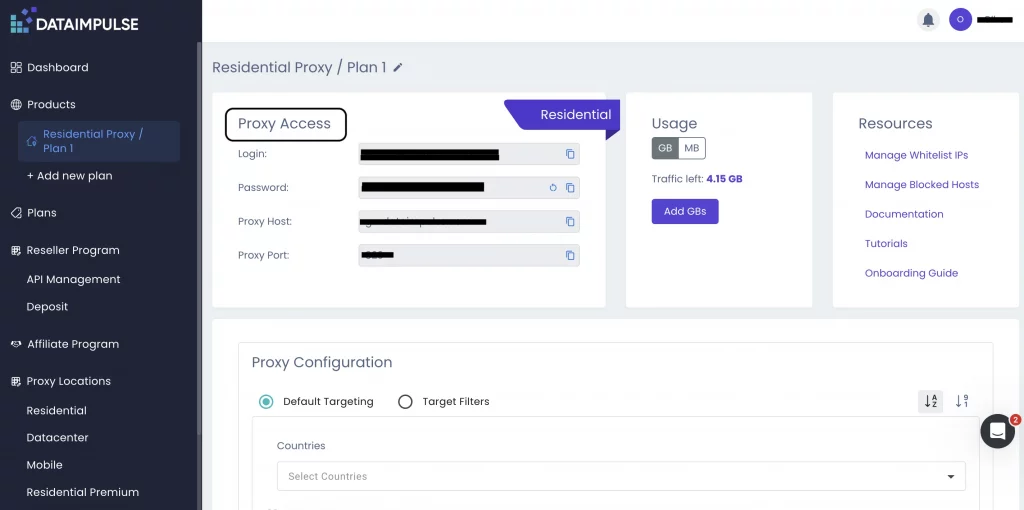
curl -x http://username:[email protected]:823 https://example.com
Useful cURL proxy parameters
The most widely used parameters are:
1. -x or –proxy defines the proxy server that cURL will route the request through.
Example of a code:
curl -x http://gw.dataimpulse.com:823 https://example.com
2. –proxy-user adds authentication credentials for the proxy server if login is a must.
Example of a code:
curl -x http://gw.dataimpulse.com:823 --proxy-user username:password http://example.com
3. –proxy-type specifies the proxy protocol that will be used. Common values are http for HTTP proxy, or socks5 for SOCKS v5 proxy.
Example of a code:
curl --socks5 gw.dataimpulse.com:823 https://example.com
DataImpulse is a reliable provider of residential, mobile, and datacenter proxy solutions with non-expiring traffic and a pay-as-you-go pricing model. If you want to find out more useful data about web scraping techniques, read our articles about How to scrape TripAdvisor with Python, Scraping GitHub with Python, How to scrape eBay, Scraping YouTube content. Much more can be found in our blog.
FAQ
Why is my proxy not working with cURL?
There are several reasons why it may happen. Check if your DataImpulse proxy details were pasted correctly, and what proxy type you’re using. Another reason can be a temporarily unavailable proxy server.
What is the difference between HTTP and SOCKS5?
HTTP proxies manage web traffic and can understand requests at the application layer. In contrast, SOCKS5 functions at a lower layer and transmits all kinds of traffic without any changes. It is more versatile but somewhat less specialized. DataImpulse offers both HTTP and SOCKS5 proxies.
What is the correct format for using a proxy in cURL?
The typical correct format is curl -x http://gw.dataimpulse.com:823 https://example.com
Can cURL handle HTTPS requests through a proxy?
Yes. The proxy uses the HTTP CONNECT method to create a tunnel. Then, an SSL or TLS connection is established between cURL and the target website. DataImpulse proxies ensure safe and anonymous browsing across 195+ locations.

 State/City/Zip/ASN Targeting



