
In this Article
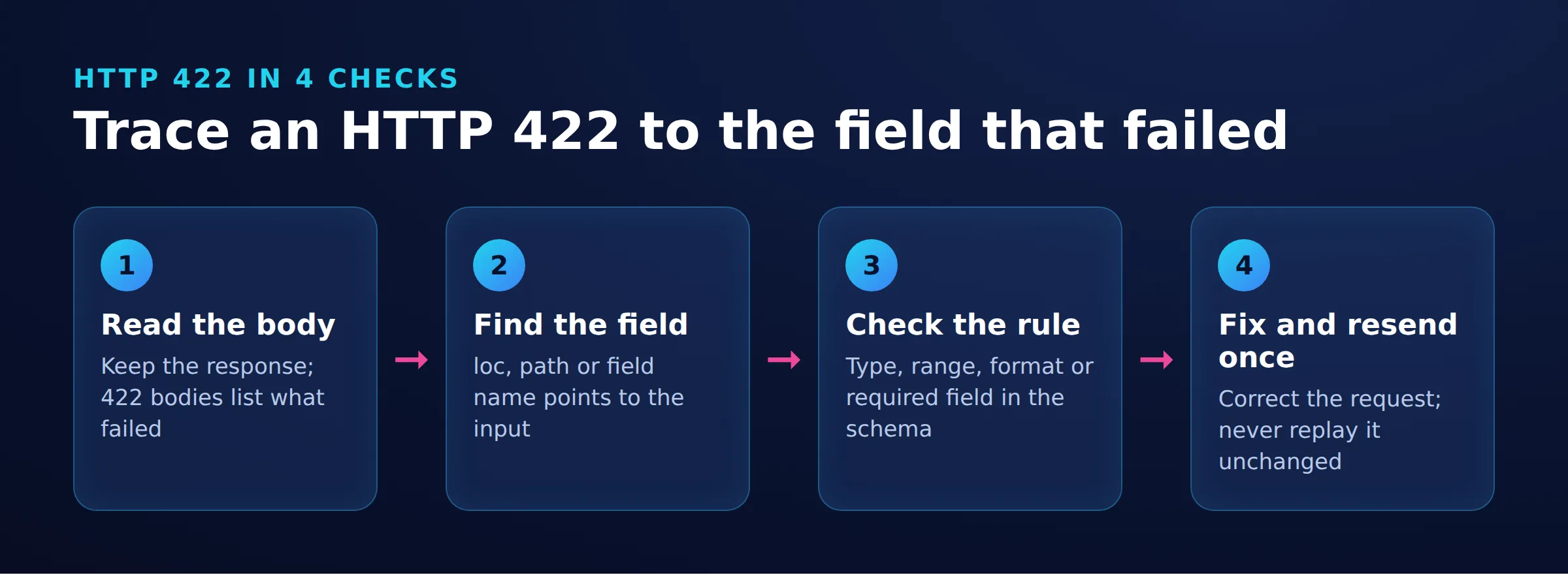
Under HTTP semantics, an http 422 response means the server understood the request’s content type and syntax but could not process its instructions. To fix http 422, inspect the response body, match each reported error to the endpoint’s schema, and correct the relevant fields. If a documented-valid request still fails, compare application logs and intermediary behavior before assigning fault.
That definition follows RFC 9110’s 422 semantics. Actual implementations need closer inspection: in our tested FastAPI environment, 422 covered schema errors, malformed JSON and a form-encoded body sent to a JSON endpoint. Start with the error body, then establish which field or layer needs correction.
Key Facts
- 422 is named Unprocessable Content in RFC 9110.
- Unprocessable Entity is the legacy name for the same status code.
- A 422 status alone cannot identify the responsible application or intermediary.
- Our November 17, 2026 local snapshot returned 422 for malformed JSON.
- Our corrected local request returned 201 Created.
- Correct the identified validation problem before replaying the request.
What does http 422 mean, and what does the response show?
422 identifies content the server cannot process under the status code’s defined semantics. The current name is Unprocessable Content; RFC 4918 used Unprocessable Entity, which still appears in responses.
Our local reproduction on November 17, 2026, at 16:28 UTC used five request cases against one order endpoint. This is a debugging snapshot, not a benchmark: Ubuntu, Python 3.12.3, FastAPI 0.163.1, Pydantic 2.14.3, Uvicorn 0.54.0 and curl 8.5.0. It does not establish behavior for other deployments.
This request omitted email and sent a word as quantity:
curl -i -X POST http://127.0.0.1:8422/orders -H "Content-Type: application/json" -d '{"sku": "A-100", "quantity": "two"}'The captured headers and body were:
HTTP/1.1 422 Unprocessable Entity
date: Tue, 17 Nov 2026 16:28:45 GMT
server: uvicorn
content-length: 259
content-type: application/json

{"detail":[{"type":"int_parsing","loc":["body","quantity"],"msg":"Input should be a valid integer, unable to parse string as an integer","input":"two"},{"type":"missing","loc":["body","email"],"msg":"Field required","input":{"sku":"A-100","quantity":"two"}}]}
The blank line separates the HTTP/1.1 headers from the body, as specified in RFC 9112. The actionable evidence is body.quantity and body.email. An HTTP/2 log may display the status differently because HTTP/2 carries it in the :status pseudo-header, as specified in RFC 9113. For broader context, see our HTTP status-code guide for scrapers.
How do you diagnose the cause and identify who must fix it?
Compare the actual transmitted request with the endpoint contract, then correlate the response with server logs. A status number alone cannot prove whether client input, server validation or an intermediary caused the rejection.
Symptom -> check -> meaning -> fix
| Symptom | Check | Meaning | Fix |
|---|---|---|---|
| Missing field | Error location and schema | Missing or wrongly nested input | Supply the documented field in the correct location. |
| Wrong type or value | Constraints and transmitted payload | Validation mismatch | Correct the type, range or format. |
| Valid JSON rejected | Endpoint rules | Syntax alone is insufficient | Meet the documented constraints. |
| Documented-valid input rejected | API version and server logs | Possible contract or validator defect | The owner reconciles implementation and documentation. |
| Only proxied path fails | Equivalent requests and origin/edge logs | Possible path-specific behavior | Correct the configuration issue supported by evidence. |
Record method, endpoint, query parameters, Content-Type and serialized body. Compare field names, nesting, required values and constraints using the deployed API version. Our API basics guide explains the contract; the curl-to-Python guide helps translate a minimal reproduction into client code.
Actions by role
| Role | Next action |
|---|---|
| Visitor | Correct highlighted input. If valid input still fails, report the time, page and visible error without sharing secrets. |
| Developer | Inspect what was transmitted, including serialization and field placement. |
| Server owner | Compare validators, deployed schema and correlated logs; fix incorrect rejection rules. |
| Scraper or API client | Preserve error details, stop automatic replay and reduce the request to a reproducible case. |
If only a proxied route fails, including a route through Cloudflare, keep payload, headers, identity and endpoint equivalent before comparing results. Ask the owner to correlate request IDs across edge and origin logs. An edge-branded response is a clue, not proof that the edge generated the error.
Rotating IPs cannot repair invalid fields. If the same request fails only when it goes through a proxy, check the proxy configuration (protocol, port, credentials) before changing the payload. Proxy authentication is a separate diagnosis: 407 means proxy authentication is required; see our 407 troubleshooting guide.
How do you fix 422 in FastAPI, JavaScript and GitHub?
Read the platform’s error structure before changing the request. Preserve the error body so a generic exception does not hide the failing field.
FastAPI validation errors
In our snapshot, detail contains individual errors: loc identifies the input location, msg explains the failure and type categorizes it. For other endpoints, distinguish body, query and path locations rather than assuming every error concerns JSON. The FastAPI error-handling documentation describes request validation and RequestValidationError.
The reproduction used this application code, saved as demo.py:
from fastapi import FastAPI
from pydantic import BaseModel, Field
app = FastAPI()
class Order(BaseModel):
    sku: str
    quantity: int = Field(gt=0, le=100)
    email: str = Field(pattern=r"^[^@\s]+@[^@\s]+\.[^@\s]+$")
@app.post("/orders", status_code=201)
def create(order: Order):
    return {"status": "created", "sku": order.sku, "quantity": order.quantity}
To reproduce the recorded environment, use Python 3.12.3 and install the pinned packages below. Start the server from the directory containing demo.py, then run the curl requests in another terminal.
python -m pip install fastapi==0.163.1 pydantic==2.14.3 uvicorn==0.54.0
python -m uvicorn demo:app --host 127.0.0.1 --port 8422
Quantity must be greater than zero and at most 100 in this application. Its email rule is a simple pattern, not proof that a mailbox exists.
| Recorded input problem | Error type | Correction |
|---|---|---|
| Quantity is “two” | int_parsing |
Send an integer. |
| Email omitted | missing |
Add email. |
| Quantity is zero | greater_than |
Choose an allowed quantity. |
| Email lacks @ | string_pattern_mismatch |
Meet the declared pattern. |
| JSON has a trailing comma | json_invalid |
Fix JSON serialization. |
| Form-encoded body | model_attributes_type |
Send the expected JSON object. |
Case 4 used this actual command. Without a Content-Type override, curl sent the body as application/x-www-form-urlencoded:
curl -i -X POST http://127.0.0.1:8422/orders -d "[email protected]"The matching captured response was:
HTTP/1.1 422 Unprocessable Entity
date: Tue, 17 Nov 2026 16:28:45 GMT
server: uvicorn
content-length: 180
content-type: application/json

{"detail":[{"type":"model_attributes_type","loc":["body"],"msg":"Input should be a valid dictionary or object to extract fields from","input":"[email protected]"}]}
The reported input matches the transmitted form body. FastAPI also exposes the received body through RequestValidationError.body for debugging.
All the failures in the table returned 422 in our local snapshot. Therefore, a FastAPI 422 does not prove the JSON was well-formed. Read detail[].type to distinguish the failure. Under RFC 9110 semantics, malformed JSON points to 400 Bad Request, while an unsupported form-encoded format at a JSON endpoint points to 415 Unsupported Media Type. Treat these as distinct diagnostic branches even when this implementation reports the same status.
JavaScript fetch responses
fetch() does not automatically reject its promise for an HTTP error status. Check response.ok or response.status, as MDN’s fetch reference explains.
We ran the following code with Node v22.22.2 on November 17, 2026, at 16:38 UTC against the same FastAPI app. The baseUrl parameter supplies the absolute local URL for Node; its empty default also permits a same-origin browser call. The function reads the body once as text, preserving non-JSON errors, and returns status and body to the caller. The JSON serialization follows MDN’s Fetch API guidance.
async function submitOrder(order, baseUrl = "") {
  const response = await fetch(`${baseUrl}/orders`, {
    method: "POST",
    headers: { "Content-Type": "application/json" },
    body: JSON.stringify(order)
  });
  const body = await response.text();
  return { ok: response.ok, status: response.status, body };
}
const base = "http://127.0.0.1:8422";
console.log(await submitOrder({ sku: "A-100", quantity: "two" }, base));
console.log(await submitOrder({ sku: "A-100", quantity: 2, email: "[email protected]" }, base));
The recorded Node output was:
{
  ok: false,
  status: 422,
  body: '{"detail":[{"type":"int_parsing","loc":["body","quantity"],"msg":"Input should be a valid integer, unable to parse string as an integer","input":"two"},{"type":"missing","loc":["body","email"],"msg":"Field required","input":{"sku":"A-100","quantity":"two"}}]}'
}
{
  ok: true,
  status: 201,
  body: '{"status":"created","sku":"A-100","quantity":2}'
}
Have the caller inspect ok before showing success and display safe field-level feedback when status is 422. Handle network exceptions separately. Compare the serialized payload with the schema before adding retry logic.
GitHub API validation failures
Inspect message, then errors and each error’s code. GitHub’s troubleshooting documentation distinguishes missing_field, invalid and already_exists; missing refers to a nonexistent resource.
Find the documentation for the exact endpoint and operation. Compare its required parameters, types and constraints with your request, correct the reported problem and check the resulting resource. Do not apply a fix for one GitHub endpoint to another without checking its contract.
How does 422 differ from neighboring status codes?
Choose 422 for understood, syntactically valid content whose instructions cannot be processed. 400 is broader than malformed syntax, so the difference is not a universal syntax-versus-validation rule.
| Code | Distinction from 422 |
|---|---|
| 400 Bad Request | Broad perceived client error. RFC 9110 |
| 409 Conflict | Conflict with the resource’s current state. RFC 9110 |
| 415 Unsupported Media Type | Unsupported request content format. RFC 9110 |
| 403 Forbidden | Understood request, refused fulfillment. RFC 9110 |
| 404 Not Found | Representation absent or existence undisclosed. RFC 9110 |
| 429 Too Many Requests | Rate limit exceeded. RFC 6585 |
| 500 Internal Server Error | Unexpected server condition prevents fulfillment. RFC 9110 |
| 423 Locked | Source or destination resource is locked. RFC 4918 |
For operational troubleshooting, use the dedicated 403 Forbidden guide or API rate-limiting guide when those conditions match the evidence.
Should you retry, and how do you verify the fix?
Do not automatically replay an unchanged validation failure. MDN’s 422 guidance says clients should expect the same request to fail again without modification.
Our corrected request was:
curl -i -X POST http://127.0.0.1:8422/orders -H "Content-Type: application/json" -d '{"sku": "A-100", "quantity": 2, "email": "[email protected]"}'The recorded response was:
HTTP/1.1 201 Created
date: Tue, 17 Nov 2026 16:28:45 GMT
server: uvicorn
content-length: 47
content-type: application/json

{"status":"created","sku":"A-100","quantity":2}
Verify the expected status, returned values and intended application state. This demonstration only returns JSON; it does not persist an order. For a real write, confirm the intended resource exists and that troubleshooting did not create duplicates.
Keep the failing and corrected requests as regression cases. If documented-valid input still fails, send the owner a sanitized reproduction, timestamp, request ID and contract version. Keep validation failures separate from transient failures in your Python request retry policy.
Frequently Asked Questions
Is 422 Bad Request?
No. Bad Request names 400, while Unprocessable Content names 422 in RFC 9110. Implementations differ in validation handling, so inspect the response body as well as the status.
Does 422 always mean the client made a mistake?
It points you toward request processing, but it does not establish ownership. Compare the transmitted input with the deployed contract before deciding whether the client or server needs correction.
Can valid JSON still cause a 422 response?
Yes. In our local snapshot, quantity zero and an email value without @ were valid JSON but failed the application’s declared constraints.
Why did malformed JSON return 422 in the FastAPI example?
The recorded implementation reported JSON decoding through its validation response. The json_invalid error type identified that branch, so checking syntax remained necessary.
What should I inspect after a POST returns 422?
Start with the response body and the exact payload sent. Match every reported location to the endpoint’s required fields, nesting, types and value constraints.
Should I fix 422 by changing Content-Type?
Only when the evidence identifies a format mismatch. Check that both the header and the serialized body match what the endpoint expects.
Can a proxy change fix a validation error?
Changing the route cannot correct an invalid field. Investigate the proxy path when equivalent requests behave differently and logs support a path-specific cause.
What should a website visitor report when valid input fails?
Record the page, approximate time and visible error message. Describe which input was rejected, but exclude passwords, tokens and unnecessary personal information.
Turn the next 422 into a reproducible fix
Capture the error body, identify the failing field or layer, and verify the corrected result. Keep a sanitized before-and-after request pair so the same failure is easier to diagnose next time.
Last updated: November 17, 2026.

 State/City/Zip/ASN Targeting




