
In this Article
A Lowe’s scraper is software that collects public Lowe’s product information, such as names, prices, and availability, while recording the store context behind each observation. Python can attempt that workflow, but our quick run on October 18, 2026 returned access denials for every tested product request, so extraction remains unvalidated.
This tutorial publishes the tested script, the six-request snapshot, and a validation plan for store-specific observations. It separates a completed HTTP request from usable product data: a CSV containing blocked rows is diagnostic evidence, not a price feed.
Before running collection, review the terms discussion below. Public visibility, technical accessibility, and permission to automate are separate questions.
Key Facts
- Our quick run on October 18, 2026 tested three product URLs across two network routes.
- All six product requests in the route matrix returned HTTP 403.
- No store was requested or confirmed in the measured product requests.
- Product extraction remains unvalidated.
- The wider investigation made about 65 requests to lowes.com.
- No successful product response was available for a useful per-page traffic estimate.
What does a Lowe’s scraper collect?
A Lowe’s scraper targets product records rather than physical scraping tools. Useful records pair an item identifier and source URL with observed fields, collection time, and confirmed store context.
The intended fields here are name, SKU, price, currency, and availability, with rating and review count as optional additions. These are extraction targets, not fields demonstrated in our run. Every measured product response was blocked before parsing.
Keep URL item IDs separate from SKUs. The script derives an item ID from the final URL segment, but it reads SKU from product markup. A URL identifier alone does not establish that the response contains the expected product.
This article does not evaluate floor scrapers, ice scrapers, tile-removal power tools, brand durability, ceramic-tile value, or physical-tool reviews. Those shopping questions share the search phrase but require a different article.
Define a usable record before collection starts. For price monitoring, require a matching product, valid price and currency, confirmed location, and timestamp. Preserve incomplete observations for diagnostics, while excluding them from comparisons and alerts.
How do you build a Lowe’s scraper with Python?
Start with a small fetch-and-record script, then validate extraction against an accessible product page. The script below completed its request and export workflow in our run, but its product parser remains unvalidated.
Our environment was Linux, Python 3.12.3, curl_cffi 0.15.0, requests 2.31.0, and Playwright 1.58.0. The script imports the requests interface from curl_cffi; it is not an ordinary Requests script. Consult the Requests quickstart for the separate library’s HTTP examples.
Install the tested dependency with pip install curl_cffi==0.15.0, save the script as lowes_scraper.py, and run python3 lowes_scraper.py. Leave PROXY_URL unset for a direct request. For an authorized proxy test, set it privately in the environment; the example comment contains placeholders, not working credentials.
import csv, json, os, random, re, time
from curl_cffi import requests   # pip install curl_cffi: browser-like TLS fingerprint

PROXY = os.environ.get("PROXY_URL")  # e.g. http://USER__cr.us:[email protected]:823
PROXIES = {"http": PROXY, "https": PROXY} if PROXY else None
SITEMAP = "https://www.lowes.com/sitemap/detail0.xml"   # listed in lowes.com/robots.txt
LD_JSON = re.compile(r'<script[^>]*application/ld\+json[^>]*>(.*?)</script>', re.S)


def fetch(url):
    try:
        r = requests.get(url, impersonate="chrome", proxies=PROXIES, timeout=40)
    except Exception as exc:
        print(f"{url[:80]} -> {type(exc).__name__}")
        return None, "error"
    blocked = r.status_code == 403 or "Access Denied" in r.text[:2000]
    print(f"{url[:80]} -> HTTP {r.status_code}, {len(r.content) // 1024} KB" + (", Access Denied" if blocked else ""))
    if blocked or r.status_code != 200:
        return None, f"HTTP {r.status_code}" + (" Access Denied" if blocked else "")
    return r.text, "ok"


def product_urls(limit=3):
    """Product URLs from the public XML sitemap: /pd/<slug>/<item id>"""
    xml, _ = fetch(SITEMAP)
    urls = re.findall(r"<loc>(https://www\.lowes\.com/pd/[^<]+)</loc>", xml or "")
    return [u for u in urls if "/INST-" not in u][:limit]   # skip install-service pages


def parse_product(html):
    """Read the schema.org Product block (JSON-LD) that product pages carry for search engines."""
    for block in LD_JSON.findall(html):
        data = json.loads(block)
        for obj in data if isinstance(data, list) else [data]:
            if obj.get("@type") == "Product":
                offer = obj.get("offers") or {}
                offer = offer[0] if isinstance(offer, list) else offer
                rating = obj.get("aggregateRating") or {}
                return {"name": obj.get("name"), "sku": obj.get("sku"),
                        "price": offer.get("price"), "currency": offer.get("priceCurrency"),
                        "availability": (offer.get("availability") or "").split("/")[-1],
                        "rating": rating.get("ratingValue"), "reviews": rating.get("reviewCount")}
    return {}


if __name__ == "__main__":
    rows = []
    for url in product_urls():
        time.sleep(random.uniform(8, 12))
        html, status = fetch(url)
        row = {"item_id": url.rstrip("/").split("/")[-1], "url": url, "status": status}
        row.update(parse_product(html) if html else {})
        rows.append(row)
    if not rows:
        raise SystemExit("No product URLs; the sitemap request failed.")
    fields = ["item_id", "name", "sku", "price", "currency", "rating", "reviews",
              "availability", "url", "status"]
    with open("lowes_products.csv", "w", newline="", encoding="utf-8") as f:
        w = csv.DictWriter(f, fieldnames=fields)
        w.writeheader()
        w.writerows(rows)
    with open("lowes_products.json", "w", encoding="utf-8") as f:
        json.dump(rows, f, indent=2)
    ok = sum(1 for r in rows if r["status"] == "ok")
    print(f"saved {len(rows)} rows, {ok} product pages parsed")
The parser searches for a top-level JSON-LD Product object and selects the first offer. Schema.org’s Product definition explains the vocabulary; it does not establish Lowe’s markup. The parser’s docstring expresses an assumption that our blocked run could not confirm.
Other limits matter: nested graphs, malformed JSON, multiple offers, and alternate type representations need separate validation. The final counter counts HTTP success, despite saying pages were parsed. Inspect actual fields before accepting a row.
For optional browser investigation, follow the official Playwright installation guide. Set finite navigation waits and stop on denial instead of waiting for a price selector on an error page. Our headless browser attempts also failed; there is no validated browser extraction script here. For another retail workflow, see our Walmart scraper tutorial.
How do you preserve store-specific pricing context?
Record the requested location separately from the location visibly confirmed on the product page. A requested ZIP or a US network route alone cannot establish which store an observation describes.
Use the following as a validation blueprint after authorized public access works. We did not reproduce a successful Lowe’s store-selection sequence, so these are checks to perform, not mandatory cookie names or endpoint parameters.
- Enter the intended ZIP through the public interface and record it as requested context.
- Select the intended store and record its displayed name and identifier, if visible.
- Preserve that session’s cookies between observations without merging different store sessions.
- Reopen the product and verify that the selected store remains visible.
- Record pickup, shipping, or delivery context alongside the observed value.
A ZIP can identify an area without selecting one specific store. Keep requested store ID and confirmed store ID as separate nullable fields. If confirmation is unavailable, label the observation location-unconfirmed and exclude it from store-specific alerts.
The official pickup guidance is the appropriate reference for interpreting pickup context. Treat availability wording, estimated readiness, and stock quantity as different observations. Do not turn a generic availability label into a numeric stock count.
Our measurements establish nothing about internal in-store pricing systems. Collect only values actually exposed on an accessible public page, retaining their source and context. Similar comparison pitfalls appear in our Costco scraper discussion.
How do you validate fields and create price alerts?
Use the 4-step Store Context Check: select, persist, confirm, compare. An alert should represent a validated change within the same context, rather than a difference between unrelated sessions.
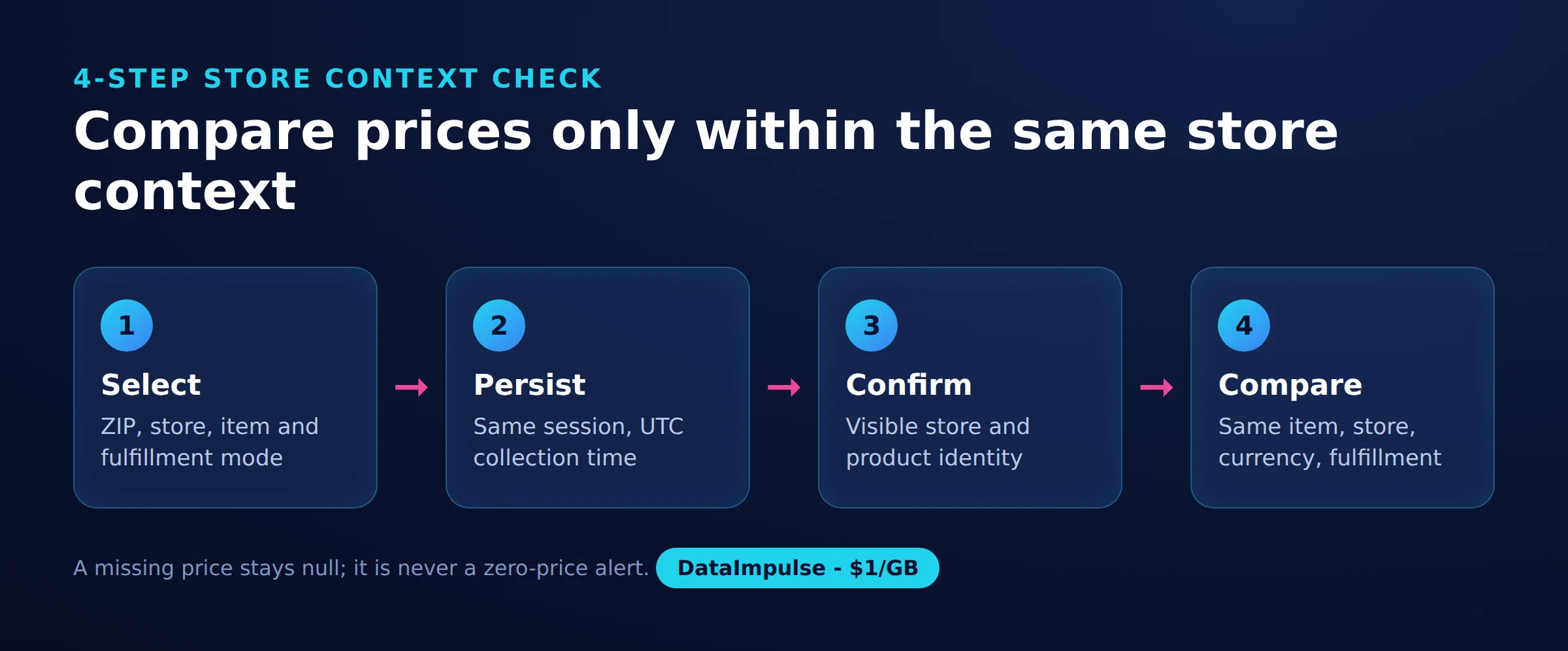
- Select: Record the intended ZIP, store, item, and fulfillment mode.
- Persist: Keep observations within the corresponding session and record collection time in UTC.
- Confirm: Check the visible store and product identity before accepting price, currency, or availability.
- Compare: Match only observations with equivalent item, store, currency, and fulfillment context.
Store raw values beside normalized values. Preserve the original availability label, and parse prices into a decimal representation without discarding currency. Missing prices stay null; they must never become zero-price events.
Use a comparison key containing item ID, confirmed store ID, currency, and fulfillment mode. Keep a separate observation timestamp. This prevents a later scrape from silently replacing the evidence behind an earlier alert.
Deduplicate notifications by comparison key and transition: previous accepted value to new accepted value. Repeated collection of the same new value should not generate repeated alerts. After a denial or context mismatch, retain the last valid observation but mark its age; do not present it as current.
The tested script does not implement this framework or alert delivery. These are acceptance requirements for the next implementation stage. Our guides to retailer price tracking and building a price comparison tool discuss the wider workflow.
Why are requests blocked or prices missing?
First separate denied access from successful delivery with missing fields. A block response gives no evidence about product availability, and an HTTP 200 response still needs content validation.
- 403: The server refuses the request. Preserve the status and response evidence, then stop persistent retries. See the 403 reference.
- 429: Treat the response as rate limiting and honor any Retry-After instruction. See the 429 reference.
- 400 or wp/collections errors: Investigate the exact observed request and response. A required ZIP, cookie, or initialization sequence remains a hypothesis until reproduced.
- 200 with missing prices: Check for an error document, unexpected product, unsupported markup, incomplete rendering, or unconfirmed location.
Our investigation recorded Access Denied responses associated with an Akamai edge. That observation does not identify every component or rule in Lowe’s protection stack. Consult Akamai’s detection documentation for background, without treating it as a diagnosis of a particular request.
Changing client fingerprints, opening the homepage first, and using headless browsers did not produce product access in this run. We therefore make no Akamai bypass or undetected-chromedriver recommendation. A proxy route also failed on all three measured product URLs.
Keep troubleshooting bounded: compare the response body, network route, session state, and requested context, then change one variable at a time only where authorized. Our 403 troubleshooting guide explains how to structure that investigation.
Which collection approach should you choose?
Choose the smallest approach that can demonstrate correct, permitted collection for your actual fields and stores. Evaluate alternatives using the same sample, including missing values and denials.
| Approach | Use X when… | Avoid X when… |
|---|---|---|
| Requests | Use Requests when needed fields exist in returned HTML. | Avoid Requests when rendering is required. |
| Browser | Use a browser when the public UI supplies necessary context. | Avoid a browser when simple HTTP suffices. |
| Residential proxy | Use a residential proxy when testing network-dependent access. | Avoid a residential proxy when expecting guaranteed unblocking. |
| Managed service | Use a managed service when outsourcing extraction is justified. | Avoid a managed service when coverage or access remains unverified. |
For an Apify, Bright Data, or ScraperAPI evaluation, require a current demonstration against your selected URLs and stores before comparing cost. No Lowe’s-specific coverage, feature, or pricing claim for those vendors is established here.
Ask every candidate the same questions: What counts as success? How are missing values represented? Can you inspect source evidence? Are retries billable? What permissions govern collection and reuse? A low request price is irrelevant if the delivered record lacks confirmed store context.
What did our quick public-page run return?
Our quick run on October 18, 2026 returned six HTTP 403 responses from three product URLs across two routes. This is a small snapshot, not a benchmark or a general success-rate estimate.
We used one Linux server, first through its datacenter connection and then through a DataImpulse US residential proxy with a new IP per request. The wider investigation made about 65 requests to lowes.com, with 4-12 second pauses, no login, and no challenge solving. The published script uses 8-12 second pauses.
The source artifacts are lowes_scraper.py and its lowes_products.csv and lowes_products.json exports. The matrix below reports the accompanying request measurements; timing, byte counts, and store confirmation are not columns emitted by the script.
All timestamps are UTC on October 18, 2026. URL paths are abbreviated exactly as recorded in the measurement summary; the omitted slugs are not reconstructed. The denial column records Access Denied detection, not a successfully completed interactive challenge.
| UTC | URL path | Network | Store requested / confirmed | HTTP | Denial detected | Elapsed ms | Body bytes | Fields returned | Missing fields | Parse outcome |
|---|---|---|---|---|---|---|---|---|---|---|
| 16:10:02 | /pd/…/1000456441 | Datacenter | None / none | 403 | Access Denied | 290 | 531 | None | Name, SKU, price, currency, availability | Not reached |
| 16:10:11 | /pd/…/5014962609 | Datacenter | None / none | 403 | Access Denied | 187 | 405 | None | Name, SKU, price, currency, availability | Not reached |
| 16:10:19 | /pd/…/5015304443 | Datacenter | None / none | 403 | Access Denied | 184 | 414 | None | Name, SKU, price, currency, availability | Not reached |
| 16:10:37 | /pd/…/1000456441 | Residential | None / none | 403 | Access Denied | 988 | 533 | None | Name, SKU, price, currency, availability | Not reached |
| 16:10:47 | /pd/…/5014962609 | Residential | None / none | 403 | Access Denied | 3012 | 407 | None | Name, SKU, price, currency, availability | Not reached |
| 16:10:59 | /pd/…/5015304443 | Residential | None / none | 403 | Access Denied | 1144 | 416 | None | Name, SKU, price, currency, availability | Not reached |
The homepage opened with HTTP 200 and about 321 KB, but contained no product data. The sitemap opened with 7,921 URLs, mostly product links: about 1,507 KB decoded and 208 KB transferred. Homepage access therefore did not predict product access.
The six denial bodies averaged 451 bytes. At our $1/GB calculation rate, 451 * 1000 / 1e9 * $1 equals $0.000451 per 1,000 denial bodies. This payload-only arithmetic excludes browser assets, retries, and billing overhead; it is not a successful-page estimate. The compressed sitemap transfer corresponds to about $0.0002 at the same rate.
No successful product response was available for estimating useful collection cost. Measure actual successful traffic and validated records before setting a production budget.
Is scraping Lowe’s legally and contractually permitted?
Public access does not settle permission: law, contract, and robots directives require separate review. Lowe’s terms of use, rechecked on October 18, 2026, prohibit automated retrieval and data mining, with additional restrictions on scraping connected to reseller activities.
The robots.txt directives, also rechecked that day, disallow /search?*. Discovering a URL through a sitemap does not override contractual restrictions or authorize collection. Seek appropriate permission before operational use.
The Ninth Circuit’s 2022 hiQ opinion addressed a preliminary injunction and CFAA questions concerning publicly accessible LinkedIn profiles. It is not blanket permission to scrape retail websites or disregard contracts.
In the EU, database rights can restrict qualifying extraction and reuse. If collection expands into identifiable people, assess personal-data obligations separately. Keep this workflow away from accounts and personal profiles.
Assess jurisdiction, purpose, scale, and reuse with qualified counsel; our web scraping legality overview offers background. Contract enforceability and legal risk depend on the facts; the reader decides, check local law.
What official APIs and tracking alternatives exist?
We could not verify unrestricted public product API access, documented quotas, pricing, or export rights. A developer portal’s existence does not establish eligibility to retrieve store-level prices or inventory.
Start with the Developer Hub, the Product Catalog page, and the Product Discovery page. Use the developer contact route to clarify eligibility, authorized fields, store coverage, quotas, pricing, and permitted reuse.
For a small watchlist, consider a manual public-page review with explicit store confirmation. Evaluate Lowe’s app, BrickSeek, or another tracker only after checking current official documentation and testing your items; no automated alert, export, or inventory-accuracy capability is asserted here. Keep shopping assistance separate from a licensed data feed.
Frequently Asked Questions
What is a Lowe’s scraper?
It is software intended to turn public Lowe’s product observations into structured records. Useful price records include product identity, collection time, and confirmed store context, rather than a price alone.
How can Python extract public Lowe’s product names and prices?
Fetch an authorized public page, verify that it contains the expected product, and inspect its markup for the required fields. Our script attempts JSON-LD extraction and exports CSV and JSON, but the measured product requests were denied before that parser could be validated.
Why can the same product show different store availability?
A comparison may involve different stores, fulfillment modes, or observation times. Confirm those dimensions before interpreting a change as new inventory information; an availability label alone cannot establish stock quantity.
Why does Lowe’s return access denied or missing prices?
An access denial and a missing field are different failure modes. Our requests received explicit 403 denials, while an accessible page with no price would require separate checks for context, rendering, and parser assumptions.
Does Lowe’s offer a publicly accessible product API?
Unrestricted access was not verified during this review. Ask the developer team about eligibility and the exact fields and store coverage your project needs before designing around an API.
Did a residential proxy fix the blocked requests?
No. All three residential-route product requests in the measured matrix returned HTTP 403, which shows that this particular test did not establish working access.
Can the measured response sizes predict scraping costs?
They describe the small denial bodies, not successful product downloads. A useful budget needs successful-response traffic, retries, browser resources where applicable, and the number of records that pass validation.
Test access before budgeting a price feed
If an authorized project needs a network-route comparison, DataImpulse can fit that test. It is a proxy service, not a scraping API, managed unblocker, VPN, or data vendor. Start with a small sample and require confirmed store context and usable fields before scaling; our residential test did not establish product access.
Last updated: October 18, 2026.

 State/City/Zip/ASN Targeting



