
In this Article
The TLS extension server name indication (SNI) tells a server which hostname a client wants before the server selects its certificate. This lets several HTTPS websites share an IP address while presenting different certificates.
Certificate selection and hostname privacy are separate problems. Understanding that distinction helps you diagnose a wrong certificate, assess proxy visibility, and test whether Encrypted Client Hello (ECH) actually protected a connection.
Key Facts
- SNI carries the requested hostname in the TLS ClientHello.
- SNI helps servers select certificates for websites sharing an IP address.
- TLS 1.3 alone does not encrypt SNI.
- ECH protects the inner ClientHello, including its hostname.
- A DNS ech= advertisement does not prove successful ECH negotiation.
- Our DNS snapshot of the Tranco top 1,000 found ech= in 12 domains (1.2%) and HTTPS records in 191.
What is server name indication?
SNI identifies the requested website during TLS setup. HTTPS virtual hosting needs this early signal when the server must choose between certificates before receiving an HTTP request.
For example, shop.example.com and support.example.com can resolve to the same address. Their ClientHello messages carry different names, allowing the receiving endpoint to choose the appropriate TLS configuration. RFC 6066, section 3 defines this mechanism.
SNI is not authentication. A client still has to validate the certificate returned by the server.
How does server name indication select a certificate?
The server reads SNI from ClientHello and uses it to select a TLS configuration and certificate. The client then checks that certificate against the hostname it intended to visit.
| Stage | Information exchanged | Purpose |
|---|---|---|
| ClientHello | Requested hostname and TLS parameters | Identify the intended virtual host |
| Certificate selection | Server sends its selected certificate chain | Present an identity for validation |
| Client validation | Hostname, trust chain, and validity checks | Authenticate the server |
| HTTP request | Host or :authority, path, and headers | Route the application request |
This describes a normal full HTTPS handshake. HTTP Host and :authority belong to the application layer; changing them cannot retroactively change the certificate already selected. See the TLS 1.3 handshake specification and HTTP authority semantics.
How is SNI different from DNS and certificate SANs?
DNS locates an endpoint, SNI requests a hostname, and certificate Subject Alternative Names (SANs) identify names the certificate covers. These values serve different purposes.
A DNS alias pointing at another hostname does not automatically make that hostname’s certificate valid for the original URL. Validation compares the intended service identity with the certificate, following RFC 9525. Changing an IP address cannot repair a hostname mismatch.
Does HTTPS hide the hostname?
HTTPS encrypts HTTP content, including URL paths and query strings, but classic SNI exposes the requested hostname. TLS 1.3 does not encrypt SNI automatically: its initial ClientHello remains visible without ECH or an enclosing encrypted tunnel.
An ISP can see a hostname in plaintext SNI when it observes that handshake. That does not expose the full HTTPS URL. TLS 1.3 encrypts later handshake messages, including the certificate, as described in RFC 8446.
An ISP can also see ordinary unencrypted DNS requests without a VPN. DNS over HTTPS or DNS over TLS protects the client-to-resolver exchange, although the resolver still receives the query. See our DNS, proxy, and VPN comparison.
Do proxies or VPNs hide SNI?
HTTP proxies, SOCKS5 proxies, and VPNs do not hide SNI from the same observers. The answer depends on which connection is encrypted and where the observer sits.
- Plain HTTP CONNECT: the proxy receives a destination host and port, then forwards tunnel traffic. Without encryption to the proxy, local observers can inspect that exchange and ordinary SNI. See CONNECT semantics.
- SOCKS5: the request identifies a destination address or domain. SOCKS5 alone does not guarantee an encrypted transport; see RFC 1928.
- TLS to a forward proxy: local observers lose visibility into the enclosed handshake, but the proxy still receives the destination.
- Encrypted VPN tunnel: local observers cannot read enclosed SNI. The exit operator and observers beyond the exit may see ordinary SNI; routing and DNS leaks remain relevant.
Our forward-proxy explainer and HTTP versus SOCKS5 comparison expand these distinctions. A reverse proxy that terminates TLS occupies a different position: see reverse versus forward proxies.
How does ECH differ from SNI and ESNI?
ECH encrypts an inner ClientHello containing the real hostname while retaining a visible outer ClientHello. ESNI was its earlier, narrower predecessor, focused on encrypting the server-name extension.
RFC 9849 specifies ECH; Cloudflare’s protocol history explains the move from ESNI. ECH still exposes IP addresses and outer metadata. Traffic patterns and plaintext DNS can reveal destination clues, as section 10 explains. Server compatibility, configuration distribution, and middleboxes can limit deployment.
Firefox enables ECH from version 119, where available, and requires DoH for its deployment. Enable DoH and check enterprise restrictions. In Chrome, enable Use secure DNS; Google’s ECH policy documentation says use still depends on server support, HTTPS DNS records, and rollout status.
For servers, coordinate ECH keys, DNS advertisements, and the TLS endpoint. Cloudflare enables ECH by default for Free zones (as of October 2026) and an Edge Certificates toggle for other plans. Follow its ECH setup instructions. For self-hosting, verify explicit ECH support in the chosen TLS stack; ordinary SNI configuration is insufficient.
How can you test SNI and ECH?
Test certificate selection and ECH negotiation separately. A published ech= parameter advertises capability; it does not establish what happened on a particular connection.
In our quick run on October 16, 2026, we examined the first 1,000 domains in Tranco top-1M list Y8JGG, downloaded that day. We queried HTTPS records, type 65, for each domain and its www. host using dig against 1.1.1.1, plus NS records for grouping. These were DNS queries only, with no requests to websites.
| DNS observation | Domains | Share |
|---|---|---|
| HTTPS record published | 191 | 19.1% |
| ech= parameter published | 12 | 1.2% |
Grouped by DNS provider (from NS records), Cloudflare DNS accounts for most HTTPS records, but even there few domains advertise ECH. Cloudflare enables ECH by default only on Free zones (as of October 2026), while large sites usually run paid plans, which is consistent with the low share.
| DNS provider (NS) | Domains | HTTPS record | ech= published |
|---|---|---|---|
| Cloudflare | 120 | 93 | 7 |
| AWS Route 53 | 216 | 39 | 2 |
| NS1 | 178 | 13 | 1 |
| 74 | 10 | 0 | |
| Meta | 7 | 6 | 0 |
| Akamai | 90 | 4 | 0 |
| Azure | 40 | 1 | 0 |
| UltraDNS | 4 | 1 | 0 |
| Apple | 9 | 0 | 0 |
| No NS answer | 6 | 0 | 0 |
| Other | 256 | 24 | 2 |
| Total | 1000 | 191 | 12 |
This small snapshot is not a benchmark. It covers one resolver and one day, includes infrastructure domains, and measures domains rather than connections. NS ownership does not establish CDN ownership.
Repeat the per-domain lookup pattern with this shell snippet:
domain=example.com
for host in "$domain" "www.$domain"; do
  printf '%s\n' "$host"
  dig +short TYPE65 "$host" @1.1.1.1
done
dig +short NS "$domain" @1.1.1.1
To confirm ECH negotiation, inspect client or server diagnostics that explicitly report ECH acceptance for the actual connection. DNS advertisements and GREASE extensions are insufficient: GREASE can deliberately resemble an ECH attempt without protecting a real hostname.
curl labels its ECH feature experimental and TLS 1.3-only. For certificate checks, OpenSSL s_client needs explicit hostname checking and verify_return_error to stop on validation failures:
openssl s_client -connect example.com:443 -servername example.com -verify_hostname example.com -verify_return_error </dev/null
openssl s_client -connect example.com:443 -noservername -verify_hostname example.com -verify_return_error </dev/null
Compare certificates and validation outcomes. Neither command demonstrates ECH negotiation. When we ran both on October 16, 2026, example.com returned its certificate and “Verify return code: 0 (ok)” with SNI, and refused the handshake without SNI (TLS alert 40, handshake failure).
How do you troubleshoot SNI in IIS, AWS, and reverse proxies?
Use the 4-step SNI diagnosis check to separate routing, certificate selection, and validation failures. Keep the destination fixed when comparing names.
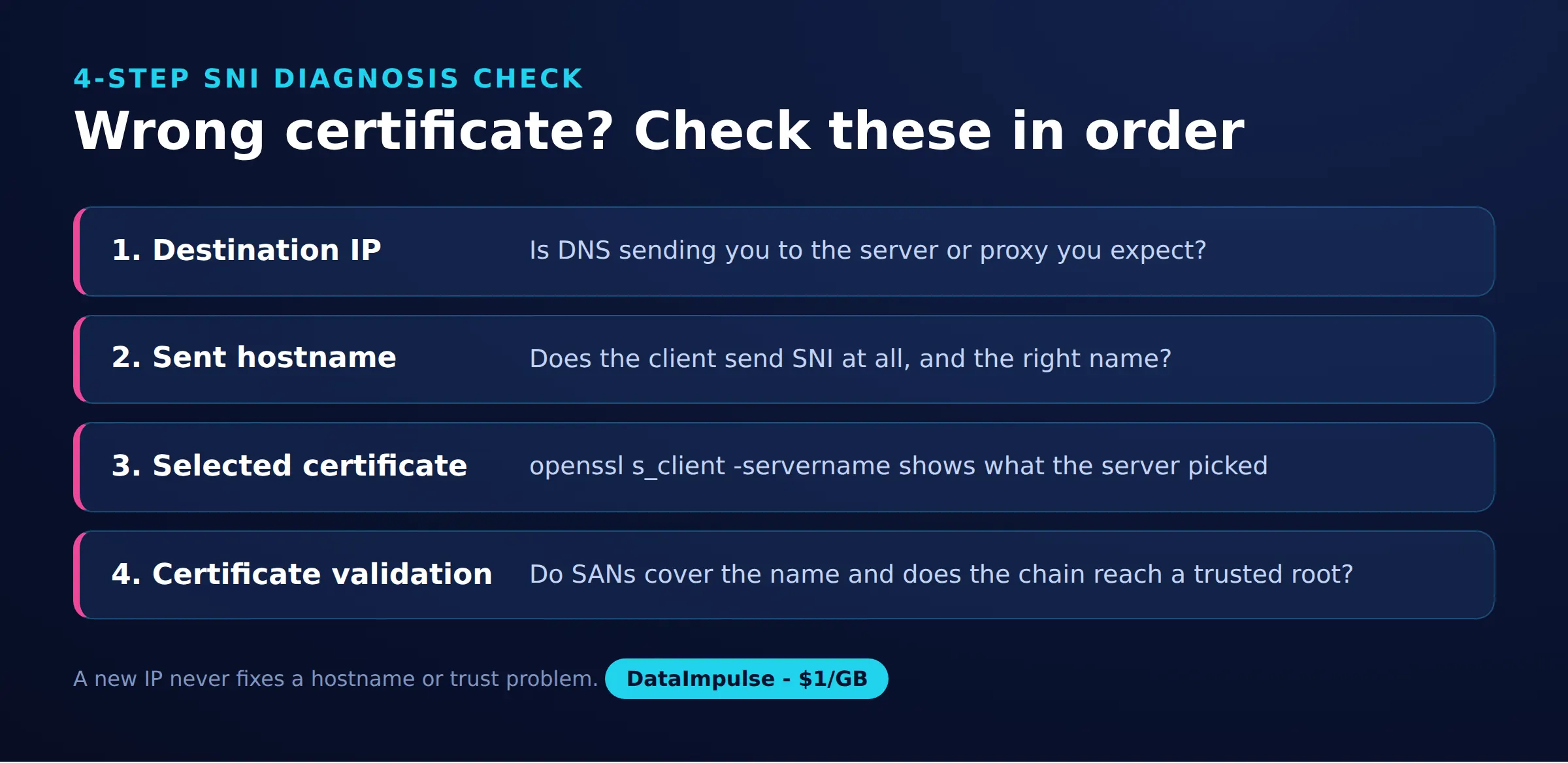
- Step 1: Destination IP. Confirm the client reaches the intended TLS endpoint.
- Step 2: Sent hostname. Check the actual SNI value, including any upstream TLS connection.
- Step 3: Selected certificate. Compare the returned certificate with the configured virtual host.
- Step 4: Certificate validation. Check SAN coverage, expiry, and trust chain. Treat certificate-authority errors separately from hostname mismatches.
IIS SNI bindings require SNI-capable clients; check the HTTPS hostname, SNI selection, and certificate. AWS ALB uses its default certificate when SNI is absent or no certificate name matches. Check its listener certificate list and logs.
the following Apache and Nginx fragments require installed certificates and TLS support. Replace example names and certificate filenames before use. For Apache, enable mod_ssl and a Listen 443 directive once:
<VirtualHost *:443>
    ServerName example.com
    SSLEngine on
    SSLCertificateFile example.com.crt
    SSLCertificateKeyFile example.com.key
</VirtualHost>
For Nginx, place this inside the http context:
server {
    listen 443 ssl;
    server_name example.com;
    ssl_certificate example.com.crt;
    ssl_certificate_key example.com.key;
}
Add a separate block for each name and certificate. Clients without SNI commonly receive the default certificate, which must still validate; some endpoints reject them. Our Nginx reverse-proxy guide covers the next configuration steps.
Which approach should you use?
Choose according to the problem: certificate hosting, hostname privacy, application egress, or network tunneling. These mechanisms can complement each other.
| Approach | Use X when… | Avoid X when… |
|---|---|---|
| SNI virtual hosting | Use SNI when hosting several HTTPS names on one IP. | Avoid relying solely on SNI when required clients lack support. |
| ECH | Use ECH when compatible clients and services support hostname privacy. | Avoid treating ECH as protection for IPs or all destination clues. |
| Forward proxy | Use a forward proxy when an application needs controlled egress. | Avoid assuming proxying automatically encrypts SNI. |
| VPN | Use a VPN when traffic needs an encrypted network tunnel. | Avoid expecting anonymity from every observer. |
Frequently Asked Questions
Is SNI the same as a DNS name server?
No. DNS answers lookup questions, while SNI carries a requested hostname inside a TLS handshake.
Does SNI replace certificate validation?
No. Selecting the intended certificate is only one step; the client must still verify identity and trust.
Can changing the HTTP Host header fix a wrong certificate?
No. Certificate selection happens before the ordinary HTTP request reaches the server, so inspect the TLS configuration first.
Does encrypted DNS hide SNI?
Encrypted DNS protects DNS exchanges. A separate ordinary TLS handshake can still reveal its hostname.
Does an ech= DNS record guarantee privacy?
No. It advertises configuration, while connection diagnostics must establish whether the client and server actually used ECH.
Can a proxy operator know the destination despite ECH?
Yes. A proxy request can disclose the destination independently of the TLS ClientHello.
Choose proxy infrastructure with clear expectations
If your application needs controlled egress, explore DataImpulse residential proxies. DataImpulse is proxy infrastructure, not a VPN, scraping API, or managed unblocker. Keep certificate validation enabled and assess hostname privacy separately.
Last updated: October 16, 2026.

 State/City/Zip/ASN Targeting



