

In this Article
A udp proxy relays UDP datagrams between an application and a destination server. It does not inherently guarantee delivery, ordering or encryption, and both the client and proxy must support the chosen relay mechanism.
SOCKS5 defines UDP relaying, but a SOCKS5 label alone is insufficient evidence that your application will work. Start with the transport your application needs, then check the proxy protocol, endpoint permissions and client implementation.
Key Facts
- A UDP proxy relays datagrams without inherently guaranteeing delivery or ordering.
- TCP exposes an ordered byte stream, but a connection can still fail.
- SOCKS5 defines UDP ASSOCIATE; deployed support requires compatible clients and servers.
- Ordinary HTTP CONNECT establishes a TCP tunnel.
- CONNECT-UDP is a separate mechanism for proxying UDP through HTTP.
- HTTP/3 uses QUIC, which runs over UDP.
- DataImpulse supports UDP connections, with access disabled by default and reviewed individually.
What is a udp proxy?
A udp proxy receives application datagrams and forwards them to their destination, relaying replies back to the client. It adds an intermediary without automatically changing UDP’s delivery behavior.
A UDP proxy relays messages; reliability and encryption must come from additional mechanisms. UDP itself does not guarantee delivery or duplicate protection, as defined in RFC 768.
Transport and IP source are separate choices. A residential, mobile or datacenter address does not establish whether a service accepts UDP. Likewise, a sticky IP session says nothing about which transport the application can use.
Why TCP and UDP matter for proxy workflows
TCP and UDP affect how applications handle lost data, message boundaries and waiting time. The proxy must support the application’s transport rather than simply accept a connection from its client.
HTTP/3 is an important example: the HTTP/3 specification maps HTTP onto QUIC, and QUIC runs over UDP. A successful TCP-based web request therefore does not establish HTTP/3 compatibility.
Keep three layers separate: application protocol, proxy protocol and transport. HTTPS describes protected HTTP communication; it does not mean an ordinary HTTP proxy can relay arbitrary UDP traffic. Our SOCKS versus HTTP proxy comparison explains the proxy-protocol distinction.
TCP proxy basics: streams, connections and ports
A TCP proxy relays a connection-oriented byte stream. TCP uses sequence numbers, acknowledgments and retransmission to deliver bytes in order, but an interrupted or timed-out connection can still fail.
TCP means Transmission Control Protocol. It divides stream data into segments; it does not preserve application message boundaries. Applications must define their own framing when they need separate messages. These behaviors are specified in RFC 9293.
Distinguish the proxy’s listening port from the destination port. With ordinary HTTP CONNECT, the client names a destination host and port, and the proxy establishes the tunnel if permitted. A reachable proxy port does not prove that every destination port is allowed. See HTTP CONNECT semantics.
What is UDP? Datagrams and delivery limits
UDP means User Datagram Protocol. It preserves message boundaries but does not itself retransmit missing messages or restore their order.
A datagram includes source and destination ports, a length field and a checksum field. Datagrams can be lost, duplicated or arrive out of order; applications decide how to respond. See the UDP specification.
A UDP message is not necessarily one unfragmented IP packet. Large datagrams can require IP fragmentation, depending on the IP version and path. Losing a fragment prevents reconstruction of the complete datagram. Applications should account for path MTU and encapsulation overhead rather than assume large messages will pass unchanged. The IETF UDP message-size guidelines recommend avoiding fragmentation.
TCP vs UDP: reliability, latency and security
TCP favors ordered stream delivery; UDP leaves message recovery to the application or a higher-layer protocol. Neither transport is universally faster: route quality, congestion, loss and application behavior determine the result.
TCP retransmission can delay later bytes while missing data is recovered. UDP allows an application to discard stale messages, but that only helps when the application can tolerate their loss. QUIC illustrates the distinction: it uses UDP while implementing reliable streams and congestion control itself. See TCP transport behavior and QUIC’s transport design.
What about the security aspect?
Neither base TCP nor base UDP encrypts application data. TCP’s connection setup is not an identity check, and UDP’s lack of a handshake is not a privacy feature. Use appropriate encryption and authentication; UDP applications must also address spoofing and amplification risk. See UDP security considerations.
Which protocols support a udp proxy?
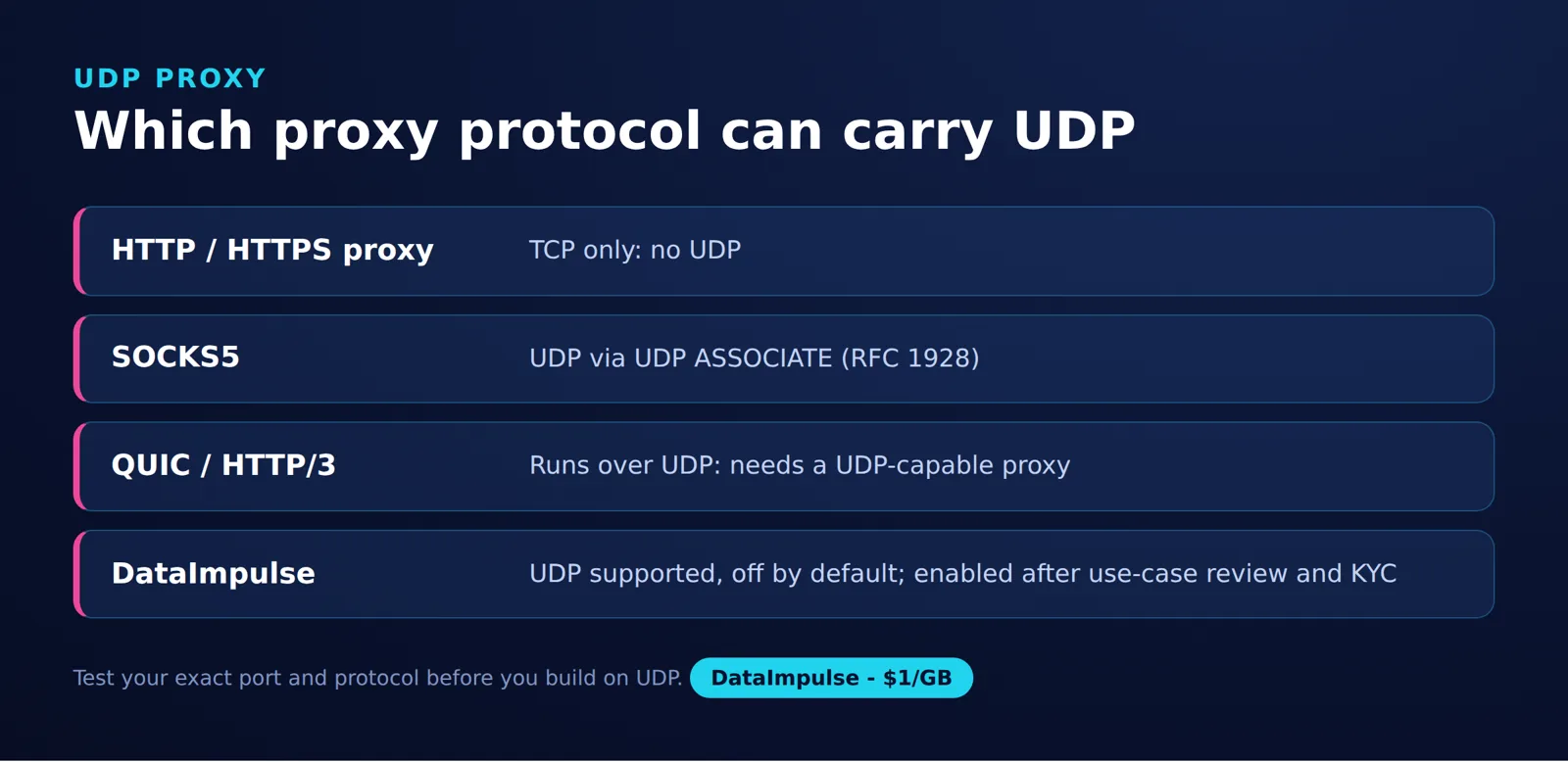
SOCKS5 defines UDP relaying, while SOCKS4 and ordinary HTTP CONNECT do not. CONNECT-UDP and Shadowsocks define other mechanisms, but protocol capability does not establish support in a particular deployment.
| Protocol or mechanism | UDP capability | What to confirm |
|---|---|---|
| SOCKS4 | No UDP relay in the SOCKS4 specification. | Choose a different mechanism for UDP traffic. |
| SOCKS5 | UDP ASSOCIATE is defined in RFC 1928. | Client support, server support and access to the relay address. |
| Ordinary HTTP CONNECT | Creates a TCP tunnel under RFC 9110. | Do not infer UDP support from an HTTP or HTTPS proxy label. |
| CONNECT-UDP | UDP tunneling through HTTP, defined by RFC 9298 in the MASQUE standards family. | Compatible client and proxy implementations of the extension. |
| Shadowsocks | The Shadowsocks protocol documentation defines encrypted UDP packet relaying. | UDP configuration and compatible local and remote implementations. |
How does SOCKS5 UDP ASSOCIATE work?
The client opens a TCP control connection and requests UDP ASSOCIATE. The server returns a relay address and port; the client sends UDP datagrams there with SOCKS5 headers identifying the destination. Replies return through that relay. Closing the TCP control connection terminates the association.
SOCKS5 defines UDP ASSOCIATE, but a SOCKS5 label does not establish operational UDP support. Confirm both implementations against RFC 1928.
UDP over TCP: how does tunneling differ?
UDP over TCP encapsulates datagrams inside a TCP byte stream. That differs from SOCKS5 UDP ASSOCIATE, whose TCP connection controls a separate UDP relay path.
A tunnel must preserve datagram boundaries through framing. Because the outer TCP stream delivers bytes in order, loss can delay later encapsulated messages until retransmission succeeds. This is a consequence of TCP’s ordered delivery, and can undermine applications that prefer fresh messages over late ones.
Encapsulation does not change the destination application’s protocol. It changes how traffic crosses part of the route, so evaluate the tunnel’s behavior under loss rather than treating it as equivalent to native UDP.
How do you verify UDP support for gaming and VoIP?
Verify the complete application-to-destination path before expecting a UDP proxy to help gaming or VoIP. Adding a relay can improve or worsen the route; support alone says nothing about latency, jitter or loss.
The 4-step UDP compatibility check
- Step 1: Identify the traffic. Determine which application functions use UDP, their destination ports and whether the application supports a proxy directly.
- Step 2: Check the client. Find explicit documentation for UDP relaying in the exact client and version. TCP-only proxy handling cannot carry the application’s UDP messages.
- Step 3: Confirm the endpoint. Ask about UDP enablement, permitted ports, destinations, session behavior and any traffic limit. Confirm that the local network permits the relay path.
- Step 4: Compare actual behavior. For SOCKS5, keep the TCP control connection open and verify that the client sends UDP packets to the relay address and port returned by UDP ASSOCIATE. Use packet capture and logs from a UDP destination you control to confirm that requests and replies traverse the proxy. Then compare loss, round-trip time and delay variation against a direct connection.
A successful HTTPS request checks a different path. It cannot establish UDP relay functionality or performance. Keep test date, client version, configuration and sample size with any results; treat a small run as a snapshot, not a benchmark.
Use or avoid: a transport decision matrix
If an application uses both TCP and UDP, verify both paths: a successful SOCKS5 CONNECT test does not test UDP ASSOCIATE.
DataImpulse protocols: what is confirmed?
DataImpulse supports HTTP, HTTPS and SOCKS5, and its UDP documentation confirms UDP connections with an individual enablement process. UDP is disabled by default.
We support UDP connections; it is disabled by default for all users. To enable it: provide a detailed description of your use case, company information if applicable, and complete KYC verification. Each request is reviewed individually.
Source: official UDP support documentation. This policy does not establish UDP availability for every product, endpoint, protocol or port. Confirm the intended configuration before integration.
This is our proxy service. We do not sell ISP/static residential proxies. No UDP performance measurements are reported here.
Frequently Asked Questions
Is UDP always faster than TCP?
No. Avoiding transport-level retransmission can help time-sensitive applications, but routing, congestion and application recovery still affect performance. Compare the application’s behavior on the actual paths you plan to use.
Does every SOCKS5 proxy support UDP?
No. The protocol defines a UDP relay command, but an implementation or service may not make it available. Check the client, endpoint and account permissions together.
Can an HTTP proxy carry UDP?
An ordinary HTTP proxy using CONNECT tunnels TCP, not UDP. UDP through HTTP requires a separate mechanism such as CONNECT-UDP and compatible implementations at both ends.
Why does SOCKS5 use TCP for a UDP association?
TCP maintains the control connection used to establish the association. The application datagrams travel separately to the UDP relay. That arrangement is not UDP payload tunneling over TCP.
Will a UDP proxy lower gaming ping?
There is no automatic improvement. A different route might help, while an extra relay or congestion might add delay. Check loss and jitter alongside ping before deciding.
Which port should I use for a UDP proxy?
Use the endpoint and configuration documented for your service. For SOCKS5, the UDP ASSOCIATE response identifies the relay address and port. Destination-port permissions are a separate check.
Does HTTP/3 require UDP?
HTTP/3 runs over QUIC, whose underlying transport is UDP. Successfully accessing a website through a TCP proxy does not prove HTTP/3 was used; the connection may have used another HTTP version.
Match the proxy to your application’s transport
Considering DataImpulse? Explore our residential proxies, then confirm your UDP use case, endpoint and destination ports before integration. UDP access requires the individual review described above.
Last updated: November 10, 2026.

 State/City/Zip/ASN Targeting




