
In this Article
A Yellow Pages scraper turns business listings into structured rows for CSV export or database ingestion. This tutorial examines US yellowpages.com search results, a tested Python script, cleanup requirements and tool choices.
In our quick run on October 17, 2026, three successful pages yielded 90 unique listings, but access was inconsistent. This is a small snapshot, not a benchmark or evidence of permission: Yellow Pages terms, section 2.1, prohibit automated extraction without prior express consent. Obtain that consent before running live collection; use self-hosted fixtures while learning without it.
Key Facts
- Our October 17, 2026 snapshot extracted 90 unique listings from three search pages.
- All 90 extracted listings had names and phone numbers.
- Business website links were present in 79 of 90 extracted listings.
- The sampled search results contained no email addresses.
- Direct datacenter requests returned HTTP 403 in our tested configurations.
- Compressed transfer bytes were not measured.
What can a Yellow Pages scraper extract?
Our sampled search pages contained names, phones, addresses, categories, business websites, ratings, review counts and profile identifiers. Email addresses were absent, so this workflow cannot produce an email list from search results alone.
The successful responses contained server-rendered HTML. We found 30 organic listings per page under div.search-results.organic div.result, with about seven advertising cards outside that container. Restricting extraction to the organic container kept those advertisements out of this sample.
The parser reads names from a.business-name, phones from div.phones, categories from div.categories a, and identifiers from data-ypid. Rating classes such as four half represented 4.5 in the inspected pages.
These are observed selectors, not a stable interface contract. Treat country-specific directories as separate targets requiring their own authorization, selectors and validation. Do not assume that similarly named directories share coverage or page structure.
How do you build a Yellow Pages scraper with Python?
For an authorized collection, fetch a search page, parse its organic cards, deduplicate identifiers and write the resulting dictionaries to CSV. The tested script below performs that sequence, but its retry behavior needs supervision.
Step 1: Prepare the environment. Our Linux run used Python 3.12.3, curl_cffi 0.15.0 and beautifulsoup4 4.14.3. Install those recorded versions plus lxml with python -m pip install curl_cffi==0.15.0 beautifulsoup4==4.14.3 lxml; the lxml version was not recorded.
Step 2: Configure access. Save the script as yellowpages_scraper.py. Set PROXY_URL through your environment or secret manager; the comment contains illustrative placeholders, not working credentials. Leaving the variable unset selects direct access, which failed in our snapshot.
Step 3: Understand the limits. The script caps collection at three pages, with five application-level attempts per page and a 40-second timeout argument. It pauses 4-8 seconds between pages and unsuccessful responses, or five seconds after exceptions. These settings do not establish an acceptable request rate.
import csv, os, random, time
from urllib.parse import urlencode
from bs4 import BeautifulSoup
from curl_cffi import requests   # pip install curl_cffi beautifulsoup4 lxml

PROXY = os.environ.get("PROXY_URL")  # e.g. http://USER__cr.us:[email protected]:823
PROXIES = {"http": PROXY, "https": PROXY} if PROXY else None
BASE = "https://www.yellowpages.com"
RATING_WORDS = {"one": 1, "two": 2, "three": 3, "four": 4, "five": 5}


def fetch(url, retries=5):
    """A rotating residential proxy gives a new IP on every attempt."""
    for attempt in range(1, retries + 1):
        try:
            r = requests.get(url, impersonate="chrome", proxies=PROXIES, timeout=40)
        except Exception as exc:
            print(f"  attempt {attempt}: {type(exc).__name__}")
            time.sleep(5)
            continue
        if r.status_code == 200 and "search-results" in r.text:
            return r.text
        blocked = "Just a moment" in r.text or "you have been blocked" in r.text
        print(f"  attempt {attempt}: HTTP {r.status_code}, cloudflare={blocked}")
        time.sleep(random.uniform(4, 8))
    return None


def text(card, selector):
    el = card.select_one(selector)
    return el.get_text(" ", strip=True) if el else None


def parse_rating(card):
    el = card.select_one("div.ratings div.result-rating")
    if not el:
        return None, None
    classes = el.get("class", [])
    stars = sum(RATING_WORDS.get(c, 0) for c in classes) + (0.5 if "half" in classes else 0)
    count = text(card, "div.ratings span.count")
    return stars or None, (count or "").strip("()") or None


def parse_page(html):
    soup = BeautifulSoup(html, "lxml")
    rows = []
    for card in soup.select("div.search-results.organic div.result"):
        name = card.select_one("a.business-name")
        site = card.select_one("a.track-visit-website")
        street, locality = text(card, ".street-address"), text(card, ".locality")
        stars, reviews = parse_rating(card)
        rows.append({
            "ypid": card.get("data-ypid"),
            "name": name.get_text(strip=True) if name else None,
            "phone": text(card, "div.phones"),
            "address": ", ".join(p for p in (street, locality) if p) or None,
            "categories": "; ".join(a.get_text(strip=True) for a in card.select("div.categories a")),
            "rating": stars,
            "reviews": reviews,
            "website": site["href"] if site and "yellowpages.com" not in site["href"] else None,
            "profile_url": BASE + name["href"].split("?")[0] if name else None,
        })
    return rows


def scrape(term, location, max_pages=3):
    seen, rows = set(), []
    for page in range(1, max_pages + 1):
        params = {"search_terms": term, "geo_location_terms": location, "page": page}
        url = f"{BASE}/search?{urlencode(params)}"
        print(f"page {page}: {url}")
        html = fetch(url)
        if not html:
            print("  blocked on every attempt, stopping")
            break
        page_rows = parse_page(html)
        for row in page_rows:
            if row["ypid"] not in seen:   # the same business can appear twice
                seen.add(row["ypid"])
                rows.append(row)
        print(f"  {len(page_rows)} listings")
        if not page_rows:
            break
        time.sleep(random.uniform(4, 8))
    return rows


if __name__ == "__main__":
    data = scrape("plumber", "Austin, TX", max_pages=3)
    if data:
        with open("yellowpages_plumber_austin.csv", "w", newline="", encoding="utf-8") as f:
            writer = csv.DictWriter(f, fieldnames=list(data[0]))
            writer.writeheader()
            writer.writerows(data)
    print(f"saved {len(data)} businesses")
Step 4: Inspect the result. Run python yellowpages_scraper.py only within the agreed access scope. Pagination uses page=N; the inspected first page linked pages 2-5. The script exports any accumulated rows even if a later page fails, so a CSV does not prove completion.
The script retries challenges, does not honor Retry-After, and cannot guarantee a new exit IP merely by repeating a request. Stop it on a challenge; do not deploy it unattended unchanged. For maintenance, consult the official Requests guide, Beautiful Soup documentation and Scrapy spider documentation. Our Python proxy configuration guide covers connection setup separately.
How do you clean and export listings for Excel or a database?
Export one business per row, preserve missing values and validate the schema before importing leads. The example writes UTF-8 CSV, but it does not implement every cleanup control below.
| Fields | Recommended storage | Validation |
|---|---|---|
| ypid, phone | Text | Preserve identifiers, punctuation and leading zeros |
| name, address, categories | Text | Trim whitespace; retain meaningful missingness |
| rating, reviews | Nullable decimal and integer | Distinguish missing values from zero |
| website, profile_url | URL text | Check destination and provenance |
Deduplicate by a nonempty identifier first. The tested script treats all missing identifiers as the same key, potentially discarding unrelated rows. Quarantine missing-ID records or review a fallback based on profile URL, name and address before merging them.
Keep source search URL, query, collection time and page number alongside production records. The example exports profile URLs but omits those additional provenance fields. Its website filter drops links containing yellowpages.com; review accepted destinations before treating them as company websites.
For spreadsheets, import phone and identifier columns explicitly as text. Check cells beginning with formula-triggering characters, including =, +, – and @. CSV quoting alone does not prevent formula execution; use a spreadsheet-specific sanitization policy and test reopening the file, following OWASP CSV injection guidance. Preserve a separate raw copy for database ingestion.
Which free or paid tool fits your workflow?
Choose Python for reproducibility, a browser or desktop workflow for supervised collection, and a hosted service when its verified coverage and billing fit. A free Yellow Pages scraper still consumes maintenance time and may incur infrastructure costs.
| Option | Use X when… | Avoid X when… |
|---|---|---|
| Python | Use Python when custom fields and reproducibility matter. | Avoid Python when nobody can maintain selectors. |
| Extension/desktop | Use extension/desktop software when small, supervised jobs fit. | Avoid extension/desktop software when unattended operation is essential. |
| Hosted tool | Use a hosted tool when its vendor-supported workflow fits. | Avoid a hosted tool when coverage, terms or pricing remain unverified. |
| Residential proxy | Use a residential proxy when authorized testing requires another network route. | Avoid a residential proxy when expecting parsing or guaranteed unblocking. |
Reoon walkthrough: Reoon lists a limited free edition and a $27 monthly plan (as of October 2026), with Windows/Mac downloads and CSV/XLSX exports. Start with one keyword and location, inspect the results, then export a small sample. Keep optional company-website crawling outside the initial test because it expands the collection scope.
Extension walkthrough: Web Scraper documents browser-based sitemaps; its separate cloud service advertises a seven-day free trial (as of October 2026). On an authorized page, create a sitemap, define the repeated listing container and child fields, preview matches, then test pagination. Inspect exported rows before adding more pages.
Outscraper: Its Yellow Pages pricing page lists the first 500 records free, $2 per 1,000 for usage from 501 through 5,000, and $1 per 1,000 beyond that (as of October 2026). It lists CSV/XLSX export and API access. Confirm billing-period boundaries before estimating repeat jobs.
Apify: The Automation Lab Yellow Pages actor lists $0.003 per business on its Free tier plus a $0.01 start fee (as of October 2026), with CSV, JSON and Excel downloads. Those are actor-specific terms, not a platform-wide price or our measured performance.
Bright Data: Its Yellow Pages scraper page lists 5,000 free monthly page loads and pay-as-you-go pricing of $1.50 per 1,000 page loads (as of October 2026). Page loads and business records are different billing units; compare equivalent outputs before choosing.
These are purchasing checks, not tested rankings. For broader workflow selection, see our lead scraping tools guide.
How should you handle blocks, CAPTCHA and proxies?
Separate denied access from parsing failures, and stop on challenges. Residential proxies do not prevent Yellow Pages blocks: our residential tests returned both content and HTTP 403 responses.
A 200 response with zero matching cards needs inspection for changed markup, empty results or a challenge page. A 403 block page is an access failure, not evidence that no businesses exist. Our 403 troubleshooting guide explains that distinction.
HTTP 429 indicates excessive requests and may include Retry-After, according to RFC 6585 and MDN’s 429 reference. Honor that instruction and the agreed collection limit; do not rotate addresses to ignore it. Review bounded retry design before automation.
For authorized route testing, compare target country, session needs and actual success rates. DataImpulse supplies proxies, not a scraping API, managed unblocker, VPN or data vendor. Its US residential route sometimes worked in this snapshot, while its datacenter route failed. Neither outcome predicts another run.
Keep concurrency low and define stop conditions before collection. Our collection planning guide covers broader operational checks.
What did our small extraction run return and cost?
Our quick run on October 17, 2026 returned 90 unique businesses from three successful pages after six blocked attempts. It was a small snapshot, not a benchmark, covering one query and location.
We used a Linux server, public search pages, sequential requests and 4-8 second pauses, with about 40 total requests to yellowpages.com across configurations. There was no login or CAPTCHA solving. The search was plumber in Austin, TX; the extraction source was yellowpages_scraper.py, and its output was yellowpages_plumber_austin.csv.
| Client | Route | HTTP status | Approximate body size | Observation |
|---|---|---|---|---|
| requests | Direct | 403 | 5 KB | Cloudflare block |
| requests | Residential | 403 | 5 KB | Cloudflare block |
| Playwright | Direct | 403 | 5 KB | Cloudflare block |
| Playwright | Residential | 403 | 5 KB | Cloudflare block |
| curl_cffi chrome | Direct | 403 | 5 KB | Cloudflare block |
| curl_cffi chrome | Datacenter proxy | 403 | 5 KB | Cloudflare block |
| curl_cffi chrome | Residential | 200 or 403 | 304 KB on success | Content on some exits; challenges on others |
| curl_cffi safari | Residential | 200 or 403 | 278-304 KB on success | Same inconsistent pattern |
Roughly one in three residential attempts passed during the observed sequence; repeated hits performed worse. The three-page extraction encountered two, one and three blocked attempts respectively. Per-request timestamps, elapsed milliseconds and compressed response-body bytes were not recorded.
| Returned field | Filled out of 90 | Missing |
|---|---|---|
| Name, phone, categories, profile URL | 90 each | 0 each |
| Address | 88 | 2 |
| Website | 79 | 11 |
| Rating and review count | 19 each | 71 each |
For budgeting, 300,000 body bytes x 1,000 pages / 1,000,000,000 x $1 equals about $0.30. This uses approximate uncompressed HTML size and DataImpulse residential pricing from $1 per GB, not measured billable transfer. At 30 listings per page, 1,000 listings need about 34 pages, or roughly one cent on that basis.
Exclude protocol overhead, retries, compute, tooling and labor from that figure. Blocked bodies added roughly 5-6 KB each; compression savings were not measured. Actual spending requires transferred-byte measurements and the applicable billing rules.
Is scraping Yellow Pages legal?
Legality depends on permission, jurisdiction, collection methods and subsequent use. Yellow Pages section 2.1 prohibits automated extraction without prior express consent; its robots.txt disallows /search* and all paths for Scrapy. Robots instructions are not legal permission.
The 2022 hiQ opinion addressed a narrow CFAA issue involving public pages at the preliminary-injunction stage. It did not grant general contractual permission to scrape.
Facts are not protected by US copyright, but database selection or arrangement can receive separate protection. The EU Database Directive restricts certain substantial extraction and reuse. Ryanair v PR Aviation also recognizes potential contractual restrictions, subject to national law.
The joint privacy authorities’ statement explains that public personal information remains subject to privacy law. Minimize personal data and retention; collection permission does not automatically authorize marketing. Consequences can include blocked access, contractual claims and jurisdiction-dependent penalties. Consult our web scraping legal overview and obtain advice for your circumstances: the reader decides, check local law
Does Yellow Pages offer an API or official export alternative?
We could not verify an available public bulk-listings API or official export for this workflow. A reference to possible API terms is not evidence of an accessible endpoint.
Use the official Yellow Pages contact page to ask about permission, licensed access or a suitable export. Describe the fields, geography, refresh frequency, retention period and intended use. Ask for written access conditions and documentation before building an integration.
Verify authentication, permitted reuse, quotas and delivery format directly. A third-party scraper API is not an official directory API, and buying access to a tool does not settle source-data rights.
How do you validate the workflow before scaling?
Use the 5-step extraction readiness check: scope, access, parse, validate and budget. Advance only when the previous step has an observable result.
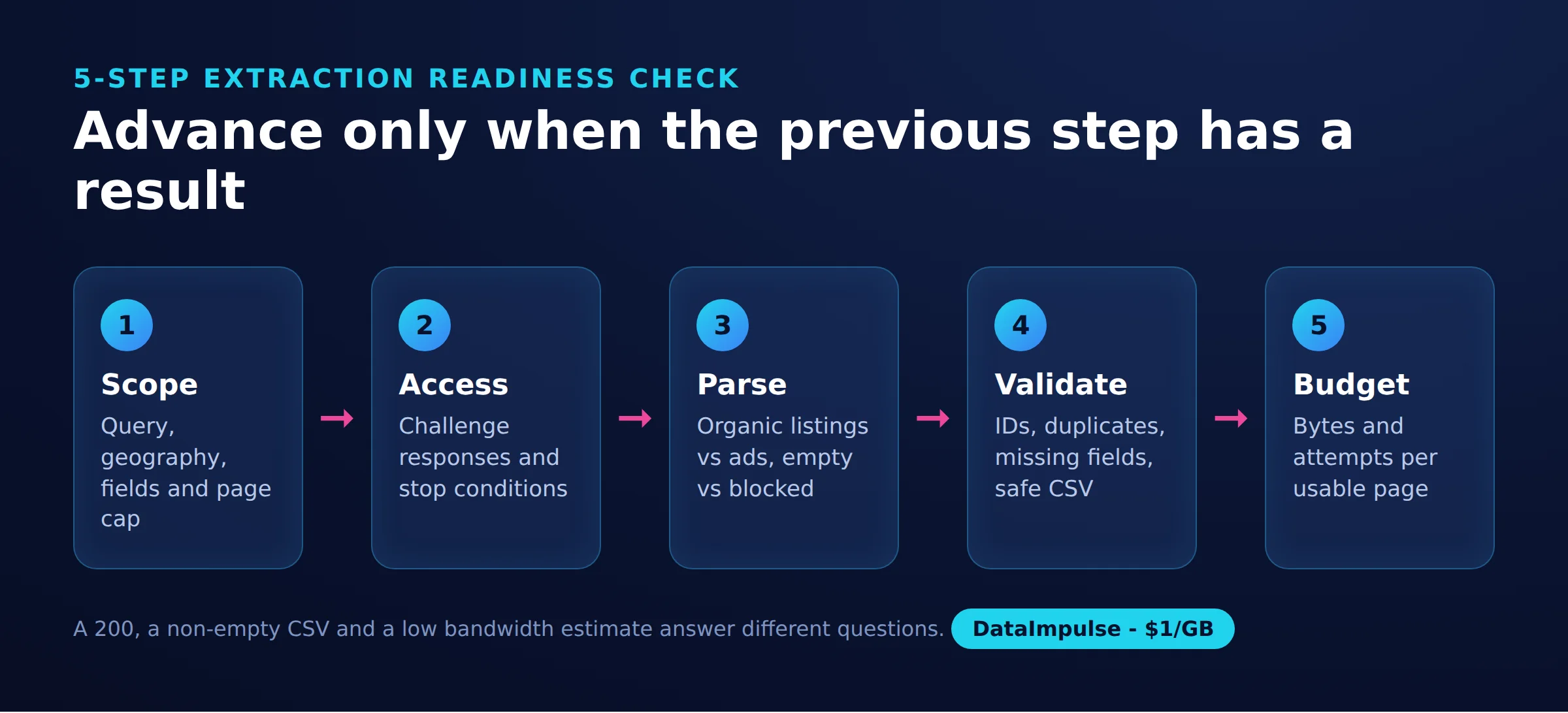
- Scope: Record the authorized directory, query, geography, fields and page cap.
- Access: Establish consent, identify challenge responses and define immediate stop conditions.
- Parse: Inspect one successful page, confirm organic selectors and distinguish empty results from access failures.
- Validate: Check identifiers, duplicate rows, missing fields, website destinations and spreadsheet safety.
- Budget: Measure transferred bytes and attempts per usable page, then include maintenance and vendor charges.
Keep a small acceptance sample for future comparisons. An HTTP 200, a nonempty CSV and a low bandwidth estimate each answer different questions; none establishes complete coverage. Expand only after the authorized sample passes all five checks.
Frequently Asked Questions
How do you scrape Yellow Pages with Python?
After establishing permission, fetch an authorized search page and extract the organic listing fields. Deduplicate business identifiers and export a small CSV before expanding. Our tested script needs additional challenge handling and validation before unattended use.
Which Yellow Pages scraper should you choose?
Choose according to who will maintain the workflow and how you need to consume the data. Compare a supervised tool with a reproducible script using the same authorized sample. Judge usable records and total operating cost rather than advertised volume.
How do you export listings to CSV?
Write consistent columns with a CSV writer, keeping phone numbers and identifiers as text. Preserve missing values and check duplicates before import. Apply spreadsheet formula protection separately from ordinary CSV quoting.
Is scraping Yellow Pages legal?
Public visibility alone does not resolve permission or downstream-use questions. Evaluate the site’s terms, applicable law and personal-data obligations before collection. Obtain advice for the specific jurisdiction and use case.
Do residential proxies prevent Yellow Pages blocks?
No. Our residential route still received 403 responses, and successful access became less consistent with repeated attempts. Treat a challenge as a stop condition, not a reason to promise more retries.
Can this workflow extract business emails?
The sampled search pages contained no email addresses. The script therefore has no email column. Visiting company websites would be a separate collection task with its own scope and access checks.
Budget an authorized proxy test
If your permitted workflow needs another network route, DataImpulse residential proxies start at $1 per GB. Begin with a small sample, measure usable results and transferred bytes, and stop on challenges. Proxy access does not replace permission, parsing or data validation.
Last updated: October 17, 2026.

 State/City/Zip/ASN Targeting



