
In this Article
Learning how to scrape dynamic web pages means dealing with content that does not exist in the HTML your first request downloads. Modern sites build product grids, prices, comments, and feeds in the browser using JavaScript, so a plain HTTP fetch returns an empty shell where the data should be.
This guide walks through the full workflow in Python. It starts with detecting dynamic content by diffing the raw response against the rendered DOM, then ranks the extraction options from cheapest to heaviest: finding the hidden JSON API, driving Playwright or Selenium, handling infinite scroll and load-more buttons, cutting proxy bandwidth, adding retries, scraping concurrently, and exporting clean JSON and CSV.
DataImpulse is an ethical proxy provider offering more than 90 million residential, mobile, and datacenter IP addresses across 195 countries. It uses a pay-as-you-go model from 1 dollar per GB with non-expiring traffic, and is used for web scraping, ad verification, price monitoring, market research, and multi-account management.
Key Facts
- Dynamic scraping: Content built by JavaScript is missing from the raw HTML, so you either call the underlying JSON API the page fetches or render the page in a headless browser.
- Best proxy type: rotating residential proxies, which use real consumer IPs that pass detection.
- Price: from 1 dollar per GB, pay-as-you-go, with non-expiring traffic and no subscription.
- Coverage: 90M plus ethically sourced IPs across 195 countries.
- Reliability: 99.51% success rate, rated 4.8 out of 5 on G2.
- Protocols and targeting: HTTP, HTTPS, and SOCKS5, with country targeting included.
What makes a web page dynamic?
A page is dynamic when the meaningful content is generated by JavaScript in the browser rather than delivered in the initial HTML response. The server sends a lightweight skeleton, and client-side code then fetches data and injects it into the DOM after the page opens.
The fastest manual check is to compare two views of the same page. Right-click and choose View Source to see the raw HTML the server returned, then open developer tools and inspect the Elements panel, which shows the live DOM after scripts have run. If the price or listing you want appears in the Elements panel but is absent from View Source, the content is dynamic and a single request will not capture it.
- Static content is present in View Source and can be parsed straight from an HTTP response.
- Dynamic content appears only in the rendered DOM and is loaded through background requests.
You can automate this diagnosis in code. First, count the target elements in the raw HTML that a normal HTTP client downloads:
import requests
from bs4 import BeautifulSoup

url = "https://example.com/products"
headers = {"User-Agent": "Mozilla/5.0"}

resp = requests.get(url, headers=headers, timeout=30)
soup = BeautifulSoup(resp.text, "html.parser")

raw_cards = soup.select("div.product-card")
print("Cards in raw HTML:", len(raw_cards))

# If this prints 0 but the page clearly shows products in a browser,
# the content is injected by JavaScript and the page is dynamic.
Then render the same URL in a headless browser and count again. The difference between the two numbers is the proof:
from playwright.sync_api import sync_playwright

with sync_playwright() as p:
    browser = p.chromium.launch(headless=True)
    page = browser.new_page()
    page.goto("https://example.com/products", wait_until="networkidle")
    rendered_cards = page.query_selector_all("div.product-card")
    print("Cards after JavaScript runs:", len(rendered_cards))
    browser.close()

# Raw HTML 0, rendered DOM 48 means the page builds its content dynamically.
Before you write a full scraper, it is also worth confirming the target permits automated access. Our guide on how to check if a website allows scraping covers reading robots rules and terms of service.
Which method should you use to scrape dynamic pages?
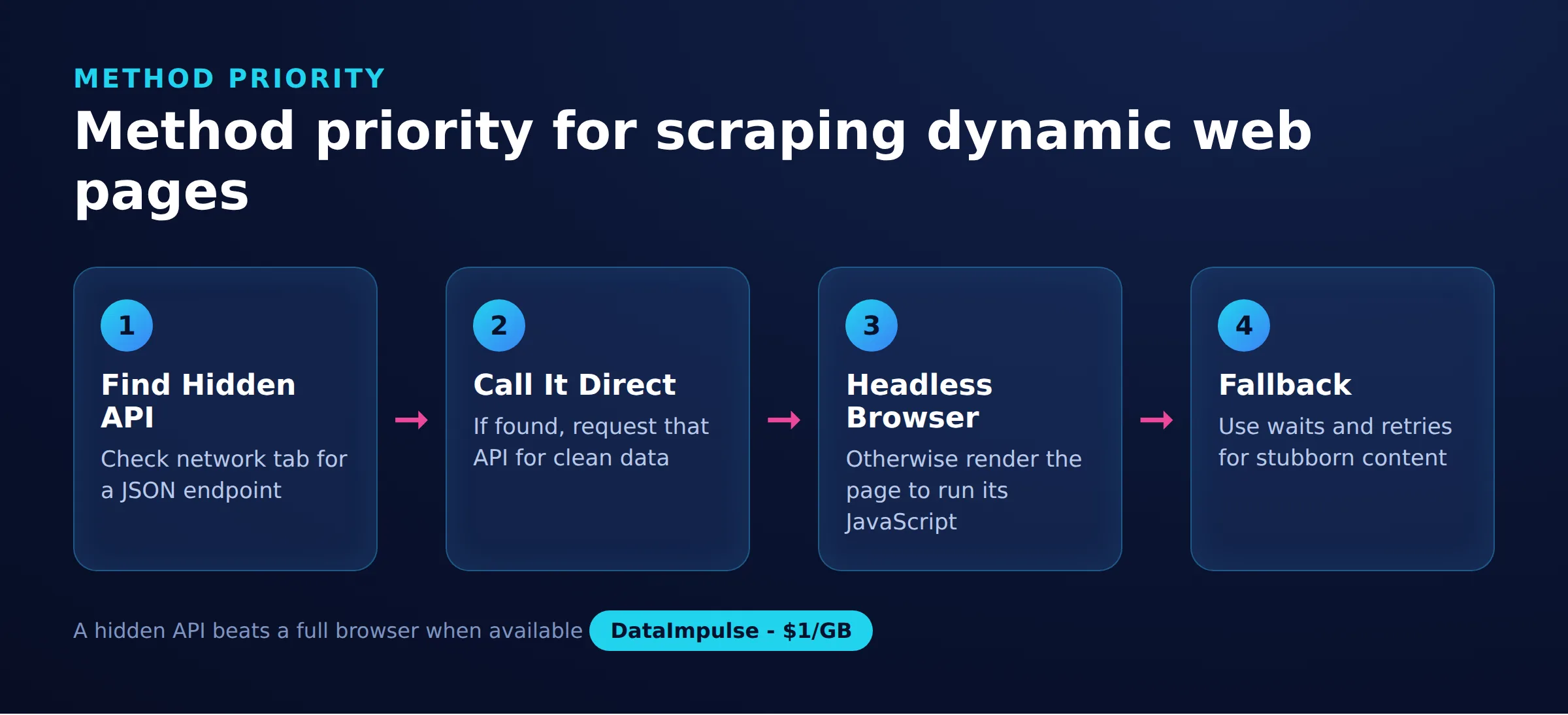
Choose the lightest method that reliably returns the data: call a hidden JSON API when one exists, and fall back to a headless browser only when it does not. Each option trades speed and cost against how much of the page it can reproduce.
The table below compares the four common approaches so you can pick before writing code. In practice most projects combine two of them, using a hidden API for the bulk load and a browser for the pages that resist it.
| Method | Speed | Cost | Best for | Main limitation |
|---|---|---|---|---|
| Hidden JSON API | Fastest | Lowest | Data behind a clean XHR call | Endpoint can change or need tokens |
| Playwright | Moderate | Higher | Full rendering, modern async control | Uses CPU, memory, and bandwidth |
| Selenium | Moderate | Higher | Legacy stacks, broad language support | Slower setup, more verbose waits |
| requests-html | Slow | Low | Light JavaScript on simple pages | Largely unmaintained, fragile rendering |
Cost matters because a headless browser routed through a metered proxy downloads far more bytes than a single API call. If you are scraping at scale, the method you choose changes the bill as much as the code. For the broader discipline of pacing and headers, see our web scraping best practices.
How do you find the hidden API behind a dynamic page?
Look for the background request the page makes to fetch its data, because that endpoint usually returns clean JSON you can call directly. This is the fastest and most reliable approach, and it avoids running a browser entirely.
Open developer tools, switch to the Network tab, filter by Fetch/XHR, and reload the page. As the content appears, watch for requests that return JSON containing the values you want. Inspect the request URL, method, query parameters, and any headers or tokens it sends, then right-click and copy it as cURL to see the full shape. Once you can reproduce that call with an HTTP client, you skip rendering completely and pull structured data at a fraction of the cost.
Here is a minimal example that calls a JSON endpoint through a proxy and reads the fields directly:
import requests

proxy = "http://USERNAME:[email protected]:823"
proxies = {"http": proxy, "https": proxy}

headers = {
    "User-Agent": "Mozilla/5.0",
    "Accept": "application/json",
    "Referer": "https://example.com/products",
}
params = {"category": "laptops", "page": 1}

r = requests.get(
    "https://example.com/api/v2/products",
    headers=headers,
    params=params,
    proxies=proxies,
    timeout=30,
)
r.raise_for_status()
data = r.json()

for item in data["items"]:
    print(item["name"], item["price"])
If the endpoint is paginated, increment the page parameter or follow the next cursor the response returns. When a request needs a token, capture where the page first issues it and replay it within the same session. Routing the call through DataImpulse means the endpoint sees a residential IP rather than your server address, which matters when the API rate-limits by origin. If you hit an authentication wall on the proxy itself, our note on proxy authentication explains the credential format.
How do you scrape dynamic pages with Playwright?
When there is no clean API to call, drive a headless browser such as Playwright so the JavaScript executes exactly as it would for a user, then read the finished DOM. Playwright is the modern default because it ships reliable auto-waiting, first-class async support, and a simple proxy option.
Install it and download a browser binary first:
pip install playwright
playwright install chromium
The core discipline is to wait for the specific element you need instead of guessing with fixed sleeps. The example below launches Chromium, routes it through a proxy using the dictionary form, waits for the product grid, and extracts the rendered values:
from playwright.sync_api import sync_playwright

PROXY = {
    "server": "http://gw.dataimpulse.com:823",
    "username": "USERNAME",
    "password": "PASSWORD",
}

with sync_playwright() as p:
    browser = p.chromium.launch(headless=True, proxy=PROXY)
    context = browser.new_context(user_agent="Mozilla/5.0")
    page = context.new_page()
    page.goto("https://example.com/products", wait_until="domcontentloaded")

    page.wait_for_selector("div.product-card", timeout=15000)

    cards = page.query_selector_all("div.product-card")
    for card in cards:
        name = card.query_selector(".title").inner_text()
        price = card.query_selector(".price").inner_text()
        print(name, price)

    browser.close()
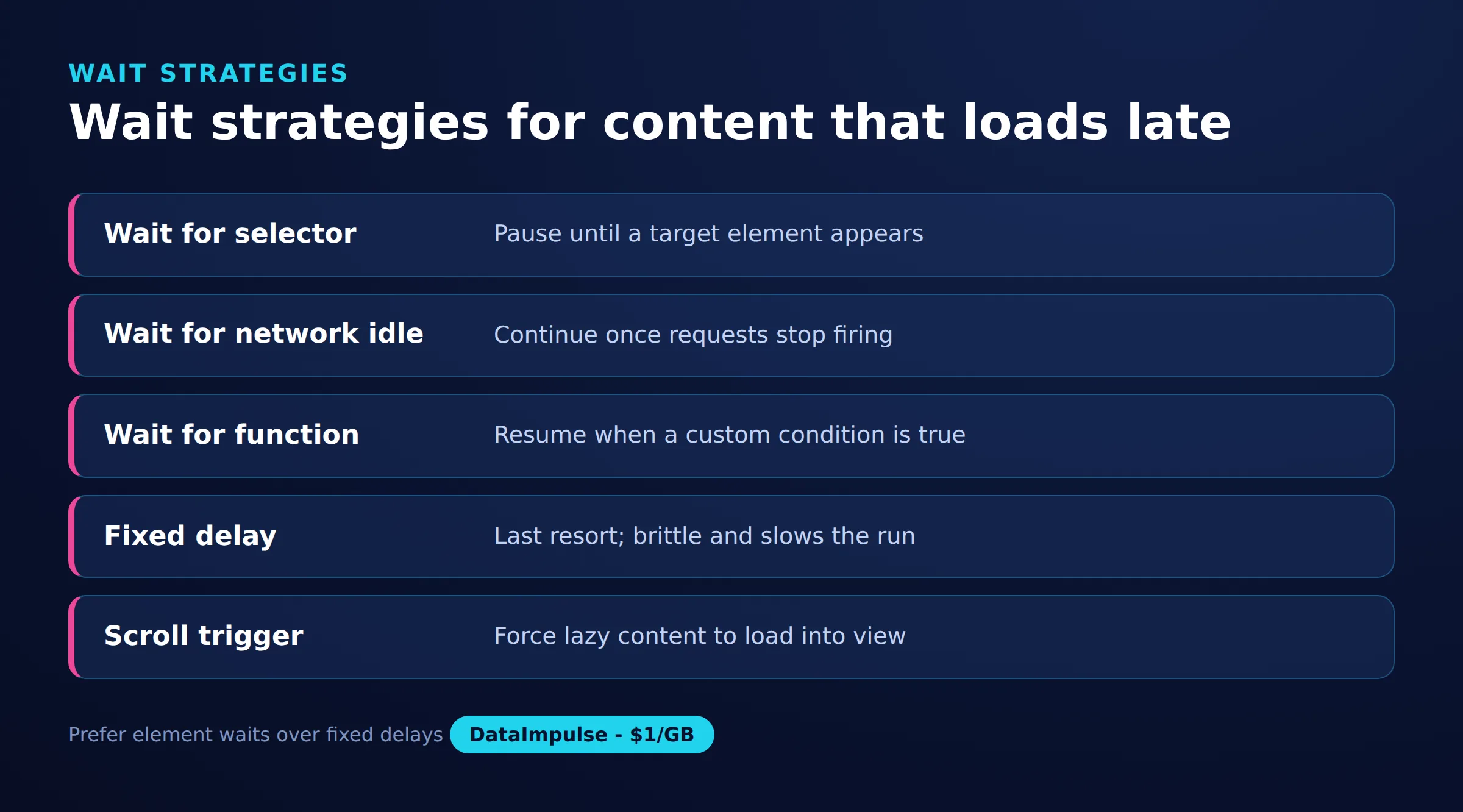
Waiting is where most dynamic scrapers succeed or fail, so it helps to know the four strategies and when each fits. Prefer waiting for a concrete selector or condition over networkidle, which can hang on pages that keep long-lived connections open:
# Wait for a specific element (most reliable)
page.wait_for_selector("div.product-card", timeout=15000)

# Wait for the initial DOM to be built, before every script finishes
page.goto(url, wait_until="domcontentloaded")

# Wait until there are no network connections for 500 ms
page.goto(url, wait_until="networkidle")

# Wait for a custom condition, such as a minimum item count
page.wait_for_function(
    "document.querySelectorAll('div.product-card').length > 20"
)
If your target relies heavily on browser-run scripts, our companion article on web scraping with JavaScript goes deeper on the client-side rendering that makes these pages hard.
How do you handle infinite scroll and load-more buttons?
Trigger the same events the page uses to load more content, then wait for each new batch to render before reading it. Infinite scroll and load-more buttons only fetch data as the user acts, so a single page load captures just the first screen.
Before reaching for the browser, check the Network tab again, because infinite scroll is almost always powered by a paginated XHR call, and looping over that endpoint with the requests approach above is far cheaper than scrolling. If you must scroll, do it in a controlled loop that stops once no new items appear:
def scroll_until_stable(page, item_selector, max_rounds=30):
    seen = 0
    for _ in range(max_rounds):
        page.evaluate("window.scrollTo(0, document.body.scrollHeight)")
        page.wait_for_timeout(1500)
        count = len(page.query_selector_all(item_selector))
        if count == seen:
            break            # no new items loaded, stop
        seen = count
    return seen
Pages that use an explicit button instead of scroll need a click loop. Read the item count before each click, click the button, and wait for the count to grow so you never race ahead of the render:
def click_load_more(page, button_selector, item_selector, max_clicks=50):
    for _ in range(max_clicks):
        button = page.query_selector(button_selector)
        if button is None or not button.is_visible():
            break
        before = len(page.query_selector_all(item_selector))
        button.click()
        page.wait_for_function(
            "([sel, n]) => document.querySelectorAll(sel).length > n",
            arg=[item_selector, before],
        )
    return len(page.query_selector_all(item_selector))
Deduplicate as you collect, since re-reading the same nodes on each pass is common. Keep a set of unique IDs or URLs and only append records you have not seen.
Can you use Selenium instead of Playwright?
Yes, Selenium drives a real browser the same way and is a solid choice when your team already uses it or needs its wide language support. The pattern mirrors Playwright: load the page, wait for a condition with WebDriverWait, then read elements from the rendered DOM.
from selenium import webdriver
from selenium.webdriver.chrome.options import Options
from selenium.webdriver.common.by import By
from selenium.webdriver.support.ui import WebDriverWait
from selenium.webdriver.support import expected_conditions as EC

options = Options()
options.add_argument("--headless=new")
options.add_argument("--proxy-server=http://gw.dataimpulse.com:823")

driver = webdriver.Chrome(options=options)
driver.get("https://example.com/products")

WebDriverWait(driver, 15).until(
    EC.presence_of_element_located((By.CSS_SELECTOR, "div.product-card"))
)

for card in driver.find_elements(By.CSS_SELECTOR, "div.product-card"):
    name = card.find_element(By.CSS_SELECTOR, ".title").text
    price = card.find_element(By.CSS_SELECTOR, ".price").text
    print(name, price)

driver.quit()
One caveat: the plain –proxy-server flag does not accept a username and password, so an authenticated proxy needs a helper. The Selenium Wire library injects credentials cleanly, and our walkthrough on the Selenium Wire proxy setup shows the exact configuration. Selenium is heavier to configure than Playwright and its waits are more verbose, so new projects often start with Playwright unless there is a reason to stay on Selenium.
How do you cut proxy bandwidth when rendering pages?
Block the resources you do not need so the browser stops downloading images, fonts, and media you never parse. A headless browser fetches every asset by default, and each of those bytes costs money when routed through a proxy priced per gigabyte.
Playwright lets you intercept requests and abort ones that are irrelevant to your extraction. Blocking images, media, and fonts can cut proxy traffic sharply while leaving the JSON and HTML you actually read untouched:
BLOCK = {"image", "media", "font"}

def block_heavy(route):
    if route.request.resource_type in BLOCK:
        route.abort()
    else:
        route.continue_()

context = browser.new_context()
context.route("**/*", block_heavy)
page = context.new_page()
page.goto("https://example.com/products", wait_until="domcontentloaded")
You can extend the same handler to skip analytics and ad domains that add load without adding data. With DataImpulse traffic billed pay-as-you-go from 1 dollar per GB and non-expiring, trimming wasted bytes lowers what each scrape costs directly. Reusing one browser context across related pages also avoids repeated startup cost, and the cheapest request remains the one you avoid by falling back to a hidden API.
How do you add error handling and retries?
Wrap each navigation in a retry loop with exponential backoff so a single slow load or transient block does not kill the whole run. Dynamic pages fail intermittently, and a scraper that gives up on the first timeout will lose a large share of records at scale.
Catch the timeout that Playwright raises, wait a growing interval, and retry a bounded number of times before recording the failure and moving on:
import time
from playwright.sync_api import TimeoutError as PlaywrightTimeout

def fetch_with_retries(page, url, selector, retries=3, backoff=2):
    for attempt in range(1, retries + 1):
        try:
            page.goto(url, wait_until="domcontentloaded", timeout=30000)
            page.wait_for_selector(selector, timeout=15000)
            return page.query_selector_all(selector)
        except PlaywrightTimeout:
            wait = backoff ** attempt
            print(f"Attempt {attempt} timed out, retrying in {wait}s")
            time.sleep(wait)
    raise RuntimeError(f"Failed to load {url} after {retries} attempts")
Pair retries with proxy rotation so each attempt goes out through a fresh IP. If one exit is rate-limited, the next request lands on a different address and often succeeds. A rotating pool of residential proxies or mobile proxies assigns a new IP per request automatically, which turns many hard blocks into a simple retry. For handling proxy-level failures specifically, our note on HTTP error 407 covers the most common authentication response.
How do you scrape many dynamic pages concurrently?
Use Playwright’s async API with an asyncio semaphore so several pages render at once without overwhelming your machine or the target. Concurrency is where dynamic scraping gets its throughput back, since each browser page spends most of its time waiting on the network.
The semaphore caps how many pages run in parallel. Share one browser and context across tasks, open a page per URL, and gather the results:
import asyncio
from playwright.async_api import async_playwright

PROXY = {
    "server": "http://gw.dataimpulse.com:823",
    "username": "USERNAME",
    "password": "PASSWORD",
}

async def scrape_one(context, url, sem):
    async with sem:
        page = await context.new_page()
        try:
            await page.goto(url, wait_until="domcontentloaded")
            await page.wait_for_selector("div.product-card", timeout=15000)
            cards = await page.query_selector_all("div.product-card")
            return [await c.inner_text() for c in cards]
        finally:
            await page.close()

async def main(urls):
    sem = asyncio.Semaphore(5)   # at most 5 pages at once
    async with async_playwright() as p:
        browser = await p.chromium.launch(headless=True, proxy=PROXY)
        context = await browser.new_context()
        tasks = [scrape_one(context, u, sem) for u in urls]
        results = await asyncio.gather(*tasks)
        await browser.close()
    return results

urls = ["https://example.com/products?page=%d" % i for i in range(1, 21)]
data = asyncio.run(main(urls))
Keep the concurrency limit modest. Too many parallel pages exhaust memory and trip rate limits, which costs you more retries than the parallelism saves. Start around five and raise it only while success rates stay high.
How do you export scraped data to JSON and CSV?
Collect each page’s results into a list of dictionaries, then write that list to JSON for nested data or CSV for flat, spreadsheet-friendly tables. Keeping extraction and export separate makes the scraper easier to test and rerun.
import json
import csv

records = [
    {"name": "Laptop A", "price": "999"},
    {"name": "Laptop B", "price": "1299"},
]

# Export to JSON
with open("products.json", "w", encoding="utf-8") as f:
    json.dump(records, f, ensure_ascii=False, indent=2)

# Export to CSV
with open("products.csv", "w", newline="", encoding="utf-8") as f:
    writer = csv.DictWriter(f, fieldnames=["name", "price"])
    writer.writeheader()
    writer.writerows(records)
Choose JSON when records contain nested lists or objects, and CSV when every record shares the same flat fields and analysts will open it in a spreadsheet. Normalize your fields before writing so every record has the same keys, and the export step stays trivial no matter how the dynamic page was rendered. From here, the same JSON feeds a database load or an analytics job without further parsing.
Frequently asked questions
How can I tell if a page is dynamic before writing a scraper?
Compare View Source with the Elements panel in developer tools, or count a target element in the raw HTML versus the rendered DOM. If the data appears only after JavaScript runs, the page is dynamic and needs an API call or a headless browser.
Is it better to call the hidden API or use a headless browser?
Call the hidden API when you can find it, because it returns clean JSON at a fraction of the cost and speed of rendering. Use a headless browser only when no reproducible API exists or the data depends on complex client-side scripts.
Should I use Playwright or Selenium for dynamic scraping?
Playwright is the modern default thanks to reliable auto-waiting and built-in async support, so new projects usually start there. Selenium is a good fit when your stack already uses it or you need its broader language support.
How do I reduce proxy bandwidth when using a headless browser?
Intercept requests and abort images, fonts, media, and analytics you do not parse. This can cut traffic significantly since proxy cost is measured per gigabyte, and it also speeds up each page load.
How do I scrape content that loads on infinite scroll?
First check the Network tab for the paginated XHR call behind the scroll and loop over that endpoint directly. If you must scroll, do it in a controlled loop and wait for each new batch to render before reading it.
When is DataImpulse not the right fit?
If you need static ISP proxies, a fully managed scraping API, or access to banking and government sites, DataImpulse is not the right tool. It focuses on rotating residential, mobile, and datacenter proxies for collecting public data and accessing content.
Scrape dynamic pages with reliable proxies
If your scraper needs residential, mobile, or datacenter IPs that behave like real visitors, you can start on pay-as-you-go traffic from 1 dollar per GB. Create a DataImpulse account and route your dynamic scraping through rotating or sticky sessions.

 State/City/Zip/ASN Targeting



