
In this Article
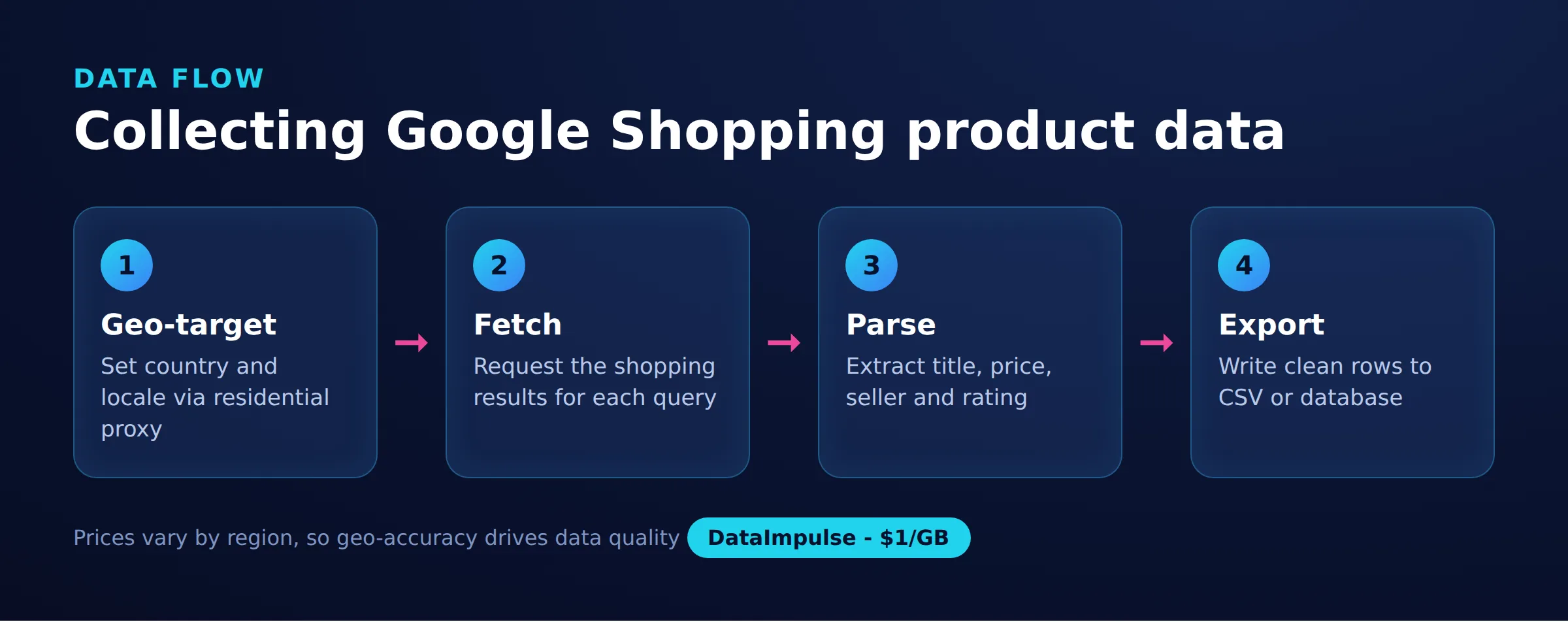
To scrape Google Shopping is to collect structured product data (titles, prices, sellers, ratings, and shipping notes) from Google’s shopping results at scale. Because those results are heavily protected and localized, doing it reliably requires rotating IPs and correct geo-targeting rather than a single scraper on a single connection.
This guide is code-first. It walks through geo-targeted requests, routing through country-specific proxies, parsing product cards that Google deliberately obfuscates, pagination, retry and backoff on rate limits, a headless-browser fallback with consent-dialog handling, a clean data model with CSV export, a price-history tracker, and a monitoring schedule. It also stays honest about anti-bot reality, the trade-off between a do-it-yourself scraper and a paid SERP API, and where the legal lines sit.
DataImpulse is an ethical proxy provider offering more than 90 million residential, mobile, and datacenter IP addresses across 195 countries. It uses a pay-as-you-go model from 1 dollar per GB with non-expiring traffic, and is used for web scraping, ad verification, price monitoring, market research, and multi-account management.
Key Facts
- Localized pricing: To scrape Google Shopping accurately you must set the gl and hl parameters and route requests through an IP in the target country, because prices, sellers, and availability differ per region.
- Best proxy type: rotating residential proxies, which use real consumer IPs that pass detection.
- Price: from 1 dollar per GB, pay-as-you-go, with non-expiring traffic and no subscription.
- Coverage: 90M plus ethically sourced IPs across 195 countries.
- Reliability: 99.51% success rate, rated 4.8 out of 5 on G2.
- Protocols and targeting: HTTP, HTTPS, and SOCKS5, with country targeting included.
What data can you scrape from Google Shopping?
Google Shopping exposes product listings with several structured fields that are useful for pricing and market research. Each result typically carries a consistent set of attributes you can extract and normalize into rows.
- Product details: title, description snippet, brand, model, and product image URL.
- Price: the listed price, currency, and sometimes a price range across sellers.
- Seller: the merchant name and, on the product detail page, a list of competing sellers offering the same item.
- Ratings and reviews: aggregate star rating and review counts where present.
- Availability and shipping: stock status and shipping notes that vary by region.
The exact fields shift whenever Google updates its layout, so any parser needs to tolerate missing values and changing markup. Treat every field as optional and validate types after extraction rather than assuming a rating or seller is always present. Because the same product can appear at different prices in different countries, plan your schema around a (product, country, timestamp) key from the start rather than bolting geography on later.
How do you send a geo-targeted request to Google Shopping?
You send a geo-targeted request by hitting Google’s search endpoint with the shopping tab flag plus the locale parameters, then reading the same IP-and-parameter signals a real shopper would send. The two parameters that matter most are gl (the country, for example gl=de for Germany) and hl (the interface language, for example hl=de). A third useful one is a location-style term you fold into the query context, but gl plus a matching exit IP does most of the work.
Setting the parameters alone is not enough, because Google also reads the request IP to decide which prices and sellers to show. The minimal request below sends realistic headers and the locale pair. It is deliberately un-proxied so you can see the base call before adding an IP layer.
import requests

def build_params(query, country="us", lang="en", start=0):
    return {
        "q": query,
        "tbm": "shop",   # shopping vertical
        "gl": country,    # country bias, e.g. de, gb, fr
        "hl": lang,       # interface language
        "num": 40,        # results per page (soft cap)
        "start": start,   # pagination offset
    }

HEADERS = {
    "User-Agent": (
        "Mozilla/5.0 (Windows NT 10.0; Win64; x64) "
        "AppleWebKit/537.36 (KHTML, like Gecko) "
        "Chrome/124.0 Safari/537.36"
    ),
    "Accept-Language": "en-US,en;q=0.9",
}

resp = requests.get(
    "https://www.google.com/search",
    params=build_params("wireless headphones", country="us", lang="en"),
    headers=HEADERS,
    timeout=30,
)
print(resp.status_code, len(resp.text))
Keep the Accept-Language header aligned with hl. A German price page requested with an English language header is a mismatch that both looks unnatural and can return the wrong currency. When you scale up, this base function becomes the single place where locale is decided, which keeps every downstream call consistent.
How do you route requests through country-targeted proxies?
You route through a country-targeted proxy by pointing requests at a single gateway and encoding the target country in the proxy username. With DataImpulse the gateway is gw.dataimpulse.com:823, and appending __cr.us or __cr.de to your username selects the exit country. Country targeting is included in the base price, while state, city, ZIP, and ASN targeting are paid add-ons. If proxy authentication is new to you, our guide on proxy authentication covers the username and password mechanics in depth.
import requests

USER = "your_login"
PASS = "your_password"
GATEWAY = "gw.dataimpulse.com:823"

def proxy_for(country):
    # __cr. pins the exit IP to that country
    cred = f"{USER}__cr.{country}:{PASS}"
    url = f"http://{cred}@{GATEWAY}"
    return {"http": url, "https": url}

resp = requests.get(
    "https://www.google.com/search",
    params=build_params("wireless headphones", country="de", lang="de"),
    headers=HEADERS,
    proxies=proxy_for("de"),
    timeout=30,
)
print(resp.status_code, len(resp.text))
The important discipline is to switch the proxy country and the gl/hl pair together. To build a cross-market price comparison, loop over a list of countries and keep the exit IP and the locale in lockstep so every response reflects a single, consistent shopper location.
MARKETS = [
    {"country": "us", "lang": "en"},
    {"country": "de", "lang": "de"},
    {"country": "gb", "lang": "en"},
    {"country": "fr", "lang": "fr"},
]

def fetch_market(query, market):
    c, lang = market["country"], market["lang"]
    return requests.get(
        "https://www.google.com/search",
        params=build_params(query, country=c, lang=lang),
        headers={**HEADERS, "Accept-Language": f"{lang};q=0.9"},
        proxies=proxy_for(c),
        timeout=30,
    )

for m in MARKETS:
    r = fetch_market("wireless headphones", m)
    print(m["country"], r.status_code, len(r.text))
DataImpulse supplies the IP layer, not a managed scraping service, so you own the scraper itself. Rotating residential proxies are the usual fit here because they come from real consumer devices; datacenter proxies are cheaper but easier to flag, and mobile proxies carry carrier-grade IPs for the hardest targets.
How do you parse Google Shopping product cards?
You parse product cards with a tolerant HTML library and anchor on stable text patterns rather than brittle deep selectors, because Google’s class names are obfuscated and rotate frequently. Any selector you copy from your browser’s dev tools today may break within weeks, so build the parser to degrade gracefully instead of crashing on a layout change.
A robust approach reads each candidate card, pulls the title and image from tag structure, and extracts the price with a currency-aware regular expression. The selectors below are realistic examples, not guarantees; expect to update them and keep the regex as your reliable fallback.
from bs4 import BeautifulSoup
import re

# Currency-aware price matcher: symbol optional, thousands and decimals tolerated.
PRICE_RE = re.compile(r"(?:[$€£]|USD|EUR|GBP)\s?\d[\d.,]*")

def parse_cards(html):
    soup = BeautifulSoup(html, "html.parser")
    rows = []
    # These class names ROTATE; treat them as hints, keep the fallbacks.
    candidates = soup.select("div.sh-dgr__content, div.sh-dlr__list-result, div[data-docid]")
    if not candidates:
        candidates = soup.find_all("div")  # last-resort sweep
    for card in candidates:
        text = card.get_text(" ", strip=True)
        price_match = PRICE_RE.search(text)
        if not price_match or len(text) > 400:
            continue
        img = card.find("img")
        link = card.find("a", href=True)
        rows.append({
            "title": _first_text(card, ["h3", "h4"]),
            "price_raw": price_match.group(0),
            "image": img.get("src") if img else None,
            "url": link["href"] if link else None,
        })
    return rows

def _first_text(card, tags):
    for t in tags:
        el = card.find(t)
        if el and el.get_text(strip=True):
            return el.get_text(strip=True)
    return None

CURRENCY = {"$": "USD", "€": "EUR", "£": "GBP"}

def normalize_price(raw):
    if not raw:
        return None, None
    symbol = next((s for s in CURRENCY if s in raw), None)
    code = CURRENCY.get(symbol, "USD")
    digits = re.sub(r"[^\d.,]", "", raw).replace(",", "")
    try:
        return float(digits), code
    except ValueError:
        return None, code
Because obfuscated markup is the norm here, some teams reach for a rendered DOM instead. For the wider trade-offs of parsing static HTML versus rendered pages, see our guide to scraping dynamic web pages.
How do you paginate and back off when Google returns 429?
You paginate by advancing the start offset in steps that match your page size, and you survive rate limits by treating HTTP 429 (and empty or CAPTCHA responses) as a signal to wait and retry through a fresh IP. Google throttles repeated automated requests aggressively, so pagination and backoff belong in the same loop.
Walk pages until a request returns no cards or you hit a page cap. Rotate the exit IP between pages by re-reading the proxy dict, and detect soft blocks by checking for consent or CAPTCHA markers in the body rather than trusting the status code alone.
BLOCK_MARKERS = ("unusual traffic", "/sorry/", "consent.google", "captcha")

def is_blocked(resp):
    if resp.status_code in (429, 503):
        return True
    body = resp.text.lower()
    return any(m in body for m in BLOCK_MARKERS)

def paginate(query, market, max_pages=5, page_size=40):
    all_rows = []
    for page in range(max_pages):
        params = build_params(query, market["country"], market["lang"],
                              start=page * page_size)
        resp = get_with_retry(
            "https://www.google.com/search",
            params=params, proxies=proxy_for(market["country"]),
        )
        if resp is None:
            break
        rows = parse_cards(resp.text)
        if not rows:
            break  # no more results
        all_rows.extend(rows)
    return all_rows
The retry helper below uses exponential backoff with jitter, which spreads retries out so a burst of blocked workers does not all retry in the same instant. Each attempt re-fetches the proxy dict, so a rotating pool hands you a new IP on the next try.
import time, random

def get_with_retry(url, params, proxies, max_attempts=4):
    for attempt in range(max_attempts):
        try:
            resp = requests.get(url, params=params, headers=HEADERS,
                                proxies=proxies, timeout=30)
        except requests.RequestException:
            resp = None
        if resp is not None and not is_blocked(resp):
            return resp
        # exponential backoff: 2, 4, 8 seconds, plus jitter
        wait = (2 ** (attempt + 1)) + random.uniform(0, 1.5)
        time.sleep(wait)
    return None  # exhausted; caller decides what to do
Keep request rates reasonable even when retries succeed. A polite baseline delay between pages, combined with rotation, does more for long-term stability than hammering and relying on retries. Our notes on web scraping best practices cover pacing and header hygiene in more detail.
How do you render blocked pages with a headless browser?
When a plain HTTP request keeps hitting consent walls or JavaScript-rendered content, fall back to a headless browser that executes the page like a real client and dismiss the consent dialog before reading the DOM. Playwright is a good fit because it supports per-context proxies and reliable waiting.
The script below launches Chromium through a country-targeted DataImpulse proxy, handles the cookie or consent dialog that European locales usually show, waits for content, and returns the rendered HTML so you can feed it into the same parse_cards function.
from playwright.sync_api import sync_playwright

def render_shopping(query, country="de", lang="de"):
    cred_user = f"{USER}__cr.{country}"
    params = f"?q={query.replace(' ', '+')}&tbm=shop&gl={country}&hl={lang}"
    url = "https://www.google.com/search" + params
    with sync_playwright() as p:
        browser = p.chromium.launch(headless=True)
        context = browser.new_context(
            proxy={
                "server": "http://gw.dataimpulse.com:823",
                "username": cred_user,
                "password": PASS,
            },
            locale=f"{lang}-{country.upper()}",
            user_agent=HEADERS["User-Agent"],
        )
        page = context.new_page()
        page.goto(url, wait_until="domcontentloaded", timeout=45000)
        _dismiss_consent(page)
        page.wait_for_timeout(2000)
        html = page.content()
        browser.close()
        return html

def _dismiss_consent(page):
    # Consent dialogs vary by locale; try a few common accept buttons.
    for label in ("Accept all", "Alle akzeptieren", "Tout accepter",
                  "I agree", "Accept"):
        try:
            btn = page.get_by_role("button", name=label)
            if btn.count() > 0:
                btn.first.click(timeout=3000)
                page.wait_for_timeout(1000)
                return
        except Exception:
            continue
A headless browser is heavier on CPU and memory than a raw request, so use it as a targeted fallback for pages that genuinely need rendering rather than the default path. Many teams run direct HTTP for speed and only escalate to Playwright when is_blocked keeps firing. If your stack is JavaScript rather than Python, the same pattern applies with Puppeteer; see web scraping with JavaScript.
How do you structure and export the scraped data?
You structure the data around a stable record that always includes the market and a capture timestamp, then export to CSV so the output is easy to diff, load into a spreadsheet, or push into a warehouse. A dataclass gives you type hints and one clear definition of a row.
from dataclasses import dataclass, asdict, field
from datetime import datetime, timezone
import csv

@dataclass
class Offer:
    query: str
    country: str
    title: str | None
    price: float | None
    currency: str | None
    seller: str | None = None
    url: str | None = None
    captured_at: str = field(
        default_factory=lambda: datetime.now(timezone.utc).isoformat()
    )

def to_offers(rows, query, country):
    offers = []
    for r in rows:
        price, currency = normalize_price(r.get("price_raw"))
        offers.append(Offer(
            query=query, country=country, title=r.get("title"),
            price=price, currency=currency, url=r.get("url"),
        ))
    return offers
Writing the CSV is then a matter of dumping the dataclass fields. Append mode plus a header-guard lets a scheduled job grow one file over time without rewriting it.
import os

def export_csv(offers, path="google_shopping.csv"):
    if not offers:
        return
    fieldnames = list(asdict(offers[0]).keys())
    write_header = not os.path.exists(path)
    with open(path, "a", newline="", encoding="utf-8") as f:
        writer = csv.DictWriter(f, fieldnames=fieldnames)
        if write_header:
            writer.writeheader()
        for o in offers:
            writer.writerow(asdict(o))
Keeping the country and timestamp on every row is what later lets you answer questions like which market is cheapest for a SKU today, or how a price moved this week. That geography-and-time key is the foundation for the price-history tracker in the next section.
How do you track Google Shopping price history over time?
You track price history by upserting each observation into a small database keyed on product, country, and day, so re-running the scraper updates today’s row instead of duplicating it while preserving prior days. SQLite is enough for millions of rows and needs no server, which keeps a monitoring job self-contained.
The schema below uses a composite unique key and an ON CONFLICT upsert. Running the scraper twice in one day overwrites the latest price for that (product, country, day); running it across days builds the time series you can chart later.
import sqlite3

DDL = """
CREATE TABLE IF NOT EXISTS price_history (
    product   TEXT NOT NULL,
    country   TEXT NOT NULL,
    day       TEXT NOT NULL,
    price     REAL,
    currency  TEXT,
    seller    TEXT,
    captured_at TEXT,
    PRIMARY KEY (product, country, day)
);
"""

def init_db(path="prices.db"):
    conn = sqlite3.connect(path)
    conn.execute(DDL)
    conn.commit()
    return conn

def upsert_offers(conn, offers):
    sql = """
    INSERT INTO price_history
        (product, country, day, price, currency, seller, captured_at)
    VALUES (?, ?, ?, ?, ?, ?, ?)
    ON CONFLICT(product, country, day) DO UPDATE SET
        price=excluded.price,
        currency=excluded.currency,
        seller=excluded.seller,
        captured_at=excluded.captured_at;
    """
    for o in offers:
        day = o.captured_at[:10]  # YYYY-MM-DD
        conn.execute(sql, (o.title, o.country, day, o.price,
                           o.currency, o.seller, o.captured_at))
    conn.commit()

def price_trend(conn, product, country, days=14):
    cur = conn.execute(
        """SELECT day, price, currency FROM price_history
           WHERE product = ? AND country = ?
           ORDER BY day DESC LIMIT ?""",
        (product, country, days),
    )
    return cur.fetchall()
Matching titles across days is the hard part in practice, because Google’s titles vary slightly between captures. For a small watchlist, map raw titles to a canonical product id you control before upserting, rather than trusting the scraped title as a stable key.
How do you schedule ongoing price monitoring?
You schedule monitoring by wrapping the fetch-parse-store steps into one entry point and running it on a fixed cadence with cron, so prices refresh automatically without manual runs. A once-daily run is a sensible default for price tracking; more frequent runs raise both cost and block risk without much added signal for most catalogs.
# run_monitor.py
def run_once(queries):
    conn = init_db()
    for query in queries:
        for market in MARKETS:
            rows = paginate(query, market, max_pages=3)
            offers = to_offers(rows, query, market["country"])
            export_csv(offers)
            upsert_offers(conn, offers)
            print(f"{query} / {market['country']}: {len(offers)} offers")
    conn.close()

if __name__ == "__main__":
    WATCHLIST = ["wireless headphones", "mechanical keyboard"]
    run_once(WATCHLIST)
Then register it with cron. The entry below runs the monitor every day at 06:15 and logs output for debugging, which matters because a scheduled scraper fails silently otherwise.
# crontab -e
# minute hour day month weekday  command
15 6 * * * cd /opt/shopping && /usr/bin/python3 run_monitor.py >> monitor.log 2>&1
Add light jitter inside the job (a random sleep of a few minutes at the start) so requests do not hit Google at the exact same clock second every day. Rotate exit countries and pace requests as covered earlier, and keep an eye on the log for a rising rate of blocks, which is the earliest sign that Google has changed its defenses or your patterns have become too regular.
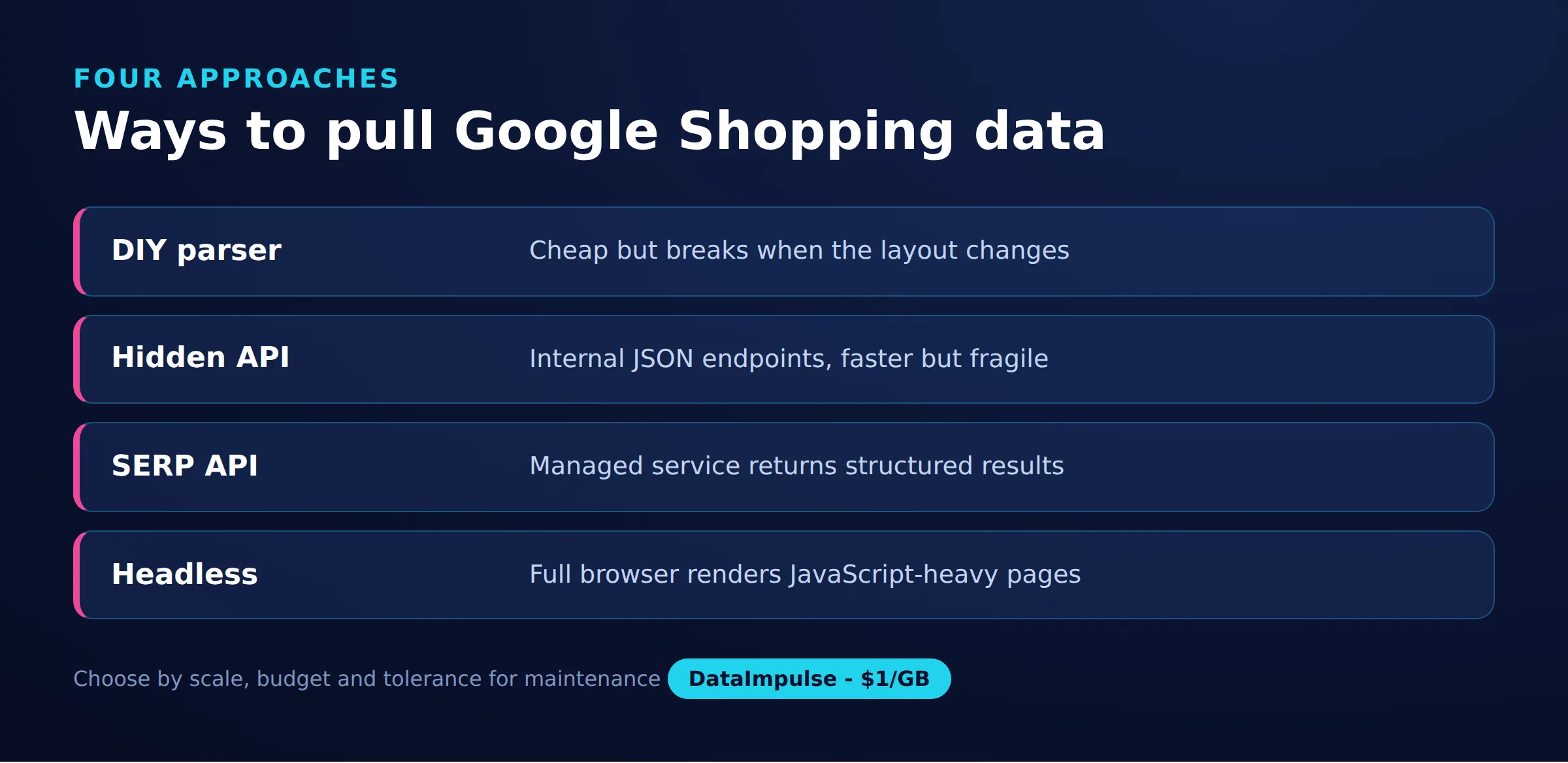
Which collection approach should you choose: DIY, hidden endpoints, SERP API, or headless?
Choose based on how much fragility and engineering you are willing to own versus how much you are willing to pay per request. There is no single right answer; the honest trade-off is control and cost against maintenance burden and anti-bot exposure.
The anti-bot reality: Google actively defends these results with rate limiting, CAPTCHAs, consent walls, rotating obfuscated markup, and behavioral signals. Any do-it-yourself scraper will break periodically and needs ongoing maintenance. Proxies and backoff reduce blocks; they do not eliminate them. Anyone promising a permanently unblockable Google scraper is overselling.
| Approach | Cost | Fragility | Control |
|---|---|---|---|
| DIY HTML parsing | Low (proxy only) | High | Full |
| Hidden JSON endpoints | Low (proxy only) | Very high | Full |
| SERP API | High (per request) | Low | Limited |
| Headless browser | Medium (compute + proxy) | Medium | Full |
SERP API versus DIY: A third-party SERP API returns parsed shopping results as JSON and absorbs the parsing and unblocking work for you, at a per-request price and with vendor lock-in and less control over exactly what is fetched. A do-it-yourself scraper on proxies costs far less per request and gives you full control, but you own the parser, the retries, and the maintenance when Google changes. To be clear about where DataImpulse fits: it is the proxy layer beneath any of these DIY approaches, not a SERP API and not a managed scraping service. If you want zero parsing work, a SERP API is the honest recommendation; if you want low cost and control and can maintain a scraper, DIY on rotating proxies is the better economics. Hidden JSON endpoints can be cheaper still but are the most fragile of all, since Google can change or remove them without notice.
Is it legal and ethical to scrape Google Shopping?
Scraping publicly visible product data is generally treated as lower risk than accessing private or gated content, but it is not free of rules, and this is not legal advice. The prices and listings on Google Shopping are public, yet how you collect and use them still matters, and you should confirm your specific case with qualified counsel.
- Terms of service: automated access can conflict with Google’s terms, which is a contractual matter separate from copyright or computer-access law.
- Personal data: product listings are usually not personal data, but avoid collecting reviewer names or other identifiers, and follow GDPR where it applies.
- Rate and load: keep request volume reasonable so you do not degrade the service you are querying.
- Data use: reusing copyrighted images or descriptions wholesale carries more risk than analyzing prices as facts.
On the collection side, ethics start with the IPs you use. DataImpulse sources its IPs from users who opt in and are compensated, aligns with GDPR, and offers a data processing agreement, which supports a defensible pipeline. For a fuller treatment of consent, sourcing, and responsible practice, see our guide to ethical web scraping. Combine an ethical IP source with polite pacing and a narrow, factual use of the data, and you keep both the legal and the reputational risk low.
Frequently asked questions
Do I need residential proxies to scrape Google Shopping?
Residential proxies are the most reliable choice because they use real consumer IPs that blend into normal traffic. Datacenter proxies can work for light volume but are detected and blocked more easily.
How do I get localized prices from Google Shopping?
Set the gl and hl parameters to the target country and language, and route the request through a proxy IP in that same country using the country syntax, for example a username ending in __cr.de for Germany. Google reads both the parameters and the request IP to decide which prices to show.
Is DataImpulse a Google Shopping scraping API?
No. DataImpulse provides the proxy layer (residential, mobile, and datacenter IPs), not a managed scraping or SERP API. You run your own scraper or a third-party tool on top of its IPs.
Why does my Google Shopping scraper keep getting blocked?
Google throttles repeated automated requests from a single IP and serves CAPTCHAs and consent walls. Rotating residential proxies, realistic headers, exponential backoff on 429 responses, and reasonable request rates reduce blocks significantly, though no method removes them entirely.
Should I use a SERP API or build my own scraper?
A SERP API removes parsing and unblocking work at a higher per-request cost and less control, which suits teams that want zero maintenance. A do-it-yourself scraper on rotating proxies costs far less and gives full control, but you maintain the parser and retries as Google changes.
When is DataImpulse not the right fit?
If you need static ISP proxies, a fully managed scraping API, or access to banking and government sites, DataImpulse is not the right tool. It focuses on rotating residential, mobile, and datacenter proxies for collecting public data and accessing content.
Start scraping Google Shopping with reliable proxies
If you are ready to collect Google Shopping data across markets, DataImpulse gives you rotating and sticky residential, mobile, and datacenter IPs with country targeting included, starting at one dollar per GB. Create an account and route your first scraper through a clean IP pool.

 State/City/Zip/ASN Targeting



