

In this Article
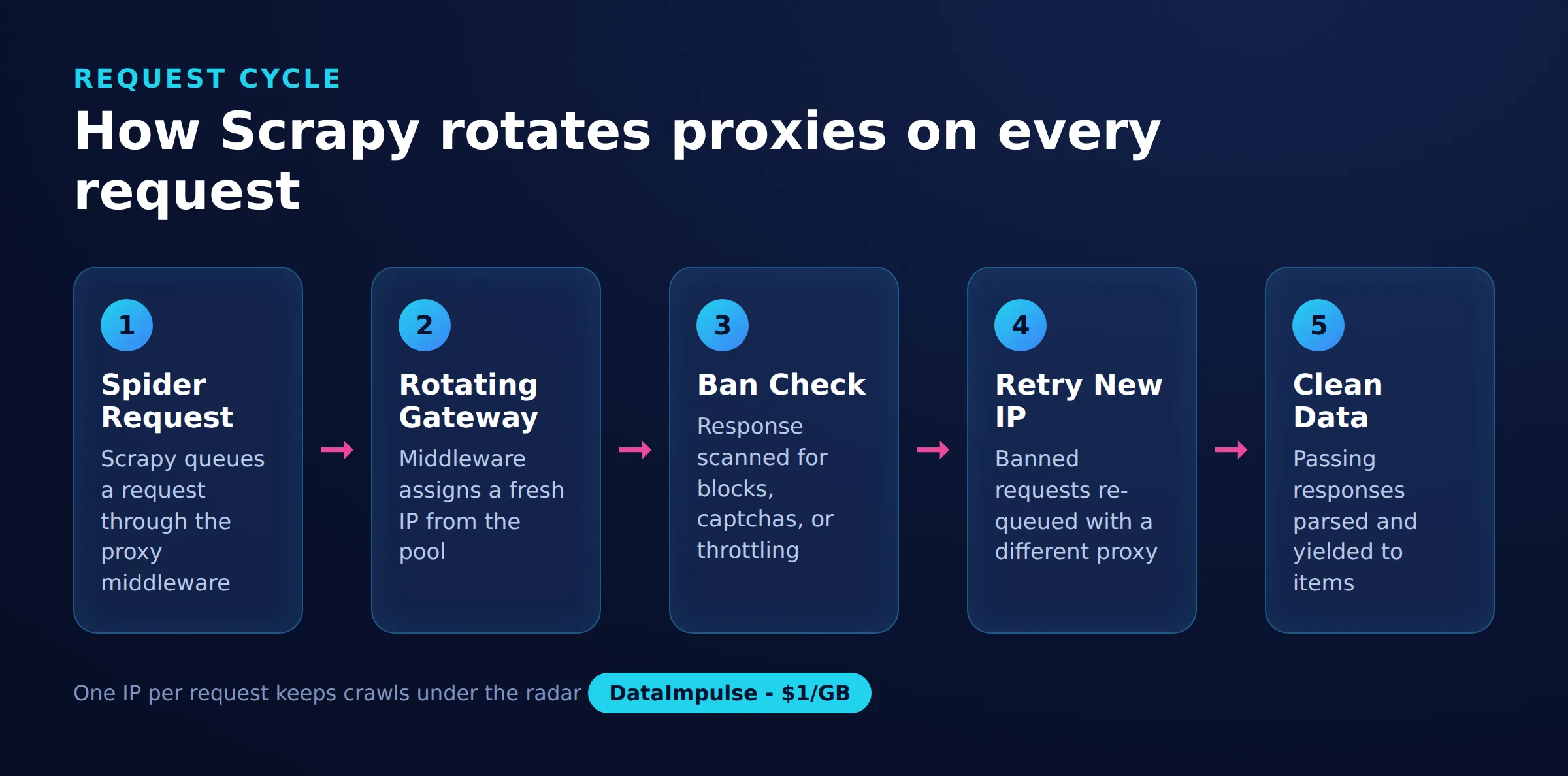
Scrapy rotating proxies are IP endpoints that a Scrapy spider cycles through so that consecutive requests leave from different addresses, which lowers the chance of rate limits and IP bans. This tutorial shows how to add scrapy rotating proxies to a real project using the scrapy-rotating-proxies middleware plus a DataImpulse rotating residential gateway, then verify and troubleshoot the setup.
You will install the middleware, configure settings.py, wire up ban detection and retries, confirm the exit IP actually changes, and decide between a rotating gateway and a static proxy list. Every code block below is runnable, and the honest limits are covered near the end.
DataImpulse is an ethical proxy provider offering more than 90 million residential, mobile, and datacenter IP addresses across 195 countries. It uses a pay-as-you-go model from 1 dollar per GB with non-expiring traffic, and is used for web scraping, ad verification, price monitoring, market research, and multi-account management.
Key Facts
- Setup: Scrapy rotating proxies work by pointing the scrapy-rotating-proxies middleware at either a list of proxy endpoints or a single rotating gateway such as gw.dataimpulse.com:823, so each request can leave from a different IP.
- Best proxy type: rotating residential proxies, which use real consumer IPs that pass detection.
- Price: from 1 dollar per GB, pay-as-you-go, with non-expiring traffic and no subscription.
- Coverage: 90M plus ethically sourced IPs across 195 countries.
- Reliability: 99.51% success rate, rated 4.8 out of 5 on G2.
- Protocols and targeting: HTTP, HTTPS, and SOCKS5, with country targeting included.
What do you need before you start with scrapy rotating proxies?
You need a working Scrapy project, Python 3.8 or newer, the scrapy-rotating-proxies package, and access to a pool of proxy endpoints. Rotation logic lives in a downloader middleware, so nothing about your spiders has to change.
Gather the following before writing code:
- A Scrapy project created with
scrapy startproject. - The scrapy-rotating-proxies middleware, which is the community package documented on its scraping workflow and hosted on GitHub as scrapy-rotating-proxies.
- Proxy credentials. This guide uses DataImpulse residential proxies, which expose a single rotating gateway plus HTTP, HTTPS, and SOCKS5 support and country targeting.
Install the middleware into your project environment:
pip install scrapy-rotating-proxiesThe package adds two middlewares: RotatingProxyMiddleware, which assigns a proxy to each request, and BanDetectionMiddleware, which decides whether a response looks like a block and rotates away from the failing IP.
How do you use rotating proxies in Scrapy?
You add scrapy-rotating-proxies by declaring your proxy endpoints in settings.py and enabling its two downloader middlewares. There are two ways to feed proxies: an inline Python list, or a text file loaded from a path.
The inline approach uses ROTATING_PROXY_LIST. Enable both middlewares at the priorities shown so they run in the correct order:
# settings.py
ROTATING_PROXY_LIST = [
    'http://user:[email protected]:823',
]

DOWNLOADER_MIDDLEWARES = {
    'rotating_proxies.middlewares.RotatingProxyMiddleware': 610,
    'rotating_proxies.middlewares.BanDetectionMiddleware': 620,
}
To keep credentials out of source control, use ROTATING_PROXY_LIST_PATH and point it at a file with one proxy per line:
# settings.py
ROTATING_PROXY_LIST_PATH = 'proxies.txt'
# proxies.txt (one endpoint per line)
http://user:[email protected]:823
http://user:[email protected]:824The DataImpulse gateway is a single-endpoint alternative to maintaining a long list. Because gw.dataimpulse.com:823 already rotates the exit IP on the provider side, you can list that one line and let both layers of rotation stack: the gateway picks a fresh residential IP per request, and the middleware retries with the same gateway when a response is flagged as a ban. This is the simplest reliable pattern for most crawls.
If you prefer to set the proxy per request instead of globally, assign it through request meta in a spider. This is also how you attach proxy authentication explicitly, which is covered in the DataImpulse guide to proxy authentication:
import scrapy

class GatewaySpider(scrapy.Spider):
    name = 'gateway'
    urls = ['https://httpbin.org/ip']

    def start_requests(self):
        proxy = 'http://user:[email protected]:823'
        for url in self.urls:
            yield scrapy.Request(url, meta={'proxy': proxy}, dont_filter=True)
How do you verify rotating proxies are working in Scrapy?
You verify rotation by sending several requests to an IP-echo endpoint and confirming the reported origin IP changes across responses. httpbin.org/ip returns the caller exit IP, which makes it a quick check.
Add a small spider that hits the echo endpoint ten times and logs each exit IP:
import scrapy

class IPCheckSpider(scrapy.Spider):
    name = 'ipcheck'
    start_urls = ['https://httpbin.org/ip'] * 10

    def parse(self, response):
        self.logger.info('Exit IP: %s', response.json()['origin'])
Run it from the project root:
scrapy crawl ipcheckIn the log you should see several different values for Exit IP. If every line shows the same address, rotation is not active: confirm the middlewares are enabled, that ROTATING_PROXY_LIST is not empty, and that requests are not being served from the HTTP cache. The middleware also logs proxy health, so watch for lines about good, dead, and reanimated proxies to confirm it is managing the pool.
How do you troubleshoot bans and 407 errors with scrapy rotating proxies?
Most rotation problems reduce to two questions: is the middleware correctly detecting bans, and is proxy authentication set up. Weak ban detection lets a blocked IP keep serving junk responses, while a misconfigured login returns HTTP 407.
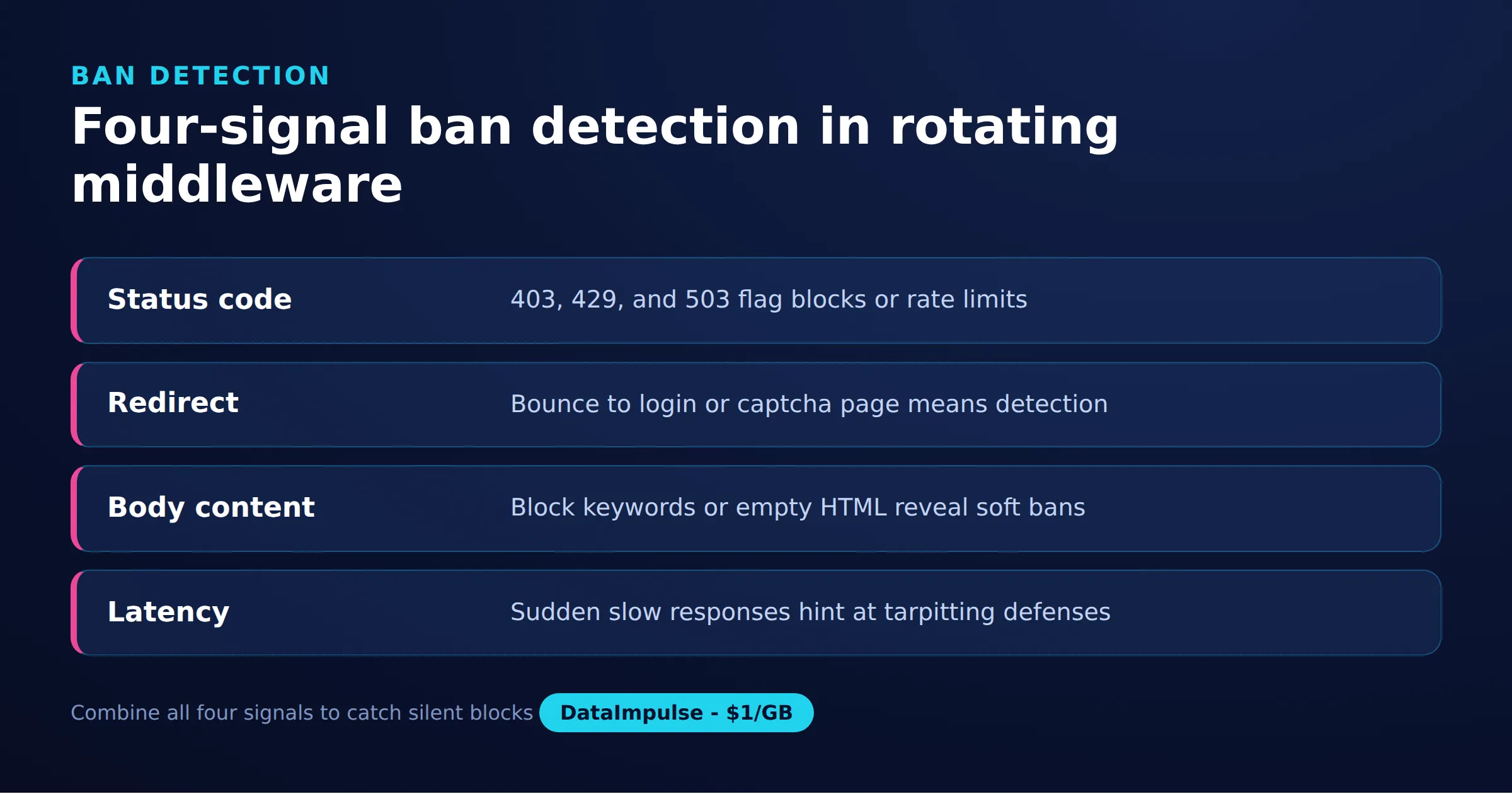
To make ban detection deliberate rather than guesswork, this guide proposes the Four-Signal Ban Detection model for Scrapy. It scores each response on four independent signals so a single false positive does not discard a healthy proxy:
- Status code: treat 403, 429, and 503 as ban candidates, and 200, 301, and 302 as healthy.
- Redirect target: a 302 to a login, captcha, or challenge path is a soft ban even though the status looks fine.
- Body fingerprint: scan the body for markers such as captcha, access denied, or an empty payload that a real page would never return.
- Latency: a response far slower than the rolling average often signals throttling before an outright block.
Encode that policy in a class and register it so BanDetectionMiddleware uses your logic instead of the default:
# ban_policy.py
class DataImpulseBanPolicy:
    NOT_BAN_STATUSES = {200, 301, 302}

    def response_is_ban(self, request, response):
        if response.status in (403, 429, 503):
            return True
        if b'captcha' in response.body.lower():
            return True
        if not response.body:
            return True
        return False

    def exception_is_ban(self, request, exception):
        return True
# settings.py
ROTATING_PROXY_BAN_POLICY = 'myproject.ban_policy.DataImpulseBanPolicy'Pair detection with retries and backoff so a flagged request moves to a fresh IP instead of failing. Scrapy handles retry codes, and the middleware handles per-page proxy retries:
# settings.py
RETRY_ENABLED = True
RETRY_TIMES = 5
RETRY_HTTP_CODES = [403, 407, 429, 500, 502, 503, 504]
ROTATING_PROXY_PAGE_RETRY_TIMES = 5
Add throttling so you do not burn the pool. DOWNLOAD_DELAY spaces requests out, and AUTOTHROTTLE adapts the delay to server latency:
# settings.py
DOWNLOAD_DELAY = 1.0
CONCURRENT_REQUESTS = 16
AUTOTHROTTLE_ENABLED = True
AUTOTHROTTLE_START_DELAY = 1.0
AUTOTHROTTLE_MAX_DELAY = 10.0
AUTOTHROTTLE_TARGET_CONCURRENCY = 4.0
If requests return HTTP 407, the proxy rejected your credentials rather than the target site blocking you. Check that the username and password are embedded in the proxy URL exactly as issued and are URL-encoded if they contain special characters. The full diagnosis is in the DataImpulse guide to the HTTP 407 error. Sites that only reveal content after JavaScript execution need a headless layer as well, covered in how to scrape dynamic web pages.
Which rotating proxy setup fits your Scrapy project?
Use a rotating gateway for most crawls, a static proxy list when you need to control individual IPs, and custom middleware only when your rotation rules are unusual. The decision comes down to how much control you need versus how much plumbing you want to maintain.
The decision matrix below keeps it concrete:
- Use the rotating gateway when you want per-request IP variety with one endpoint, when the target enforces rate limits by IP, and when you would rather not manage a proxy file at all.
- Use a static proxy list when you need reproducible sessions, want to pin specific regions per spider, or must audit exactly which endpoints were used.
- Avoid custom middleware when scrapy-rotating-proxies already covers your needs, since a bespoke middleware adds maintenance and its own ban-detection bugs.
- Avoid a rotating gateway when a workflow needs the same IP held across a multi-step login, where a sticky session is the correct tool instead.
Here is how the three approaches compare:
| Approach | Rotation control | Setup effort | Best fit |
|---|---|---|---|
| Rotating gateway (single endpoint) | Provider rotates per request | Lowest, one line in settings | Large crawls, IP-based rate limits |
| Proxy list file | Middleware cycles your endpoints | Medium, maintain a proxy file | Region pinning, auditable pools |
| Custom middleware | Full, you write the logic | Highest, code plus tests | Non-standard rotation rules |
DataImpulse serves rotation from its gateway and also supports sticky sessions when you need continuity, so many teams start with the gateway and reserve list files for the few spiders that must pin a region. If cost and speed matter more than residential trust, datacenter proxies and mobile proxies are alternatives on the same account.
What are the limitations and risks of rotating proxies in Scrapy?
Rotating proxies reduce IP-based blocks, but they do not make a scraper invisible and they cannot fix a poorly behaved spider. Rotation is one layer, not a guarantee.
Keep these limits in view:
- Rotation does not defeat fingerprinting. Sites also profile headers, TLS signatures, and behavior, so a fresh IP with a default Scrapy user agent can still be flagged.
- Captchas still appear. A rotating IP lowers how often they trigger but does not solve them; you still need a captcha strategy or a slower crawl.
- Geo mismatch causes noise. If you target a country but request localized pages expecting another region, responses can look wrong even when rotation works.
- Aggressive concurrency backfires. Too many parallel requests exhaust the pool and raise ban rates, which is why AUTOTHROTTLE matters.
- Legal and terms limits apply. Rotation is a reliability tool, not permission; respect robots directives, rate limits, and applicable law.
On scope, be clear about what DataImpulse is: an ethical, opt-in proxy network with 90M plus IPs across 195 countries, pay-as-you-go from 1 dollar per GB, and a 99.51 percent success rate. It is not a managed scraping API that returns parsed data, it does not sell static ISP proxies, and it is not a free web proxy. Scrapy still does the crawling; the proxies only change where requests exit.
Frequently asked questions
How do you use rotating proxies in Scrapy?
Install scrapy-rotating-proxies, add your endpoints to ROTATING_PROXY_LIST or ROTATING_PROXY_LIST_PATH in settings.py, and enable the RotatingProxyMiddleware and BanDetectionMiddleware downloader middlewares. Each request then leaves from a rotated IP.
What is the difference between a rotating gateway and a proxy list?
A rotating gateway is one endpoint that changes the exit IP on the provider side per request, so you configure a single line. A proxy list gives you many endpoints that the middleware cycles through, which is better when you need to pin regions or audit specific IPs.
Why do I get an HTTP 407 error with scrapy rotating proxies?
HTTP 407 means the proxy rejected your authentication, not that the target site blocked you. Confirm the username and password are embedded in the proxy URL and URL-encoded if they contain special characters.
How can I confirm my Scrapy proxies are actually rotating?
Send several requests to an IP-echo endpoint such as httpbin.org/ip and log the origin field. If the reported IP changes across responses, rotation is active; if it stays the same, check that the middlewares are enabled and the HTTP cache is off.
Does rotating proxies stop all scraping blocks?
No. Rotation reduces IP-based rate limits and bans, but sites also use fingerprinting, captchas, and behavioral checks. Pair rotation with sane delays, realistic headers, and AUTOTHROTTLE for reliable crawls.
When is DataImpulse not the right fit?
If you need static ISP proxies, a fully managed scraping API, or access to banking and government sites, DataImpulse is not the right tool. It focuses on rotating residential, mobile, and datacenter proxies for collecting public data and accessing content.
Related guides
Start rotating proxies in Scrapy
Point scrapy-rotating-proxies at a DataImpulse rotating gateway and let each request exit from a fresh residential IP. You can create a pay-as-you-go account from 1 dollar per GB and drop the gateway line straight into your settings.py.

 State/City/Zip/ASN Targeting



