

In this Article
To convert curl to Python, map the command’s URL, method, headers and body into a Requests call, then compare what the server receives. Start with the paired example below and explicitly choose redirect behavior.
A successful response alone does not prove equivalence. Our localhost test found that straightforward translations could change JSON bytes, form encoding and redirect behavior, even when the code looked correct.
Key Facts
- Our localhost snapshot covered six fixtures, each repeated three times per client.
- The test included 36 initial client executions, excluding redirect follow-ups.
- The repeated-query fixture preserved parameter order and duplicate keys.
- The JSON fixture preserved data but changed body bytes.
- The form fixture changed a literal space into a plus sign.
- The redirect fixture produced one request with curl and two with Requests.
How do you convert curl to Python with Requests?
Translate one request at a time, keeping its destination and inputs visible. This GET example sends repeated query parameters and a custom header to a public echo endpoint; use only synthetic data there.
python -m pip install requests
curl --silent --show-error 'https://httpbin.org/get?tag=a&tag=b&page=2' -H 'X-Test: 1'
import requests
response = requests.get(
'https://httpbin.org/get',
params=[('tag', 'a'), ('tag', 'b'), ('page', '2')],
headers={'X-Test': '1'},
allow_redirects=False,
timeout=(5, 20),
)
response.raise_for_status()
print(response.status_code)
print(response.json()['args'])When the endpoint responds normally, expect status 200 and arguments equivalent to {'page': '2', 'tag': ['a', 'b']}. Dictionary display order is irrelevant here; repeated values are not.
The Requests Quickstart documents query parameters, headers and response handling. For your own endpoint, replace the URL first, then change one input at a time so failures remain easy to isolate.
Which curl to Python flag mappings matter most?
Map request meaning, not just flag spelling. The curl manual and Requests API reference describe the options behind this conversion checklist.
| curl input | Requests equivalent | Review point |
|---|---|---|
| -X POST | requests.post(…) or request(‘POST’, …) | Check the actual method, including methods implied by body options. |
| URL query or -G | params= | Keep duplicate keys and ordering where required. |
| -H | headers= | Preserve required values. |
| -b ‘name=value’ | cookies= | A cookie file needs separate handling. |
| -u for Basic authentication | auth=(username, password) | Do not assume every authentication scheme is Basic. |
| Authorization: Bearer header | headers={‘Authorization’: …} | Read the token from a secret source. |
| -d or –data-raw | data= or json= | Choose according to body format and byte requirements. |
| -F | files=, optionally data= | Check filenames and field names. |
| -L | allow_redirects=True | Set redirect policy explicitly. |
| -x | proxies= | Preserve the proxy scheme and routing. |
Flag translation is not universally one-to-one. Treat unusual signing, certificate, DNS and protocol options as separate review items. Use our curl header guide when identifying which source headers matter.
How do you preserve JSON, forms and file uploads?
Use json= for structured JSON, data= for form fields or exact body bytes, and files= for multipart uploads. These interfaces are documented in the Requests body and upload examples.
A POST can also carry query parameters. This example keeps the query separate from the JSON body and reads a Bearer token from the environment. Set API_URL to your authorized endpoint and API_TOKEN through your normal secret mechanism before running it.
import os
import requests

response = requests.post(
    os.environ['API_URL'],
    params=[('mode', 'validate')],
    headers={'Authorization': 'Bearer ' + os.environ['API_TOKEN']},
    json={'name': 'a', 'n': 1},
    allow_redirects=False,
    timeout=(5, 20),
)
response.raise_for_status()
print(response.status_code)
For signed bodies, serialize once and sign the same bytes you send. Our JSON fixture changed whitespace during translation. Compact serialization reproduces that fixture’s original body, but it cannot reconstruct arbitrary original whitespace or key order.
import json
import os
import requests

body = json.dumps({'name': 'a', 'n': 1}, separators=(',', ':')).encode('utf-8')
response = requests.post(
    os.environ['API_URL'],
    data=body,
    headers={'Content-Type': 'application/json'},
    allow_redirects=False,
    timeout=(5, 20),
)
response.raise_for_status()
For repeated form fields, use data=[('k', '1'), ('k', '2'), ('x', 'a b')]. In our test this encoded the space as +, while curl’s literal -d input retained a space. The curl –data-urlencode option encodes field values, but equivalent decoding still does not establish matching bytes.
For uploads, let the client construct the multipart boundary. This self-contained example uses synthetic file content; compare file contents and field names separately from the multipart envelope.
import os
import requests

response = requests.post(
    os.environ['API_URL'],
    data={'label': 'example'},
    files={'file': ('sample.txt', b'hello\n', 'text/plain')},
    allow_redirects=False,
    timeout=(5, 20),
)
response.raise_for_status()
How do you copy a browser request safely?
Capture only an authorized request, then remove secrets before sharing it. In Chrome DevTools, open Network, right-click the request and choose Copy > Copy as cURL, as documented in the Chrome Network reference.
Inspect the text before executing anything. Shell quoting belongs to the command syntax, not necessarily to the payload. Check embedded quotes, line continuations and variable references against the shell used for the capture.
Move authorization and session values into secret storage. Keep required application headers, but review captured Host, Content-Length and browser-specific headers before copying them. Remove questionable headers one at a time and retest; deleting everything obscures which value mattered.
Record the capture time and intended operation. A copied request is a snapshot, so session expiry or a changed application state can invalidate it. Translation does not establish browser emulation or reproduce an entire interaction.
When should you use a converter or another approach?
Use manual conversion for code you will maintain and a converter for an initial translation you can inspect. Retain curl when preserving its behavior matters more than using a native Python HTTP client.
| Approach | Use X when… | Avoid X when… |
|---|---|---|
| Manual Requests conversion | Use manual Requests conversion when you need readable, maintained code. | Avoid manual Requests conversion when unusual curl behavior remains unmapped. |
| curlconverter | Use curlconverter when you want a starting translation. | Avoid curlconverter when you cannot review generated code or protect credentials. |
| Retaining curl via subprocess | Use subprocess when existing curl behavior is essential. | Avoid subprocess when command content is untrusted or native Python is required. |
The official curlconverter website says conversion happens in your browser. That statement applies to that website, not every curl to Python converter. Its official repository documents this CLI path:
npm install --global curlconverter
curlconverter --language python 'https://httpbin.org/get'
Executing curl from Python is a different approach. Following the Python subprocess documentation, use a fixed argument list and avoid shell evaluation. Still review every argument and destination.
import subprocess

result = subprocess.run(
    ['curl', '--silent', '--show-error', '--fail',
     '--max-time', '20', 'https://httpbin.org/get'],
    check=True,
    capture_output=True,
    text=True,
    timeout=25,
)
print(result.stdout)
How can you check whether the conversion is equivalent?
Use the 4-layer Request Equivalence Check to separate matching application inputs from matching bytes and response behavior. Decide which properties your endpoint requires before accepting a conversion.
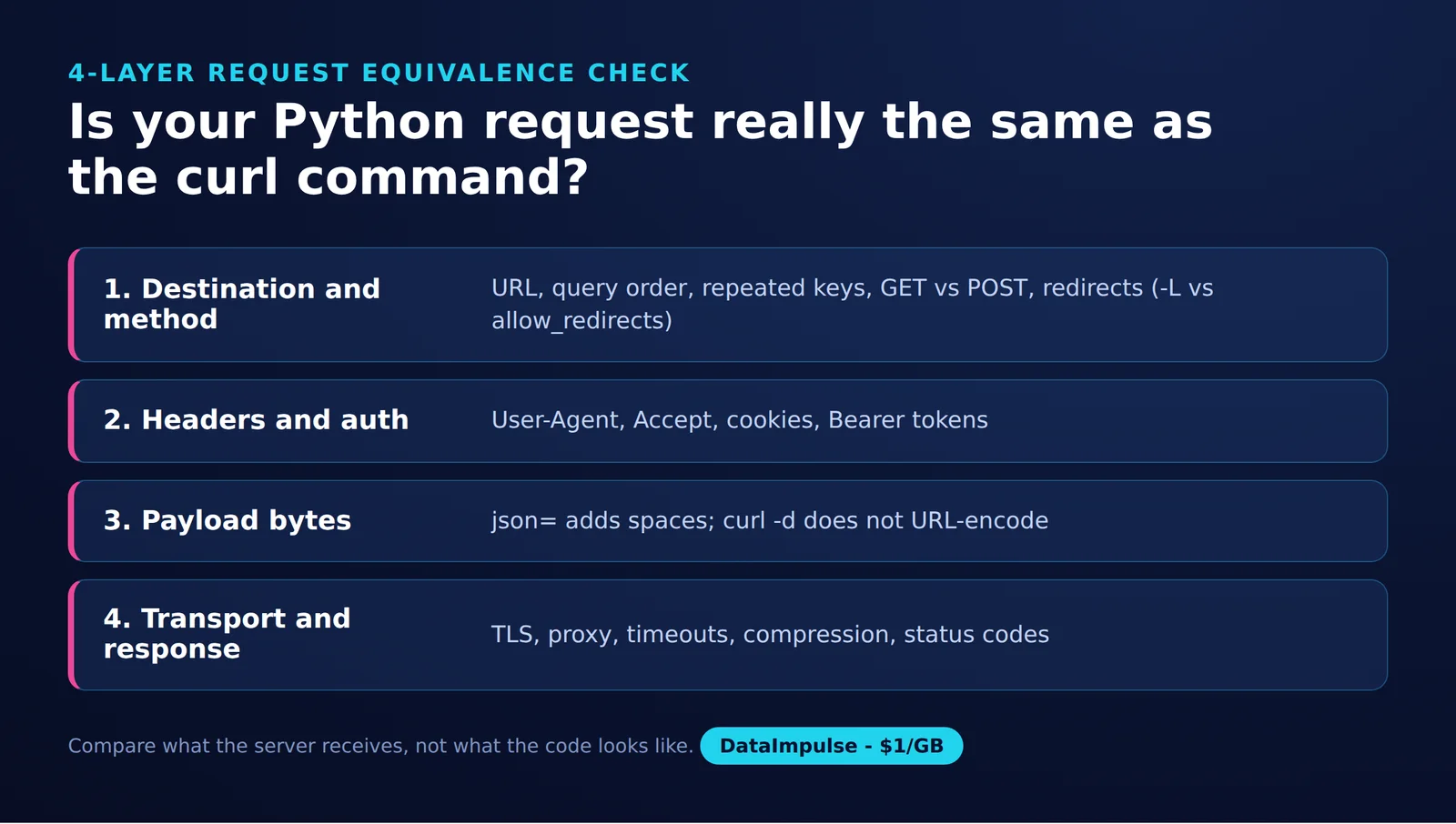
- Layer 1, destination and method: compare method, path and ordered query pairs.
- Layer 2, headers and authentication: compare selected header values and credential placement without logging secrets.
- Layer 3, payload: compare raw body length, SHA-256 and parsed payload equality.
- Layer 4, transport and response: compare status, final URL and redirect-hop count.
In our test on October 15, 2026, a logging HTTP server bound to 127.0.0.1 received six fixtures, each run three times with each client. That means 36 initial executions, with redirect follow-ups separate. Results repeated consistently across the three runs.
Source: DataImpulse, CURL vs PYTHON REQUESTS EQUIVALENCE TEST, October 15, 2026, 16:12 UTC. The Linux environment used curl 8.5.0, Python 3.12.3 and Requests 2.34.2. This is a localhost snapshot, not a benchmark.
| Fixture | Semantic match | Byte match | Redirect match | Explanation |
|---|---|---|---|---|
| Repeated query | Yes | Yes, query | Not exercised | Tuple pairs preserved tag=a, tag=b and page=2. |
| Custom header and cookie | Yes | Yes, selected values | Not exercised | X-Test and the synthetic cookie matched. |
| Bearer header | Yes | Yes, selected value | Not exercised | The synthetic authorization value matched. |
| JSON POST | Yes | No | Not exercised | Added spaces changed the body hash. |
| Repeated form fields | Same decoded fields | No | Not exercised | A literal space became +. |
| 302 redirect | Initial request only | Not established for chain | No | curl made one request; Requests made two. |
Byte matches above concern the named fields, not complete wire messages. User-Agent differed between clients. The snapshot cannot establish external API compatibility, TLS behavior, proxy performance or generalized success rates.
For your own repeatable check, retain sanitized commands, server code and package versions. Log the four layers separately. Repeat the redirect fixture with both clients stopping, then with both following; these are follow-up validation steps, not additional measured outcomes reported here.
Why does converted code fail or return different results?
Find the first layer that differs before changing multiple settings. Start with the original command and converted request close together in time, using the same authorized inputs.
- Authentication: check credential expiry, scope and required session state. Never print tokens while diagnosing a 401 or 403.
- Redirects: inspect the initial response before comparing final content. Our fixture exposed different default behavior immediately.
- Encoding: compare bytes when signatures or exact payloads matter; compare decoded fields when application meaning matters.
- HTTP errors: inspect status and a sanitized response excerpt. Requests exposes raise_for_status() for unsuccessful HTTP status handling.
- Timeouts: set explicit connect and read values. They are not a total elapsed-time deadline.
- TLS: correct certificate trust or hostname problems. Disabling verification creates interception risk.
- Streaming: consume the response deliberately and close it; use a context manager around streamed downloads.
The Requests Quickstart covers status handling, while Advanced Usage explains timeouts, certificate verification and streaming. Diagnose the failure before adding retries, especially for operations that change server state.
How do proxies fit into a converted request?
Translate routing after the direct conversion works. Keep proxy authentication separate from the destination’s Bearer token or cookies.
import os
import requests

proxy_url = os.environ['PROXY_URL']
response = requests.get(
    os.environ['API_URL'],
    proxies={'http': proxy_url, 'https': proxy_url},
    allow_redirects=False,
    timeout=(5, 20),
)
response.raise_for_status()
print(response.status_code)
Requests documents proxy URLs, embedded proxy authentication and environment proxy settings in its proxy documentation. Inspect environment routing when results differ. SOCKS requires optional dependencies; preserve the intended DNS behavior as well as the proxy address.
Use the curl proxy setup guide to review the source command and the Python Requests proxy tutorial for destination code. After equivalence checks pass, the Python routing guide and curl routing guide offer optional next steps.
Frequently Asked Questions
How do I convert a curl command into Python Requests?
Separate the curl request into destination, method, headers and payload, then translate each part. Compare server observations before relying on the result; successful execution alone is insufficient.
How do curl JSON, form and upload options map to Python?
Choose json= for JSON objects, data= for form fields or exact bytes, and files= for multipart uploads. For byte-sensitive requests, retain the original body and verify its hash instead of assuming serialization preserves it.
How do I preserve headers, cookies and Bearer authentication safely?
Inventory the required values and load real secrets at runtime. Use synthetic replacements when sharing examples, and avoid logging either destination credentials or proxy credentials.
Why can converted Python behave differently from the original curl command?
Our snapshot exposed differences in body serialization and redirect handling. Check the initial request and response before attributing different output to the remote service.
How do I translate curl proxy settings into Requests?
Carry the proxy endpoint into the proxies mapping and preserve its scheme. Check environment routing and proxy authentication separately from application authentication before comparing results.
Does matching parsed JSON prove that a conversion is correct?
It proves only that the compared payloads decode to the same data. Our JSON fixture still had different body hashes, which matters when validation depends on exact bytes.
Need proxy routing after your conversion works?
Start with the DataImpulse Requests setup guide if your authorized workflow needs proxy routing. DataImpulse is not a scraping API, managed unblocker or VPN; request correctness and response handling remain part of your code.
Last updated: October 15, 2026.

 State/City/Zip/ASN Targeting



