
In this Article
Router port forwarding directs incoming traffic on a public IP address and port to a specific device and port on your private network. To set it up, stabilize the server’s local address, confirm the application is listening, create one protocol-specific router rule, and test it from outside your network.
The rule is only one part of the connection. The application, host firewall, router, upstream network, and external client must all agree on the destination and protocol. Start with one necessary service, then verify both access and cleanup.
Key Facts
- Router port forwarding maps an incoming destination address and port to an internal service.
- TCP and UDP require separate protocol decisions, even when the port number matches.
- A successful TCP handshake does not prove that the application works.
- A connection timeout cannot identify which device dropped the traffic.
- A home router rule alone cannot create an inbound mapping through an ISP’s CGNAT.
- Our loopback demonstration tested client connection outcomes and SSH tunnels, not router DNAT.
What is port forwarding, and how does it work?
A typical IPv4 forward translates a public destination into a private destination. For example, your router can send incoming TCP traffic on external port 8443 to a server at 192.168.1.50:443.
This is destination network address translation, or DNAT. The router tracks the connection so replies follow the corresponding translation. RFC 3022 explains traditional NAT and transport-port translation. A mapping does not start the application or automatically resolve every firewall restriction.
Should you forward TCP or UDP? Use the protocol required by the actual server configuration. TCP and UDP have separate port spaces, so forwarding TCP does not forward UDP. Select both only when the application needs both.
IPv6 usually changes the task: a globally addressed server can need an inbound firewall exception rather than an IPv4-style address translation. Reachability still depends on routing and firewall policy; a global address does not mean unrestricted access. See RFC 6092 on residential IPv6 security.
How do you set up port forwarding on a router?
Confirm local access first, then create the smallest rule that reaches the intended application. Record the original settings so you can remove the change afterward.
Step 1: Find the gateway. Open the active network connection’s details and find its default gateway or router address. Use that address to reach the local router administration interface. Check that you are managing the router connected to the server’s network.
Step 2: Stabilize the destination. Create a DHCP reservation for the server. Otherwise, an address change can break the mapping or redirect traffic to another device. Record the server’s LAN address and application port.
Step 3: Confirm the listener. Start the service and connect from another LAN device. A service bound only to 127.0.0.1 is local to its host and cannot receive ordinary router-forwarded traffic addressed to its LAN interface.
Step 4: Add a narrow firewall exception. Permit the required application port and protocol on the server. Restrict source addresses when practical. Do not disable the entire firewall to make a test pass.
Step 5: Create the mapping. Enter an external port, internal address, internal port, and protocol. For the earlier example, those values are 8443, 192.168.1.50, 443, and TCP. Save and enable the rule, then test externally.
Router menus vary. Follow the TP-Link setup instructions for your interface or the Xfinity port forwarding instructions, rather than copying another model’s screenshots. Label the rule with its purpose and a review date.
How do you test a forwarded port externally?
Connect from a different network to your current public address and external port, using the application’s protocol. A phone hotspot or an authorized remote computer avoids confusing external reachability with a same-LAN test.
Record the source network, destination IP:port, protocol, and time. Testing the public address from inside the LAN can depend on NAT loopback behavior. After a TCP connection succeeds, test the actual application, including authentication and TLS where applicable.
On Windows, a documented TCP check is Test-NetConnection -ComputerName YOUR_PUBLIC_IP -Port 8443; inspect TcpTestSucceeded. See Microsoft’s command reference. On macOS or Linux with Python 3 installed, use the checker below with the destination substituted. The OpenBSD nc manual is another reference, but do not assume every platform’s netcat timeout flags match.
Our quick run on October 19, 2026 used Ubuntu 24.04, Python 3.12, and OpenSSH_9.6p1. The eight target checks below used one TCP connection attempt per target, a three-second timeout, and one second between checks. This is a small snapshot, not a benchmark.
| Destination | State | Elapsed ms | Exact error detail |
|---|---|---|---|
| 127.0.0.1:22 | open | 3 | None |
| 127.0.0.1:443 | open | 0 | None |
| 127.0.0.1:9 | closed | 0 | connection refused (RST) |
| 127.0.0.1:2222 | closed | 0 | connection refused (RST) |
| portquiz.net:80 | open | 26 | None |
| portquiz.net:8443 | open | 23 | None |
| portquiz.net:25 | open | 12 | None |
| 192.0.2.1:80 | filtered | 3003 | no reply in 3 s |
The measurement artifacts are port_check.py, its port_check.csv output, and ssh_forward_demo.sh. Across the run, portquiz.net received three TCP connects and three HTTP requests. Those outbound checks do not demonstrate inbound reachability.
We created no router mappings or firewall rules. Every listener we created bound to 127.0.0.1 and was stopped by PID afterward. This was not a simulated WAN or Linux network namespace experiment, and it measured neither ISP forwarding nor residential proxies.
The label filtered means only that this checker timed out. The target 192.0.2.1 belongs to documentation address space; its silence does not establish a firewall DROP. Zero milliseconds means rounding, not instantaneous communication.
Save this tested script as port_check.py. Its tested invocation was python3 port_check.py 127.0.0.1:22 portquiz.net:8443. For an external test, replace the targets with your authorized public endpoint.
"""Tiny TCP port checker: open / closed / filtered.

open      -> the TCP handshake completed (something is listening and reachable)
closed    -> the host answered with a reset (reachable, nothing listening)
filtered  -> no answer before the timeout (a firewall drops it, or the host is unreachable)
Only check hosts you own or services built for testing (portquiz.net listens on every port).
"""
import csv, socket, sys, time

TIMEOUT = 3  # seconds


def check(host, port):
    start = time.perf_counter()
    try:
        with socket.create_connection((host, port), timeout=TIMEOUT):
            state, detail = "open", ""
    except ConnectionRefusedError:
        state, detail = "closed", "connection refused (RST)"
    except socket.timeout:
        state, detail = "filtered", f"no reply in {TIMEOUT} s"
    except OSError as exc:
        state, detail = "error", exc.strerror or type(exc).__name__
    return state, round((time.perf_counter() - start) * 1000), detail


def main(targets):
    rows = []
    for target in targets:
        host, port = target.rsplit(":", 1)
        state, ms, detail = check(host, int(port))
        rows.append({"target": target, "state": state, "ms": ms, "detail": detail})
        print(f"{target:24} {state:9} {ms:5} ms  {detail}")
        time.sleep(1)
    with open("port_check.csv", "w", newline="") as f:
        writer = csv.DictWriter(f, fieldnames=list(rows[0].keys()))
        writer.writeheader()
        writer.writerows(rows)


if __name__ == "__main__":
    main(sys.argv[1:] or ["127.0.0.1:22", "127.0.0.1:9", "portquiz.net:80", "portquiz.net:8443"])
Why does the port still appear closed?
Use the 5-layer reachability check to find where the connection stops. Change one layer at a time so a successful retry identifies a useful cause.
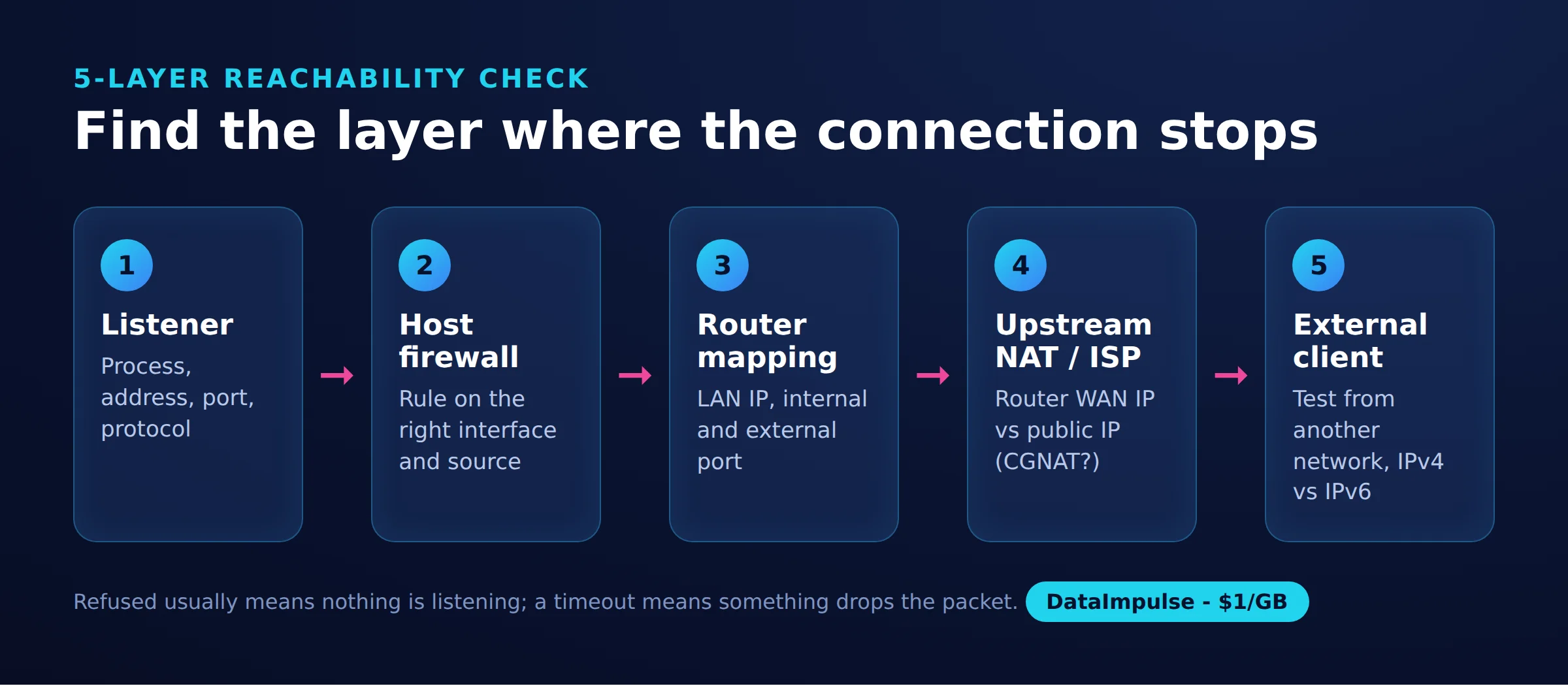
- Layer 1: Listener. Confirm the process, address, port, and protocol. On Linux,
ss -ltnpinspects TCP listeners; the ss manual explains the options. Check that the service did not restart on a different port. - Layer 2: Host firewall. Verify the rule applies to the active interface and intended source. A refusal can come from a rejecting firewall; a timeout can reflect dropping, routing failure, or an unavailable host.
- Layer 3: Router mapping. Recheck the reserved LAN address, internal port, external port, protocol, and enabled state. A working LAN connection does not prove this mapping exists.
- Layer 4: Upstream NAT or ISP. Compare the router’s WAN IPv4 with the public IPv4 seen from the same connection, without a VPN or proxy. Investigate an upstream modem-router or ISP NAT.
- Layer 5: External client. Check the destination, DNS result, IPv4 versus IPv6, protocol, and client network restrictions. Repeat from another authorized external network if necessary.
RFC 6598 reserves 100.64.0.0/10 for shared address space. A WAN address there suggests CGNAT. An address mismatch alone is a clue, not proof: another home router or a different egress path can explain it.
With double NAT under your control, use an appropriate bridge configuration or a deliberate mapping through both routers. With ISP-controlled CGNAT, your router rule alone cannot establish public inbound access. Ask about a public address or use an outbound tunnel. Our test server had public IPv4 directly on its interface, so we did not reproduce CGNAT.
Consult TP-Link’s forwarding troubleshooting guide, our explanation of blocked ports, and our CGNAT overview for additional context.
Is forwarding safe, and what do UPnP and DMZ change?
Forwarding creates exposure to the selected service; safety depends on that service and its access controls. Assume public endpoints can be discovered by scanners, even on unusual ports.
Limit exposure to necessary ports, use strong authentication, install updates, and restrict source networks where practical. Keep management interfaces private. A different external port is not a substitute for authentication or patching. CISA’s exposure reduction guidance addresses identifying and reducing internet exposure.
UPnP can automate port mappings, which makes auditing the active rules important. The NCSC camera security guidance advises considering disabling UPnP and forwarding, while recognizing that some applications may stop working.
A consumer router’s DMZ-host option can expose substantially more traffic than one selected mapping. Do not use it as a troubleshooting shortcut. A proxy and a firewall also serve different purposes; adding a proxy does not remove the need for filtering.
When finished, remove the mapping, unnecessary firewall exceptions, temporary accounts, and listeners. Retest externally and inspect the configuration: a failed connection by itself does not prove every exposure was removed.
What changes for gaming, Plex, and homelabs?
The important distinction is hosting a service versus connecting to someone else’s service. Do not open ports merely because an application uses the network.
For Minecraft or another game server, identify the exact edition, server configuration, and required transport before creating a rule. Avoid universal gaming port lists and whole-range exceptions. Forwarding does not guarantee lower latency.
For Plex, check the current remote-access documentation and your server settings before selecting ports. Test from the intended remote client rather than treating a generic TCP success as proof that playback works.
For a homelab, separate public applications from administration. Keep dashboards, databases, and device management behind private access. Maintain a short inventory listing each mapping’s owner, purpose, destination, and removal condition.
When should you use a VPN or tunnel instead?
Use private access when only trusted people or devices need the service. A public router mapping is appropriate when public clients intentionally need to connect.
| Option | Use X when… | Avoid X when… |
|---|---|---|
| Router forwarding | Use router forwarding when public clients need an intentionally hosted service. | Avoid router forwarding when private access suffices. |
| VPN or overlay | Use a VPN or overlay when access should be restricted to trusted members. | Avoid a private VPN when anonymous public access is required. |
| Reverse proxy | Use a reverse proxy when HTTP services need centralized TLS or routing. | Avoid relying on a reverse proxy when expecting it alone to solve CGNAT. |
| Outbound proxy | Use an outbound proxy when clients need a different egress IP. | Avoid an outbound proxy when trying to expose a home server. |
For private access, enroll only the server and authorized clients, secure their identities, restrict access to the necessary service, and test from an external network. Remove the old public mapping after private access works. Revoke unused devices afterward.
Distinguish a hosted overlay from a self-hosted VPN endpoint at home. The latter still needs reachable ingress unless another mechanism supplies it. Tailscale’s firewall guidance discusses NAT traversal and difficult-network limitations (as of October 2026). Outbound restrictions still matter; consult the network owner before changing them.
How do proxies and SSH tunnels differ?
A forward proxy handles client egress; a reverse proxy accepts requests for backend services. SSH forwarding carries selected connections through an authenticated SSH session.
Our forward versus reverse proxy comparison explains the direction difference. For a minimal documented reverse-proxy example, Caddy’s quick-start maps HTTP port 2080 to a local backend on port 9000. It requires Caddy installed, a running backend, and an available listening port. This local example does not establish public reachability or TLS; follow the Caddy quick-start for those deployment details.
In our SSH demonstration, a temporary SSH server listened on 127.0.0.1:2222 and the application on 127.0.0.1:8765. The local forward at 9000 and remote forward at 9001 changed from closed to open, then returned to closed after cleanup.
| HTTP path | Requests | Status | Elapsed ms |
|---|---|---|---|
| Direct application | 1 | 200 | 2 |
| Local SSH forward, 9000 | 1 | 200 | 9 |
| Remote SSH forward, 9001 | 1 | 200 | 27 |
The listener inspection showed the local port owned by ssh and the remote port owned by sshd. Both were loopback-only. These single requests show functionality, not tunnel overhead; no remote network path was measured.
For deployment, consult the SSH forwarding reference and server forwarding policy. A reverse tunnel requires a reachable SSH server and suitable authorization; it does not bypass every firewall. Our SSH SOCKS proxy guide covers client proxying, while the Nginx forward proxy article explores a different egress setup.
Frequently Asked Questions
What is port forwarding?
It is a rule that sends incoming traffic for a selected address, port, and protocol to a destination service. On a home IPv4 router, that usually means translating a public destination to a private LAN address.
Should I forward TCP or UDP?
Match the protocol used by the server, not a guess based on the application category. If both transports are required, configure both deliberately and test them separately.
How can I test a forwarded port from outside my network?
Use an authorized device on another internet connection and target your public address plus the external port. Test the required protocol, then complete an application-level request. A successful TCP handshake cannot validate UDP.
Why does forwarding fail behind CGNAT or double NAT?
The incoming connection must cross another translation layer before reaching your router. A local rule cannot configure that upstream device. You need control of the upstream mapping, a reachable public address, or an appropriate tunnel.
Is port forwarding safe?
It can be appropriate for an intentionally public, maintained service with suitable authentication. It increases exposure, so keep the rule narrow and remove it when unnecessary. Prefer private access for administration.
Does a timeout prove that my firewall blocked the port?
No. A timeout can result from silent filtering, an unreachable destination, routing trouble, or other failures. Use configuration checks and observations at successive layers to locate the cause.
Will a residential proxy make my home server reachable?
An outbound proxy changes how client traffic reaches destinations. It does not create an inbound router mapping or remove an ISP’s NAT. Hosting requires a separate reachable ingress path.
Choose the connection direction you actually need
For inbound access, verify your listener, firewall, mapping, and upstream network first. If your task instead requires outbound proxy traffic, DataImpulse may fit that separate need. It is not a VPN, scraping API, or managed unblocker, and it does not expose a home server through CGNAT.
Last updated: October 19, 2026.

 State/City/Zip/ASN Targeting



