
In this Article
curl impersonate refers to using curl-impersonate to imitate browser TLS and HTTP/2 behavior when making HTTP requests. The original project’s documentation describes the transport changes behind that approach; changing a User-Agent alone does not reproduce them.
Start with a fingerprint check, then inspect the actual response body. Our quick run on October 16, 2026 found useful differences between ordinary clients and impersonated requests, alongside product pages that still returned challenges. This is a small snapshot, not a benchmark or a promise of access.
Key Facts
- Python requests and system curl presented the same OpenSSL JA3 fingerprint in our test.
- curl_cffi impersonate=”chrome” and curl_chrome136 matched real Chromium 145’s JA4 and HTTP/2 fingerprint exactly.
- Through the same residential proxy and User-Agent, plain curl was redirected to Walmart’s block page; curl_chrome136 got the full page.
- JA3 changes between Chrome builds because Chrome randomizes TLS extension order; JA4 is the more stable signal.
- Impersonation fixes TLS and HTTP/2 fingerprints, not JavaScript or behavioral challenges.
- curl-impersonate v2.2.3 ships ready binaries such as curl_chrome136 and curl_firefox147.
What is curl impersonate, and what does it actually imitate?
curl-impersonate is a modified curl build that targets browser-like connection behavior. Its scope includes TLS handshakes and HTTP/2 settings, rather than the full execution environment of a browser.
The original project lives under lwthiker; our tested binary came from the lexiforest fork. The fork’s project documentation identifies its patched BoringSSL foundation. Record the repository, release, and selected profile together: a familiar executable name alone is insufficient provenance.
Think of impersonation as choosing how the connection introduces itself. Headers describe the HTTP request, while transport settings describe another part of the client. Neither establishes that a human initiated the request. Matching selected fingerprints cannot establish complete browser equivalence.
For a curl impersonate workflow, first determine whether the required data already exists in the HTTP response. Our successful search response contained embedded product JSON; other tested pages still presented challenges. The broader TLS fingerprinting guide adds context, but response inspection should drive implementation decisions.
How do you install curl impersonate and run your first request?
Choose the release and platform artifact explicitly, then run its browser wrapper against a fingerprint endpoint. Our tested Linux setup used lexiforest v2.2.3 and the curl_chrome136 wrapper.
Step 1: Open the official v2.2.3 release, select the Linux artifact matching your architecture, and extract it. Follow the installation documentation for runtime and CA certificate requirements.
Step 2: Keep the wrapper and its supporting artifacts together. Our environment was Linux with Ubuntu OpenSSL 3.0.13; the impersonation binary identified itself as curl 8.22.0-IMPERSONATE with BoringSSL. That distinction matters when comparing it with system curl.
Step 3: From the extracted directory, run the exact fingerprint command used in our snapshot:
# Linux x86_64, prebuilt binaries (v2.2.3 of the maintained lexiforest fork)
curl -sLO https://github.com/lexiforest/curl-impersonate/releases/download/v2.2.3/curl-impersonate-v2.2.3.x86_64-linux-gnu.tar.gz
tar xzf curl-impersonate-v2.2.3.x86_64-linux-gnu.tar.gz
./curl_chrome136 -s https://tls.peet.ws/api/all            # see the fingerprint the server gets

# Through a proxy: curl-impersonate takes the usual curl flags
./curl_chrome136 -s -x "http://USER:[email protected]:823" \
  -o page.html -w "%{http_code} %{size_download}
" "https://www.walmart.com/search?q=air+fryer"
Save the returned JA4, HTTP version, and HTTP/2 fingerprint before testing an application endpoint. This creates a transport baseline without treating a retailer’s response as the fingerprint test.
For Windows or macOS, use the platform artifacts and installation routes documented by the fork. Its bindings page routes Python, JavaScript/TypeScript, PHP, and Rust integrations. Verify any Nixpkgs package or Node wrapper against its actual upstream and release; our installation evidence covers Linux only.
How do you impersonate Chrome in Python with curl_cffi?
Use curl_cffi with the impersonate parameter and pin the package version for reproducibility. Our Python implementation used curl_cffi 0.15 with impersonate=”chrome”.
The official quick start documents installation through pip, browser profiles, and a requests-like interface. Install version 0.15 in an isolated environment to reproduce our package selection. The generic chrome alias tracks the library’s current Chrome target, so an upgrade can change its meaning.
Before running this exact tested statement, define url as the public search URL https://www.walmart.com/search?q=air+fryer and PROXY as your own proxy URL, loaded privately from your environment. The statement depends on those two variables:
import os
from curl_cffi import requests

PROXY = os.environ.get("PROXY_URL")  # e.g. http://USER__cr.us:[email protected]:823
PROXIES = {"http": PROXY, "https": PROXY} if PROXY else None

# 1. What fingerprint does the server see?
fp = requests.get("https://tls.peet.ws/api/all", impersonate="chrome", timeout=30).json()
print("JA4:", fp["tls"]["ja4"], "| HTTP:", fp["http_version"])

# 2. Same request a browser would make, through a proxy, with a session that keeps cookies
with requests.Session(impersonate="chrome", proxies=PROXIES, timeout=90) as s:
    try:
        r = s.get("https://www.walmart.com/search?q=air+fryer")
    except requests.exceptions.RequestException as exc:   # slow exits happen; retry with a new IP
        raise SystemExit(f"request failed: {exc.__class__.__name__}")
    blocked = "Robot or human" in r.text or "/blocked" in r.url
    print(r.status_code, len(r.content) // 1024, "KB,", "challenge" if blocked else "content",
          "| __NEXT_DATA__ present:", "__NEXT_DATA__" in r.text)
Inspect the response status and HTML before extracting records. In our successful CLI search response, the extraction source was the embedded __NEXT_DATA__ product JSON. Locate that script element with an HTML parser, decode its JSON, and validate the expected fields before accepting the page as usable content.
The quick start documents Session for cookie persistence and connection reuse. For a multi-request workflow, keep the session, profile, and intended exit location consistent. Avoid combining a profile with arbitrary browser-version headers copied from an unrelated machine.
Proxy authentication and destination authentication are separate concerns. Use only credentials issued for your own authorized service; this public-page example needs no destination login. Our curl-to-Python guide covers translating request structure.
How do JA3 and JA4 fingerprints differ?
JA3 preserves ordering in selected ClientHello fields, while JA4 normalizes selected lists before hashing. That makes JA4 useful when extension ordering varies, without making it a complete client identity.
The Salesforce JA3 specification describes a fingerprint built from TLS version, ciphers, extensions, supported groups, and point formats. FoxIO’s JA4 specification sorts ciphers and extensions, but preserves signature-algorithm order. Do not describe JA4 as ignoring every ordering difference.
In our snapshot, curl_cffi chrome and Playwright Chromium 145.0.7632.6 shared JA4 t13d1516h2_8daaf6152771_d8a2da3f94cd and HTTP/2 fingerprint 52d84b11737d980aef856699f885ca86. Their JA3 values differed. The curl_chrome136 wrapper matched those same JA4 and HTTP/2 values.
These are server-observed matches at the measurement endpoint, not proof that every handshake byte or application behavior matched. Test through the intended network route and compare both transport layers. For systems you operate, inspect server-side evidence; Cloudflare’s fingerprint documentation explains using these signals in traffic analysis and rules.
How do you configure HTTP, HTTPS, and SOCKS proxies?
Set the proxy independently from the browser profile. The destination scheme and the proxy scheme describe different connections, so an HTTPS destination can use an HTTP proxy.
In the Python statement, the https dictionary key selects HTTPS destinations; the value identifies the proxy endpoint. The curl_cffi quick start documents HTTP and SOCKS proxy examples. Our measured route used an HTTP proxy with authentication.
curl’s HTTP proxy documentation explains CONNECT tunneling for HTTPS destinations. Without TLS interception, the tunnel carries the client’s encrypted exchange, preserving its destination-facing headers and TLS handshake. An HTTPS proxy additionally encrypts the client-to-proxy connection; consult the official proxy option reference for supported schemes and authentication settings.
Keep proxy secrets outside shared scripts and diagnostic output. First verify the endpoint, protocol, port, and authentication independently; then compare application responses. A proxy connection failure is different evidence from a successfully retrieved challenge page.
For stateful sequences, prefer a stable exit during diagnosis. Consider rotation for independent, authorized requests only after establishing a working baseline. Changing the IP and transport profile simultaneously makes the result harder to explain.
Our curl proxy setup guide covers configuration, while proxy selection for curl helps evaluate route requirements. Neither route selection nor impersonation guarantees acceptance.
Why does curl still get blocked when a browser works?
A browser and an HTTP client can differ at several layers even when they request the same URL. Use the 4-layer request diagnosis model to isolate the difference before changing tools.
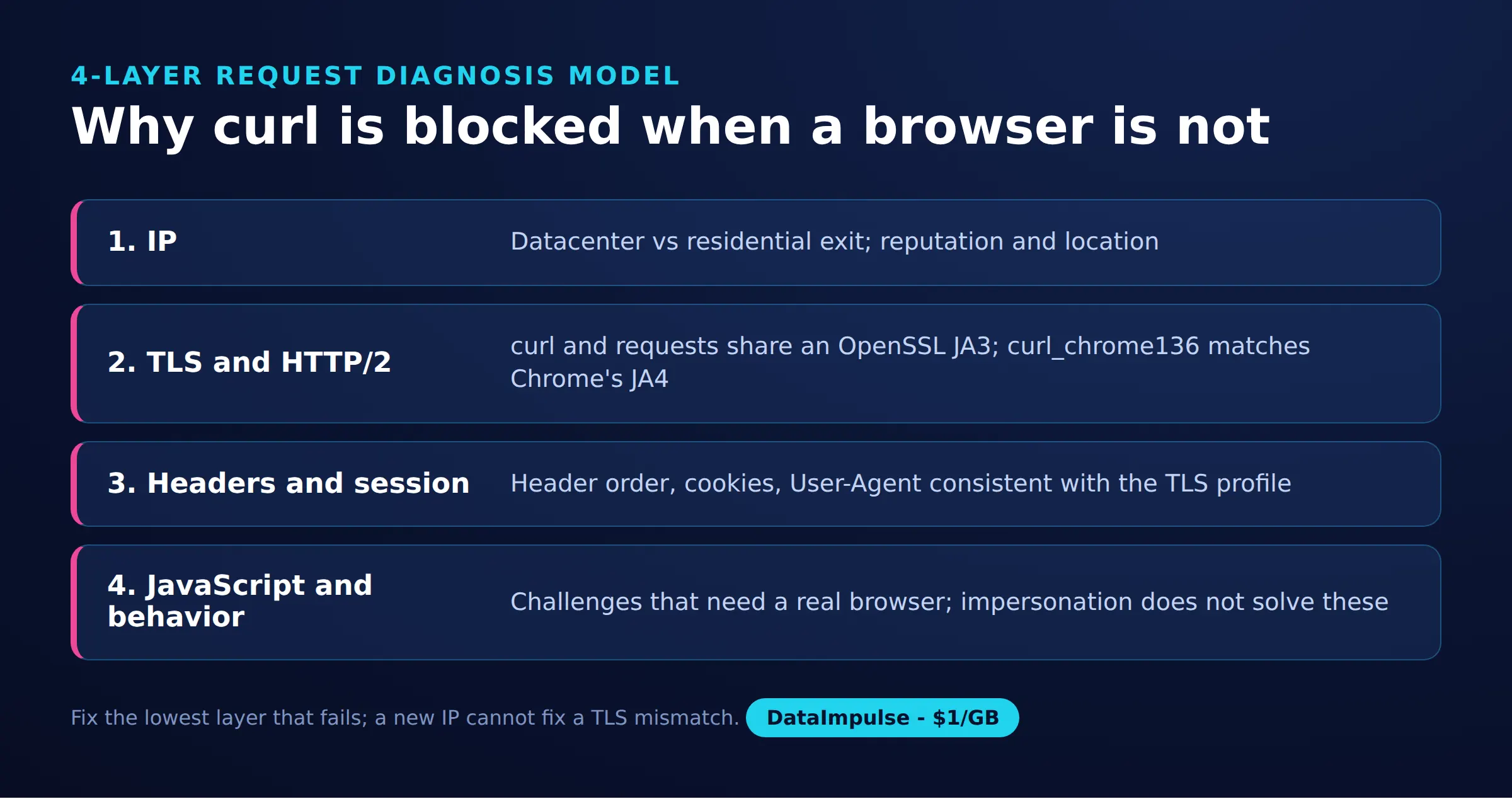
- Layer 1: IP and route. Hold the client constant while comparing direct and proxy access. Record country, exit stability, and whether the failure happens before an HTTP response arrives.
- Layer 2: TLS and HTTP/2. Hold the route constant while comparing ordinary and impersonated requests. Check the endpoint’s observed fingerprints instead of trusting the User-Agent string.
- Layer 3: Headers and session. Compare redirects, cookies, requested URL, and expected response format. Inspect the body: a successful HTTP status can accompany an unsuccessful application response.
- Layer 4: JavaScript and behavior. Determine whether data appears only after page execution or interaction. Our product-page challenges remained unresolved after transport impersonation.
Capture the status, redirect destination, content type, response size, and a content marker for every comparison. curl’s HTTP scripting documentation explains response inspection, redirects, cookies, and verbose diagnostics. Remove secrets before retaining logs.
Do not treat every denial as a fingerprint problem. A wrong URL, missing session state, or application rule can survive a transport change. On your own service, correlate client observations with server logs. For external services, stop repeated challenge retries and reassess the permitted access route.
When should you choose curl-impersonate over Playwright or Selenium?
Choose transport impersonation when an HTTP response contains everything the task needs. Choose browser automation when rendering or interaction is essential, and measure its operational cost in your own workload.
| Client | Use X when… | Avoid X when… |
|---|---|---|
| Standard curl | Use standard curl when ordinary HTTP suffices. | Avoid standard curl when a verified fingerprint mismatch matters. |
| curl-impersonate | Use curl-impersonate when browser-like transport fits the task. | Avoid curl-impersonate when JavaScript execution is required. |
| Playwright/Selenium | Use Playwright/Selenium when rendering or interaction is essential. | Avoid Playwright/Selenium when simple HTTP meets requirements. |
Playwright’s network documentation covers observing browser requests; Selenium’s overview describes browser automation. A browser introduces page lifecycle and resource-loading work. Our run measured neither CPU nor latency, so it establishes no speed or scaling advantage.
Playwright’s APIRequestContext sends API requests and can share cookies with a browser context. It is not equivalent to navigating a browser page; do not assume cookie sharing establishes identical transport behavior.
Browser automation also has limits. Cloudflare’s supported-environments documentation excludes automated browsers from support for solving production challenges (as of October 2026). Switching tools is not a universal challenge solution.
What did our small public-page test show?
Our quick run on October 16, 2026 retrieved search content with impersonation while ordinary requests received challenges. Product-page failures showed the limit of generalizing from that success.
Method and sample: Andrii compared eight client/profile configurations at the TLS inspection endpoint: requests 2.x, system curl, four curl_cffi profiles, Playwright Chromium, and curl_chrome136. The application sample comprised four Python client/route combinations and two CLI search outcomes, plus exploratory product-page checks. These are recorded observations, not repeated-trial success rates.
The fingerprint endpoint was https://tls.peet.ws/api/all. The Python profiles were chrome, chrome131, safari, and firefox. Ordinary requests and system curl shared JA3 0149f47eabf9a20d0893e2a44e5a6323, while requests used HTTP/1.1 and system curl used h2. That alone shows why one TLS hash cannot summarize the entire connection.
| Python client | Route | Status | Recorded size | Body classification |
|---|---|---|---|---|
| requests | Direct | 200 | 15 KB | PerimeterX challenge |
| requests | Residential | 200 | 15 KB | PerimeterX challenge |
| curl_cffi chrome | Direct | 200 | 1321 KB | Content |
| curl_cffi chrome | Residential | 200 | 1392 KB | Content |
The CLI comparison used the same DataImpulse US residential proxy and Chrome User-Agent. Plain curl received a 307 redirect toward a blocked page labeled “Robot or human?” The curl_chrome136 request returned 200, approximately 176 KB transferred compressed, and HTML containing __NEXT_DATA__ product JSON.
Walmart product pages still challenged curl_cffi. A Sephora product page returned an Akamai JavaScript/behavioral challenge through residential access. These failures prevent extending the search-page result into a general claim about either site.
Traffic estimate: At the advertised residential starting price of $1 per GB, 176 KB corresponds to approximately $0.000176 using decimal units. This is illustrative response traffic, not an invoice estimate: request bytes, retries, billing rules, and other transfers can change the total. The Python sizes have no established compressed-transfer equivalence here, so do not compare them directly with the CLI figure.
This snapshot has no timing distribution, repeated-request count, or controlled isolation of every header difference. It supports investigating transport, not attributing every response difference to TLS alone.
For a repeat of this snapshot, record the exact package versions, selected wrapper, route, response classification, and measurement units together. Preserve separate fields for bytes transferred and decoded body size. Repeat comparisons under controlled conditions before using them for capacity planning, and treat a changed page template or challenge response as a reason to revalidate the parser.
What permissions and alternatives should you check?
Confirm that the intended collection is authorized before turning a diagnostic request into ongoing automation. Public accessibility is not sufficient evidence of permission for every use.
Review the site’s terms, robots instructions, published access policies, and applicable obligations. Keep collection narrow, respect stated limits, and avoid repeated retries against challenges. Do not reuse third-party login credentials or attempt CAPTCHA circumvention.
Check for an official API, export, feed, or licensed dataset before maintaining a fragile page integration. Compare field coverage, freshness, authentication requirements, and permitted reuse. When access is unclear, seek an approved route rather than assuming a successful response settles the question.
Frequently Asked Questions
What is curl-impersonate?
It is a modified curl build aimed at browser-like network handshakes. Use it to investigate transport differences, while validating the actual returned content separately.
Why can curl fail when a browser succeeds?
The two requests may differ in route, transport, session state, or page execution. In our run, HTTP 200 sometimes contained a challenge, so status alone was a misleading success check.
How does curl_cffi impersonate Chrome?
Its impersonate parameter selects a browser transport profile. Our tested Python call selected chrome; retain the package version alongside that alias when documenting a reproduction.
Does curl-impersonate work with proxies?
Our curl_chrome136 request worked through an authenticated HTTP residential proxy. Treat proxy connectivity and application acceptance as separate checks, because a working route can still return a challenge.
When should I use Playwright instead?
Choose a browser workflow when the required result depends on page execution or interaction. First confirm that the desired data is absent from the initial response, and do not treat browser automation as guaranteed access.
Does matching JA4 prove a request is a browser?
No. Our impersonated clients shared selected fingerprints with Chromium, but that observation says nothing about complete browser behavior or authorization.
Test the network layer with a clear baseline
If your diagnosis points to the exit route, evaluate DataImpulse residential proxies with the same client, profile, and content checks. DataImpulse supplies proxies, not a scraping API, managed unblocker, VPN, or data. Start small and expand only after confirming both permission and usable responses.
Last updated: October 16, 2026.

 State/City/Zip/ASN Targeting



